

Microsoft’s latest Windows Update changes amount to a rare admission that reliability is not only a patching problem, but a relationship problem. The company is rolling out a more flexible update experience that lets Windows users choose a pause end date up to 35 days away and then extend that pause repeatedly, effectively removing the old practical ceiling on deferring updates. It is also separating normal power actions from update actions, improving setup-time choices, and attempting to consolidate monthly servicing so users see fewer disruptive restarts.
For much of the Windows 10 and Windows 11 era, Microsoft has defended automatic updates as a necessary security posture for a hostile internet. That argument has always had merit: unpatched PCs become botnet fuel, ransomware entry points, and weak links in home and business networks. But the same model also trained users to fear the moment their PC decided it was time to restart.
The new Windows Update experience targets that resentment directly. Rather than simply telling users to be patient, Microsoft is adding visible controls for pause scheduling, shutdown behavior, out-of-box setup, and update transparency. The message is clear: Windows Update should feel less like an ambush and more like a planned maintenance window.
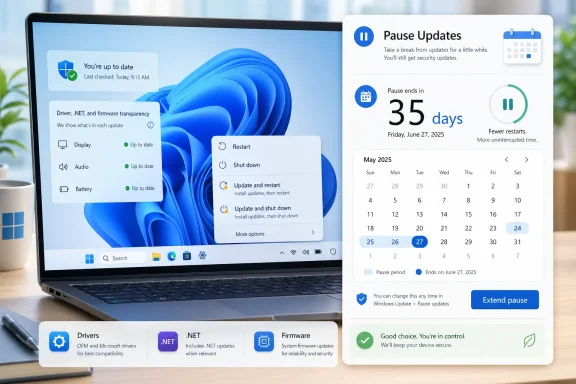
The most eye-catching change is the new ability to extend update pauses “as many times as you need,” with each pause window still capped at 35 days. In practical terms, that means a determined user can keep postponing updates in rolling blocks. Microsoft still recommends installing updates shortly after release, but the user interface is shifting from enforcement-first to consent-first.
This does not mean Windows is abandoning security automation. Microsoft is also trying to coordinate driver, .NET, firmware, and quality updates into a more unified monthly rhythm. The long-term goal is not merely fewer prompts; it is a calmer servicing model that preserves security while reducing the emotional tax of owning a Windows PC.
The change to the power menu is particularly important because it fixes one of Windows’ most irritating habits. Users have long complained that “Shut down” or “Restart” could become entangled with update installation at exactly the wrong moment. By separating Restart, Shut down, Update and restart, and Update and shut down, Microsoft is making the menu match user intent.
The new pause control is the headline feature because it breaks with years of policy design that treated long avoidance as a problem to be corrected. Microsoft is still limiting each pause interval to 35 days, but the ability to reset that interval repeatedly changes the practical meaning of the limit.
Key user-facing changes include:
Microsoft’s forced-update stance became more pronounced with Windows 10, when the company moved toward Windows as a service. That strategy made sense from an engineering and security standpoint because it reduced fragmentation and kept millions of devices on supported builds. But it also made every PC feel more like part of a managed fleet, even when it sat in a kitchen, dorm room, studio, or gaming den.
The tension has always been asymmetric. Microsoft sees a billion-device ecosystem exposed to constant attacks; users see one machine that must work right now. When that machine is interrupted, the platform-level security argument does not soften the frustration.
The trust issue is not only about restarts. It is about predictability. A predictable update that takes ten minutes is tolerable; an unpredictable update that takes ten minutes during a client call feels hostile.
Still, users do not judge update systems by architectural sympathy. They judge them by outcomes. If an update triggers BitLocker recovery, breaks audio, causes boot loops, or changes a driver at the wrong time, the result is the same: Windows Update becomes something to fear.
Microsoft’s new controls are therefore less about convenience than damage containment. Giving users and administrators more agency can reduce the sense that every Patch Tuesday is a roll of the dice.
Microsoft knows this, which is why the company frames the change as flexibility rather than permission to opt out forever. The problem is that user behavior rarely follows the ideal model. If a setting makes indefinite avoidance easy, some people will use it that way.
The security trade-off can be summarized plainly:
The ideal model would combine flexible scheduling with escalating clarity. Users should know what kind of update they are postponing, whether it includes active exploitation fixes, and how long their device has been without current security patches. Control works best when paired with context.
A pause button without education is a temptation. A pause button with risk visibility becomes a planning tool.
The new shutdown behavior may be even more appreciated than the indefinite pause. Many users do not mind updating, but they strongly object to being trapped into updating when they merely want to pack up and leave. Seeing Shut down mean shut down again is a small change with outsized emotional value.
The out-of-box experience change is also important for new PC buyers. Few things sour a new device faster than opening the lid and immediately waiting through a servicing session. Letting a user reach the desktop first respects the excitement and urgency of setup, though it also means the device may initially lack the newest fixes.
Common consumer scenarios include:
Microsoft’s challenge is to nudge without nagging. If the company becomes too aggressive, it recreates the resentment these changes are meant to solve. If it becomes too quiet, it allows home PCs to drift into avoidable insecurity.
The best consumer experience will likely depend on smarter warnings. A generic “updates are available” banner is less useful than a plain-language explanation that a security update has been deferred for 70 days.
Business IT already uses rings, deferrals, deadlines, and policy controls to stage Windows updates. The best-run organizations do not blindly patch every device on day one, but they also do not let users decide indefinitely. They validate updates in pilot groups, monitor breakage, and then expand deployment across the fleet.
For admins, the important question is whether Microsoft’s new experience complements or conflicts with existing tools such as Microsoft Intune, Group Policy, Windows Autopatch, and Windows Update client policies. If the consumer interface remains subordinate to enterprise policy, the change could improve employee satisfaction without weakening compliance.
A sensible enterprise rollout would preserve several principles:
Microsoft should document exactly how the new pause controls interact with domain policies, MDM settings, compliance deadlines, Autopatch rings, and commercial out-of-box provisioning. In enterprise Windows, clarity is not optional.
A single monthly reboot target fits how many organizations already think about maintenance. It creates a rhythm that people can plan around and administrators can communicate. If Windows can reliably install most updates in one coordinated cycle, the platform becomes easier to live with.
The proposed flow is straightforward:
The question is whether Microsoft can make routine months feel routine. If the baseline experience becomes predictable, users may be more forgiving when exceptional updates arrive.
Microsoft’s move to add device class information to driver titles is modest but meaningful. Knowing that an update is related to display, audio, battery, or another class helps users make informed choices. It also helps troubleshooters connect cause and effect after something changes.
Better driver transparency helps in several ways:
A more transparent update UI should eventually distinguish not only update type, but also risk and rollback characteristics. Users should know when an update affects firmware, when it is security-critical, and whether delaying it carries known consequences.
Windows has a harder job because of its vast compatibility surface. That said, complexity does not excuse poor experience. Users increasingly expect operating systems to update like modern services while still respecting human schedules.
The competitive lesson is blunt: control is now a feature. In a market where hardware differences are narrowing and cloud services carry much of the daily workload, the feel of maintenance can influence platform loyalty.
Windows gains opportunities if this update experience works:
If the new controls reduce disruptions, they blunt a long-running criticism. If updates continue to break visible things, the pause button may be seen as a workaround for Microsoft’s own quality failures rather than a genuine user empowerment feature.
Microsoft’s update pipeline must still improve validation, rollback, driver vetting, telemetry interpretation, and communication. Users should not need to pause indefinitely because they assume the latest cumulative update is unsafe. The goal should be confidence, not avoidance.
The reliability challenge has several layers:
If not, the new pause option may become a symbol of resignation: Microsoft admitting that users need an escape hatch because the update system cannot be trusted. That would be a poor outcome for a platform built on broad, automatic servicing.
The most important signals to watch are practical rather than promotional:
The broader opportunity is cultural. If Microsoft treats update UX as a core part of Windows quality rather than an afterthought, it can turn one of the operating system’s most disliked rituals into a routine act of maintenance.
Microsoft’s new Windows Update controls are a welcome course correction, but they are not the destination. The best update experience is not one users postpone forever; it is one they trust enough to schedule, install, and forget. If Microsoft can combine real user control, fewer restarts, clearer update information, and more reliable patches, Windows may finally move beyond the era where every update prompt feels like a warning sign.
Source: theregister.com Microsoft updates the Windows Update Experience
 Overview
For much of the Windows 10 and Windows 11 era, Microsoft has defended automatic updates as a necessary security posture for a hostile internet. That argument has always had merit: unpatched PCs become botnet fuel, ransomware entry points, and weak links in home and business networks. But the same model also trained users to fear the moment their PC decided it was time to restart.The new Windows Update experience targets that resentment directly. Rather than simply telling users to be patient, Microsoft is adding visible controls for pause scheduling, shutdown behavior, out-of-box setup, and update transparency. The message is clear: Windows Update should feel less like an ambush and more like a planned maintenance window.
The most eye-catching change is the new ability to extend update pauses “as many times as you need,” with each pause window still capped at 35 days. In practical terms, that means a determined user can keep postponing updates in rolling blocks. Microsoft still recommends installing updates shortly after release, but the user interface is shifting from enforcement-first to consent-first.
This does not mean Windows is abandoning security automation. Microsoft is also trying to coordinate driver, .NET, firmware, and quality updates into a more unified monthly rhythm. The long-term goal is not merely fewer prompts; it is a calmer servicing model that preserves security while reducing the emotional tax of owning a Windows PC.
What Microsoft Is Changing
The four-part update reset
The update package described by Microsoft has four main parts, and each one addresses a different point of friction. Users can skip updates during device setup in supported consumer scenarios, pause updates through a new calendar interface, choose normal restart or shutdown options even when updates are pending, and see clearer information about available updates.The change to the power menu is particularly important because it fixes one of Windows’ most irritating habits. Users have long complained that “Shut down” or “Restart” could become entangled with update installation at exactly the wrong moment. By separating Restart, Shut down, Update and restart, and Update and shut down, Microsoft is making the menu match user intent.
The new pause control is the headline feature because it breaks with years of policy design that treated long avoidance as a problem to be corrected. Microsoft is still limiting each pause interval to 35 days, but the ability to reset that interval repeatedly changes the practical meaning of the limit.
Key user-facing changes include:
- Calendar-based pause scheduling instead of only preset week blocks.
- Repeated pause extensions in 35-day increments.
- Standard restart and shutdown choices even when updates are waiting.
- Update-specific power choices kept visible for users who are ready.
- More detailed driver labels that identify classes such as display, audio, or battery.
- Setup-time update skipping for applicable consumer devices.
Why Windows Update Became a Trust Problem
Security necessity met everyday disruption
Windows Update’s reputation problem did not appear overnight. It grew from years of poorly timed restarts, long installation phases, driver surprises, failed updates, and occasional post-patch breakage. Users may intellectually understand that updates are necessary, but they remember the day a laptop restarted before a presentation.Microsoft’s forced-update stance became more pronounced with Windows 10, when the company moved toward Windows as a service. That strategy made sense from an engineering and security standpoint because it reduced fragmentation and kept millions of devices on supported builds. But it also made every PC feel more like part of a managed fleet, even when it sat in a kitchen, dorm room, studio, or gaming den.
The tension has always been asymmetric. Microsoft sees a billion-device ecosystem exposed to constant attacks; users see one machine that must work right now. When that machine is interrupted, the platform-level security argument does not soften the frustration.
The trust issue is not only about restarts. It is about predictability. A predictable update that takes ten minutes is tolerable; an unpredictable update that takes ten minutes during a client call feels hostile.
The legacy of bad patch days
Every major operating system vendor ships flawed updates, but Windows carries a special burden because of its hardware and software diversity. The platform must support countless combinations of chipsets, GPUs, printers, firmware versions, security tools, business agents, gaming overlays, and legacy peripherals. That complexity makes perfect reliability impossible.Still, users do not judge update systems by architectural sympathy. They judge them by outcomes. If an update triggers BitLocker recovery, breaks audio, causes boot loops, or changes a driver at the wrong time, the result is the same: Windows Update becomes something to fear.
Microsoft’s new controls are therefore less about convenience than damage containment. Giving users and administrators more agency can reduce the sense that every Patch Tuesday is a roll of the dice.
The Security Trade-Off
More control can mean more exposure
The obvious risk is that users may pause updates indefinitely and forget why updates matter. Security patches often close vulnerabilities that are already being exploited, and delays can turn a manageable risk into an open invitation. A user who keeps extending pauses for months may feel more in control while becoming less protected.Microsoft knows this, which is why the company frames the change as flexibility rather than permission to opt out forever. The problem is that user behavior rarely follows the ideal model. If a setting makes indefinite avoidance easy, some people will use it that way.
The security trade-off can be summarized plainly:
- Short pauses help users avoid bad timing.
- Long pauses increase exposure to known vulnerabilities.
- Repeated pauses create a new behavioral risk.
- Clear reminders will be essential if Microsoft wants users to return to patching.
- Enterprise policy controls must prevent unmanaged drift in business environments.
The difference between defer and neglect
There is a meaningful difference between delaying an update for a week and avoiding updates for a quarter. The first is planning; the second can become negligence. Microsoft’s user interface will need to communicate that distinction without reviving the old sense of coercion.The ideal model would combine flexible scheduling with escalating clarity. Users should know what kind of update they are postponing, whether it includes active exploitation fixes, and how long their device has been without current security patches. Control works best when paired with context.
A pause button without education is a temptation. A pause button with risk visibility becomes a planning tool.
Consumer Impact
The everyday PC finally gets breathing room
For consumers, the most immediate benefit is simple: fewer moments where Windows seems to hijack the machine. Students can delay updates during exams, travelers can avoid hotel Wi-Fi update sessions, and remote workers can keep a laptop stable during a critical week. That matters because modern PCs are not idle appliances; they are workstations, classrooms, entertainment centers, and lifelines.The new shutdown behavior may be even more appreciated than the indefinite pause. Many users do not mind updating, but they strongly object to being trapped into updating when they merely want to pack up and leave. Seeing Shut down mean shut down again is a small change with outsized emotional value.
The out-of-box experience change is also important for new PC buyers. Few things sour a new device faster than opening the lid and immediately waiting through a servicing session. Letting a user reach the desktop first respects the excitement and urgency of setup, though it also means the device may initially lack the newest fixes.
Common consumer scenarios include:
- Delaying updates before a flight, exam, performance, or presentation.
- Avoiding long installs on slow or metered connections.
- Keeping a gaming PC stable before tournaments or livestreams.
- Postponing updates while troubleshooting hardware or driver problems.
- Choosing a normal shutdown when battery life or travel timing matters.
The risk of permanent procrastination
The consumer downside is equally obvious. Some users will pause and keep pausing because nothing seems broken. That is dangerous because security updates protect against threats the user may never directly see until it is too late.Microsoft’s challenge is to nudge without nagging. If the company becomes too aggressive, it recreates the resentment these changes are meant to solve. If it becomes too quiet, it allows home PCs to drift into avoidable insecurity.
The best consumer experience will likely depend on smarter warnings. A generic “updates are available” banner is less useful than a plain-language explanation that a security update has been deferred for 70 days.
Enterprise and IT Administrator Impact
Managed devices are a different world
For enterprises, this announcement raises as many questions as it answers. Microsoft has said more details are coming about how the features will apply to commercial customers and what controls administrators will receive. That caveat matters because unmanaged update pausing would be unacceptable in many regulated environments.Business IT already uses rings, deferrals, deadlines, and policy controls to stage Windows updates. The best-run organizations do not blindly patch every device on day one, but they also do not let users decide indefinitely. They validate updates in pilot groups, monitor breakage, and then expand deployment across the fleet.
For admins, the important question is whether Microsoft’s new experience complements or conflicts with existing tools such as Microsoft Intune, Group Policy, Windows Autopatch, and Windows Update client policies. If the consumer interface remains subordinate to enterprise policy, the change could improve employee satisfaction without weakening compliance.
A sensible enterprise rollout would preserve several principles:
- Admins define maximum deferral and pause behavior for managed devices.
- Compliance deadlines override casual user postponement where required.
- Pilot rings remain the first line of update validation.
- Security updates receive stricter treatment than optional feature changes.
- Reporting tools identify devices that repeatedly miss patch targets.
- User experience improvements reduce help desk tickets without surrendering control.
Policy must be explicit
The worst outcome would be ambiguity. If employees believe they can pause indefinitely but administrators silently override that choice, trust suffers. If administrators believe policies apply but edge cases bypass them, security suffers.Microsoft should document exactly how the new pause controls interact with domain policies, MDM settings, compliance deadlines, Autopatch rings, and commercial out-of-box provisioning. In enterprise Windows, clarity is not optional.
Fewer Reboots and the Monthly Servicing Rhythm
One restart is the new target
Microsoft’s plan to coordinate driver, .NET, firmware, and quality updates around a single monthly restart may prove more significant than the pause button. Users complain about updates not only because they happen, but because they seem to happen repeatedly. Reducing the number of restart moments attacks the source of fatigue.A single monthly reboot target fits how many organizations already think about maintenance. It creates a rhythm that people can plan around and administrators can communicate. If Windows can reliably install most updates in one coordinated cycle, the platform becomes easier to live with.
The proposed flow is straightforward:
- Updates download quietly in the background.
- Windows groups applicable updates into a consolidated availability view.
- Installation waits for a coordinated maintenance point.
- The user or policy selects a restart moment.
- Windows returns the user to work with fewer repeated interruptions.
Emergency updates will remain messy
Out-of-band updates are the exception that proves the rule. When a critical flaw is being exploited or a previous patch causes serious harm, Microsoft may need to ship outside the normal cadence. No user experience redesign can eliminate that reality.The question is whether Microsoft can make routine months feel routine. If the baseline experience becomes predictable, users may be more forgiving when exceptional updates arrive.
Driver and Firmware Transparency
Why labels matter
Driver updates have long been a sore spot because they sit at the boundary between Microsoft, hardware vendors, and device-specific quirks. A graphics driver, audio driver, Wi-Fi driver, battery firmware component, or storage controller update can affect the system more dramatically than a typical application patch. Yet Windows Update has often described them in ways that are too vague for ordinary users and too sparse for power users.Microsoft’s move to add device class information to driver titles is modest but meaningful. Knowing that an update is related to display, audio, battery, or another class helps users make informed choices. It also helps troubleshooters connect cause and effect after something changes.
Better driver transparency helps in several ways:
- Users can identify whether an update touches a sensitive device category.
- Admins can correlate failures with a clearer update description.
- Support forums can diagnose problems faster.
- Hardware vendors face more visible accountability.
- Optional updates become less mysterious to non-experts.
Firmware raises the stakes
Firmware updates deserve special caution because they can change behavior below the operating system layer. When they go well, they improve stability and security. When they go badly, recovery may be far more difficult than uninstalling a normal patch.A more transparent update UI should eventually distinguish not only update type, but also risk and rollback characteristics. Users should know when an update affects firmware, when it is security-critical, and whether delaying it carries known consequences.
Competitive Implications
Windows responds to platform pressure
Microsoft is not making these changes in isolation. Competing platforms have trained users to expect clearer maintenance windows, faster updates, or less intrusive background servicing. ChromeOS, macOS, iOS, Android, and Linux distributions all take different approaches, but Windows is judged against the best parts of each.Windows has a harder job because of its vast compatibility surface. That said, complexity does not excuse poor experience. Users increasingly expect operating systems to update like modern services while still respecting human schedules.
The competitive lesson is blunt: control is now a feature. In a market where hardware differences are narrowing and cloud services carry much of the daily workload, the feel of maintenance can influence platform loyalty.
Windows gains opportunities if this update experience works:
- It can reduce negative sentiment around Patch Tuesday.
- It can make Windows 11 feel more mature after years of upgrade resistance.
- It can help Microsoft retain power users who resent forced behavior.
- It can improve perceptions among professionals who depend on uptime.
- It can make managed Windows environments feel less adversarial to employees.
Rivals will still exploit the pain
Apple and Google do not need Windows Update to be terrible; they only need users to believe it might be. Every high-profile broken patch becomes marketing oxygen for rival ecosystems. Microsoft’s best defense is not messaging, but reliability.If the new controls reduce disruptions, they blunt a long-running criticism. If updates continue to break visible things, the pause button may be seen as a workaround for Microsoft’s own quality failures rather than a genuine user empowerment feature.
The Reliability Question Microsoft Still Must Answer
Pausing is not fixing
The most important caveat is that better pause controls do not make updates better. They make bad timing less painful and give users a way to wait out suspected issues. That is valuable, but it does not replace quality engineering.Microsoft’s update pipeline must still improve validation, rollback, driver vetting, telemetry interpretation, and communication. Users should not need to pause indefinitely because they assume the latest cumulative update is unsafe. The goal should be confidence, not avoidance.
The reliability challenge has several layers:
- Detecting hardware-specific failures before broad rollout.
- Expanding safe deployment holds when telemetry shows trouble.
- Making rollback faster and more understandable.
- Preventing recurring driver regressions.
- Communicating known issues in plain language.
- Reducing install time on slower and intermittently connected devices.
Trust is rebuilt over many months
A single announcement cannot erase years of frustration. Users will judge the change by whether their next six months of patching feel calmer. If they see fewer forced restarts, clearer prompts, and fewer broken systems, the narrative can shift.If not, the new pause option may become a symbol of resignation: Microsoft admitting that users need an escape hatch because the update system cannot be trusted. That would be a poor outcome for a platform built on broad, automatic servicing.
Strengths and Opportunities
A better update experience can improve both satisfaction and security if Microsoft uses the new flexibility to guide users toward planned maintenance rather than indefinite avoidance.
- User agency improves trust by making Windows feel less coercive.
- Calendar-based pausing helps people plan around real-world deadlines.
- Separated power actions remove one of the most common update irritations.
- Consolidated monthly restarts could reduce update fatigue significantly.
- Clearer driver labeling improves troubleshooting and informed decision-making.
- Setup-time flexibility makes new PCs feel faster and less bureaucratic.
- Enterprise policy integration could let admins preserve compliance while giving users a smoother experience.
Risks and Concerns
The same controls that make Windows more humane can also create new security and management problems if Microsoft fails to pair them with strong defaults, transparent warnings, and robust administrative oversight.
- Indefinite pausing may leave consumer PCs exposed for long periods.
- Security messaging fatigue could cause users to ignore important warnings.
- Enterprise ambiguity may confuse admins until commercial policy details are fully documented.
- Broken updates will still damage trust, even if users can defer them.
- Driver and firmware failures remain hard to predict across diverse hardware.
- Out-of-band patches may disrupt the promise of a single monthly restart.
- Small businesses may mistake flexibility for a complete patch management strategy.
Looking Ahead
What Microsoft needs to prove
The next phase is execution. Microsoft must show that the new Windows Update experience can reach mainstream users without creating a larger population of chronically unpatched devices. It must also explain how commercial controls will work before enterprises face user confusion.The most important signals to watch are practical rather than promotional:
- Whether the pause extension behavior ships broadly beyond Insider channels.
- How Microsoft handles security-critical updates during extended pauses.
- What controls are exposed to Intune, Group Policy, and Autopatch.
- Whether monthly restart consolidation actually reduces reboot frequency.
- Whether update failure recovery improves enough for users to notice.
The broader opportunity is cultural. If Microsoft treats update UX as a core part of Windows quality rather than an afterthought, it can turn one of the operating system’s most disliked rituals into a routine act of maintenance.
Microsoft’s new Windows Update controls are a welcome course correction, but they are not the destination. The best update experience is not one users postpone forever; it is one they trust enough to schedule, install, and forget. If Microsoft can combine real user control, fewer restarts, clearer update information, and more reliable patches, Windows may finally move beyond the era where every update prompt feels like a warning sign.
Source: theregister.com Microsoft updates the Windows Update Experience
