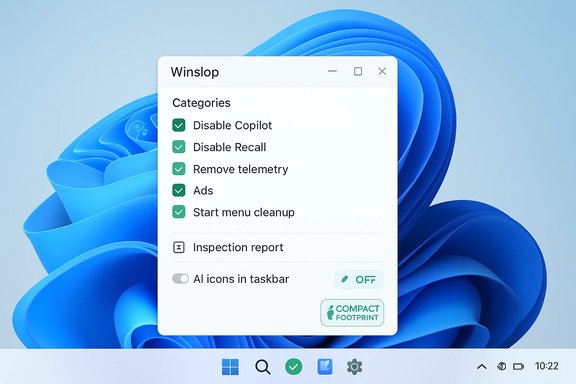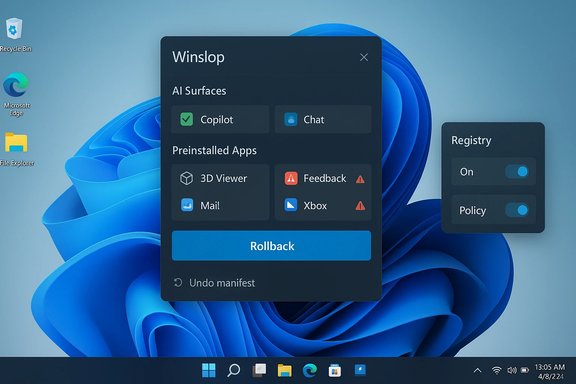
Winslop’s arrival on the Windows scene is a symptom, not a solution: it promises surgical removal of AI surfaces and other “hidden” bloat in Windows 11, but it also reopens familiar trade‑offs between convenience, control, and long‑term system reliability.
Background / Overview
Windows 11’s transition from a “desktop OS” to an “AI PC” platform has delivered visible features such as Copilot, Recall, and agent‑style Actions, but it has also increased complexity in how features are packaged and provisioned. For many users the frustration isn’t just that AI features appear by default — it’s that opt‑outs are inconsistent, removals can be temporary, and provisioning surfaces can be scattered across user packages, provisioning manifests, and the servicing store.That fragmentation has created two simultaneous dynamics: (1) a burst of robust, community‑driven cleanup utilities and scripts that promise durable removals, and (2) a renewed emphasis by Microsoft on supported admin controls — notably a narrowly scoped Group Policy to remove the consumer Copilot app for managed devices. Both responses reflect demand for control, but they do so in very different ways.
What Winslop Claims — A concise summary
Winslop is being marketed in enthusiast channels as a compact, modular debloat utility for Windows 10/11 that targets AI surfaces, preinstalled apps, telemetry toggles, and other provisioning artifacts. The entry has achieved distribution attention and a downloadable artifact on mainstream third‑party directories, confirming it is real and active in the wild. Core public claims attributed to Winslop in community write‑ups include:- Detect and list “hidden” or provisioned components (per‑item preview).
- Offer granular, modular selection rather than a single “nuke everything” mode.
- Provide rollback or restore mechanisms to reduce the risk of permanent breakage.
Technical primer — the layers any debloater must navigate
To evaluate Winslop or any similar tool, users must understand the stack Windows uses to ship, provision, and restore features.1. User‑level Appx / MSIX packages
- Cmdlets like Get‑AppxPackage and Remove‑AppxPackage only affect the current user. These actions are relatively low risk and reversible: the Store or winget can reinstall missing packages.
2. Provisioned Appx manifests
- Remove‑AppxProvisionedPackage targets manifests that cause apps to reappear for new user profiles. Removing provisioning is more invasive: it changes behavior for future accounts and is sometimes referenced by multiple OS features. This is medium risk.
3. Component‑Based Servicing (CBS) / WinSxS servicing store
- This is the authoritative servicing inventory Windows uses for feature installations and updates. Edits here — removing components or installing “blocker” packages — are powerful but dangerous: they may create upgrade or update failures, repair loops, or corrupt servicing states that require offline repair or reimaging. Community testing repeatedly identifies servicing‑level edits as the single largest source of long‑term fragility.
4. Registry/policy and scheduled tasks
- Many removals are lower risk: flipping well‑documented policy keys, Group Policy equivalents, or deleting scheduled tasks. These are usually reversible and are the first, sensible layer to try before touching provisioning or servicing.
What we can verify quickly — distribution and visibility
- Winslop is listed on mainstream software directories with a recent build (Softpedia shows version 0.25.11), confirming active distribution and community visibility. That listing documents feature claims such as disabling Copilot and removing telemetry toggles, but it does not prove the internal mechanics or safety.
- Community forums and mirror analyses describe Winslop as modular and rollback‑oriented, and they repeatedly emphasize that headlines about “removes hidden provisioning” are not a substitute for repository and code review. Those community write‑ups serve as useful independent data points but are not a substitute for an audit of the tool’s released filters and binary behavior.
Cross‑checking the critical claims — what remains unverified
The most significant technical claims that determine whether Winslop is “safe” or “dangerous” hinge on one question: does Winslop edit the servicing store or install blocker packages?- If the tool confines itself to user‑level uninstalls, registry/policy edits, and provisioned manifest removal (with clear warning labels), the risk profile is manageable for power users tested in VMs.
- If it performs CBS edits or inserts blocker packages to permanently prevent re‑provisioning, it crosses into high‑risk territory. Community analyses repeatedly show this step causes the majority of persistent upgrade breakage in modified machines. Those claims require direct auditing of the project’s source, release notes, or the binary. At present that specific verification is not publicly documented in a way we can independently confirm. Treat servicing edits as unverified until proven otherwise.
The broader admin context — Microsoft’s supported controls
Microsoft has not been oblivious to this tension. For managed devices, Microsoft shipped a narrowly scoped Group Policy (RemoveMicrosoftCopilotApp) in Insider preview builds that performs a one‑time uninstall of the consumer Copilot app under strict conditions — effectively acknowledging the need for supported, auditable controls rather than one‑off hacks. That policy demonstrates Microsoft’s preferred path: supported single‑action removals plus layered administrative controls (MDM, AppLocker) for durability. Key takeaways about Microsoft’s approach:- The policy is conservative and one‑time; it does not permanently block reinstallations.
- Durable prevention requires AppLocker/WDAC rules and tenant provisioning controls — deliberate administrative design rather than binary servicing surgery.
How Winslop stacks against safer alternatives
For most users and administrators there are safer, supported ways to reduce AI surface area and local noise without risking upgrade integrity:- Use documented Microsoft commands and cleanup tools (DISM cleanup, Remove‑AppxPackage) for reversible actions.
- Use Microsoft’s admin policy and MDM tooling for managed fleets; add AppLocker for durable enforcement.
- For privacy and UI cleanups (taskbar, widgets, Edge personalization), simple Settings changes or well‑audited GUI apps (e.g., O&O ShutUp10++) are lower risk. These address many day‑to‑day annoyances without touching servicing metadata.
The CNET perspective: eight annoying features and low‑risk fixes
The CNET piece reiterated what many users already know: a lot of Windows 11’s most annoying behaviors can be solved with modest settings changes rather than invasive debloater surgery. Common fixes include disabling Widgets, removing startup apps, turning off recommended items in Start, moderating OneDrive defaults, and hiding Copilot UI elements where Windows allows it — all actions that reduce daily friction without risking servicing breakage.These practical measures matter for two reasons:
- They relieve the immediate user experience pain points that drive people toward one‑click debloaters.
- They preserve update resilience while delivering many of the same UX benefits Winslop advertises.
Strengths of Winslop’s proposition (if implemented conservatively)
Assuming Winslop adheres to transparent, reversible design principles, it could deliver meaningful value:- Granular control — exposing per‑item previews and requiring user consent reduces accidental breakage and improves trust.
- Rollback mechanisms — automatically creating restore points or exporting an undo manifest is a clear, practical mitigation strategy.
- Community auditability — an open, well‑documented filter list and signed releases invite review and make safety claims verifiable.
The real risks — upgrade fragility and hidden dependency breakage
The most important negative consequences come from a handful of real technical failure modes:- Servicing/upgrade fragility — edits to the CBS/WinSxS store or installation of blocker packages frequently cause failed updates and repair loops. Community incident reports back this claim.
- Shared dependency breakage — provisioned packages sometimes serve multiple OS features; removing what appears to be “bloat” can silently disable unrelated functionality.
- Warranty/support and enterprise risk — devices modified outside vendor‑supported channels may face supportability or SLA issues for managed fleets. Microsoft’s managed policy path underscores the enterprise preference for controlled, auditable changes.
A pragmatic playbook: how to evaluate and (if desired) use Winslop safely
- Verify the canonical repository and prefer signed, reproducible builds. If there’s no public, auditable repo, treat the tool as untrusted.
- Read the filter list in full. Confirm whether any action writes to the servicing store (CBS), installs blocker packages, or performs offline servicing edits. If those actions exist, require separate, explicit consent and clear rollback steps.
- Test in a VM or an image clone first. Observe exactly what is removed and whether the machine still applies cumulative updates.
- Create full backups and a System Restore point before any run. Have bootable recovery media and an offline image ready.
- Avoid enabling any option labeled “Fix servicing store” or “Install blocker package” unless you are a seasoned sysadmin and accept the upgrade‑path risk.
- For fleets: prefer Microsoft‑supported controls (Group Policy / RemoveMicrosoftCopilotApp) + AppLocker for durable enforcement.
Verdict — is Winslop the answer to AI oversaturation in Windows 11?
Short answer: Not by itself.Winslop targets a genuine pain point — users want durable control over preinstalled AI features and telemetry — and it brings attractive UX concepts (modular selection, previews, rollback). However, whether it is the answer depends entirely on implementation details that remain unverified in public reporting: namely, whether Winslop performs servicing‑level edits or relies on safer, reversible techniques. Community mirrors and directory listings confirm Winslop exists and is actively distributed, but they do not replace a vetted code audit. In practice:
- For everyday users: Winslop is not a recommended first line of defense. Many of the most irritating AI and UI behaviors can be resolved with supported settings changes and conservative cleanup steps (a point emphasized in mainstream coverage of Windows 11 tweaks).
- For power users and hobbyists: Winslop is worth investigating — but only after a repository review, VM testing, and a confirmation that servicing edits are not automatic defaults.
- For enterprises: rely on Microsoft’s documented policies and MDM/AppLocker combos rather than one‑off debloaters for fleet‑wide governance.
Final recommendations — a balanced path forward
- Prioritize the low‑risk layer first: tweak Settings, remove startup apps, hide Widgets, and use winget or the Store to uninstall user apps. These actions resolve a large share of daily annoyances with minimal risk.
- If you need durable removal in a managed environment, deploy Microsoft’s supported policy, pilot it, and then add AppLocker/MDM rules for persistence.
- If you evaluate Winslop: insist on transparency. Review its filter list and changelog, run it in non‑production VMs, and never enable servicing edits unless you have an image‑level fallback.
Windows 11’s AI integration raised a technical and social problem that tools like Winslop aim to solve: users want agency. A responsible solution blends three elements — transparent tooling, conservative defaults that avoid servicing surgery, and supported administrative policies for fleets. Until Winslop (or any similar utility) proves it operates within those guardrails, the safest posture remains backup first, verify second, and avoid servicing edits unless you fully accept the upgrade risks.
Source: Windows Central https://www.windowscentral.com/micr...indows-11-most-annoying-features-how-to-fix/]