

Microsoft is responding to years of Windows 11 performance complaints by accelerating its WinUI 3 native interface work in May 2026, publishing early File Explorer and Notepad benchmark gains while also adding command-line templates and AI-assisted tooling for Windows App SDK developers. This is not a cosmetic course correction. It is Microsoft trying to rebuild trust in the part of Windows users touch most often: the interface between their hardware and their patience.
The company’s pitch is simple enough to fit on a slide: Windows should feel native again. The harder truth is that Microsoft is now trying to undo the reputational damage caused by years of hybrid UI layers, web-powered panels, slow shell surfaces, and first-party apps that too often behaved like websites wearing desktop clothes.
For years, “native” sounded like a developer preference. In 2026, it has become a performance argument.
The backlash against web wrappers did not appear out of nowhere. Windows users have watched chat clients, control panels, assistant apps, media apps, and even operating-system surfaces drift toward browser-based stacks that are easy to ship but expensive to run. Electron and PWA-style approaches are not automatically bad, but they often carry a runtime tax that feels insulting when the interface is doing something simple.
Microsoft’s latest WinUI 3 messaging lands because it speaks directly to that frustration. The company is not merely saying that native Windows apps are prettier or more consistent with Fluent Design. It is saying the native stack itself must become faster, leaner, and easier to adopt.
That distinction matters. If WinUI 3 remains a framework that only Microsoft can afford to use well, then the broader Windows ecosystem will continue defaulting to web technologies. If WinUI 3 becomes both performant and approachable, Microsoft has a chance to shift incentives rather than merely scold developers for choosing the cheaper path.
The operating system has needed this argument for a long time. Windows 11 has often looked modern while feeling oddly indirect, as though every click had to pass through one more abstraction layer before the machine reacted. Microsoft is now acknowledging, implicitly if not always bluntly, that responsiveness is not polish. It is product substance.
But they also need to be read carefully. These numbers do not mean File Explorer itself will launch 41 percent faster for every user. They apply to the WinUI slice of the launch path, not the entire sequence of shell initialization, storage enumeration, extension loading, recent file population, cloud integration, and everything else that can make Explorer feel sluggish.
That caveat should not diminish the importance of the work. UI frameworks are foundational debt. If the framework spends too much time allocating memory, calling through layers, and cleaning up temporary objects, every application built on it inherits that tax. Reducing that overhead is not a one-off speed hack; it is an infrastructure investment.
File Explorer is also the right benchmark because it is the app that exposes Windows’ credibility problem most brutally. Users can forgive a slow creative suite. They are less forgiving when the file manager hesitates on a machine with modern silicon, fast storage, and enough memory to run a small data center.
The same applies to Notepad, another benchmark Microsoft has cited. Notepad is culturally important because it is supposed to be instant. If the simplest Windows tools begin to feel ceremonial, the operating system’s entire performance story starts to unravel.
Both sides had a point, but they were arguing about different things. The technical question was whether momentary boosting is an acceptable scheduler-level tactic. The emotional question was whether users still trust Microsoft not to cover software inefficiency with hardware aggression.
That is why the WinUI 3 performance work matters beyond its benchmark table. It gives Microsoft a better answer. The company can plausibly say it is working both ends of the problem: improving the scheduler and reducing the UI overhead that makes scheduling tricks feel necessary.
Modern responsiveness is always a stack problem. The CPU governor, graphics compositor, storage layer, UI framework, app architecture, and network dependencies all shape the sensation of speed. A system can be technically powerful and still feel lethargic if the interface is doing too much work before it acknowledges the user.
The danger for Microsoft is that Windows has accumulated too many places where users suspect that is exactly what is happening. The WinUI effort is therefore not just about shaving function calls. It is about rebuilding the belief that Windows’ own interface is engineered for the machine in front of you, not merely packaged for Microsoft’s internal deployment convenience.
The problem is that a convenience layer can become an architectural habit. When too many surfaces are powered by web technologies, the desktop begins to feel less like a coherent operating system and more like a collection of embedded websites sharing a taskbar. Users may not know which panel is React, which one is XAML, and which one is native C++, but they notice the pauses.
Windows 11 has been especially vulnerable to this perception because its visual redesign promised refinement. Rounded corners, centered taskbar icons, translucent materials, and animated surfaces created the expectation of a smoother OS. When those surfaces stuttered, lagged, or loaded like remote content, the disappointment was sharper.
The phrase “web app slop” is crude, but it captures a real consumer judgment. Users increasingly see heavyweight web wrappers as a transfer of cost from developer to customer. The company saves engineering effort; the user pays in RAM, battery life, startup time, and inconsistency.
Microsoft cannot eliminate web technology from Windows, and it should not pretend otherwise. The web is essential to modern software. But the operating system’s core affordances — Start, search, settings, file management, basic utilities, account surfaces — need to feel like they belong to the platform, not like they were imported through a browser viewport.
If Start feels delayed, cluttered, or webby, users interpret that as a judgment on the entire OS. A sluggish Start menu makes an expensive PC feel cheap. It also undermines Microsoft’s claims that Windows 11 is a premium desktop environment built for modern hardware.
Moving shell surfaces toward native UI is therefore a strategic correction. It says Microsoft understands that the Windows shell cannot be treated like a web dashboard. It must be immediate, predictable, and deeply integrated with input, accessibility, windowing, and system state.
This also sharpens the stakes for WinUI 3 itself. The framework is no longer merely a recommended toolkit for third-party developers. It is increasingly the technology Microsoft is asking to carry the lived experience of Windows. That means every performance flaw, layout bug, control inconsistency, and deployment headache becomes a platform credibility issue.
The upside is equally large. If Microsoft can make WinUI 3 fast inside its own shell, developers get a stronger signal that the framework is not another abandoned Windows UI bet. Windows development history is littered with frameworks that inspired cautious optimism before fading into migration fatigue. WinUI 3 has to prove it is not next in line.
That is why Microsoft’s new
This matters culturally. The modern developer workflow is increasingly terminal-first, editor-neutral, scriptable, and automation-friendly. If WinUI requires a heavyweight IDE ritual while web apps can be bootstrapped in seconds, the native option loses before performance is even discussed.
The WinApp CLI also addresses one of Windows app development’s longest-running pain points: packaging and app identity. MSIX, certificates, manifests, and activation pipelines are necessary machinery, but they can feel disproportionate when a developer simply wants to build and test a basic app. Reducing that friction makes native development feel less like bureaucracy.
The larger move is philosophical. Microsoft is trying to make native Windows apps feel like part of the contemporary developer ecosystem rather than a special-case legacy craft. That is the right target. Developers will not return to native UI at scale because Microsoft publishes a blog post. They will return if the path of least resistance starts producing native output.
If an agent can create a WinUI 3 project, choose a template, generate XAML, wire up MVVM patterns, run the app, observe failures, and iterate through UI tests, then native development becomes less intimidating. It also becomes more legible to developers who do not already have years of Windows-specific muscle memory.
This does not mean AI will magically produce high-quality native apps. Anyone who has watched coding agents hallucinate APIs or generate brittle abstractions should be cautious. The value is not that the agent replaces engineering judgment. The value is that it can compress the boilerplate-heavy early phase where many developers otherwise give up.
Microsoft’s agent strategy is also a hedge against documentation decay. Windows development has suffered from overlapping guidance across UWP, WPF, WinForms, WinUI, MAUI, Windows App SDK, and legacy platform APIs. A grounded agent that knows the current preferred path can steer developers away from obsolete patterns faster than search results can.
There is risk here, too. If the generated apps are sloppy, inaccessible, or architecturally confused, WinUI could inherit a new kind of slop — not web slop, but agent slop. Microsoft will need to ensure the templates, skills, and tests encode good Windows behavior rather than simply producing demos that compile.
Still, the direction is coherent. Microsoft is no longer asking developers to choose native Windows out of platform loyalty. It is trying to make native Windows competitive on time, tooling, and automation.
Windows succeeds because it preserves compatibility. Windows stagnates when compatibility prevents modernization. Every deep platform cleanup has to pass through that narrow gap.
By making some high-performance pathways opt-in initially, Microsoft is choosing caution. That is understandable. Breaking existing WinUI apps in the name of speed would alienate the very developers Microsoft needs to win over. But leaving improvements opt-in forever would limit the ecosystem-wide benefit.
The stated direction toward making these paths opt-out in later Windows App SDK generations is therefore important. It suggests Microsoft wants the default app model to become faster over time, while still giving developers warning and migration room. That is the only realistic way to move a large platform without causing chaos.
This is also where enterprise IT will watch closely. Businesses do not merely care that Windows apps are fast. They care that updates do not break internal tools, line-of-business clients, accessibility accommodations, packaging scripts, or endpoint management assumptions. Microsoft’s performance push has to be predictable enough for conservative environments.
The challenge is to make modernization boring. Users want speed; administrators want stability; developers want clarity. WinUI 3 has to satisfy all three groups, or the native revival will remain mostly a Microsoft first-party story.
WinUI 3 sits in that shadow. Even if the technology is sound, the ecosystem remembers churn. Developers do not merely ask whether a framework works today. They ask whether Microsoft will still care in five years.
The recent moves help, but they are not yet proof. Public performance work, GitHub transparency, command-line templates, and AI agent support all point in the right direction. The true test will be whether Microsoft uses WinUI 3 consistently across its own products and keeps sanding down the rough edges that third-party developers hit in production.
Windows users have their own version of this skepticism. They have seen first-party apps rewritten, replaced, webified, unwebified, and redesigned again. They have watched Microsoft promote performance while adding new background services, feeds, recommendations, AI panels, and account prompts. A faster UI framework will not excuse every annoyance elsewhere in the OS.
That is the tension at the heart of this moment. Microsoft appears to be doing serious engineering work. But the company is also trying to persuade an audience trained by experience to discount announcements until the bits arrive on their machines.
Memory prices, laptop battery expectations, and the growing number of always-on productivity tools have changed the way users think about efficiency. A single chat app consuming hundreds of megabytes or more might have been shrugged off a decade ago. Today, it competes with browsers, IDEs, virtual machines, game launchers, security tools, AI assistants, sync clients, and collaboration apps.
The result is a new impatience with desktop applications that feel like they bring an entire browser engine to show a settings panel. Enthusiasts have complained about this for years, but the complaint has gone mainstream because the cumulative load is now visible. Users open Task Manager and see the bill.
Native Windows apps have an opportunity here, but only if Microsoft avoids nostalgia. The argument cannot be that everything old was better. Classic Win32 software could be ugly, leaky, inaccessible, and inconsistent. The argument must be that modern native apps can deliver platform integration and efficiency without returning to the visual and deployment chaos of the past.
WinUI 3 is supposed to be that compromise: modern controls, Fluent styling, accessibility hooks, packaging support, and native performance. If Microsoft can make that real, it gives developers a credible alternative to the browser-in-a-box default.
The environmental and mobile implications are also worth noting. Battery life is performance. Fan noise is performance. Thermal headroom is performance. An app that wakes fewer components, allocates less memory, and renders through a native path is not merely faster in a benchmark; it can make a laptop feel calmer.
When they are instant, the system disappears and the user feels in control. When they hesitate, the user starts narrating the machine’s failures. That narration is hard to reverse.
Windows 11 has often suffered from death by tiny pauses. None alone is catastrophic. Together they create a sense that the OS is negotiating with itself before obeying. A native UI push is valuable precisely because it targets the layer where those tiny pauses are most visible.
Microsoft should be judged not by whether it can produce benchmark wins in a development branch, but by whether everyday Windows actions feel less mediated after these changes ship. That will require end-to-end discipline. A leaner WinUI path can still be undermined by network calls, account prompts, shell extensions, cloud sync delays, or promotional content.
The best version of this strategy is not “Windows uses WinUI 3.” It is “Windows feels immediate again.” Frameworks are implementation details. Responsiveness is the product.
What may be ending is Microsoft’s tolerance for letting Windows itself feel like a web container. That is a much narrower claim, but a more important one. The operating system’s native surfaces set the expectation for the entire ecosystem. If Microsoft cannot make its own interface fast, coherent, and efficient, it has little standing to ask anyone else to do better.
There is also a competitive dimension. Apple has long benefited from the perception that its native apps feel integrated and efficient, even when reality is more complicated. Linux desktops, for all their fragmentation, often attract enthusiasts precisely because they can feel direct and lightweight. Windows cannot afford to be the platform where powerful hardware goes to feel sluggish.
The good news for Microsoft is that the path forward is not mysterious. Cut framework overhead. Move core shell surfaces native. Make development easier. Improve packaging. Support modern editor and AI workflows. Preserve compatibility without letting it freeze the platform. Then ship the improvements in a way users can actually feel.
The bad news is that Windows users have heard enough promises. They will believe in native Windows not when Microsoft says WinUI 3 is faster, but when File Explorer opens without hesitation, Start responds like a local surface, Notepad feels instant again, and Task Manager stops telling the story of a desktop weighed down by hidden browser engines.
Microsoft’s commitment to WinUI 3 is therefore best understood as the beginning of a credibility test. If the company follows through, Windows 11 could finally turn its visual modernization into tactile modernization. If it does not, “native” will become another word in the long Windows vocabulary of almost-kept promises, and users will keep measuring the platform by the milliseconds it asks them to forgive.
Source: Windows Latest Microsoft commits to native UI for Windows 11 as users push back against web app slop
The company’s pitch is simple enough to fit on a slide: Windows should feel native again. The harder truth is that Microsoft is now trying to undo the reputational damage caused by years of hybrid UI layers, web-powered panels, slow shell surfaces, and first-party apps that too often behaved like websites wearing desktop clothes.
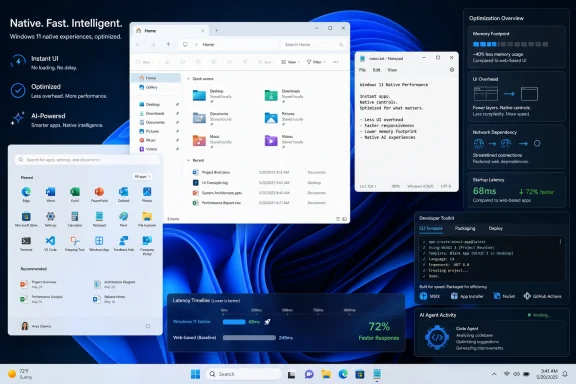 Microsoft Finally Treats Native UI as a Performance Feature
For years, “native” sounded like a developer preference. In 2026, it has become a performance argument.The backlash against web wrappers did not appear out of nowhere. Windows users have watched chat clients, control panels, assistant apps, media apps, and even operating-system surfaces drift toward browser-based stacks that are easy to ship but expensive to run. Electron and PWA-style approaches are not automatically bad, but they often carry a runtime tax that feels insulting when the interface is doing something simple.
Microsoft’s latest WinUI 3 messaging lands because it speaks directly to that frustration. The company is not merely saying that native Windows apps are prettier or more consistent with Fluent Design. It is saying the native stack itself must become faster, leaner, and easier to adopt.
That distinction matters. If WinUI 3 remains a framework that only Microsoft can afford to use well, then the broader Windows ecosystem will continue defaulting to web technologies. If WinUI 3 becomes both performant and approachable, Microsoft has a chance to shift incentives rather than merely scold developers for choosing the cheaper path.
The operating system has needed this argument for a long time. Windows 11 has often looked modern while feeling oddly indirect, as though every click had to pass through one more abstraction layer before the machine reacted. Microsoft is now acknowledging, implicitly if not always bluntly, that responsiveness is not polish. It is product substance.
The File Explorer Numbers Are Promising, but They Are Not a Miracle
The headline figures are striking: Microsoft’s WinUI engineering work has reportedly produced 41 percent fewer allocations, 63 percent fewer transient allocations, 45 percent fewer function calls, and a 25 percent reduction in time spent in WinUI code for the WinUI portion of File Explorer launch. Those are not vague “feels faster” claims. They are the kind of low-level metrics that suggest engineers are cutting real overhead.But they also need to be read carefully. These numbers do not mean File Explorer itself will launch 41 percent faster for every user. They apply to the WinUI slice of the launch path, not the entire sequence of shell initialization, storage enumeration, extension loading, recent file population, cloud integration, and everything else that can make Explorer feel sluggish.
That caveat should not diminish the importance of the work. UI frameworks are foundational debt. If the framework spends too much time allocating memory, calling through layers, and cleaning up temporary objects, every application built on it inherits that tax. Reducing that overhead is not a one-off speed hack; it is an infrastructure investment.
File Explorer is also the right benchmark because it is the app that exposes Windows’ credibility problem most brutally. Users can forgive a slow creative suite. They are less forgiving when the file manager hesitates on a machine with modern silicon, fast storage, and enough memory to run a small data center.
The same applies to Notepad, another benchmark Microsoft has cited. Notepad is culturally important because it is supposed to be instant. If the simplest Windows tools begin to feel ceremonial, the operating system’s entire performance story starts to unravel.
The Low Latency Profile Fight Was Really About Trust
The recent argument over Windows 11’s hidden Low Latency Profile became heated because it touched a nerve. Users saw a feature that temporarily boosts CPU responsiveness and suspected Microsoft was brute-forcing around bloated software. Microsoft’s defenders argued that short-lived CPU frequency boosts are common across modern operating systems and are part of legitimate responsiveness engineering.Both sides had a point, but they were arguing about different things. The technical question was whether momentary boosting is an acceptable scheduler-level tactic. The emotional question was whether users still trust Microsoft not to cover software inefficiency with hardware aggression.
That is why the WinUI 3 performance work matters beyond its benchmark table. It gives Microsoft a better answer. The company can plausibly say it is working both ends of the problem: improving the scheduler and reducing the UI overhead that makes scheduling tricks feel necessary.
Modern responsiveness is always a stack problem. The CPU governor, graphics compositor, storage layer, UI framework, app architecture, and network dependencies all shape the sensation of speed. A system can be technically powerful and still feel lethargic if the interface is doing too much work before it acknowledges the user.
The danger for Microsoft is that Windows has accumulated too many places where users suspect that is exactly what is happening. The WinUI effort is therefore not just about shaving function calls. It is about rebuilding the belief that Windows’ own interface is engineered for the machine in front of you, not merely packaged for Microsoft’s internal deployment convenience.
WebView Was Convenient Until It Became the Villain
WebView2 gave Microsoft and developers a practical escape hatch. It allowed web content to live inside Windows apps, helped teams reuse code, and made it easier to ship experiences across platforms. In enterprise software and service-heavy apps, that flexibility is valuable.The problem is that a convenience layer can become an architectural habit. When too many surfaces are powered by web technologies, the desktop begins to feel less like a coherent operating system and more like a collection of embedded websites sharing a taskbar. Users may not know which panel is React, which one is XAML, and which one is native C++, but they notice the pauses.
Windows 11 has been especially vulnerable to this perception because its visual redesign promised refinement. Rounded corners, centered taskbar icons, translucent materials, and animated surfaces created the expectation of a smoother OS. When those surfaces stuttered, lagged, or loaded like remote content, the disappointment was sharper.
The phrase “web app slop” is crude, but it captures a real consumer judgment. Users increasingly see heavyweight web wrappers as a transfer of cost from developer to customer. The company saves engineering effort; the user pays in RAM, battery life, startup time, and inconsistency.
Microsoft cannot eliminate web technology from Windows, and it should not pretend otherwise. The web is essential to modern software. But the operating system’s core affordances — Start, search, settings, file management, basic utilities, account surfaces — need to feel like they belong to the platform, not like they were imported through a browser viewport.
Start Menu Native Work Signals a Broader Retreat From Shell Compromise
The reported shift of Windows 11 Start menu work away from React-based components and toward native WinUI 3 is arguably more symbolically important than the File Explorer benchmark. Start is not just another app. It is the front door of Windows.If Start feels delayed, cluttered, or webby, users interpret that as a judgment on the entire OS. A sluggish Start menu makes an expensive PC feel cheap. It also undermines Microsoft’s claims that Windows 11 is a premium desktop environment built for modern hardware.
Moving shell surfaces toward native UI is therefore a strategic correction. It says Microsoft understands that the Windows shell cannot be treated like a web dashboard. It must be immediate, predictable, and deeply integrated with input, accessibility, windowing, and system state.
This also sharpens the stakes for WinUI 3 itself. The framework is no longer merely a recommended toolkit for third-party developers. It is increasingly the technology Microsoft is asking to carry the lived experience of Windows. That means every performance flaw, layout bug, control inconsistency, and deployment headache becomes a platform credibility issue.
The upside is equally large. If Microsoft can make WinUI 3 fast inside its own shell, developers get a stronger signal that the framework is not another abandoned Windows UI bet. Windows development history is littered with frameworks that inspired cautious optimism before fading into migration fatigue. WinUI 3 has to prove it is not next in line.
The Developer Tooling Story Is the Other Half of the Performance Story
Performance alone will not kill the web-wrapper habit. Developers choose Electron and similar stacks not because they love memory overhead, but because the workflow is familiar, cross-platform, well-documented, and friendly to modern tooling. Native Windows development has too often felt like entering a maze with three generations of signage.That is why Microsoft’s new
dotnet new templates for WinUI are more than a convenience. They attack the setup problem directly. A developer can scaffold and run a packaged WinUI app from the command line without beginning the journey inside the full Visual Studio experience.This matters culturally. The modern developer workflow is increasingly terminal-first, editor-neutral, scriptable, and automation-friendly. If WinUI requires a heavyweight IDE ritual while web apps can be bootstrapped in seconds, the native option loses before performance is even discussed.
The WinApp CLI also addresses one of Windows app development’s longest-running pain points: packaging and app identity. MSIX, certificates, manifests, and activation pipelines are necessary machinery, but they can feel disproportionate when a developer simply wants to build and test a basic app. Reducing that friction makes native development feel less like bureaucracy.
The larger move is philosophical. Microsoft is trying to make native Windows apps feel like part of the contemporary developer ecosystem rather than a special-case legacy craft. That is the right target. Developers will not return to native UI at scale because Microsoft publishes a blog post. They will return if the path of least resistance starts producing native output.
AI Agents Are Microsoft’s Attempt to Change the Economics
The WinUI agent plugin for GitHub Copilot and Claude Code is easy to dismiss as another AI-era announcement bolted onto a platform strategy. That would miss the point. Microsoft is using AI assistance to attack the biggest practical advantage web stacks have: speed of assembly.If an agent can create a WinUI 3 project, choose a template, generate XAML, wire up MVVM patterns, run the app, observe failures, and iterate through UI tests, then native development becomes less intimidating. It also becomes more legible to developers who do not already have years of Windows-specific muscle memory.
This does not mean AI will magically produce high-quality native apps. Anyone who has watched coding agents hallucinate APIs or generate brittle abstractions should be cautious. The value is not that the agent replaces engineering judgment. The value is that it can compress the boilerplate-heavy early phase where many developers otherwise give up.
Microsoft’s agent strategy is also a hedge against documentation decay. Windows development has suffered from overlapping guidance across UWP, WPF, WinForms, WinUI, MAUI, Windows App SDK, and legacy platform APIs. A grounded agent that knows the current preferred path can steer developers away from obsolete patterns faster than search results can.
There is risk here, too. If the generated apps are sloppy, inaccessible, or architecturally confused, WinUI could inherit a new kind of slop — not web slop, but agent slop. Microsoft will need to ensure the templates, skills, and tests encode good Windows behavior rather than simply producing demos that compile.
Still, the direction is coherent. Microsoft is no longer asking developers to choose native Windows out of platform loyalty. It is trying to make native Windows competitive on time, tooling, and automation.
The Opt-In Performance Path Shows How Hard Platform Repair Really Is
One detail in Microsoft’s plan deserves more attention: some performance changes are opt-in for now because they may break older applications that depend on customized control templates or container behavior. That sounds like boring framework governance. It is actually the central dilemma of Windows.Windows succeeds because it preserves compatibility. Windows stagnates when compatibility prevents modernization. Every deep platform cleanup has to pass through that narrow gap.
By making some high-performance pathways opt-in initially, Microsoft is choosing caution. That is understandable. Breaking existing WinUI apps in the name of speed would alienate the very developers Microsoft needs to win over. But leaving improvements opt-in forever would limit the ecosystem-wide benefit.
The stated direction toward making these paths opt-out in later Windows App SDK generations is therefore important. It suggests Microsoft wants the default app model to become faster over time, while still giving developers warning and migration room. That is the only realistic way to move a large platform without causing chaos.
This is also where enterprise IT will watch closely. Businesses do not merely care that Windows apps are fast. They care that updates do not break internal tools, line-of-business clients, accessibility accommodations, packaging scripts, or endpoint management assumptions. Microsoft’s performance push has to be predictable enough for conservative environments.
The challenge is to make modernization boring. Users want speed; administrators want stability; developers want clarity. WinUI 3 has to satisfy all three groups, or the native revival will remain mostly a Microsoft first-party story.
Microsoft’s Own History Is the Biggest Objection
Skepticism is warranted because Microsoft has made grand Windows developer promises before. The company has asked developers to bet on Silverlight, Metro, UWP, bridges, Store-first distribution strategies, and various app models that later lost momentum or were reframed. Many Windows developers learned to wait before following Redmond into another UI future.WinUI 3 sits in that shadow. Even if the technology is sound, the ecosystem remembers churn. Developers do not merely ask whether a framework works today. They ask whether Microsoft will still care in five years.
The recent moves help, but they are not yet proof. Public performance work, GitHub transparency, command-line templates, and AI agent support all point in the right direction. The true test will be whether Microsoft uses WinUI 3 consistently across its own products and keeps sanding down the rough edges that third-party developers hit in production.
Windows users have their own version of this skepticism. They have seen first-party apps rewritten, replaced, webified, unwebified, and redesigned again. They have watched Microsoft promote performance while adding new background services, feeds, recommendations, AI panels, and account prompts. A faster UI framework will not excuse every annoyance elsewhere in the OS.
That is the tension at the heart of this moment. Microsoft appears to be doing serious engineering work. But the company is also trying to persuade an audience trained by experience to discount announcements until the bits arrive on their machines.
The RAM Backlash Gives Native Apps a Political Opening
The timing helps Microsoft. Hardware trends have made software bloat harder to ignore.Memory prices, laptop battery expectations, and the growing number of always-on productivity tools have changed the way users think about efficiency. A single chat app consuming hundreds of megabytes or more might have been shrugged off a decade ago. Today, it competes with browsers, IDEs, virtual machines, game launchers, security tools, AI assistants, sync clients, and collaboration apps.
The result is a new impatience with desktop applications that feel like they bring an entire browser engine to show a settings panel. Enthusiasts have complained about this for years, but the complaint has gone mainstream because the cumulative load is now visible. Users open Task Manager and see the bill.
Native Windows apps have an opportunity here, but only if Microsoft avoids nostalgia. The argument cannot be that everything old was better. Classic Win32 software could be ugly, leaky, inaccessible, and inconsistent. The argument must be that modern native apps can deliver platform integration and efficiency without returning to the visual and deployment chaos of the past.
WinUI 3 is supposed to be that compromise: modern controls, Fluent styling, accessibility hooks, packaging support, and native performance. If Microsoft can make that real, it gives developers a credible alternative to the browser-in-a-box default.
The environmental and mobile implications are also worth noting. Battery life is performance. Fan noise is performance. Thermal headroom is performance. An app that wakes fewer components, allocates less memory, and renders through a native path is not merely faster in a benchmark; it can make a laptop feel calmer.
Windows Needs Fewer Excuses and More Instant Reactions
The most important Windows performance metric is not a number Microsoft can easily publish. It is the delay between user intent and visible response. Click Start. Open Explorer. Search settings. Rename a file. Launch Notepad. Switch desktops. These actions form the emotional texture of the OS.When they are instant, the system disappears and the user feels in control. When they hesitate, the user starts narrating the machine’s failures. That narration is hard to reverse.
Windows 11 has often suffered from death by tiny pauses. None alone is catastrophic. Together they create a sense that the OS is negotiating with itself before obeying. A native UI push is valuable precisely because it targets the layer where those tiny pauses are most visible.
Microsoft should be judged not by whether it can produce benchmark wins in a development branch, but by whether everyday Windows actions feel less mediated after these changes ship. That will require end-to-end discipline. A leaner WinUI path can still be undermined by network calls, account prompts, shell extensions, cloud sync delays, or promotional content.
The best version of this strategy is not “Windows uses WinUI 3.” It is “Windows feels immediate again.” Frameworks are implementation details. Responsiveness is the product.
Redmond’s Native Bet Has a Short List of Proof Points
Microsoft’s latest moves are credible because they connect engineering, platform tooling, and developer economics. They are still early enough that users should withhold final judgment until the improvements arrive broadly in Windows and the Windows App SDK.- Microsoft’s reported WinUI 3 gains apply to the WinUI portion of File Explorer launch, not to the entire File Explorer startup path.
- The move toward native shell surfaces matters most where users interact with Windows constantly, especially Start, File Explorer, Notepad, and Settings.
- The new command-line templates and WinApp CLI reduce the friction that has historically pushed developers toward web wrappers.
- The WinUI agent plugin is best understood as an attempt to make native Windows development cheaper and faster, not as a guarantee of better app quality.
- The opt-in nature of some performance changes shows Microsoft is balancing speed against compatibility, which remains the defining constraint of Windows.
- The strategy will only work if Microsoft keeps using WinUI 3 seriously in its own products and avoids another cycle of platform enthusiasm followed by neglect.
This Is a Platform Course Correction, Not a Victory Lap
The mistake would be to treat Microsoft’s WinUI 3 push as a declaration that the era of web apps on Windows is over. It is not. Web technologies will remain central to software, and many cross-platform apps will continue to choose them for rational business reasons.What may be ending is Microsoft’s tolerance for letting Windows itself feel like a web container. That is a much narrower claim, but a more important one. The operating system’s native surfaces set the expectation for the entire ecosystem. If Microsoft cannot make its own interface fast, coherent, and efficient, it has little standing to ask anyone else to do better.
There is also a competitive dimension. Apple has long benefited from the perception that its native apps feel integrated and efficient, even when reality is more complicated. Linux desktops, for all their fragmentation, often attract enthusiasts precisely because they can feel direct and lightweight. Windows cannot afford to be the platform where powerful hardware goes to feel sluggish.
The good news for Microsoft is that the path forward is not mysterious. Cut framework overhead. Move core shell surfaces native. Make development easier. Improve packaging. Support modern editor and AI workflows. Preserve compatibility without letting it freeze the platform. Then ship the improvements in a way users can actually feel.
The bad news is that Windows users have heard enough promises. They will believe in native Windows not when Microsoft says WinUI 3 is faster, but when File Explorer opens without hesitation, Start responds like a local surface, Notepad feels instant again, and Task Manager stops telling the story of a desktop weighed down by hidden browser engines.
Microsoft’s commitment to WinUI 3 is therefore best understood as the beginning of a credibility test. If the company follows through, Windows 11 could finally turn its visual modernization into tactile modernization. If it does not, “native” will become another word in the long Windows vocabulary of almost-kept promises, and users will keep measuring the platform by the milliseconds it asks them to forgive.
Source: Windows Latest Microsoft commits to native UI for Windows 11 as users push back against web app slop
