

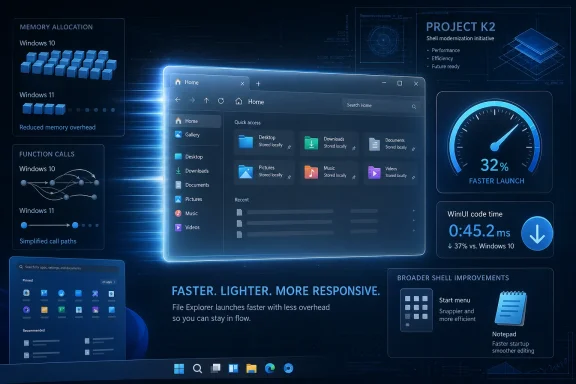
Microsoft is testing performance work for Windows 11’s WinUI 3 interface stack in May 2026, with reported File Explorer launch improvements including 41 percent fewer memory allocations, 63 percent fewer transient allocations, 45 percent fewer function calls, and 25 percent less time spent in WinUI code. The short version is that Microsoft is not merely repainting Windows 11’s interface; it is trying to make the framework underneath feel less expensive every time a user opens a window. That matters because Windows 11’s most common complaint has never been only visual inconsistency. It has been the suspicion that the modern Windows shell is doing too much work to accomplish too little.
For years, Windows 11’s performance debate has been trapped in the wrong argument. Microsoft would talk about elegance, consistency, and modern design, while users talked about the Start menu hesitating, File Explorer pausing, context menus taking a beat too long, and basic shell actions feeling softer than they did on older machines running older versions of Windows.
The new WinUI 3 work is notable because it points at the right layer of the problem. File Explorer and Notepad are not exotic benchmarks. They are daily muscle-memory apps, the sort of surfaces where a 200-millisecond delay feels worse than a benchmark regression in a workload most users never run.
That is why the numbers matter even if they do not yet prove a finished fix. A 41 percent reduction in allocations and a 45 percent reduction in function calls are not marketing adjectives; they describe less churn in the machinery that appears when Windows draws and initializes modern interface components. If Microsoft can keep pushing in that direction, Windows 11’s modern shell has a chance to feel less like a skin stretched over legacy foundations.
The more important shift is cultural. Microsoft appears to be treating WinUI 3 performance not as a cleanup task after the design work is done, but as a first-order requirement for making Windows itself credible again.
In practice, WinUI 3 has carried baggage. Developers and users have complained for years that apps built with newer Microsoft UI stacks can feel heavier than their Win32 predecessors. The complaint is not always fair, because legacy Windows code benefits from decades of optimization and user familiarity. But the perception stuck because users do not judge frameworks. They judge the Start menu opening late.
This is the trap Microsoft built for itself with Windows 11. The company wanted a calmer, more coherent interface, but many of the visible improvements arrived alongside regressions in responsiveness, discoverability, or flexibility. Rounded corners and softened visuals do not buy much goodwill if the right-click menu is slower or the taskbar loses capabilities users relied on for years.
WinUI 3’s role in Project K2 therefore has a double burden. It must modernize Windows while also disproving the assumption that “modern” in Microsoft UI language means heavier, slower, and less complete. That is a harder job than simply replacing old dialogs with new controls.
It is also one of the most emotionally loaded parts of Windows 11. The app has accumulated modern command bars, tabs, cloud hooks, gallery views, context menu changes, and a mix of legacy and modern surfaces. Some of these additions are useful. Some feel like sediment.
That makes Explorer a brutally honest test case. If Microsoft can reduce launch overhead there, the improvement will not be hidden inside a synthetic demo. Users will feel it when they press Win+E, open a folder from the taskbar, or spawn a new Explorer window while doing something else.
The reported focus on launch time is similarly important. Responsiveness is not only about maximum throughput. It is about the first second of interaction, when users decide whether the machine is keeping up with them or making them wait.
But these figures describe the WinUI portion of a launch path, not necessarily the entire Explorer experience. File Explorer is a hybrid creature, and Windows itself is a dense web of shell components, extensions, cloud integrations, storage providers, thumbnails, indexing, and compatibility layers. Optimizing one framework layer can be meaningful without being magical.
That distinction matters because Microsoft has often been punished for overpromising Windows improvements. Users remember when a “faster” Windows feature still felt slow on their machine because the real bottleneck was a shell extension, OneDrive integration, an antivirus hook, a network location, or a bloated context menu entry. The platform is bigger than any one benchmark.
Still, narrow improvements are how real performance work begins. A 25 percent reduction in time spent in WinUI code during a launch sequence is not a cure for every Explorer complaint, but it is a sign that Microsoft is measuring the right things instead of merely asserting that the new stack is good enough.
That trust problem is not just about bugs. It is about the feeling that Windows has become less respectful of the user’s time. A delayed context menu, a Start menu recommendation, a forced account prompt, an unexpected Copilot surface, or a post-update setting change may each be individually defensible. Together, they become a narrative.
The WinUI 3 performance work fits into K2 because it attacks the quiet part of that narrative. If the shell feels slow, every other annoyance feels more insulting. Users will tolerate complexity from a fast system more readily than from one that pauses before doing basic work.
Microsoft’s challenge is that K2 cannot be merely a branding exercise. The Windows audience has seen too many “renewed focus” moments dissolve into another cycle of features arriving before fundamentals are fixed. If K2 is real, the proof will be boring: fewer stalls, fewer regressions, fewer half-modernized surfaces, and fewer moments where users wonder why new Windows feels slower than old Windows.
This has been a recurring pattern across modern software. Efficiency gains are often consumed by additional layers before they reach the person at the keyboard. Windows is especially vulnerable because it serves competing constituencies: consumers, enterprise administrators, developers, OEMs, advertisers, cloud services, and Microsoft’s own strategic priorities.
The WinUI 3 changes will matter most if Microsoft treats them as a latency dividend to be returned to users. A Start menu rebuilt on a faster framework should open faster, not merely make room for more dynamic content. A modern Explorer should navigate folders more quickly, not use the savings to hide more service hooks behind a cleaner façade.
This is where the K2 story becomes more than a technical migration. Microsoft has to decide whether Windows 11’s next phase is about restraint. Performance is not only an engineering property; it is a product discipline.
Some optimizations reportedly require opt-in behavior because they involve breaking changes to control styles or animation behavior. That sounds minor until you remember how many enterprise apps depend on quirks, layout assumptions, timing behavior, or custom styling that was never intended as a contract but became one through use. In the Windows ecosystem, even “better” can be a breaking change.
That also explains why Microsoft may make certain optimizations opt-out defaults only in later major versions. Framework evolution is less like flipping a switch and more like negotiating with history. The company has to give app developers time to test, adapt, and decide whether the tradeoff is safe.
For users, this means the benefits may arrive unevenly. Microsoft’s own apps and shell surfaces may pick up gains sooner. Third-party apps may need new WinAppSDK versions, developer action, or a willingness to accept changed control behavior. The platform can improve before every app on it does.
Developers choose frameworks partly on tooling, partly on capability, and partly on social proof. If Microsoft’s own apps feel sluggish using its own stack, that becomes a warning label. If File Explorer and Notepad become visibly faster because WinUI 3 has been optimized under real workloads, that becomes a different kind of signal.
There is also a credibility issue around the Windows App SDK. Microsoft has asked developers to follow several generations of UI strategy over the last decade and a half, not all of which aged gracefully. The company cannot afford another native-app story that feels transitional forever.
The best thing Microsoft can do for WinUI 3 is use it in unforgiving places and make it fast there. File Explorer is unforgiving. The Start menu is unforgiving. Settings, search, taskbar flyouts, and shell dialogs are unforgiving. That is precisely why they are the right proving ground.
But this kind of feature is a complement, not a replacement. Boosting the CPU can help mask startup costs, but it does not excuse wasteful framework behavior. If WinUI performs unnecessary allocations or makes avoidable calls, a temporary frequency boost simply burns more power to run inefficient code faster.
Used properly, however, the two approaches can reinforce each other. A leaner framework reduces the amount of work needed during launch, while a short-lived CPU boost helps complete that smaller amount of work quickly. That combination is more promising than either technique alone.
The battery and thermal implications will need watching. Windows runs on everything from plugged-in desktops to thin-and-light laptops already juggling background tasks, browser tabs, Teams calls, and power policies. A responsiveness feature that feels great on AC power but causes heat or battery complaints on mobile hardware would simply move the frustration elsewhere.
Enterprises are usually less impressed by “modernized” UI than consumer marketing assumes. They want predictable behavior, manageable defaults, and fewer helpdesk tickets. If a rewritten Start menu is faster but changes workflows again, IT departments will ask whether the speed gain offsets the disruption.
The opt-in and versioned nature of some WinUI improvements may therefore be a blessing. It gives Microsoft and developers a path to stage changes rather than detonate them across managed environments overnight. But it also means administrators will need to watch release notes and Insider builds more closely, especially if core shell components start crossing from old frameworks into WinUI 3 at a faster pace.
The most important enterprise question is whether Microsoft can improve responsiveness without creating a new compatibility class of “modern shell issues.” The company has earned some skepticism here. Windows admins have long memories, and they tend to remember the update that broke workflows more vividly than the one that shaved milliseconds from launch time.
That is why a WinUI 3 Start menu rebuild is potentially consequential. If Microsoft uses the rewrite to restore customization, improve launch speed, and reduce clutter, it could repair one of Windows 11’s most visible self-inflicted wounds. If it uses the rewrite mainly to make the same contested design more technically modern, the backlash will be predictable.
Performance gives Microsoft an opening. A Start menu that opens instantly and respects user choices can reset the tone of the OS. A Start menu that is faster but still feels like a negotiation with Microsoft’s services will not.
The political part is not partisan; it is about control. Windows users, especially enthusiasts and IT pros, are sensitive to any surface that feels less like a tool and more like a channel. K2’s success will depend on whether Microsoft understands that responsiveness and respect are now linked.
Search is also a harder problem than launch time. It depends on indexing, ranking, file metadata, app results, settings, cloud content, permissions, and sometimes network state. It is both a UI problem and an information-retrieval problem.
Microsoft has repeatedly tried to make Windows Search more than a local utility. Sometimes that ambition helps, especially for users tied deeply into Microsoft 365. Sometimes it makes a simple local task feel contaminated by web and account logic. The line between helpful integration and unwanted interruption is thin.
If Project K2 is meant to address Windows 11’s biggest pain points, Search will be one of its real tests. Making the search box faster is useful. Making the results feel trustworthy is harder and more important.
That is why framework performance is not an abstract developer concern. When the shell hesitates, Windows feels less native to itself. When a modern dialog opens slower than an old one, the user does not see architectural progress. They see regression.
A successful WinUI 3 push would make the modern parts of Windows stop calling attention to themselves. The interface would still look contemporary, but it would lose the telltale pauses that make users suspect a stack of abstraction underneath. The best framework work disappears into the feeling that nothing is in the way.
That is also the standard Microsoft should be held to. Not “is this better than the last Insider build?” but “does this make Windows feel immediate again?” The latter is a much higher bar, and it is the one users actually care about.
Source: TweakTown Microsoft is improving the responsiveness of Windows 11 with WinUI 3
 Microsoft Has Finally Found the Right Performance Target
For years, Windows 11’s performance debate has been trapped in the wrong argument. Microsoft would talk about elegance, consistency, and modern design, while users talked about the Start menu hesitating, File Explorer pausing, context menus taking a beat too long, and basic shell actions feeling softer than they did on older machines running older versions of Windows.The new WinUI 3 work is notable because it points at the right layer of the problem. File Explorer and Notepad are not exotic benchmarks. They are daily muscle-memory apps, the sort of surfaces where a 200-millisecond delay feels worse than a benchmark regression in a workload most users never run.
That is why the numbers matter even if they do not yet prove a finished fix. A 41 percent reduction in allocations and a 45 percent reduction in function calls are not marketing adjectives; they describe less churn in the machinery that appears when Windows draws and initializes modern interface components. If Microsoft can keep pushing in that direction, Windows 11’s modern shell has a chance to feel less like a skin stretched over legacy foundations.
The more important shift is cultural. Microsoft appears to be treating WinUI 3 performance not as a cleanup task after the design work is done, but as a first-order requirement for making Windows itself credible again.
WinUI 3 Was Supposed to Modernize Windows, Not Slow It Down
WinUI 3 occupies an awkward place in the Windows story. It is Microsoft’s modern native UI framework, closely tied to the Windows App SDK, and it is meant to give developers a path toward contemporary Windows applications without abandoning the platform’s native identity. In theory, it is exactly what Windows needs.In practice, WinUI 3 has carried baggage. Developers and users have complained for years that apps built with newer Microsoft UI stacks can feel heavier than their Win32 predecessors. The complaint is not always fair, because legacy Windows code benefits from decades of optimization and user familiarity. But the perception stuck because users do not judge frameworks. They judge the Start menu opening late.
This is the trap Microsoft built for itself with Windows 11. The company wanted a calmer, more coherent interface, but many of the visible improvements arrived alongside regressions in responsiveness, discoverability, or flexibility. Rounded corners and softened visuals do not buy much goodwill if the right-click menu is slower or the taskbar loses capabilities users relied on for years.
WinUI 3’s role in Project K2 therefore has a double burden. It must modernize Windows while also disproving the assumption that “modern” in Microsoft UI language means heavier, slower, and less complete. That is a harder job than simply replacing old dialogs with new controls.
File Explorer Is the Benchmark Because File Explorer Is the Complaint
Choosing File Explorer as a benchmark is not incidental. Explorer is one of the few pieces of Windows that nearly every class of user touches: home users managing downloads, developers navigating repos, photographers moving files, sysadmins opening network shares, and power users living in nested folders all day.It is also one of the most emotionally loaded parts of Windows 11. The app has accumulated modern command bars, tabs, cloud hooks, gallery views, context menu changes, and a mix of legacy and modern surfaces. Some of these additions are useful. Some feel like sediment.
That makes Explorer a brutally honest test case. If Microsoft can reduce launch overhead there, the improvement will not be hidden inside a synthetic demo. Users will feel it when they press Win+E, open a folder from the taskbar, or spawn a new Explorer window while doing something else.
The reported focus on launch time is similarly important. Responsiveness is not only about maximum throughput. It is about the first second of interaction, when users decide whether the machine is keeping up with them or making them wait.
The Numbers Are Encouraging, but They Are Narrow
The reported File Explorer gains are impressive on their face. Fewer allocations usually mean less pressure on memory management. Fewer transient allocations mean less short-lived garbage created and discarded during startup. Fewer function calls suggest that the framework is doing less layered work to produce the same visible result.But these figures describe the WinUI portion of a launch path, not necessarily the entire Explorer experience. File Explorer is a hybrid creature, and Windows itself is a dense web of shell components, extensions, cloud integrations, storage providers, thumbnails, indexing, and compatibility layers. Optimizing one framework layer can be meaningful without being magical.
That distinction matters because Microsoft has often been punished for overpromising Windows improvements. Users remember when a “faster” Windows feature still felt slow on their machine because the real bottleneck was a shell extension, OneDrive integration, an antivirus hook, a network location, or a bloated context menu entry. The platform is bigger than any one benchmark.
Still, narrow improvements are how real performance work begins. A 25 percent reduction in time spent in WinUI code during a launch sequence is not a cure for every Explorer complaint, but it is a sign that Microsoft is measuring the right things instead of merely asserting that the new stack is good enough.
Project K2 Looks Like an Admission, Not Just an Initiative
Project K2, as it has been described in recent reporting, is Microsoft’s broader effort to address the Windows 11 pain points that have hardened into reputation: performance, reliability, interface consistency, AI clutter, update friction, and system footprint. The name matters less than what it implies. Microsoft appears to understand that Windows 11 has a trust problem.That trust problem is not just about bugs. It is about the feeling that Windows has become less respectful of the user’s time. A delayed context menu, a Start menu recommendation, a forced account prompt, an unexpected Copilot surface, or a post-update setting change may each be individually defensible. Together, they become a narrative.
The WinUI 3 performance work fits into K2 because it attacks the quiet part of that narrative. If the shell feels slow, every other annoyance feels more insulting. Users will tolerate complexity from a fast system more readily than from one that pauses before doing basic work.
Microsoft’s challenge is that K2 cannot be merely a branding exercise. The Windows audience has seen too many “renewed focus” moments dissolve into another cycle of features arriving before fundamentals are fixed. If K2 is real, the proof will be boring: fewer stalls, fewer regressions, fewer half-modernized surfaces, and fewer moments where users wonder why new Windows feels slower than old Windows.
A Faster Framework Helps Only If Microsoft Stops Spending the Savings
The danger with UI performance work is that it can become a budget increase rather than a user benefit. A team optimizes the framework, another team adds animation, telemetry, cloud suggestions, AI affordances, or richer content, and the user ends up with the same perceived delay wrapped in a more elaborate experience.This has been a recurring pattern across modern software. Efficiency gains are often consumed by additional layers before they reach the person at the keyboard. Windows is especially vulnerable because it serves competing constituencies: consumers, enterprise administrators, developers, OEMs, advertisers, cloud services, and Microsoft’s own strategic priorities.
The WinUI 3 changes will matter most if Microsoft treats them as a latency dividend to be returned to users. A Start menu rebuilt on a faster framework should open faster, not merely make room for more dynamic content. A modern Explorer should navigate folders more quickly, not use the savings to hide more service hooks behind a cleaner façade.
This is where the K2 story becomes more than a technical migration. Microsoft has to decide whether Windows 11’s next phase is about restraint. Performance is not only an engineering property; it is a product discipline.
Opt-In Optimizations Reveal the Cost of Compatibility
The reported plan to land improvements in the WinUI development branch, with some changes flowing into future WinAppSDK versions where feasible, is exactly the sort of detail that makes Windows engineering hard. Microsoft cannot simply break every app to make the framework cleaner. Compatibility is Windows’ superpower and its anchor.Some optimizations reportedly require opt-in behavior because they involve breaking changes to control styles or animation behavior. That sounds minor until you remember how many enterprise apps depend on quirks, layout assumptions, timing behavior, or custom styling that was never intended as a contract but became one through use. In the Windows ecosystem, even “better” can be a breaking change.
That also explains why Microsoft may make certain optimizations opt-out defaults only in later major versions. Framework evolution is less like flipping a switch and more like negotiating with history. The company has to give app developers time to test, adapt, and decide whether the tradeoff is safe.
For users, this means the benefits may arrive unevenly. Microsoft’s own apps and shell surfaces may pick up gains sooner. Third-party apps may need new WinAppSDK versions, developer action, or a willingness to accept changed control behavior. The platform can improve before every app on it does.
Developers Need a Framework They Can Trust in Public
WinUI 3’s performance reputation matters beyond File Explorer. If Microsoft wants developers to build native Windows apps instead of wrapping web interfaces in desktop shells, the native stack must feel obviously competitive. “It is Microsoft’s recommended framework” is not enough.Developers choose frameworks partly on tooling, partly on capability, and partly on social proof. If Microsoft’s own apps feel sluggish using its own stack, that becomes a warning label. If File Explorer and Notepad become visibly faster because WinUI 3 has been optimized under real workloads, that becomes a different kind of signal.
There is also a credibility issue around the Windows App SDK. Microsoft has asked developers to follow several generations of UI strategy over the last decade and a half, not all of which aged gracefully. The company cannot afford another native-app story that feels transitional forever.
The best thing Microsoft can do for WinUI 3 is use it in unforgiving places and make it fast there. File Explorer is unforgiving. The Start menu is unforgiving. Settings, search, taskbar flyouts, and shell dialogs are unforgiving. That is precisely why they are the right proving ground.
Low Latency Profile Is a Booster, Not a Substitute
The separate Low Latency Profile idea is interesting because it attacks responsiveness from the hardware scheduling side. Temporarily boosting the CPU to its maximum frequency for a short window during app launches could make Windows feel more immediate, especially on modern laptops that aggressively balance battery life and performance.But this kind of feature is a complement, not a replacement. Boosting the CPU can help mask startup costs, but it does not excuse wasteful framework behavior. If WinUI performs unnecessary allocations or makes avoidable calls, a temporary frequency boost simply burns more power to run inefficient code faster.
Used properly, however, the two approaches can reinforce each other. A leaner framework reduces the amount of work needed during launch, while a short-lived CPU boost helps complete that smaller amount of work quickly. That combination is more promising than either technique alone.
The battery and thermal implications will need watching. Windows runs on everything from plugged-in desktops to thin-and-light laptops already juggling background tasks, browser tabs, Teams calls, and power policies. A responsiveness feature that feels great on AC power but causes heat or battery complaints on mobile hardware would simply move the frustration elsewhere.
Enterprise IT Will Measure the Pain Differently
For administrators, the WinUI 3 story is not just about whether Explorer feels snappier. It is about change management. Any migration of core Windows surfaces raises questions about stability, policy support, accessibility, automation, shell extensions, and user training.Enterprises are usually less impressed by “modernized” UI than consumer marketing assumes. They want predictable behavior, manageable defaults, and fewer helpdesk tickets. If a rewritten Start menu is faster but changes workflows again, IT departments will ask whether the speed gain offsets the disruption.
The opt-in and versioned nature of some WinUI improvements may therefore be a blessing. It gives Microsoft and developers a path to stage changes rather than detonate them across managed environments overnight. But it also means administrators will need to watch release notes and Insider builds more closely, especially if core shell components start crossing from old frameworks into WinUI 3 at a faster pace.
The most important enterprise question is whether Microsoft can improve responsiveness without creating a new compatibility class of “modern shell issues.” The company has earned some skepticism here. Windows admins have long memories, and they tend to remember the update that broke workflows more vividly than the one that shaved milliseconds from launch time.
The Start Menu Is Where K2 Becomes Political
The Start menu is not just another UI surface. It is the front door to Windows, and every redesign becomes a referendum on Microsoft’s priorities. Windows 11’s Start menu has been criticized not only for performance but for reduced flexibility, recommendation space, and a sense that Microsoft’s preferred content sometimes gets better placement than the user’s own intent.That is why a WinUI 3 Start menu rebuild is potentially consequential. If Microsoft uses the rewrite to restore customization, improve launch speed, and reduce clutter, it could repair one of Windows 11’s most visible self-inflicted wounds. If it uses the rewrite mainly to make the same contested design more technically modern, the backlash will be predictable.
Performance gives Microsoft an opening. A Start menu that opens instantly and respects user choices can reset the tone of the OS. A Start menu that is faster but still feels like a negotiation with Microsoft’s services will not.
The political part is not partisan; it is about control. Windows users, especially enthusiasts and IT pros, are sensitive to any surface that feels less like a tool and more like a channel. K2’s success will depend on whether Microsoft understands that responsiveness and respect are now linked.
Windows Search Remains the Unfinished Argument
The TweakTown piece rightly notes that Windows Search is still one of the promises to watch. Search is where Windows 11’s performance, relevance, cloud strategy, and user trust collide. A faster shell will not fully redeem the experience if typing a local query still produces uneven results, web-first distractions, or inconsistent indexing behavior.Search is also a harder problem than launch time. It depends on indexing, ranking, file metadata, app results, settings, cloud content, permissions, and sometimes network state. It is both a UI problem and an information-retrieval problem.
Microsoft has repeatedly tried to make Windows Search more than a local utility. Sometimes that ambition helps, especially for users tied deeply into Microsoft 365. Sometimes it makes a simple local task feel contaminated by web and account logic. The line between helpful integration and unwanted interruption is thin.
If Project K2 is meant to address Windows 11’s biggest pain points, Search will be one of its real tests. Making the search box faster is useful. Making the results feel trustworthy is harder and more important.
The Real Test Is Whether Windows Starts Feeling Native Again
The word native has become slippery in the Windows world. It can refer to performance, platform integration, visual language, input behavior, accessibility, deployment, or simply the absence of a browser frame pretending to be an app. Microsoft wants WinUI 3 to carry the native Windows story forward, but users will define native in simpler terms: it should feel like it belongs, and it should keep up.That is why framework performance is not an abstract developer concern. When the shell hesitates, Windows feels less native to itself. When a modern dialog opens slower than an old one, the user does not see architectural progress. They see regression.
A successful WinUI 3 push would make the modern parts of Windows stop calling attention to themselves. The interface would still look contemporary, but it would lose the telltale pauses that make users suspect a stack of abstraction underneath. The best framework work disappears into the feeling that nothing is in the way.
That is also the standard Microsoft should be held to. Not “is this better than the last Insider build?” but “does this make Windows feel immediate again?” The latter is a much higher bar, and it is the one users actually care about.
The WinUI Dividend Has to Reach the Keyboard
Microsoft’s latest numbers are promising because they are concrete, but the lesson for Windows users is still practical rather than celebratory. The work is real enough to watch, but not mature enough to declare victory.- Microsoft is optimizing WinUI 3 itself, not merely moving more Windows surfaces onto the framework.
- File Explorer and Notepad are being used as practical launch-time benchmarks because they represent everyday Windows interactions.
- The reported File Explorer gains apply to the WinUI portion of launch work, so users should not assume every Explorer delay will disappear at once.
- Some improvements may require app opt-in because changes to control styles and animation behavior can affect compatibility.
- The biggest payoff will come if Microsoft combines framework efficiency with product restraint rather than spending the savings on more shell complexity.
- Project K2 will be judged by visible behavior in Start, Explorer, Search, and updates, not by internal initiative names.
Source: TweakTown Microsoft is improving the responsiveness of Windows 11 with WinUI 3
