

Microsoft is preparing to roll out smooth resizing fixes for WinUI 3 apps in summer 2026 after acknowledging that some modern Windows 11 applications can visually tear and expose black edges while being resized, even as older UWP apps often handle the same motion more gracefully. That is a small admission with large symbolism. Windows 11’s native-app revival depends not on keynote language about “modern” interfaces, but on whether the platform can make ordinary desktop interactions feel solid. Right now, the resize border is where Microsoft’s UI strategy briefly shows its wiring.
The embarrassing part is not that a UI framework has a rendering bug. The embarrassing part is that WinUI 3 is supposed to be the future-facing answer to years of Windows app fragmentation, while UWP — the platform Microsoft has largely moved past — can still look smoother in a basic gesture users perform dozens of times a day.
The issue, highlighted by developers and now addressed publicly by Microsoft design leadership, is visible during live resizing. Some WinUI 3 apps can show harsh black bands, edge tearing, or delayed repainting as the window changes dimensions. UWP apps such as Clock or older Store-era experiences often avoid the same ugliness because their rendering and composition paths were built around a more controlled app model.
That distinction matters because WinUI 3 is not an obscure side project. It is the UI layer Microsoft wants developers to use for modern Windows desktop apps through the Windows App SDK. It is also the technology increasingly associated with Microsoft’s effort to rebuild parts of Windows 11 itself as native experiences rather than web views, legacy Win32 dialogs, or a patchwork of half-modern surfaces.
Microsoft’s March Rogers reportedly said the company is working on platform improvements to solve the tearing and is testing the code first on inbox apps before moving it into the Windows App SDK. That staging is important. It suggests Microsoft is not merely papering over one app’s bad behavior, but trying to fix the platform path that third-party developers ultimately inherit.
The irony is sharp. UWP was criticized for being constrained, store-shaped, and insufficiently attractive to traditional desktop developers. But that constraint also gave Microsoft more control over lifecycle, composition, and visual behavior. A UWP window resizing smoothly is not magic; it is the result of a platform that forced apps into a more predictable rendering environment.
WinUI 3 took a different route. It decoupled modern Windows UI from UWP and made it available to conventional desktop apps through the Windows App SDK. That was the right strategic move if Microsoft wanted to meet developers where they actually were: in Win32, C++, C#, unpackaged apps, enterprise tools, and decades of desktop assumptions.
But decoupling has a cost. Once modern XAML is bolted into the broader desktop world, it inherits the complexity of that world. Window resizing is no longer just an animation problem; it becomes a negotiation among the app, the compositor, the framework, the message pump, the desktop window manager, and whatever legacy or modern hosting surface is involved.
This is why the resize bug is more than cosmetic. It exposes the central bargain of WinUI 3: Microsoft wants the reach and compatibility of Win32 with the polish of a controlled modern app platform. That is a difficult engineering target, and the black edge during resizing is a reminder that the bridge is still under construction.
One minute, Windows presents a fluent, rounded, dark-mode-aware surface. The next, it opens a decades-old dialog with tiny controls and no awareness of the theme around it. Somewhere else, a “modern” app behaves like a browser tab in a window. Then a native WinUI 3 app appears and, while resizing, looks less stable than a UWP app from the Windows 10 era.
That is the Windows problem in miniature. Microsoft cannot simply delete the old platform because enterprises, hardware vendors, accessibility tools, admin consoles, shell extensions, and line-of-business applications depend on it. Nor can it leave everything untouched, because users increasingly judge desktop software against iOS, Android, macOS, and polished web apps.
The result is a migration measured in seams. File Explorer has gained modern pieces without becoming a fully modern app. Settings has absorbed more Control Panel territory without fully replacing it. Dialogs are being rewritten one at a time. The Start menu, long criticized for feeling oddly webby and sluggish, is reportedly part of the broader shift toward native UI.
In that context, Microsoft testing smooth resizing on inbox apps first is both sensible and revealing. Inbox apps are the proving ground because they are the most visible and the most politically useful. If Microsoft can make its own WinUI 3 apps feel smooth under common interaction, it can argue that the platform is ready for everyone else.
Microsoft has not been innocent here. Its own products have often drifted toward web surfaces, cloud-first shells, and UI choices that feel detached from the native desktop. Copilot’s history on Windows is a useful example: sometimes positioned as a system feature, sometimes behaving like a web app, and often treated by users as evidence that Microsoft would rather ship a service endpoint than a carefully integrated desktop tool.
That is why the renewed push around WinUI 3 matters. Microsoft is trying to make the case that native Windows apps can be modern, attractive, performant, and easier to build. Windows App SDK 2.0, released in late April 2026, brought a cleaner versioning scheme and a set of platform improvements including XAML conditionals, modernized storage pickers, expanded popup anchoring APIs, WebView2 drag improvements, and Windows AI-related additions.
Those features matter to developers, but they do not automatically win back trust. Developers remember churn. They remember Silverlight, Metro, UWP, WinRT, XAML Islands, Project Reunion, Windows App SDK naming changes, and years of confusing guidance about which framework was the “real” future. They also remember when Microsoft’s own apps did not follow the company’s recommended path.
That is the credibility gap WinUI 3 must close. A developer deciding between WinUI 3 and Electron is not just choosing a framework. They are choosing whether to trust Microsoft’s desktop roadmap for the next five to ten years. A resize tearing fix will not settle that question, but it removes a particularly visible argument against the native path.
Window resizing sits in the category of interactions users expect to be invisible. It should not require attention. When it fails, it makes the entire app feel cheaper, even if the underlying code is excellent. For creative tools, developer utilities, system settings, file managers, and productivity apps, live resizing is part of the basic desktop contract.
For sysadmins and IT pros, polish also has a practical dimension. A visually unstable app can be read as an unreliable app, especially in managed environments where users already blame Windows for every delay, flicker, or oddity. The resize border may not corrupt data, but it contributes to the perception that Microsoft’s modern stack is not mature enough for serious internal tools.
The developer impact is even more direct. If a team builds a WinUI 3 prototype and sees tearing during resizing, it does not matter that Microsoft has a long-term explanation involving composition and SDK delivery. The app looks worse than expected. The team may retreat to WPF, stick with Win32, wrap a web UI, or choose a cross-platform framework that gives more predictable results across operating systems.
That is why the fix belongs in the platform rather than in scattered app-level workarounds. If every developer has to fight the same visual defect, the ecosystem loses. If Microsoft solves it once in the framework and ships it through Windows App SDK updates, WinUI 3 becomes easier to recommend.
But caution also creates expectations. “Coming this summer” is a narrow enough window that developers will remember it. If the fix lands cleanly, Microsoft gets a concrete proof point for the claim that WinUI 3 is improving rapidly. If it slips, arrives only in limited Insider builds, or works inconsistently across apps, the episode will reinforce the idea that Windows UI modernization remains permanently unfinished.
The sequencing also raises an interesting question: which inbox apps are being used as the proving ground? Photos is frequently cited as a WinUI 3 example where resizing problems are visible. Notepad and parts of File Explorer have also become reference points in Microsoft’s performance work. The more Microsoft dogfoods WinUI 3 in high-traffic first-party apps, the faster it will find defects that third-party developers have been hitting for years.
That dogfooding is overdue. Microsoft has often damaged its own developer story by asking outsiders to adopt technologies before its flagship apps consistently did. A platform becomes credible when the vendor uses it under pressure, not merely when it demonstrates it at Build.
If WinUI 3 is to be the native foundation for Windows 11’s next decade, Microsoft’s apps need to suffer through its rough edges first. Then the fixes need to flow outward quickly, predictably, and with enough documentation that developers can understand which Windows builds, SDK versions, and app configurations are affected.
The 2.0 release also shows Microsoft widening the SDK beyond visual controls. Storage pickers, package validation, popup anchoring, WebView2 improvements, Windows ML refactoring, and AI-related APIs all point to a broader attempt to make the Windows App SDK the place where modern desktop capabilities arrive. That is strategically coherent.
The risk is bloat and confusion. If Windows App SDK becomes the bucket for everything new, developers may struggle to distinguish core UI maturity from adjacent platform ambitions. Microsoft needs WinUI 3 to become boringly dependable before it asks developers to get excited about every new API surface around it.
Smooth resizing fits that “boringly dependable” category. So do launch time, memory usage, accessibility behavior, theme consistency, input reliability, high-DPI correctness, and packaging clarity. These are not headline features, but they are the conditions under which a headline feature can survive contact with real users.
The most encouraging part of the current moment is that Microsoft appears to be focusing on fundamentals. Recent reporting and Microsoft’s own release notes point to performance work, SDK cleanup, better samples, and more first-party usage. That is the right direction. Windows does not need another branding reset; it needs the current native stack to become trustworthy.
WinUI 3 has an enterprise pitch. It promises modern Windows UI without abandoning desktop reach. It can support apps that need access to local resources, traditional deployment models, and Windows-specific capabilities. It also gives organizations a path to modernize tools without converting everything into a browser app.
But the old alternatives are sticky. WPF remains familiar. WinForms still powers countless internal utilities. Raw Win32 is ugly but reliable in the hands of teams that know it. Web apps are easy to deploy and easier to staff. For WinUI 3 to break through, it must be visibly better in enough ways to justify retraining, migration, and risk.
That is why small visual regressions matter disproportionately. They become anecdotes in architecture meetings. Someone tries a prototype, resizes the window, sees tearing, and the room concludes that the new Microsoft framework is not ready. That conclusion may be unfair, but it is how platform reputations are formed.
Microsoft’s job is not merely to ship the fix. It must make the fixed path obvious. Developers need to know which SDK version contains the improvements, whether older Windows 11 releases benefit, whether Windows 10 support is affected, and whether app changes are required. In enterprise environments, ambiguity is often indistinguishable from “no.”
The blocker is execution across an enormous compatibility surface. Windows cannot behave like macOS because it does not have Apple’s platform leverage, hardware control, or willingness to break old assumptions. It cannot behave like the web because the desktop still matters for local workflows, professional software, gaming, device management, and enterprise infrastructure. It has to modernize while remaining Windows.
That is why every small UI defect becomes a referendum. A black edge during resizing is not just a black edge. It is a visible reminder that Microsoft’s modern and legacy worlds are still negotiating in real time. It tells users that the future exists, but not always cleanly.
The good news is that this is a solvable class of problem. Microsoft does not need to invent a new platform to fix resizing. It needs to continue the less glamorous work of improving WinUI 3, dogfooding it in inbox apps, shipping fixes through the Windows App SDK, and resisting the temptation to pivot again before the current strategy matures.
The bad news is that Windows users have heard “we are fixing the fundamentals” before. The burden of proof is on Microsoft, and it will be measured not by blog posts but by whether Photos, Notepad, File Explorer surfaces, settings panes, and third-party WinUI 3 apps feel better in daily use.
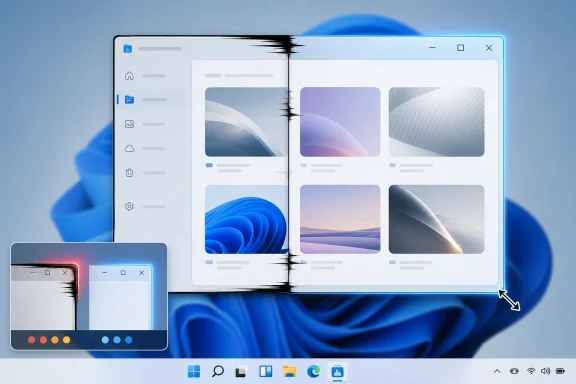 The Native Future Is Tripping Over the Window Frame
The embarrassing part is not that a UI framework has a rendering bug. The embarrassing part is that WinUI 3 is supposed to be the future-facing answer to years of Windows app fragmentation, while UWP — the platform Microsoft has largely moved past — can still look smoother in a basic gesture users perform dozens of times a day.The issue, highlighted by developers and now addressed publicly by Microsoft design leadership, is visible during live resizing. Some WinUI 3 apps can show harsh black bands, edge tearing, or delayed repainting as the window changes dimensions. UWP apps such as Clock or older Store-era experiences often avoid the same ugliness because their rendering and composition paths were built around a more controlled app model.
That distinction matters because WinUI 3 is not an obscure side project. It is the UI layer Microsoft wants developers to use for modern Windows desktop apps through the Windows App SDK. It is also the technology increasingly associated with Microsoft’s effort to rebuild parts of Windows 11 itself as native experiences rather than web views, legacy Win32 dialogs, or a patchwork of half-modern surfaces.
Microsoft’s March Rogers reportedly said the company is working on platform improvements to solve the tearing and is testing the code first on inbox apps before moving it into the Windows App SDK. That staging is important. It suggests Microsoft is not merely papering over one app’s bad behavior, but trying to fix the platform path that third-party developers ultimately inherit.
UWP’s Ghost Still Haunts the Desktop
UWP has become one of Microsoft’s most awkward success-failure stories. As a business and developer-platform bet, it never became the universal Windows app model Microsoft wanted. As a technical experience, however, parts of it still make Windows 11’s supposedly newer stack look unfinished.The irony is sharp. UWP was criticized for being constrained, store-shaped, and insufficiently attractive to traditional desktop developers. But that constraint also gave Microsoft more control over lifecycle, composition, and visual behavior. A UWP window resizing smoothly is not magic; it is the result of a platform that forced apps into a more predictable rendering environment.
WinUI 3 took a different route. It decoupled modern Windows UI from UWP and made it available to conventional desktop apps through the Windows App SDK. That was the right strategic move if Microsoft wanted to meet developers where they actually were: in Win32, C++, C#, unpackaged apps, enterprise tools, and decades of desktop assumptions.
But decoupling has a cost. Once modern XAML is bolted into the broader desktop world, it inherits the complexity of that world. Window resizing is no longer just an animation problem; it becomes a negotiation among the app, the compositor, the framework, the message pump, the desktop window manager, and whatever legacy or modern hosting surface is involved.
This is why the resize bug is more than cosmetic. It exposes the central bargain of WinUI 3: Microsoft wants the reach and compatibility of Win32 with the polish of a controlled modern app platform. That is a difficult engineering target, and the black edge during resizing is a reminder that the bridge is still under construction.
Microsoft Is Rebuilding the Plane While Users Are Clicking It
Windows 11 is in the middle of a long, messy architectural migration. The operating system still carries Control Panel dependencies, legacy property sheets, old shell components, modern Settings pages, WebView surfaces, React-based pieces, XAML Islands, UWP remnants, and WinUI 3 rewrites. Users experience that not as architecture, but as inconsistency.One minute, Windows presents a fluent, rounded, dark-mode-aware surface. The next, it opens a decades-old dialog with tiny controls and no awareness of the theme around it. Somewhere else, a “modern” app behaves like a browser tab in a window. Then a native WinUI 3 app appears and, while resizing, looks less stable than a UWP app from the Windows 10 era.
That is the Windows problem in miniature. Microsoft cannot simply delete the old platform because enterprises, hardware vendors, accessibility tools, admin consoles, shell extensions, and line-of-business applications depend on it. Nor can it leave everything untouched, because users increasingly judge desktop software against iOS, Android, macOS, and polished web apps.
The result is a migration measured in seams. File Explorer has gained modern pieces without becoming a fully modern app. Settings has absorbed more Control Panel territory without fully replacing it. Dialogs are being rewritten one at a time. The Start menu, long criticized for feeling oddly webby and sluggish, is reportedly part of the broader shift toward native UI.
In that context, Microsoft testing smooth resizing on inbox apps first is both sensible and revealing. Inbox apps are the proving ground because they are the most visible and the most politically useful. If Microsoft can make its own WinUI 3 apps feel smooth under common interaction, it can argue that the platform is ready for everyone else.
The Web Wrapper Backlash Changed the Politics of WinUI
For years, Windows users have complained that too many “apps” are really web pages wearing desktop clothes. Electron, Progressive Web Apps, React Native, and WebView2 have legitimate uses, especially for cross-platform teams. But the backlash is easy to understand: users bought fast PCs and still find basic utilities consuming too much memory, launching slowly, or ignoring platform conventions.Microsoft has not been innocent here. Its own products have often drifted toward web surfaces, cloud-first shells, and UI choices that feel detached from the native desktop. Copilot’s history on Windows is a useful example: sometimes positioned as a system feature, sometimes behaving like a web app, and often treated by users as evidence that Microsoft would rather ship a service endpoint than a carefully integrated desktop tool.
That is why the renewed push around WinUI 3 matters. Microsoft is trying to make the case that native Windows apps can be modern, attractive, performant, and easier to build. Windows App SDK 2.0, released in late April 2026, brought a cleaner versioning scheme and a set of platform improvements including XAML conditionals, modernized storage pickers, expanded popup anchoring APIs, WebView2 drag improvements, and Windows AI-related additions.
Those features matter to developers, but they do not automatically win back trust. Developers remember churn. They remember Silverlight, Metro, UWP, WinRT, XAML Islands, Project Reunion, Windows App SDK naming changes, and years of confusing guidance about which framework was the “real” future. They also remember when Microsoft’s own apps did not follow the company’s recommended path.
That is the credibility gap WinUI 3 must close. A developer deciding between WinUI 3 and Electron is not just choosing a framework. They are choosing whether to trust Microsoft’s desktop roadmap for the next five to ten years. A resize tearing fix will not settle that question, but it removes a particularly visible argument against the native path.
App Polish Is Infrastructure, Not Decoration
It is tempting to dismiss resizing glitches as a niche annoyance for people who stare too closely at window borders. That misses how desktop quality is perceived. Users rarely describe a platform as good because one animation was smooth; they describe it as bad because dozens of tiny moments accumulate into drag.Window resizing sits in the category of interactions users expect to be invisible. It should not require attention. When it fails, it makes the entire app feel cheaper, even if the underlying code is excellent. For creative tools, developer utilities, system settings, file managers, and productivity apps, live resizing is part of the basic desktop contract.
For sysadmins and IT pros, polish also has a practical dimension. A visually unstable app can be read as an unreliable app, especially in managed environments where users already blame Windows for every delay, flicker, or oddity. The resize border may not corrupt data, but it contributes to the perception that Microsoft’s modern stack is not mature enough for serious internal tools.
The developer impact is even more direct. If a team builds a WinUI 3 prototype and sees tearing during resizing, it does not matter that Microsoft has a long-term explanation involving composition and SDK delivery. The app looks worse than expected. The team may retreat to WPF, stick with Win32, wrap a web UI, or choose a cross-platform framework that gives more predictable results across operating systems.
That is why the fix belongs in the platform rather than in scattered app-level workarounds. If every developer has to fight the same visual defect, the ecosystem loses. If Microsoft solves it once in the framework and ships it through Windows App SDK updates, WinUI 3 becomes easier to recommend.
The Summer Fix Is a Test of Microsoft’s New Discipline
The reported rollout plan is cautious: test on native inbox apps, then push improvements toward the Windows App SDK. That is exactly how Microsoft should handle a fix touching rendering, resizing, and app surface behavior. A bad platform fix could trade black tearing for flicker, latency, layout regressions, or GPU-specific bugs.But caution also creates expectations. “Coming this summer” is a narrow enough window that developers will remember it. If the fix lands cleanly, Microsoft gets a concrete proof point for the claim that WinUI 3 is improving rapidly. If it slips, arrives only in limited Insider builds, or works inconsistently across apps, the episode will reinforce the idea that Windows UI modernization remains permanently unfinished.
The sequencing also raises an interesting question: which inbox apps are being used as the proving ground? Photos is frequently cited as a WinUI 3 example where resizing problems are visible. Notepad and parts of File Explorer have also become reference points in Microsoft’s performance work. The more Microsoft dogfoods WinUI 3 in high-traffic first-party apps, the faster it will find defects that third-party developers have been hitting for years.
That dogfooding is overdue. Microsoft has often damaged its own developer story by asking outsiders to adopt technologies before its flagship apps consistently did. A platform becomes credible when the vendor uses it under pressure, not merely when it demonstrates it at Build.
If WinUI 3 is to be the native foundation for Windows 11’s next decade, Microsoft’s apps need to suffer through its rough edges first. Then the fixes need to flow outward quickly, predictably, and with enough documentation that developers can understand which Windows builds, SDK versions, and app configurations are affected.
Windows App SDK 2.0 Gives Microsoft a Better Delivery Vehicle
Windows App SDK 2.0 is not just another version number. Its shift to semantic versioning is the kind of administrative change that sounds dull until you remember how much developer confidence depends on predictable dependencies. If Microsoft wants WinUI 3 adoption, it needs the SDK to feel less like a moving target and more like a professional platform.The 2.0 release also shows Microsoft widening the SDK beyond visual controls. Storage pickers, package validation, popup anchoring, WebView2 improvements, Windows ML refactoring, and AI-related APIs all point to a broader attempt to make the Windows App SDK the place where modern desktop capabilities arrive. That is strategically coherent.
The risk is bloat and confusion. If Windows App SDK becomes the bucket for everything new, developers may struggle to distinguish core UI maturity from adjacent platform ambitions. Microsoft needs WinUI 3 to become boringly dependable before it asks developers to get excited about every new API surface around it.
Smooth resizing fits that “boringly dependable” category. So do launch time, memory usage, accessibility behavior, theme consistency, input reliability, high-DPI correctness, and packaging clarity. These are not headline features, but they are the conditions under which a headline feature can survive contact with real users.
The most encouraging part of the current moment is that Microsoft appears to be focusing on fundamentals. Recent reporting and Microsoft’s own release notes point to performance work, SDK cleanup, better samples, and more first-party usage. That is the right direction. Windows does not need another branding reset; it needs the current native stack to become trustworthy.
Enterprise Windows Will Judge the Migration by Its Boring Parts
Enterprise IT does not care about fluent animations in the same way enthusiasts do, but it cares deeply about consistency, supportability, and user confidence. A framework that looks unfinished can become a deployment risk if help desks are flooded with complaints or if internal developers cannot produce stable tools without heroic effort.WinUI 3 has an enterprise pitch. It promises modern Windows UI without abandoning desktop reach. It can support apps that need access to local resources, traditional deployment models, and Windows-specific capabilities. It also gives organizations a path to modernize tools without converting everything into a browser app.
But the old alternatives are sticky. WPF remains familiar. WinForms still powers countless internal utilities. Raw Win32 is ugly but reliable in the hands of teams that know it. Web apps are easy to deploy and easier to staff. For WinUI 3 to break through, it must be visibly better in enough ways to justify retraining, migration, and risk.
That is why small visual regressions matter disproportionately. They become anecdotes in architecture meetings. Someone tries a prototype, resizes the window, sees tearing, and the room concludes that the new Microsoft framework is not ready. That conclusion may be unfair, but it is how platform reputations are formed.
Microsoft’s job is not merely to ship the fix. It must make the fixed path obvious. Developers need to know which SDK version contains the improvements, whether older Windows 11 releases benefit, whether Windows 10 support is affected, and whether app changes are required. In enterprise environments, ambiguity is often indistinguishable from “no.”
The Resize Bug Says the Quiet Part About Windows Out Loud
The deeper story is that Windows modernization is no longer blocked by a lack of ambition. Microsoft has plenty of ambition. It wants native apps back, AI surfaces integrated, Control Panel retired, File Explorer faster, Start rebuilt, settings unified, and third-party developers excited about Windows again.The blocker is execution across an enormous compatibility surface. Windows cannot behave like macOS because it does not have Apple’s platform leverage, hardware control, or willingness to break old assumptions. It cannot behave like the web because the desktop still matters for local workflows, professional software, gaming, device management, and enterprise infrastructure. It has to modernize while remaining Windows.
That is why every small UI defect becomes a referendum. A black edge during resizing is not just a black edge. It is a visible reminder that Microsoft’s modern and legacy worlds are still negotiating in real time. It tells users that the future exists, but not always cleanly.
The good news is that this is a solvable class of problem. Microsoft does not need to invent a new platform to fix resizing. It needs to continue the less glamorous work of improving WinUI 3, dogfooding it in inbox apps, shipping fixes through the Windows App SDK, and resisting the temptation to pivot again before the current strategy matures.
The bad news is that Windows users have heard “we are fixing the fundamentals” before. The burden of proof is on Microsoft, and it will be measured not by blog posts but by whether Photos, Notepad, File Explorer surfaces, settings panes, and third-party WinUI 3 apps feel better in daily use.
The Summer Patch Carries More Weight Than Its Pixel Count
This episode leaves Microsoft with a straightforward but unforgiving checklist. The company has chosen WinUI 3 as a pillar of Windows 11’s native future, and now it has to make the framework look worthy of that role in the smallest interactions.- Microsoft has acknowledged that WinUI 3 resizing can visually tear in ways older UWP apps often avoid.
- The company is reportedly testing platform-level improvements in inbox apps before rolling them into the Windows App SDK.
- The fix is expected to begin rolling out in summer 2026, making timing and version clarity important for developers.
- Windows App SDK 2.0 gives Microsoft a more coherent delivery vehicle, but it does not erase years of developer hesitation by itself.
- The practical test for WinUI 3 is not whether it can demo well, but whether it can make everyday Windows apps feel native, stable, and fast.
- Third-party adoption will depend on Microsoft proving that native Windows development no longer means accepting avoidable visual and performance compromises.
References
- Primary source: Windows Latest
Published: Thu, 28 May 2026 21:54:57 GMT
Microsoft admits Windows 11's WinUI 3 apps resize worse than the UWP it replaced, rolling out fix in summer
Microsoft confirms smooth resizing is finally coming to WinUI 3 apps in Windows 11, fixing black tearing and improving native apps. www.windowslatest.com
- Official source: learn.microsoft.com
Windows App SDK 2.0 release notes - Windows apps | Microsoft Learn
Provides information about what's new in Windows App SDK 2.0.learn.microsoft.com - Related coverage: visualstudiomagazine.com
WinUI 3 Gallery 2.9 Highlights Windows App SDK 2.0 for App Developers -- Visual Studio Magazine
Microsoft's WinUI 3 Gallery 2.9 gives developers a working reference app for trying Windows App SDK 2.0 controls, APIs and improvements without starting a new project.visualstudiomagazine.com - Official source: devblogs.microsoft.com
Announcing WinUI 3 Gallery 2.9 - #ifdef Windows
Hey WinUI developers! If you’re new around here, WinUI Gallery is the go-to app for exploring WinUI 3 controls, samples, design guidance, and handydevblogs.microsoft.com - Related coverage: theregister.com
Microsoft aims to speed Windows with 'leap forward' in WinUI 3 perf
Bittersweet post tells devs what they already knew: The framework is too slowwww.theregister.com - Related coverage: windowscentral.com
Windows 11 could feel noticeably faster soon, thanks to deep performance upgrades in Microsoft’s app platform | Windows Central
Microsoft is double dipping on WinUI improvements by moving core elements to it and improving the framework itself.www.windowscentral.com
- Related coverage: techspot.com
Microsoft says new Windows App SDK delivers "incredible" performance gains | TechSpot
Microsoft recently announced the release of Windows App SDK version 1.6, which the company claims will deliver substantial performance improvements and footprint reductions for "modern" Windows 11...www.techspot.com - Related coverage: stackoverflow.com
xaml - Windows App SDK WinUI 3 TextBox shaky when resizing window with relative panel - Stack Overflow
I find that when I place a TextBox control inside a RelatviePanel and align its sides with the panel the text gets jumpy when I resize the height of the window. If I change the property TextWrappin...stackoverflow.com
- Official source: github.com
GitHub - microsoft/WindowsAppSDK: The Windows App SDK empowers all Windows desktop apps with modern Windows UI, APIs, and platform features, including back-compat support, shipped via NuGet. · GitHub
The Windows App SDK empowers all Windows desktop apps with modern Windows UI, APIs, and platform features, including back-compat support, shipped via NuGet. - microsoft/WindowsAppSDK github.com
- Related coverage: tutorialr.com
