

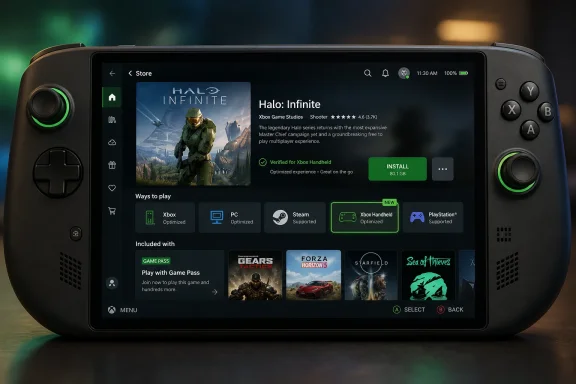
Microsoft has begun showing an “Xbox Handheld” logo in the “Ways to play” area of some Xbox Store listings on June 22, 2026, with examples including Halo: Campaign Evolved and Gears of War: E-Day alongside Xbox, PC, Steam, and PlayStation availability icons. The small badge is not a handheld console announcement, and treating it as one would be a mistake. But it is still a revealing change: Microsoft is turning portable Windows gaming from a compatibility footnote into a storefront promise. For Xbox, that may matter more than another rumor about hardware.
The new Xbox Handheld mark appears to be doing a very practical job. It tells shoppers, before they buy or install, that a game belongs in Microsoft’s emerging handheld compatibility story. That is useful in the same way Steam Deck verification is useful: not because a badge makes silicon faster, but because it reduces the anxiety around whether a game will behave on a smaller screen, controller-first interface, and battery-limited machine.
Microsoft has already been moving in this direction with the ROG Xbox Ally and ROG Xbox Ally X, the ASUS-built handheld PCs that carry Xbox branding while remaining Windows devices. The company has also been promoting a handheld compatibility program that classifies games as optimized or mostly compatible on those devices. The new logo looks like the store-facing version of that same effort rather than evidence of a secret, imminent first-party Xbox portable.
That distinction matters. Xbox has spent years trying to explain that it is a console, a PC storefront, a cloud service, a subscription, a publisher, and now a handheld-friendly Windows layer. The more Xbox stretches across devices, the more it needs signage. A badge is boring product plumbing, but product plumbing is exactly what Xbox has lacked when trying to make “play anywhere” feel like one coherent experience.
The phrase “Xbox Handheld” is doing a lot of work. It sounds like a category, not just a model. That allows Microsoft to support the Xbox Ally line today, leave room for other Windows handhelds tomorrow, and keep the dream of a more console-like portable Xbox alive without committing to it on a store page.
Microsoft is now trying to build its own version of that trust layer. On a Windows handheld, the problem is not whether games exist. The problem is that the platform is too broad. A game may launch, but the text may be too small, the launcher may demand a mouse, the default graphics profile may shred battery life, the anti-cheat may complain, or the first boot may dump the player into a desktop dialog box designed for a monitor and keyboard.
That is why the logo matters. It is not just a marketing sticker; it is Microsoft admitting that Windows compatibility is not the same thing as handheld readiness. For PC gamers, that admission is overdue. For Xbox users, it is even more important, because the Xbox brand historically implies a curated experience rather than a “good luck with the settings menu” adventure.
The Xbox Ally machines sit right in that tension. They are PCs, which means they can run Steam, Battle.net, Epic Games Store, GOG, and Xbox on PC. But they are also sold with Xbox expectations: controller navigation, a full-screen Xbox experience, Game Bar improvements, and a promise that Microsoft will smooth out the Windows rough edges. A clear handheld badge is part of that smoothing process.
The Xbox Ally X gets Microsoft closer to that world, but not all the way there. It can play PC games, Xbox Play Anywhere titles, cloud games, and remote-played console games. What it cannot do is magically convert every Xbox console purchase into a native handheld install. That gap is why the emotional reaction around an “Xbox Handheld” logo is so strong. The badge suggests belonging, but the library model still has boundaries.
That is not a small issue. Many Xbox users built digital libraries over more than a decade with the assumption that Xbox meant Xbox. On a Series X, that assumption works. On a Windows handheld, it fragments. Some games are downloadable through the Xbox app; some require a separate PC purchase; some are playable only through streaming; some are unavailable unless the publisher made the right PC storefront choices.
Microsoft’s challenge is that it wants the upside of an open PC and the simplicity of a console. Those are not impossible to reconcile, but they are not the same thing. The badge is a step toward clarity, not a solution to ownership fragmentation.
That is why the “Ways to play” area is becoming one of the most important parts of an Xbox listing. A modern Microsoft game page can now tell a customer whether a title is on Game Pass, Xbox Series X|S, Xbox on PC, Xbox Handheld, Steam, and sometimes PlayStation. The icons are not decoration. They are Microsoft’s attempt to make a scattered publishing strategy readable at a glance.
Halo: Campaign Evolved is a perfect example of why that matters. Halo was once the most obvious shorthand for Xbox console identity. Seeing its store page communicate a world that includes Xbox, PC, handheld, Steam, and PlayStation tells you more about the company’s current strategy than any executive slogan. Xbox is no longer just where Microsoft’s games live. It is one label among several ways to access them.
That does not mean Xbox hardware is irrelevant. It means Xbox hardware has to coexist with a broader software-first map. If Microsoft wants users to accept that map, it has to label it honestly.
That is why the criteria behind the logo matter. A good handheld compatibility program should mean more than “the game can launch on an AMD APU.” It should imply controller-first navigation, sane default settings, scalable UI, predictable suspend and resume behavior, acceptable performance targets, and no hostile launcher surprises.
The hardest part is performance. Handheld PCs are improving quickly, but they remain constrained machines. Even the better models live in a world of tradeoffs: resolution, frame rate, battery draw, thermals, fan noise, and storage. If Microsoft tags a visually ambitious game as handheld-ready, users will want to know whether that means 30 frames per second with compromises, 60 frames per second with reconstruction, or simply “it boots.”
Steam Deck verification has faced this same pressure. A compatibility mark is only as trusted as the experience users have after clicking Play. Microsoft has the advantage of controlling Windows, the Xbox app, Game Bar, and much of the first-party publishing pipeline. That gives it more levers than most PC storefronts, but it also gives it fewer excuses.
The company has been adding handheld-oriented pieces over time: fuller-screen Xbox app experiences, better controller navigation, Game Bar improvements, default profiles, shader delivery work, and compatibility labeling. None of that turns Windows into a console OS overnight. But together, those features create a layer that can make Windows feel less like a desktop hiding inside a handheld shell.
The new badge is therefore a public-facing expression of internal discipline. It says Microsoft is no longer content to leave handheld PC gaming as a third-party aftermarket category. It wants Xbox to be the trusted front door for that experience, even when the underlying device remains a Windows machine made by an OEM.
This is strategically sensible. Microsoft does not have to beat Valve by making Windows as elegant as SteamOS in every respect. It has to make enough of the experience feel deliberate that users stop seeing Windows handhelds as enthusiast contraptions and start seeing them as mainstream Xbox-adjacent devices.
But hardware timing is brutal. Component prices, memory costs, battery limits, thermal design, and retail pricing can turn a good idea into an expensive compromise. A true Xbox handheld would need to answer questions the Xbox Ally sidesteps: whether it runs Windows, whether it runs console games natively, whether it supports third-party PC stores, how it handles backward compatibility, and whether it is subsidized like a console or priced like a premium PC.
That is why the current Xbox Handheld logo is probably more about the devices that exist than the device fans imagine. Microsoft can build the software ecosystem now, validate game compatibility now, and teach users to look for the badge now. If a first-party handheld arrives later, it inherits an existing label system instead of launching into chaos.
If it never arrives, the badge still has a job. It gives Microsoft a way to remain relevant in handheld gaming without owning every piece of hardware. In a market where ASUS, Lenovo, MSI, Acer, Valve, and others are all experimenting, that may be the more flexible bet.
The problem is coverage. Xbox Play Anywhere is excellent when a game supports it and frustratingly invisible when it does not. For users, the distinction is often discovered too late, usually when they try to install a game they believed they owned “on Xbox” and find that the PC entitlement is separate or absent.
The Xbox Handheld badge cannot solve that on its own. A game can be handheld-compatible and still require a PC copy. It can support Xbox Play Anywhere and still run poorly on a low-power device. It can be available through cloud streaming and still not be natively portable. These are different promises, and Microsoft needs to keep them distinct.
That is why the “Ways to play” section is so important. It should not simply sell optimism. It should communicate rights, platforms, and expected experience with as little ambiguity as possible. The clearer Microsoft is here, the less backlash it will face when users discover that “Xbox” no longer means one thing.
But the Steam Deck remains a different target. It runs SteamOS by default, relies heavily on Proton for Windows games, and has its own compatibility issues around anti-cheat, launchers, video codecs, and store integration. A game that is good on an Xbox Ally is not automatically good on a Steam Deck.
Still, optimization work tends to spill over. Developers who create scalable presets, readable UI, robust controller support, and better performance profiles are helping more than one handheld ecosystem. Microsoft’s badge may be aimed at its own handheld program, but the underlying work could benefit the broader PC portable market.
This is one of the quiet upsides of the handheld boom. Competition is forcing PC games to behave better outside the desktop tower. The Steam Deck started that pressure. Xbox is now adding more of it.
“Xbox Handheld” is not yet a single device category in the way “Xbox Series X|S” is. It is closer to a compatibility and experience lane. But naming that lane is still meaningful. Once the store has a badge, users can search for it, developers can target it, support teams can reference it, and marketing can build around it.
That is how ecosystems solidify. Not all at once, and not always with dramatic hardware reveals. Sometimes they solidify through boring metadata, filters, labels, and installation warnings. Microsoft is trying to turn handheld Windows gaming into something the Xbox Store can understand.
The real test will be consistency. If only a handful of first-party games carry the badge, it will feel ornamental. If a broad range of Xbox, Game Pass, and third-party PC titles earn the label with transparent criteria, it becomes useful. Storefront trust is cumulative.
Microsoft has already accepted that the console boundary is porous. Its games are on PC, its services run on phones and handhelds, and some of its marquee franchises are no longer confined to Xbox consoles. The question is not whether Xbox becomes more distributed. It already has. The question is whether the distributed Xbox experience can become understandable enough that users trust it.
The Xbox Handheld logo is one answer. Not a complete answer, but a visible one. It gives shoppers a signal that Microsoft is no longer treating handheld play as an edge case buried inside a support article. It belongs in the same “Ways to play” row as console, PC, Steam, cloud, and PlayStation.
 The Badge Is Small Because the Strategy Is Not
The new Xbox Handheld mark appears to be doing a very practical job. It tells shoppers, before they buy or install, that a game belongs in Microsoft’s emerging handheld compatibility story. That is useful in the same way Steam Deck verification is useful: not because a badge makes silicon faster, but because it reduces the anxiety around whether a game will behave on a smaller screen, controller-first interface, and battery-limited machine.Microsoft has already been moving in this direction with the ROG Xbox Ally and ROG Xbox Ally X, the ASUS-built handheld PCs that carry Xbox branding while remaining Windows devices. The company has also been promoting a handheld compatibility program that classifies games as optimized or mostly compatible on those devices. The new logo looks like the store-facing version of that same effort rather than evidence of a secret, imminent first-party Xbox portable.
That distinction matters. Xbox has spent years trying to explain that it is a console, a PC storefront, a cloud service, a subscription, a publisher, and now a handheld-friendly Windows layer. The more Xbox stretches across devices, the more it needs signage. A badge is boring product plumbing, but product plumbing is exactly what Xbox has lacked when trying to make “play anywhere” feel like one coherent experience.
The phrase “Xbox Handheld” is doing a lot of work. It sounds like a category, not just a model. That allows Microsoft to support the Xbox Ally line today, leave room for other Windows handhelds tomorrow, and keep the dream of a more console-like portable Xbox alive without committing to it on a store page.
Microsoft Is Borrowing Steam’s Best Trick
The smartest thing Valve did with Steam Deck was not simply building a handheld PC. It made compatibility legible. The Deck Verified label turned an intimidating PC question — will this game run well on this exact device? — into a consumer-facing answer, even if that answer was sometimes imperfect.Microsoft is now trying to build its own version of that trust layer. On a Windows handheld, the problem is not whether games exist. The problem is that the platform is too broad. A game may launch, but the text may be too small, the launcher may demand a mouse, the default graphics profile may shred battery life, the anti-cheat may complain, or the first boot may dump the player into a desktop dialog box designed for a monitor and keyboard.
That is why the logo matters. It is not just a marketing sticker; it is Microsoft admitting that Windows compatibility is not the same thing as handheld readiness. For PC gamers, that admission is overdue. For Xbox users, it is even more important, because the Xbox brand historically implies a curated experience rather than a “good luck with the settings menu” adventure.
The Xbox Ally machines sit right in that tension. They are PCs, which means they can run Steam, Battle.net, Epic Games Store, GOG, and Xbox on PC. But they are also sold with Xbox expectations: controller navigation, a full-screen Xbox experience, Game Bar improvements, and a promise that Microsoft will smooth out the Windows rough edges. A clear handheld badge is part of that smoothing process.
The Xbox Ally Still Is Not the Xbox Portable Fans Imagine
The reason this badge immediately triggered speculation is obvious: Xbox fans still want a real Xbox handheld. Not merely a Windows PC with Xbox branding, but a portable device that plays their console library natively, respects their purchases, resumes like a console, and does not ask them to remember whether a game is Xbox Play Anywhere, Xbox on PC, cloud-only, or console-only.The Xbox Ally X gets Microsoft closer to that world, but not all the way there. It can play PC games, Xbox Play Anywhere titles, cloud games, and remote-played console games. What it cannot do is magically convert every Xbox console purchase into a native handheld install. That gap is why the emotional reaction around an “Xbox Handheld” logo is so strong. The badge suggests belonging, but the library model still has boundaries.
That is not a small issue. Many Xbox users built digital libraries over more than a decade with the assumption that Xbox meant Xbox. On a Series X, that assumption works. On a Windows handheld, it fragments. Some games are downloadable through the Xbox app; some require a separate PC purchase; some are playable only through streaming; some are unavailable unless the publisher made the right PC storefront choices.
Microsoft’s challenge is that it wants the upside of an open PC and the simplicity of a console. Those are not impossible to reconcile, but they are not the same thing. The badge is a step toward clarity, not a solution to ownership fragmentation.
Store Labels Are Becoming the New Console Box Art
The classic console buying experience was easy because it was physically constrained. If the box said Xbox, you knew the game worked on Xbox. As platforms dissolve into cross-buy programs, cloud entitlements, PC ports, and device categories, storefront metadata has to replace the old certainty.That is why the “Ways to play” area is becoming one of the most important parts of an Xbox listing. A modern Microsoft game page can now tell a customer whether a title is on Game Pass, Xbox Series X|S, Xbox on PC, Xbox Handheld, Steam, and sometimes PlayStation. The icons are not decoration. They are Microsoft’s attempt to make a scattered publishing strategy readable at a glance.
Halo: Campaign Evolved is a perfect example of why that matters. Halo was once the most obvious shorthand for Xbox console identity. Seeing its store page communicate a world that includes Xbox, PC, handheld, Steam, and PlayStation tells you more about the company’s current strategy than any executive slogan. Xbox is no longer just where Microsoft’s games live. It is one label among several ways to access them.
That does not mean Xbox hardware is irrelevant. It means Xbox hardware has to coexist with a broader software-first map. If Microsoft wants users to accept that map, it has to label it honestly.
Handheld Optimization Is a Promise Microsoft Must Now Keep
The risk with a badge is that users will treat it as a warranty. If a game carries an Xbox Handheld logo and then ships with unreadable menus, poor frame pacing, broken sleep behavior, or miserable battery life, Microsoft owns part of that disappointment even if the developer technically owns the code.That is why the criteria behind the logo matter. A good handheld compatibility program should mean more than “the game can launch on an AMD APU.” It should imply controller-first navigation, sane default settings, scalable UI, predictable suspend and resume behavior, acceptable performance targets, and no hostile launcher surprises.
The hardest part is performance. Handheld PCs are improving quickly, but they remain constrained machines. Even the better models live in a world of tradeoffs: resolution, frame rate, battery draw, thermals, fan noise, and storage. If Microsoft tags a visually ambitious game as handheld-ready, users will want to know whether that means 30 frames per second with compromises, 60 frames per second with reconstruction, or simply “it boots.”
Steam Deck verification has faced this same pressure. A compatibility mark is only as trusted as the experience users have after clicking Play. Microsoft has the advantage of controlling Windows, the Xbox app, Game Bar, and much of the first-party publishing pipeline. That gives it more levers than most PC storefronts, but it also gives it fewer excuses.
Windows Is Still the Opportunity and the Problem
The handheld PC market exists because Windows has the broadest game compatibility story in the world. It also exists in spite of Windows, because the operating system was not built first for seven-inch screens and thumbsticks. Microsoft’s entire Xbox handheld push is an attempt to harvest the first truth while mitigating the second.The company has been adding handheld-oriented pieces over time: fuller-screen Xbox app experiences, better controller navigation, Game Bar improvements, default profiles, shader delivery work, and compatibility labeling. None of that turns Windows into a console OS overnight. But together, those features create a layer that can make Windows feel less like a desktop hiding inside a handheld shell.
The new badge is therefore a public-facing expression of internal discipline. It says Microsoft is no longer content to leave handheld PC gaming as a third-party aftermarket category. It wants Xbox to be the trusted front door for that experience, even when the underlying device remains a Windows machine made by an OEM.
This is strategically sensible. Microsoft does not have to beat Valve by making Windows as elegant as SteamOS in every respect. It has to make enough of the experience feel deliberate that users stop seeing Windows handhelds as enthusiast contraptions and start seeing them as mainstream Xbox-adjacent devices.
The First-Party Handheld Rumor Will Not Die Because the Market Keeps Inviting It
Speculation about an in-house Xbox handheld persists because the logic is tempting. Microsoft has the content, the cloud infrastructure, the account system, the controller heritage, the Windows base, and the financial muscle. It also has a console business that needs a sharper answer to Nintendo’s dominance in portable play and Valve’s credibility among PC enthusiasts.But hardware timing is brutal. Component prices, memory costs, battery limits, thermal design, and retail pricing can turn a good idea into an expensive compromise. A true Xbox handheld would need to answer questions the Xbox Ally sidesteps: whether it runs Windows, whether it runs console games natively, whether it supports third-party PC stores, how it handles backward compatibility, and whether it is subsidized like a console or priced like a premium PC.
That is why the current Xbox Handheld logo is probably more about the devices that exist than the device fans imagine. Microsoft can build the software ecosystem now, validate game compatibility now, and teach users to look for the badge now. If a first-party handheld arrives later, it inherits an existing label system instead of launching into chaos.
If it never arrives, the badge still has a job. It gives Microsoft a way to remain relevant in handheld gaming without owning every piece of hardware. In a market where ASUS, Lenovo, MSI, Acer, Valve, and others are all experimenting, that may be the more flexible bet.
Xbox Play Anywhere Is Necessary but Not Enough
Xbox Play Anywhere remains one of Microsoft’s strongest ideas. Buy a supported game once, play it across console and PC, keep your saves, and avoid the old platform tax. In the handheld era, that proposition becomes even more valuable because a portable Windows device can become a natural extension of a console library.The problem is coverage. Xbox Play Anywhere is excellent when a game supports it and frustratingly invisible when it does not. For users, the distinction is often discovered too late, usually when they try to install a game they believed they owned “on Xbox” and find that the PC entitlement is separate or absent.
The Xbox Handheld badge cannot solve that on its own. A game can be handheld-compatible and still require a PC copy. It can support Xbox Play Anywhere and still run poorly on a low-power device. It can be available through cloud streaming and still not be natively portable. These are different promises, and Microsoft needs to keep them distinct.
That is why the “Ways to play” section is so important. It should not simply sell optimism. It should communicate rights, platforms, and expected experience with as little ambiguity as possible. The clearer Microsoft is here, the less backlash it will face when users discover that “Xbox” no longer means one thing.
Steam Deck Users Should Read the Badge as a Signal, Not a Guarantee
The new Xbox Handheld mark will naturally interest Steam Deck owners, even if Microsoft is not officially labeling Deck compatibility through the Xbox Store. If a game is being optimized for devices like the Xbox Ally or Xbox Ally X, that often suggests the developer has at least thought about lower-power hardware, controller input, and smaller displays.But the Steam Deck remains a different target. It runs SteamOS by default, relies heavily on Proton for Windows games, and has its own compatibility issues around anti-cheat, launchers, video codecs, and store integration. A game that is good on an Xbox Ally is not automatically good on a Steam Deck.
Still, optimization work tends to spill over. Developers who create scalable presets, readable UI, robust controller support, and better performance profiles are helping more than one handheld ecosystem. Microsoft’s badge may be aimed at its own handheld program, but the underlying work could benefit the broader PC portable market.
This is one of the quiet upsides of the handheld boom. Competition is forcing PC games to behave better outside the desktop tower. The Steam Deck started that pressure. Xbox is now adding more of it.
Microsoft’s Storefront Is Finally Saying the Quiet Part Out Loud
For years, Xbox messaging has oscillated between platform confidence and platform ambiguity. Sometimes Xbox was a console. Sometimes it was Game Pass. Sometimes it was the Xbox app. Sometimes it was “wherever you play.” The new badge is interesting because it takes one slice of that ambiguity and gives it a name.“Xbox Handheld” is not yet a single device category in the way “Xbox Series X|S” is. It is closer to a compatibility and experience lane. But naming that lane is still meaningful. Once the store has a badge, users can search for it, developers can target it, support teams can reference it, and marketing can build around it.
That is how ecosystems solidify. Not all at once, and not always with dramatic hardware reveals. Sometimes they solidify through boring metadata, filters, labels, and installation warnings. Microsoft is trying to turn handheld Windows gaming into something the Xbox Store can understand.
The real test will be consistency. If only a handful of first-party games carry the badge, it will feel ornamental. If a broad range of Xbox, Game Pass, and third-party PC titles earn the label with transparent criteria, it becomes useful. Storefront trust is cumulative.
The Badge Changes the Conversation Even If It Does Not Announce a Device
The most tempting read is that Microsoft is teasing a future first-party Xbox portable. The more grounded read is that Microsoft is preparing the Xbox Store for a world where handheld PC gaming is a permanent platform category. The grounded read is more likely and more important.Microsoft has already accepted that the console boundary is porous. Its games are on PC, its services run on phones and handhelds, and some of its marquee franchises are no longer confined to Xbox consoles. The question is not whether Xbox becomes more distributed. It already has. The question is whether the distributed Xbox experience can become understandable enough that users trust it.
The Xbox Handheld logo is one answer. Not a complete answer, but a visible one. It gives shoppers a signal that Microsoft is no longer treating handheld play as an edge case buried inside a support article. It belongs in the same “Ways to play” row as console, PC, Steam, cloud, and PlayStation.
The New Icon Draws a Line Microsoft Now Has to Defend
The practical takeaways are less about secret hardware and more about expectations. The logo is useful only if Microsoft treats it as a standard rather than a sticker.- The Xbox Handheld badge most likely refers to Microsoft’s handheld compatibility program for devices such as the ROG Xbox Ally and ROG Xbox Ally X.
- The badge does not mean every Xbox console purchase becomes a native handheld download.
- Xbox Play Anywhere remains the key entitlement bridge, but only for games that explicitly support it.
- A handheld logo should imply real usability on portable hardware, not merely that a game launches.
- Steam Deck owners can treat the badge as a positive optimization signal, but not as an official Deck compatibility guarantee.
- Microsoft’s bigger challenge is making Xbox’s console, PC, handheld, cloud, and third-party storefront story legible to ordinary users.
References
- Primary source: Windows Central
Published: 2026-06-22T10:52:07.049809
Microsoft just added an "Xbox Handheld" logo to major game pages, and I have questions | Windows Central
Microsoft has started adding an Xbox Handheld badge to major game pages, offering a clearer look at where Xbox games can be played.www.windowscentral.com
