

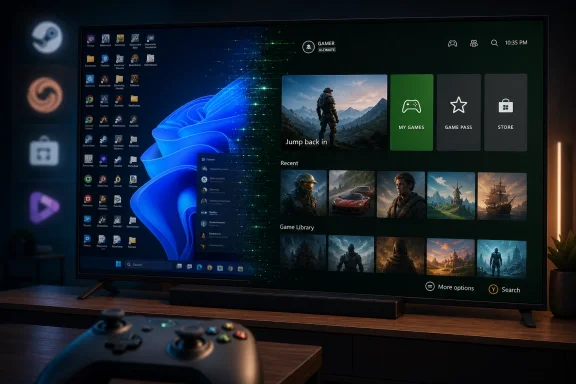
Microsoft began rolling out Xbox mode to Windows 11 PCs on April 30, 2026, in select markets, bringing a controller-optimized full-screen Xbox interface to laptops, desktops, tablets, and handhelds after first testing the experience on Windows gaming handhelds and the ROG Xbox Ally line. The move is less about giving Windows another launcher than about admitting something PC gamers have known for years: Windows is powerful, flexible, and often miserable from ten feet away. Xbox mode is Microsoft’s attempt to make the PC feel less like a workstation that happens to run games and more like a gaming device that happens to run Windows. Whether it succeeds will depend on whether Microsoft can resist treating the mode as another storefront surface and instead make it a genuinely calmer layer over the chaos of PC gaming.
For decades, the Windows desktop has been the unavoidable tax on PC gaming. It is the place where drivers are installed, launchers fight for attention, overlays multiply, and a mouse cursor becomes the most important accessory in the room. That tradeoff has usually been tolerated because Windows gets you the games, the hardware choice, the mods, the storefronts, and the performance ceiling.
The problem is that tolerance is not affection. Valve exposed that with the Steam Deck, not by beating Windows on compatibility, but by proving that a handheld gaming PC could feel coherent. SteamOS hid the plumbing, respected the controller, resumed quickly, and treated the player’s library as the center of the experience rather than a shortcut on a desktop.
Xbox mode is Microsoft’s delayed answer to that lesson. The company is not replacing Windows with a console operating system, nor is it turning every PC into an Xbox. It is trying to create a gaming shell that lets Windows recede when the user wants to play.
That distinction matters. If Xbox mode is merely the Xbox app in a nicer suit, it will be dismissed as another Microsoft overlay. If it can consistently reduce friction, tame background distractions, and make controller-first navigation feel native, it becomes a strategic wedge into the next era of Xbox hardware.
The Windows handheld category has been a gift and an embarrassment for Microsoft. It showed that PC gamers want portable Windows machines, but it also made Windows’ small-screen weaknesses impossible to ignore. Tiny taskbars, intrusive update prompts, inconsistent sleep behavior, desktop launchers, and controller-hostile dialogs are tolerable on a monitor and keyboard. On a seven-inch screen, they become product defects.
The ROG Xbox Ally partnership gave Microsoft a controlled environment to work on those defects without declaring war on the entire Windows ecosystem. It could tune the Xbox app, Game Bar, controller behavior, library aggregation, and docked experiences around a known set of hardware. That was the laboratory.
Now the experiment is moving outward. Microsoft says Xbox mode is rolling out to Windows 11 PCs, including laptops, desktops, and tablets, with availability expanding over several weeks in select markets. That staged rollout is classic Microsoft risk management, but it also signals that the company knows this is more than a cosmetic update. A full-screen gaming layer that touches input, updates, libraries, background behavior, and display settings can break trust quickly if it feels half-finished.
That makes Microsoft’s job harder and potentially more valuable. A controller-friendly Xbox shell that only launches Game Pass titles would be neat but narrow. A controller-friendly shell that can find and launch installed games from leading PC storefronts becomes a more serious attempt to mediate the modern PC gaming mess.
Microsoft has been careful to emphasize that Xbox mode is still built on Windows. That is both a reassurance and a warning. It means users keep the openness of PC gaming, including third-party storefronts and desktop access. It also means the old Windows complexity is still there, waiting behind the curtain.
The best version of Xbox mode does not pretend the curtain is gone. It simply makes sure most players do not have to keep pulling it back.
That is a surprisingly radical idea for modern Windows. The operating system has spent years becoming more insistent: notifications, widgets, account prompts, cloud nudges, browser recommendations, AI surfaces, app promotions, security warnings, and update choreography all compete for attention. Many of these things have defensible purposes in isolation. Together, they make Windows feel like a general-purpose machine that never quite shuts up.
Gaming punishes that behavior. A player in a match does not care that OneDrive needs attention. A handheld user does not want a background process eating battery because Windows believes now is a fine time to index, sync, scan, promote, or nag. A living-room PC connected to a television does not benefit from a desktop metaphor designed for a desk.
Xbox mode’s promise is therefore cultural as much as technical. It asks whether Microsoft can make a Windows experience defined by subtraction. Fewer interruptions. Fewer visible seams. Fewer moments where a controller user has to reach for a trackpad or mouse. Fewer reminders that the machine is also a productivity platform, an ad surface, and an identity funnel.
That restraint will be hard for Microsoft because it cuts against many incentives inside the company. Windows is not merely an operating system; it is distribution. Xbox mode will be judged by whether it protects the gaming session from that distribution instinct.
That makes Xbox mode more than a convenience feature for today’s Windows 11 PCs. It is a preview of the interface philosophy Microsoft may carry into its next hardware generation. If the future Xbox runs more PC-like software, supports broader libraries, or allows more flexible storefront behavior, Microsoft needs a front end that can make that openness feel manageable.
This is the central tension. Consoles are loved because they are closed enough to be predictable. PCs are loved because they are open enough to be personal. Microsoft wants the emotional benefit of the former without surrendering the strategic advantage of the latter.
Xbox mode is the software bridge across that gap. It says: stay in the Windows universe, bring your storefronts, keep your hardware, keep your library, but enter through a door that looks and feels like Xbox. That is a compelling pitch, especially if the next Xbox becomes less a single box under the television and more a family of devices running a shared gaming experience.
But bridges fail when neither side trusts them. Console players may see too much PC complexity. PC players may see too much platform control. Microsoft has to convince both groups that Xbox mode is a convenience layer, not a cage.
If Xbox mode behaves like a neutral command center, many players will use it. A full-screen interface that aggregates installed games, works with a controller, switches cleanly back to the desktop, and avoids interfering with Steam or other storefronts has obvious appeal. It is especially attractive for living-room PCs, handhelds, and gaming laptops connected to televisions.
If it behaves like a funnel into Game Pass and the Microsoft Store, the reaction will be much harsher. PC gamers have long memories, and Microsoft’s history in PC gaming includes both genuine investment and regrettable platform schemes. The phrase Games for Windows Live still has the power to make older players wince.
The company’s current messaging acknowledges this reality. Microsoft is presenting Xbox mode as open, flexible, and compatible with leading PC storefronts. That is the correct posture. The test will be in defaults, ranking, prompts, and friction.
A neutral interface does not have to pretend every service is identical. Xbox can promote Xbox features. But the moment launching a Steam game feels second-class, or dismissing Microsoft account prompts becomes part of the ritual, the whole project starts looking less like a gamer-friendly mode and more like another land grab.
For enthusiasts, that sounds like a boring concern. For IT departments, it is the first thing they will ask. Consumer Windows features often bleed into Pro and education environments in ways that require policy cleanup, app removal, or user support. Even if Xbox mode is harmless when unused, its presence can become another item on the hardening checklist.
Microsoft has been slowly improving the ability of enterprise and education administrators to remove or control more inbox apps and consumer-facing components. That work needs to continue if Windows is going to become more modular by audience. A gaming-first mode makes sense on a handheld, a home desktop, or a living-room PC. It makes little sense on a domain-joined accounting workstation.
This is where Microsoft’s “one Windows” philosophy repeatedly collides with reality. The same Windows install base contains gamers chasing frame pacing, parents managing screen time, developers running containers, students writing papers, and sysadmins trying to keep machines boring. Xbox mode is a welcome feature for one slice of that base, but it should not become another example of consumer enthusiasm creating enterprise clutter.
The best outcome is simple: make it easy to enable, easy to ignore, and easy to manage. If Microsoft does that, Xbox mode can expand without becoming an IT irritant.
That pressure changed the conversation. For years, Microsoft could assume that PC gaming meant a desk, a keyboard, a mouse, and a monitor. Handhelds made those assumptions obsolete. A Windows device now might be controlled entirely by thumbsticks, launched from a couch, suspended mid-game in a backpack, or docked to a television like a Switch.
The operating system has to adapt to that context. It is not enough to run the executable. It has to handle power states, scaling, input, overlays, updates, display switching, audio routing, cloud saves, and library presentation without making the user feel like a field technician.
The ROG Xbox Ally updates show how granular this work becomes. Docking behavior, automatic TV gaming modes, controller pairing, display widgets, gamepad cursor support, vibration, and library customization are not glamorous platform slogans. They are the small repairs that make a device feel intentional.
That is the humility Windows needs. PC gaming’s greatest strength is its sprawl, but devices succeed when someone takes responsibility for the whole experience. Xbox mode is Microsoft trying to take more responsibility without closing the platform that made PC gaming dominant.
The technical act of finding installed games is not the hardest part. The hard part is making the library feel honest. Does it show where a game came from? Does it preserve launcher requirements without hiding them until the worst possible moment? Does it respect user customization? Does it avoid filling empty space with promotions masquerading as recommendations?
A great game library is not just a grid. It is a memory palace. It contains purchases, subscriptions, abandoned live-service experiments, modded installs, early access builds, cloud saves, controller profiles, and the emotional sediment of years of play. Microsoft can help organize that, but it cannot fake ownership of it.
This is why the ability to add, remove, edit, and launch custom games and apps matters. It gives users agency over the shell. It also acknowledges that PC gaming will always exceed the boundaries of any corporate catalog.
Xbox mode should lean into that mess rather than sanitize it. A Windows gaming shell that lets users bring their weird library with them will feel PC-native. A shell that only celebrates the parts Microsoft can monetize will feel like a console dashboard with delusions of openness.
PC performance is a swamp of variables. CPU scheduling, GPU drivers, shader compilation, power plans, overlay hooks, anti-cheat, memory pressure, storage speed, display mode, and background services can all influence the experience. A mode that reduces some background activity may help in constrained scenarios, especially handhelds or lower-memory systems. On a high-end desktop, it may be less noticeable.
The more important performance benefit may be perceived smoothness rather than raw frame rate. If Xbox mode reduces interruptions, shortens the path to launch, improves shader readiness through related platform work, and makes controller navigation predictable, the experience can feel faster even when benchmarks barely move. That still matters.
But Microsoft should avoid overselling Xbox mode as a magic gaming optimizer. Windows users have seen too many “game mode” toggles that promised more than they delivered. The stronger argument is not that Xbox mode will turn a midrange PC into a console, but that it may remove enough incidental friction to make gaming on Windows feel less compromised.
For serious players, the proof will come from repeatable tests: boot-to-game time, memory usage, suspend reliability, frame-time consistency, shader stutter, controller-only navigation success, and how often the desktop intrudes. Those are the metrics that will decide whether Xbox mode becomes daily muscle memory or a novelty button.
That difference is philosophical. Windows has traditionally asked the user to meet it on desktop terms. Xbox mode tries to meet the player on console terms, at least temporarily. The more complete that temporary shift feels, the more successful the mode will be.
This is why a gamepad cursor, mundane as it sounds, matters. PC gaming will always involve apps and launchers that were not designed for controllers. Rather than pretending those will vanish, Microsoft is giving users a bridge across hostile UI territory. It is a workaround, but a necessary one.
The challenge is to keep workarounds from becoming the experience. If users constantly need a virtual cursor to dismiss launchers, accept prompts, resize windows, or find hidden buttons, Xbox mode will feel like a skin over dysfunction. If those moments become rare exceptions, the illusion holds.
A console-like PC does not need to eliminate complexity. It needs to quarantine it.
That context shapes how people will interpret this rollout. A generous reading says Microsoft is finally doing the hard platform work to make Windows a better gaming OS. A cynical reading says Microsoft wants to wrap the PC in Xbox branding because traditional console growth has slowed and Game Pass needs more surfaces.
Both readings can be true. Companies do useful things for strategic reasons. The question is whether the user benefit survives the business model.
Microsoft’s muscle memory is to integrate, promote, bundle, and steer. Xbox mode needs a different muscle: serve the player first, monetize second. That does not mean hiding Game Pass or pretending Xbox is not the sponsor of the experience. It means earning the right to be the front door by being the best front door.
Valve understands this deeply. Steam is a store, a launcher, a social layer, a controller mapper, a cloud save service, and an update system. It is also trusted because, most of the time, it gets out of the way when the player wants to play. Microsoft wants that position on Windows. It will have to behave accordingly.
That is probably wise. Xbox mode touches too many use cases for a single triumphant launch. Desktop users, handheld owners, laptop players, docked couch setups, Game Pass subscribers, Steam loyalists, and mixed-library collectors will all stress it differently. Microsoft needs that feedback loop.
The danger is that gradual rollout becomes vague rollout. Users need to know whether their device is eligible, which update path matters, whether the Xbox app or Game Bar version is the limiting factor, and what “select markets” means in practice. Windows feature delivery is already confusing enough without another capability appearing for some users and not others.
Microsoft’s instructions are familiar: keep Windows updated and enable the setting to get the latest updates as soon as they are available. That is fine for enthusiasts. It is less satisfying for users trying to understand why a heavily promoted gaming feature is absent from their machine.
A gaming console either has the dashboard update or it does not. Windows, being Windows, will make the answer messier.
That kind of boring is hard. It requires coordination across Windows Update, Xbox app development, Game Bar, driver partners, OEMs, storefronts, display standards, controller firmware, cloud services, and game developers. The user only sees the failure when one of those pieces breaks.
The ROG Xbox Ally work suggests Microsoft understands at least part of this. Docking improvements and automatic TV behavior are exactly the sort of quality-of-life details that make a device feel console-like. The broader PC rollout now asks whether those lessons can survive the diversity of Windows hardware.
There will be edge cases. Ultrawide monitors, multi-display rigs, capture setups, custom launch scripts, mod managers, nonstandard controllers, accessibility hardware, and enterprise policies will all complicate the dream. That is the price of PC openness.
The trick is not to solve every edge case in the full-screen shell. It is to make the common path excellent and the escape hatch obvious. Xbox mode should never trap a Windows user in simplicity. It should offer simplicity as a place to visit.
This is how platforms are built now: not with a clean break, but with layers. Game Pass became a service layer. Xbox Play Anywhere became a license layer. Cloud gaming became an access layer. Xbox mode is an experience layer.
If those layers align, Microsoft can tell a more convincing story than “buy our next console.” It can say your Xbox is the screen you are using, your library follows you, and Windows is no longer the awkward room you must pass through on the way to the game. That is a powerful promise.
But promises are cheap in platform transitions. The lived experience will be what matters. If a player launches Xbox mode and still has to fight four launchers, two sign-in prompts, a display bug, and a Windows notification, the brand work evaporates.
Microsoft is not short on vision. It is short on patience from users who have heard versions of this vision before.
Source: Thurrott.com xbox-mode-rtm - Thurrott.com
 Microsoft Finally Stops Pretending the Desktop Is Good Enough
For decades, the Windows desktop has been the unavoidable tax on PC gaming. It is the place where drivers are installed, launchers fight for attention, overlays multiply, and a mouse cursor becomes the most important accessory in the room. That tradeoff has usually been tolerated because Windows gets you the games, the hardware choice, the mods, the storefronts, and the performance ceiling.The problem is that tolerance is not affection. Valve exposed that with the Steam Deck, not by beating Windows on compatibility, but by proving that a handheld gaming PC could feel coherent. SteamOS hid the plumbing, respected the controller, resumed quickly, and treated the player’s library as the center of the experience rather than a shortcut on a desktop.
Xbox mode is Microsoft’s delayed answer to that lesson. The company is not replacing Windows with a console operating system, nor is it turning every PC into an Xbox. It is trying to create a gaming shell that lets Windows recede when the user wants to play.
That distinction matters. If Xbox mode is merely the Xbox app in a nicer suit, it will be dismissed as another Microsoft overlay. If it can consistently reduce friction, tame background distractions, and make controller-first navigation feel native, it becomes a strategic wedge into the next era of Xbox hardware.
The Handheld Was the Test Bed, Not the Destination
Xbox mode did not arrive fully formed on traditional PCs. It grew out of Microsoft’s work on the Xbox full-screen experience for Windows handhelds, most visibly the ROG Xbox Ally and ROG Xbox Ally X. Those devices were always more important as a software experiment than as individual pieces of hardware.The Windows handheld category has been a gift and an embarrassment for Microsoft. It showed that PC gamers want portable Windows machines, but it also made Windows’ small-screen weaknesses impossible to ignore. Tiny taskbars, intrusive update prompts, inconsistent sleep behavior, desktop launchers, and controller-hostile dialogs are tolerable on a monitor and keyboard. On a seven-inch screen, they become product defects.
The ROG Xbox Ally partnership gave Microsoft a controlled environment to work on those defects without declaring war on the entire Windows ecosystem. It could tune the Xbox app, Game Bar, controller behavior, library aggregation, and docked experiences around a known set of hardware. That was the laboratory.
Now the experiment is moving outward. Microsoft says Xbox mode is rolling out to Windows 11 PCs, including laptops, desktops, and tablets, with availability expanding over several weeks in select markets. That staged rollout is classic Microsoft risk management, but it also signals that the company knows this is more than a cosmetic update. A full-screen gaming layer that touches input, updates, libraries, background behavior, and display settings can break trust quickly if it feels half-finished.
The Steam Big Picture Comparison Is Obvious, and Incomplete
The easiest description of Xbox mode is “Steam Big Picture, but from Microsoft.” That is not wrong, but it is too small. Steam Big Picture is a launcher interface sitting atop an ecosystem Valve largely controls through Steam. Xbox mode has to sit atop Windows, multiple storefronts, Game Pass, the Microsoft Store, Steam, Epic, Battle.net, Ubisoft Connect, EA’s app, indie launchers, GPU control panels, anti-cheat systems, overlays, and whatever else a PC gamer has accumulated over the last ten years.That makes Microsoft’s job harder and potentially more valuable. A controller-friendly Xbox shell that only launches Game Pass titles would be neat but narrow. A controller-friendly shell that can find and launch installed games from leading PC storefronts becomes a more serious attempt to mediate the modern PC gaming mess.
Microsoft has been careful to emphasize that Xbox mode is still built on Windows. That is both a reassurance and a warning. It means users keep the openness of PC gaming, including third-party storefronts and desktop access. It also means the old Windows complexity is still there, waiting behind the curtain.
The best version of Xbox mode does not pretend the curtain is gone. It simply makes sure most players do not have to keep pulling it back.
The Real Feature Is Not Full Screen; It Is Restraint
A full-screen interface is easy to mock because, at one level, it is just pixels. Microsoft can enlarge tiles, hide the taskbar, center the library, and call it a day. But the meaningful part of Xbox mode is not that it fills the display. It is that Microsoft is trying to create a mode in which Windows does less.That is a surprisingly radical idea for modern Windows. The operating system has spent years becoming more insistent: notifications, widgets, account prompts, cloud nudges, browser recommendations, AI surfaces, app promotions, security warnings, and update choreography all compete for attention. Many of these things have defensible purposes in isolation. Together, they make Windows feel like a general-purpose machine that never quite shuts up.
Gaming punishes that behavior. A player in a match does not care that OneDrive needs attention. A handheld user does not want a background process eating battery because Windows believes now is a fine time to index, sync, scan, promote, or nag. A living-room PC connected to a television does not benefit from a desktop metaphor designed for a desk.
Xbox mode’s promise is therefore cultural as much as technical. It asks whether Microsoft can make a Windows experience defined by subtraction. Fewer interruptions. Fewer visible seams. Fewer moments where a controller user has to reach for a trackpad or mouse. Fewer reminders that the machine is also a productivity platform, an ad surface, and an identity funnel.
That restraint will be hard for Microsoft because it cuts against many incentives inside the company. Windows is not merely an operating system; it is distribution. Xbox mode will be judged by whether it protects the gaming session from that distribution instinct.
Project Helix Is the Shadow Behind the Rollout
The timing of Xbox mode is not accidental. Microsoft has been laying groundwork for a future Xbox strategy that looks less like a traditional console cycle and more like a convergence of Xbox and Windows. The reported and discussed next-generation Xbox work, often associated with Project Helix, points toward hardware that may blur the boundary between console and PC more aggressively than any prior Xbox.That makes Xbox mode more than a convenience feature for today’s Windows 11 PCs. It is a preview of the interface philosophy Microsoft may carry into its next hardware generation. If the future Xbox runs more PC-like software, supports broader libraries, or allows more flexible storefront behavior, Microsoft needs a front end that can make that openness feel manageable.
This is the central tension. Consoles are loved because they are closed enough to be predictable. PCs are loved because they are open enough to be personal. Microsoft wants the emotional benefit of the former without surrendering the strategic advantage of the latter.
Xbox mode is the software bridge across that gap. It says: stay in the Windows universe, bring your storefronts, keep your hardware, keep your library, but enter through a door that looks and feels like Xbox. That is a compelling pitch, especially if the next Xbox becomes less a single box under the television and more a family of devices running a shared gaming experience.
But bridges fail when neither side trusts them. Console players may see too much PC complexity. PC players may see too much platform control. Microsoft has to convince both groups that Xbox mode is a convenience layer, not a cage.
PC Gamers Will Welcome the Convenience and Police the Motive
The PC gaming audience is not hostile to good interfaces. It is hostile to being managed. That difference matters because Xbox mode arrives in a community that has already endured years of launcher proliferation, account requirements, telemetry disputes, overlay conflicts, and storefront exclusives.If Xbox mode behaves like a neutral command center, many players will use it. A full-screen interface that aggregates installed games, works with a controller, switches cleanly back to the desktop, and avoids interfering with Steam or other storefronts has obvious appeal. It is especially attractive for living-room PCs, handhelds, and gaming laptops connected to televisions.
If it behaves like a funnel into Game Pass and the Microsoft Store, the reaction will be much harsher. PC gamers have long memories, and Microsoft’s history in PC gaming includes both genuine investment and regrettable platform schemes. The phrase Games for Windows Live still has the power to make older players wince.
The company’s current messaging acknowledges this reality. Microsoft is presenting Xbox mode as open, flexible, and compatible with leading PC storefronts. That is the correct posture. The test will be in defaults, ranking, prompts, and friction.
A neutral interface does not have to pretend every service is identical. Xbox can promote Xbox features. But the moment launching a Steam game feels second-class, or dismissing Microsoft account prompts becomes part of the ritual, the whole project starts looking less like a gamer-friendly mode and more like another land grab.
The Enterprise Angle Is Awkward but Real
Windows 11 PCs are not only gaming rigs. They are also office machines, school laptops, shared family devices, and managed endpoints. Rolling a prominent Xbox mode into Windows 11 therefore creates an awkward administrative question: who asked for this on a business PC?For enthusiasts, that sounds like a boring concern. For IT departments, it is the first thing they will ask. Consumer Windows features often bleed into Pro and education environments in ways that require policy cleanup, app removal, or user support. Even if Xbox mode is harmless when unused, its presence can become another item on the hardening checklist.
Microsoft has been slowly improving the ability of enterprise and education administrators to remove or control more inbox apps and consumer-facing components. That work needs to continue if Windows is going to become more modular by audience. A gaming-first mode makes sense on a handheld, a home desktop, or a living-room PC. It makes little sense on a domain-joined accounting workstation.
This is where Microsoft’s “one Windows” philosophy repeatedly collides with reality. The same Windows install base contains gamers chasing frame pacing, parents managing screen time, developers running containers, students writing papers, and sysadmins trying to keep machines boring. Xbox mode is a welcome feature for one slice of that base, but it should not become another example of consumer enthusiasm creating enterprise clutter.
The best outcome is simple: make it easy to enable, easy to ignore, and easy to manage. If Microsoft does that, Xbox mode can expand without becoming an IT irritant.
Handheld Gaming Forced Windows to Learn Some Humility
The most interesting thing about Xbox mode is that it implicitly concedes Windows was not ready for the devices the market created. Handheld gaming PCs did not wait for Microsoft. Valve moved first with Steam Deck, then ASUS, Lenovo, MSI, Ayaneo, GPD, and others pushed Windows into shapes it had never served gracefully.That pressure changed the conversation. For years, Microsoft could assume that PC gaming meant a desk, a keyboard, a mouse, and a monitor. Handhelds made those assumptions obsolete. A Windows device now might be controlled entirely by thumbsticks, launched from a couch, suspended mid-game in a backpack, or docked to a television like a Switch.
The operating system has to adapt to that context. It is not enough to run the executable. It has to handle power states, scaling, input, overlays, updates, display switching, audio routing, cloud saves, and library presentation without making the user feel like a field technician.
The ROG Xbox Ally updates show how granular this work becomes. Docking behavior, automatic TV gaming modes, controller pairing, display widgets, gamepad cursor support, vibration, and library customization are not glamorous platform slogans. They are the small repairs that make a device feel intentional.
That is the humility Windows needs. PC gaming’s greatest strength is its sprawl, but devices succeed when someone takes responsibility for the whole experience. Xbox mode is Microsoft trying to take more responsibility without closing the platform that made PC gaming dominant.
The Library Problem Is Really an Identity Problem
Microsoft’s aggregated library pitch sounds straightforward: put installed games from multiple storefronts in one place. In practice, the library is where every platform’s ambitions collide. Steam wants to be the library. Xbox wants to be the library. Epic wants visibility. Publishers want direct relationships. Players want their games to appear wherever they are easiest to launch.The technical act of finding installed games is not the hardest part. The hard part is making the library feel honest. Does it show where a game came from? Does it preserve launcher requirements without hiding them until the worst possible moment? Does it respect user customization? Does it avoid filling empty space with promotions masquerading as recommendations?
A great game library is not just a grid. It is a memory palace. It contains purchases, subscriptions, abandoned live-service experiments, modded installs, early access builds, cloud saves, controller profiles, and the emotional sediment of years of play. Microsoft can help organize that, but it cannot fake ownership of it.
This is why the ability to add, remove, edit, and launch custom games and apps matters. It gives users agency over the shell. It also acknowledges that PC gaming will always exceed the boundaries of any corporate catalog.
Xbox mode should lean into that mess rather than sanitize it. A Windows gaming shell that lets users bring their weird library with them will feel PC-native. A shell that only celebrates the parts Microsoft can monetize will feel like a console dashboard with delusions of openness.
Performance Claims Need Proof, Not Vibes
Microsoft and others have framed Xbox mode partly around minimizing background distractions and improving the gaming experience. That is plausible, and in handheld contexts it could be meaningful. But performance claims in Windows gaming deserve skepticism until measured.PC performance is a swamp of variables. CPU scheduling, GPU drivers, shader compilation, power plans, overlay hooks, anti-cheat, memory pressure, storage speed, display mode, and background services can all influence the experience. A mode that reduces some background activity may help in constrained scenarios, especially handhelds or lower-memory systems. On a high-end desktop, it may be less noticeable.
The more important performance benefit may be perceived smoothness rather than raw frame rate. If Xbox mode reduces interruptions, shortens the path to launch, improves shader readiness through related platform work, and makes controller navigation predictable, the experience can feel faster even when benchmarks barely move. That still matters.
But Microsoft should avoid overselling Xbox mode as a magic gaming optimizer. Windows users have seen too many “game mode” toggles that promised more than they delivered. The stronger argument is not that Xbox mode will turn a midrange PC into a console, but that it may remove enough incidental friction to make gaming on Windows feel less compromised.
For serious players, the proof will come from repeatable tests: boot-to-game time, memory usage, suspend reliability, frame-time consistency, shader stutter, controller-only navigation success, and how often the desktop intrudes. Those are the metrics that will decide whether Xbox mode becomes daily muscle memory or a novelty button.
The Controller Is the Center of the Story
The controller-optimized interface is not merely a convenience. It changes the implied posture of the machine. A mouse-and-keyboard UI assumes the user is leaning forward, managing windows, selecting small targets, and multitasking. A controller UI assumes the user is playing.That difference is philosophical. Windows has traditionally asked the user to meet it on desktop terms. Xbox mode tries to meet the player on console terms, at least temporarily. The more complete that temporary shift feels, the more successful the mode will be.
This is why a gamepad cursor, mundane as it sounds, matters. PC gaming will always involve apps and launchers that were not designed for controllers. Rather than pretending those will vanish, Microsoft is giving users a bridge across hostile UI territory. It is a workaround, but a necessary one.
The challenge is to keep workarounds from becoming the experience. If users constantly need a virtual cursor to dismiss launchers, accept prompts, resize windows, or find hidden buttons, Xbox mode will feel like a skin over dysfunction. If those moments become rare exceptions, the illusion holds.
A console-like PC does not need to eliminate complexity. It needs to quarantine it.
Microsoft’s Biggest Competitor Is Its Own Muscle Memory
Xbox mode arrives at a moment when Microsoft is trying to repair trust across both Windows and Xbox. Windows 11 has become more polished in some areas, but it has also frustrated power users with ads, account pressure, hardware requirements, and feature churn. Xbox, meanwhile, has spent years explaining a strategy that often feels more coherent in investor decks than in living rooms.That context shapes how people will interpret this rollout. A generous reading says Microsoft is finally doing the hard platform work to make Windows a better gaming OS. A cynical reading says Microsoft wants to wrap the PC in Xbox branding because traditional console growth has slowed and Game Pass needs more surfaces.
Both readings can be true. Companies do useful things for strategic reasons. The question is whether the user benefit survives the business model.
Microsoft’s muscle memory is to integrate, promote, bundle, and steer. Xbox mode needs a different muscle: serve the player first, monetize second. That does not mean hiding Game Pass or pretending Xbox is not the sponsor of the experience. It means earning the right to be the front door by being the best front door.
Valve understands this deeply. Steam is a store, a launcher, a social layer, a controller mapper, a cloud save service, and an update system. It is also trusted because, most of the time, it gets out of the way when the player wants to play. Microsoft wants that position on Windows. It will have to behave accordingly.
The April Rollout Is a Beginning, Not a Victory Lap
The phrase “rolling out” does a lot of work here. Some players in select markets can get Xbox mode now, while others will wait as availability expands. That means first impressions will be uneven, and the broader Windows ecosystem will digest the feature gradually rather than all at once.That is probably wise. Xbox mode touches too many use cases for a single triumphant launch. Desktop users, handheld owners, laptop players, docked couch setups, Game Pass subscribers, Steam loyalists, and mixed-library collectors will all stress it differently. Microsoft needs that feedback loop.
The danger is that gradual rollout becomes vague rollout. Users need to know whether their device is eligible, which update path matters, whether the Xbox app or Game Bar version is the limiting factor, and what “select markets” means in practice. Windows feature delivery is already confusing enough without another capability appearing for some users and not others.
Microsoft’s instructions are familiar: keep Windows updated and enable the setting to get the latest updates as soon as they are available. That is fine for enthusiasts. It is less satisfying for users trying to understand why a heavily promoted gaming feature is absent from their machine.
A gaming console either has the dashboard update or it does not. Windows, being Windows, will make the answer messier.
The Version That Wins Is the One That Disappears
For Xbox mode to matter a year from now, it has to become boring in the best way. Press a button, enter the interface, pick a game, play, switch apps if needed, return to the desktop when done. No drama. No scavenger hunt. No sudden reminder that the printer driver wants attention.That kind of boring is hard. It requires coordination across Windows Update, Xbox app development, Game Bar, driver partners, OEMs, storefronts, display standards, controller firmware, cloud services, and game developers. The user only sees the failure when one of those pieces breaks.
The ROG Xbox Ally work suggests Microsoft understands at least part of this. Docking improvements and automatic TV behavior are exactly the sort of quality-of-life details that make a device feel console-like. The broader PC rollout now asks whether those lessons can survive the diversity of Windows hardware.
There will be edge cases. Ultrawide monitors, multi-display rigs, capture setups, custom launch scripts, mod managers, nonstandard controllers, accessibility hardware, and enterprise policies will all complicate the dream. That is the price of PC openness.
The trick is not to solve every edge case in the full-screen shell. It is to make the common path excellent and the escape hatch obvious. Xbox mode should never trap a Windows user in simplicity. It should offer simplicity as a place to visit.
The Xbox Button Now Points at Microsoft’s Larger Bet
There is a broader strategic elegance in Microsoft using Xbox mode to make Windows more console-like rather than using Xbox hardware to become more PC-like overnight. The software can evolve in public. The installed base is enormous. The feedback comes from real devices. The company can learn before the next major Xbox hardware wave arrives.This is how platforms are built now: not with a clean break, but with layers. Game Pass became a service layer. Xbox Play Anywhere became a license layer. Cloud gaming became an access layer. Xbox mode is an experience layer.
If those layers align, Microsoft can tell a more convincing story than “buy our next console.” It can say your Xbox is the screen you are using, your library follows you, and Windows is no longer the awkward room you must pass through on the way to the game. That is a powerful promise.
But promises are cheap in platform transitions. The lived experience will be what matters. If a player launches Xbox mode and still has to fight four launchers, two sign-in prompts, a display bug, and a Windows notification, the brand work evaporates.
Microsoft is not short on vision. It is short on patience from users who have heard versions of this vision before.
The Windows Gaming Shell Has to Earn the Front Door
The concrete story of this rollout is simple enough, but the implications are larger than a new full-screen interface.- Xbox mode began rolling out to Windows 11 PCs on April 30, 2026, starting in select markets and expanding gradually over the following weeks.
- The feature brings a controller-optimized, full-screen Xbox experience to desktops, laptops, tablets, and handhelds rather than limiting it to dedicated gaming handhelds.
- Microsoft is positioning the mode as an open Windows layer that can surface Game Pass titles and installed games from major PC storefronts.
- The most important test is whether Xbox mode reduces real friction, including background distractions, launcher chaos, display management, and controller-hostile UI.
- The feature is also a preview of Microsoft’s broader Xbox-and-Windows convergence strategy ahead of its next major hardware era.
- The rollout will succeed only if Microsoft treats Xbox mode as a player-first shell rather than a storefront-first funnel.
Source: Thurrott.com xbox-mode-rtm - Thurrott.com
