

Microsoft began rolling out Xbox Mode for Windows 11 on April 30, 2026, in select markets, bringing a controller-optimized, full-screen Xbox-style interface to laptops, desktops, tablets, and handheld PCs after weeks of Xbox Insider testing and earlier work on gaming handhelds. The move is bigger than another toggle in Settings. It is Microsoft admitting, in product form, that the Windows desktop is still the wrong front door for a growing slice of PC gaming. Xbox Mode does not turn a PC into a console, but it does make the PC feel less embarrassed about wanting to be one.
For decades, Windows has treated the desktop as the natural starting point for everything: spreadsheets, browsers, games, drivers, launchers, firmware tools, chat clients, anti-cheat warnings, RGB utilities, and the occasional modal dialog that appears at exactly the wrong time. PC gamers have learned to tolerate this mess because the upside is enormous. Windows is where the games are, where the hardware freedom is, and where every storefront eventually has to show up.
But handheld gaming PCs exposed the bargain. A seven-inch device with thumbsticks makes the Windows desktop feel less like a productivity environment and more like a hostile archaeological layer. Tiny taskbar icons, login prompts, system trays, launchers that demand mouse input, and update nags are irritations on a monitor; in your hands, they become design failures.
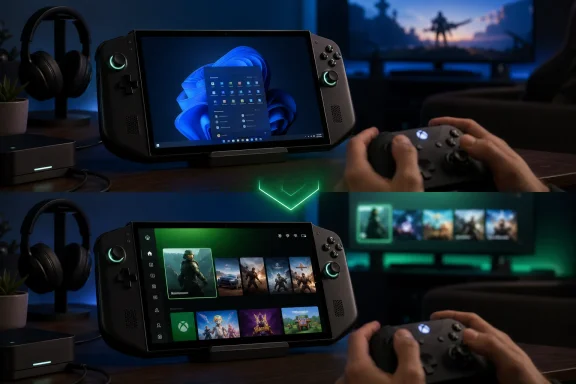
Xbox Mode is Microsoft’s answer to that mismatch. It offers a full-screen, controller-first interface inspired by the Xbox console dashboard, with access to a combined library that includes Xbox Game Pass, installed Xbox and Microsoft Store titles, and games from major PC storefronts. Users can enter it from Game Bar, with Win+G or the Xbox button on a controller, or by using Win+F11. If the update has arrived, a new Xbox Mode page appears under Gaming in the Windows 11 Settings app, where users can configure the PC to boot directly into the experience.
That boot option is the tell. Microsoft is not merely adding a launcher. It is giving Windows a second personality.
Valve solved this on the Steam Deck by hiding Linux behind SteamOS. The desktop exists, but it is not the product’s default emotional state. You wake the device, you see games, and you navigate with controls already in your hands. That sounds obvious until you compare it with a Windows handheld asking the user to tap a password field, dismiss a notification, wait for three updaters, and hope the launcher remembers which screen size it is on.
Microsoft could not copy SteamOS wholesale without giving up the very thing that makes Windows valuable: openness. The PC’s chaos is also its moat. Steam, Epic, Battle.net, GOG, Xbox, emulators, mods, overlays, capture tools, community launchers, niche peripherals, and strange old games all survive because Windows remains permissive.
Xbox Mode tries to split the difference. It does not replace Windows with an Xbox operating system. It places a console-like shell over Windows for the moments when the user wants a console-like session, then lets them jump back to the traditional desktop when the PC part of the PC is needed.
That sounds like a compromise because it is. But it is also the only compromise Microsoft can realistically make.
Xbox Mode is aimed at the front end rather than only the scheduler. Its job is to make getting into a game feel coherent with a controller in hand. That means a large-format interface, a library-first layout, recent games, Game Pass integration, store access, social features, Game Bar, and app switching without forcing the user back through a conventional desktop workflow.
The performance angle matters, but it should not be oversold. Microsoft’s language emphasizes minimizing background distractions rather than magically turning Windows into a lean console OS. Reports from earlier testing suggested lower overhead and fewer desktop components in the way, but the more reliable promise is experiential: fewer moments where Windows reminds you that you are sitting on top of a general-purpose operating system.
That distinction will matter to enthusiasts. If Xbox Mode is marketed as a frame-rate miracle, it will disappoint. If it is understood as a controller-first operating posture for Windows, it has a better chance of being judged on the thing it can actually improve.
Xbox Mode is different because the market has changed around it. PC gaming is no longer confined to desks, towers, and monitors. Handhelds, mini PCs, docked portable systems, streaming devices, cloud gaming, and high-refresh living-room displays have blurred the old boundary between console and computer. A gaming laptop connected to a TV is no longer a fringe scenario; for many players, it is the most powerful “console” they own.
Microsoft sees the same convergence from the other side. Xbox is no longer merely a box under the television. It is a services layer, a subscription business, a cloud endpoint, a storefront, a developer platform, and an identity system. Xbox Mode gives that strategy a Windows-native surface.
That is why the aggregated library is critical. If Xbox Mode were only a glossy front end for Game Pass, it would be dismissed as another Microsoft funnel. By acknowledging leading PC storefronts, Microsoft is conceding reality: the PC gamer’s library is fragmented, and any credible full-screen gaming mode must reduce that fragmentation rather than pretend it does not exist.
This is the modern Windows feature rollout in miniature. Microsoft wants the marketing moment of availability and the engineering safety of gradual deployment. Some users get the switch immediately; others wait days or weeks; everyone else argues online about whether they are missing a prerequisite, a region flag, a Store update, an Xbox app build, or divine favor.
There is a defensible reason for caution. Xbox Mode touches input, shell behavior, boot preference, app switching, storefront discovery, and gaming workloads across an enormous hardware base. A gaming desktop with three monitors, a handheld with custom controls, a tablet with detachable keyboard, and a laptop docked to a TV all qualify as Windows 11 PCs, but they are not the same machine in any practical sense.
Still, Microsoft’s silence on market availability makes the launch feel less confident than the product idea deserves. If Xbox Mode is meant to be a new face of Windows gaming, users should not need to infer whether their country is part of the experiment.
The harder comparison is SteamOS. Valve’s advantage is vertical clarity. On the Steam Deck, it controls the primary experience, the store, the compatibility layer, the update cadence, and the default expectations. The result is not as open as Windows, but it is calmer.
Microsoft cannot offer that same calm without narrowing Windows. Instead, it is trying to provide a console-like mode while preserving the right to fall through to the full OS. This makes Xbox Mode more flexible than SteamOS but also more vulnerable to the old Windows problem: some part of the stack can always break the illusion.
A third-party launcher can demand a login. A driver utility can throw a pop-up. A game can ignore controller input until focus is restored. An anti-cheat component can fail in a way that requires a keyboard. Xbox Mode can reduce these moments, but it cannot abolish them unless Microsoft becomes much more aggressive about certification, background behavior, and storefront integration.
That is the central tension. The more Xbox Mode behaves like a console, the more it will need rules. The more rules Microsoft imposes, the more PC gamers will worry about Windows becoming less PC-like.
Shader compilation stutter, first-run hitches, inconsistent fullscreen behavior, and launcher overhead are not merely annoyances for enthusiasts. They shape first impressions. A console game is expected to start cleanly from ten feet away with a controller. A PC game is often forgiven for needing fiddling. Xbox Mode narrows that forgiveness gap.
If Microsoft wants Windows handhelds and living-room PCs to compete with consoles, it needs more than a pretty home screen. It needs games to launch reliably, scale correctly, handle suspend and resume gracefully, respect controller navigation, and avoid dumping users into desktop-only flows. The interface creates the expectation; developers and middleware have to help fulfill it.
This is where Microsoft’s dual role matters. It owns Windows, Xbox, DirectX, Game Pass, the Microsoft Store, and major studios. It also has to coexist with Steam, Epic, hardware OEMs, anti-cheat vendors, GPU companies, and peripheral makers. Xbox Mode can become a useful standard only if Microsoft persuades the ecosystem that supporting it improves the PC rather than corrals it.
The concern is not that employees will suddenly convert accounting workstations into Xboxes. It is that Windows keeps accumulating consumer experiences that enterprises must account for, document, suppress, or explain. Every new shell-adjacent feature becomes one more setting in the image-management conversation.
For BYOD, education, labs, and shared machines, the calculus is more nuanced. A Windows tablet or laptop that can move between normal desktop use and a controller-friendly gaming interface may be attractive in homes and dorm rooms. In locked-down environments, it may be noise.
Microsoft will need to make the management story boring, which is the highest compliment an admin can pay. If Xbox Mode can be hidden, disabled, or governed cleanly, enterprise IT will move on. If it appears unpredictably in Settings or changes behavior after consumer-style update prompts, it will become another example in the long-running argument that Windows 11 sometimes forgets who owns the device.
That reliability bar is higher than it sounds. Windows is full of small seams that are invisible with a keyboard and mouse but glaring with a controller. Focus management, DPI scaling, multi-monitor behavior, Bluetooth reconnects, sleep states, overlay conflicts, notification priority, and account authentication all become part of the Xbox Mode experience whether Microsoft wants them there or not.
Handheld users will be the harshest judges because they have lived with the problem most intensely. They know the difference between a real console-like experience and a full-screen app wearing a console costume. They also know that the ability to drop into the Windows desktop is not a weakness; it is the reason they bought a Windows handheld instead of a closed console.
That is why Microsoft should resist the temptation to overbrand the feature as an Xbox takeover of Windows. The pitch should be simpler: when you want Windows to behave like a gaming device, it can. When you want the full PC, it is still there.
Windows 11 is the most important battlefield for that idea because it is where Microsoft has the most control and the most competition. On a Samsung TV or a mobile browser, Xbox is an app or a service. On Windows, it can become a mode of the operating system.
That has strategic value. If the next Xbox hardware generation is more PC-like, and if PC handhelds continue to grow, Microsoft needs a common user experience that spans devices without demanding that every device be a traditional console. Xbox Mode is a step toward that shared layer.
It also gives Microsoft a way to make Game Pass feel more native on PCs without making the mistake of ignoring non-Microsoft libraries. The company wants users to start in its interface, but it knows they will not stay there if the interface pretends Steam does not exist.
That is useful, but the broader test is whether Microsoft can keep polishing it after the launch novelty fades. Windows has a history of promising new modes, experiences, and surfaces that arrive with ambition and then drift into maintenance. Xbox Mode cannot afford that if it is meant to carry the company’s PC gaming strategy.
It needs rapid iteration around the unglamorous stuff: controller focus, storefront reliability, suspend and resume behavior, multi-display handling, accessibility, parental controls, cloud saves, account switching, and update timing. A console-like interface that interrupts a Saturday night gaming session with PC-like chores will not get many second chances.
The good news is that Microsoft appears to be treating this as an evolution rather than a one-off release. The bad news is that Windows users have heard that before.
The concrete takeaways are straightforward:
Source: Thurrott.com Microsoft is Rolling Out Xbox Mode in Windows 11
 Microsoft Finally Stops Pretending the Desktop Is Neutral
For decades, Windows has treated the desktop as the natural starting point for everything: spreadsheets, browsers, games, drivers, launchers, firmware tools, chat clients, anti-cheat warnings, RGB utilities, and the occasional modal dialog that appears at exactly the wrong time. PC gamers have learned to tolerate this mess because the upside is enormous. Windows is where the games are, where the hardware freedom is, and where every storefront eventually has to show up.But handheld gaming PCs exposed the bargain. A seven-inch device with thumbsticks makes the Windows desktop feel less like a productivity environment and more like a hostile archaeological layer. Tiny taskbar icons, login prompts, system trays, launchers that demand mouse input, and update nags are irritations on a monitor; in your hands, they become design failures.
Xbox Mode is Microsoft’s answer to that mismatch. It offers a full-screen, controller-first interface inspired by the Xbox console dashboard, with access to a combined library that includes Xbox Game Pass, installed Xbox and Microsoft Store titles, and games from major PC storefronts. Users can enter it from Game Bar, with Win+G or the Xbox button on a controller, or by using Win+F11. If the update has arrived, a new Xbox Mode page appears under Gaming in the Windows 11 Settings app, where users can configure the PC to boot directly into the experience.
That boot option is the tell. Microsoft is not merely adding a launcher. It is giving Windows a second personality.
The Handheld Problem Became a Windows Problem
Xbox Mode began life as the Full Screen Experience on Xbox Ally handhelds in 2025, where it was less a luxury than a survival mechanism. Devices like the ROG Ally, Lenovo Legion Go, MSI Claw, and their descendants proved that Windows could run handheld gaming hardware impressively well, but also that Windows had never really been designed for the posture of handheld play.Valve solved this on the Steam Deck by hiding Linux behind SteamOS. The desktop exists, but it is not the product’s default emotional state. You wake the device, you see games, and you navigate with controls already in your hands. That sounds obvious until you compare it with a Windows handheld asking the user to tap a password field, dismiss a notification, wait for three updaters, and hope the launcher remembers which screen size it is on.
Microsoft could not copy SteamOS wholesale without giving up the very thing that makes Windows valuable: openness. The PC’s chaos is also its moat. Steam, Epic, Battle.net, GOG, Xbox, emulators, mods, overlays, capture tools, community launchers, niche peripherals, and strange old games all survive because Windows remains permissive.
Xbox Mode tries to split the difference. It does not replace Windows with an Xbox operating system. It places a console-like shell over Windows for the moments when the user wants a console-like session, then lets them jump back to the traditional desktop when the PC part of the PC is needed.
That sounds like a compromise because it is. But it is also the only compromise Microsoft can realistically make.
This Is Not Just Game Mode With Better Branding
The replacement of Windows 11’s Game Mode is symbolically important because Game Mode was always a modest promise. It adjusted priorities, reduced some background interference, and told users that Windows understood games were special workloads. It did not solve the experience problem.Xbox Mode is aimed at the front end rather than only the scheduler. Its job is to make getting into a game feel coherent with a controller in hand. That means a large-format interface, a library-first layout, recent games, Game Pass integration, store access, social features, Game Bar, and app switching without forcing the user back through a conventional desktop workflow.
The performance angle matters, but it should not be oversold. Microsoft’s language emphasizes minimizing background distractions rather than magically turning Windows into a lean console OS. Reports from earlier testing suggested lower overhead and fewer desktop components in the way, but the more reliable promise is experiential: fewer moments where Windows reminds you that you are sitting on top of a general-purpose operating system.
That distinction will matter to enthusiasts. If Xbox Mode is marketed as a frame-rate miracle, it will disappoint. If it is understood as a controller-first operating posture for Windows, it has a better chance of being judged on the thing it can actually improve.
Microsoft’s Real Target Is the Living Room Again
Microsoft has tried to put Windows in the living room before, usually with the subtlety of a company that thinks a Start menu is a universal solvent. Media Center had its fans. Steam Big Picture filled a gap Microsoft left open. The Xbox app on Windows slowly grew into a Game Pass hub. None of these made the Windows PC feel like a natural console alternative from the couch.Xbox Mode is different because the market has changed around it. PC gaming is no longer confined to desks, towers, and monitors. Handhelds, mini PCs, docked portable systems, streaming devices, cloud gaming, and high-refresh living-room displays have blurred the old boundary between console and computer. A gaming laptop connected to a TV is no longer a fringe scenario; for many players, it is the most powerful “console” they own.
Microsoft sees the same convergence from the other side. Xbox is no longer merely a box under the television. It is a services layer, a subscription business, a cloud endpoint, a storefront, a developer platform, and an identity system. Xbox Mode gives that strategy a Windows-native surface.
That is why the aggregated library is critical. If Xbox Mode were only a glossy front end for Game Pass, it would be dismissed as another Microsoft funnel. By acknowledging leading PC storefronts, Microsoft is conceding reality: the PC gamer’s library is fragmented, and any credible full-screen gaming mode must reduce that fragmentation rather than pretend it does not exist.
The Select-Market Rollout Is Classic Microsoft Caution
The rollout is starting in select markets, but Microsoft has not clearly identified which ones. That ambiguity is frustrating, especially for users who read “beginning today” and then find nothing in Windows Update. The official path is familiar: open Settings, go to Windows Update, enable “Get the latest updates as soon as they are available,” and check for updates.This is the modern Windows feature rollout in miniature. Microsoft wants the marketing moment of availability and the engineering safety of gradual deployment. Some users get the switch immediately; others wait days or weeks; everyone else argues online about whether they are missing a prerequisite, a region flag, a Store update, an Xbox app build, or divine favor.
There is a defensible reason for caution. Xbox Mode touches input, shell behavior, boot preference, app switching, storefront discovery, and gaming workloads across an enormous hardware base. A gaming desktop with three monitors, a handheld with custom controls, a tablet with detachable keyboard, and a laptop docked to a TV all qualify as Windows 11 PCs, but they are not the same machine in any practical sense.
Still, Microsoft’s silence on market availability makes the launch feel less confident than the product idea deserves. If Xbox Mode is meant to be a new face of Windows gaming, users should not need to infer whether their country is part of the experiment.
The Competition Is Steam Big Picture, Not PlayStation
The obvious comparison is Steam Big Picture, and it is not an insult. Valve understood earlier than Microsoft that PC gaming needed a controller-friendly living-room layer. Big Picture was never perfect, but it made Steam usable from a couch long before Windows itself was willing to meet players there.The harder comparison is SteamOS. Valve’s advantage is vertical clarity. On the Steam Deck, it controls the primary experience, the store, the compatibility layer, the update cadence, and the default expectations. The result is not as open as Windows, but it is calmer.
Microsoft cannot offer that same calm without narrowing Windows. Instead, it is trying to provide a console-like mode while preserving the right to fall through to the full OS. This makes Xbox Mode more flexible than SteamOS but also more vulnerable to the old Windows problem: some part of the stack can always break the illusion.
A third-party launcher can demand a login. A driver utility can throw a pop-up. A game can ignore controller input until focus is restored. An anti-cheat component can fail in a way that requires a keyboard. Xbox Mode can reduce these moments, but it cannot abolish them unless Microsoft becomes much more aggressive about certification, background behavior, and storefront integration.
That is the central tension. The more Xbox Mode behaves like a console, the more it will need rules. The more rules Microsoft imposes, the more PC gamers will worry about Windows becoming less PC-like.
Developers May Care More Than Players Think
For players, Xbox Mode is a dashboard. For developers, it is part of a broader push to make Windows a more predictable gaming target. Microsoft has been talking up improvements around shader delivery, DirectStorage, graphics tooling, and the PC development pipeline, and Xbox Mode fits that story because presentation and performance are increasingly intertwined.Shader compilation stutter, first-run hitches, inconsistent fullscreen behavior, and launcher overhead are not merely annoyances for enthusiasts. They shape first impressions. A console game is expected to start cleanly from ten feet away with a controller. A PC game is often forgiven for needing fiddling. Xbox Mode narrows that forgiveness gap.
If Microsoft wants Windows handhelds and living-room PCs to compete with consoles, it needs more than a pretty home screen. It needs games to launch reliably, scale correctly, handle suspend and resume gracefully, respect controller navigation, and avoid dumping users into desktop-only flows. The interface creates the expectation; developers and middleware have to help fulfill it.
This is where Microsoft’s dual role matters. It owns Windows, Xbox, DirectX, Game Pass, the Microsoft Store, and major studios. It also has to coexist with Steam, Epic, hardware OEMs, anti-cheat vendors, GPU companies, and peripheral makers. Xbox Mode can become a useful standard only if Microsoft persuades the ecosystem that supporting it improves the PC rather than corrals it.
The Enterprise Angle Is Small but Not Zero
Most IT departments are not waiting for a console dashboard on corporate laptops. In managed environments, Xbox Mode will likely be something to disable, ignore, or control through policy if it appears on business images. The fact that it lives under Gaming settings and can alter boot behavior will be enough to get admins’ attention.The concern is not that employees will suddenly convert accounting workstations into Xboxes. It is that Windows keeps accumulating consumer experiences that enterprises must account for, document, suppress, or explain. Every new shell-adjacent feature becomes one more setting in the image-management conversation.
For BYOD, education, labs, and shared machines, the calculus is more nuanced. A Windows tablet or laptop that can move between normal desktop use and a controller-friendly gaming interface may be attractive in homes and dorm rooms. In locked-down environments, it may be noise.
Microsoft will need to make the management story boring, which is the highest compliment an admin can pay. If Xbox Mode can be hidden, disabled, or governed cleanly, enterprise IT will move on. If it appears unpredictably in Settings or changes behavior after consumer-style update prompts, it will become another example in the long-running argument that Windows 11 sometimes forgets who owns the device.
The Best Version of Xbox Mode Is Boringly Reliable
The success case for Xbox Mode is not that users marvel at it. The success case is that users stop thinking about it. A controller wakes the PC, the PC opens into a clean game library, the game launches, Game Bar appears when summoned, and the desktop stays out of sight until invited.That reliability bar is higher than it sounds. Windows is full of small seams that are invisible with a keyboard and mouse but glaring with a controller. Focus management, DPI scaling, multi-monitor behavior, Bluetooth reconnects, sleep states, overlay conflicts, notification priority, and account authentication all become part of the Xbox Mode experience whether Microsoft wants them there or not.
Handheld users will be the harshest judges because they have lived with the problem most intensely. They know the difference between a real console-like experience and a full-screen app wearing a console costume. They also know that the ability to drop into the Windows desktop is not a weakness; it is the reason they bought a Windows handheld instead of a closed console.
That is why Microsoft should resist the temptation to overbrand the feature as an Xbox takeover of Windows. The pitch should be simpler: when you want Windows to behave like a gaming device, it can. When you want the full PC, it is still there.
The Xbox Brand Moves From Hardware to Habit
Xbox Mode also advances a larger brand migration. Microsoft has spent years teaching users that Xbox is not just a console. Xbox is on PC, phones, TVs, handhelds, cloud sessions, subscriptions, and cross-buy libraries. The phrase “This is an Xbox” used to sound like marketing provocation; now it is increasingly a product roadmap.Windows 11 is the most important battlefield for that idea because it is where Microsoft has the most control and the most competition. On a Samsung TV or a mobile browser, Xbox is an app or a service. On Windows, it can become a mode of the operating system.
That has strategic value. If the next Xbox hardware generation is more PC-like, and if PC handhelds continue to grow, Microsoft needs a common user experience that spans devices without demanding that every device be a traditional console. Xbox Mode is a step toward that shared layer.
It also gives Microsoft a way to make Game Pass feel more native on PCs without making the mistake of ignoring non-Microsoft libraries. The company wants users to start in its interface, but it knows they will not stay there if the interface pretends Steam does not exist.
The Rollout Turns One Toggle Into a Platform Test
For now, the practical reality is modest. Some Windows 11 users in select markets will see the update. They will find Xbox Mode under Gaming settings. They can choose whether the machine boots into it, invoke it through Game Bar or keyboard shortcuts, and move back to the desktop when needed.That is useful, but the broader test is whether Microsoft can keep polishing it after the launch novelty fades. Windows has a history of promising new modes, experiences, and surfaces that arrive with ambition and then drift into maintenance. Xbox Mode cannot afford that if it is meant to carry the company’s PC gaming strategy.
It needs rapid iteration around the unglamorous stuff: controller focus, storefront reliability, suspend and resume behavior, multi-display handling, accessibility, parental controls, cloud saves, account switching, and update timing. A console-like interface that interrupts a Saturday night gaming session with PC-like chores will not get many second chances.
The good news is that Microsoft appears to be treating this as an evolution rather than a one-off release. The bad news is that Windows users have heard that before.
The Windows Gaming Bet Now Has a Front Door
Xbox Mode is not a new operating system, and that is precisely why it matters. Microsoft is not abandoning the Windows desktop; it is acknowledging that the desktop should not be the mandatory lobby for every kind of computing. For gaming, especially handheld and living-room gaming, the old lobby was getting in the way.The concrete takeaways are straightforward:
- Xbox Mode began rolling out for Windows 11 on April 30, 2026, starting in select markets with broader availability in those markets planned over the following weeks.
- The feature provides a controller-optimized, full-screen Xbox-style interface for laptops, desktops, tablets, and handheld PCs.
- Users who receive the update should see Xbox Mode settings under Gaming, including an option to boot directly into the experience instead of the traditional desktop.
- Xbox Mode supports switching back and forth between the full-screen gaming interface and the normal Windows 11 desktop.
- The library experience is designed to aggregate Game Pass, Xbox and Microsoft Store titles, and installed games from major PC storefronts.
- The feature replaces the older Game Mode framing with something more ambitious: a second, gaming-first posture for Windows itself.
Source: Thurrott.com Microsoft is Rolling Out Xbox Mode in Windows 11
