

Microsoft began rolling out Xbox Mode for Windows 11 PCs on April 30, 2026, expanding the controller-first Xbox full-screen experience beyond handhelds to desktops, laptops, and tablets, while pairing the interface push with a broader Xbox app catalog expansion of nearly 400 PC games. The move is less a surprise launch than the visible edge of a strategy Microsoft has been assembling for more than a year. Windows is not becoming an Xbox console, but Microsoft is trying to make the moments when a PC behaves like one feel ordinary. That distinction matters, because the company’s gaming problem has never been a lack of reach; it has been a lack of a coherent living-room-grade experience on the platform it already controls.
Xbox Mode is Microsoft’s most serious attempt in years to admit what PC gamers have known forever: Windows is powerful, flexible, and often infuriating from ten feet away. A console asks you to sit down, press a button, and play. A Windows PC asks you to manage launchers, updates, overlays, drivers, login prompts, notification banners, and the occasional background process that chooses the worst possible time to become important.
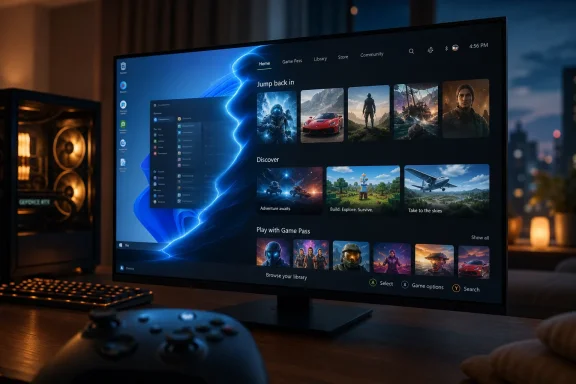
The new mode attacks that problem at the interface layer. It presents a full-screen, controller-optimized Xbox environment that can surface Game Pass titles, Microsoft Store purchases, and installed games from other storefronts. For users accustomed to Steam Big Picture or SteamOS, the concept is familiar. What is different is the ambition: Microsoft is not just shipping a launcher skin, it is trying to make console-style PC gaming a first-party Windows behavior.
That is why the feature matters even if the rollout is phased, even if availability varies by region and device, and even if some claims circulating around build numbers and update versions are too garbled to treat as reliable. The verified story is substantial enough without embellishment. Xbox Mode is moving from its handheld origins toward general Windows 11 availability, and Microsoft is framing it as a foundational gaming experience rather than a niche accessory.
The company’s timing is not accidental. Windows 10 is nearing the end of mainstream consumer support, Windows 11 adoption has become the strategic default, and gaming remains one of the few consumer PC categories where users still buy hardware for enthusiasm rather than obligation. Microsoft is using that moment to reassert that Windows, not a separate Xbox box, is the largest gaming surface it owns.
That handheld origin matters because it explains the priorities. A handheld PC exposes Windows’ awkwardness more brutally than a desktop does. Tiny touch targets, launcher pop-ups, background updates, and keyboard-dependent prompts become more than annoyances when the machine is in your hands and the main input device is a controller.
Microsoft’s full-screen experience was built to reduce that friction. It gives players a gamepad-friendly home screen, quick access to a unified library, and a way to move into games without first negotiating the desktop. On handhelds, that is a usability requirement. On desktops and laptops, it becomes a strategic choice.
The expansion to normal Windows 11 PCs suggests Microsoft believes the handheld fix can become a living-room fix. A mini PC under a television, a gaming laptop connected to an HDMI cable, or a desktop paired with an Xbox controller all become more console-like if Windows can step aside at the right moment. That is the practical promise behind Xbox Mode: not that Windows disappears, but that it learns when to get out of the way.
That is why library aggregation is central. PC gaming is fragmented across Steam, the Xbox app, Battle.net, Epic Games Store, Ubisoft Connect, EA app, GOG, and whatever launcher a publisher decides is strategically necessary this quarter. Microsoft cannot realistically make those stores disappear. It can, however, try to make the player’s first screen feel less fragmented than the business underneath it.
Xbox Mode’s strongest argument is that it does not need to defeat Steam to be useful. If it can show installed Steam games beside Game Pass titles and Microsoft Store games, it becomes a front door rather than a walled garden. That is a smarter posture than the old Microsoft Store era, when Microsoft seemed to believe distribution power would follow automatically from Windows preinstallation.
There is also a performance-adjacent claim in the way Microsoft talks about the experience. The full-screen environment is designed to reduce the overhead of the regular desktop and background activity, especially on handhelds and lower-power systems. Early outside testing has suggested that the savings may be more obvious in memory use and responsiveness than in raw frame-rate gains, which is exactly the kind of distinction Microsoft should be careful not to blur.
Microsoft’s advantage is different. It owns Windows, DirectX, Game Bar, the Xbox app, Game Pass integration, and the operating-system plumbing that sits beneath the launchers. Valve has a stronger store and a more trusted relationship with core PC gamers. Microsoft has the default platform.
That default status is powerful, but it is not destiny. The Microsoft Store was default, too, and PC gamers spent years avoiding it unless Game Pass made the compromise worthwhile. Windows preinstallation gives Xbox Mode reach; it does not automatically give it affection.
The interesting possibility is that Xbox Mode becomes a companion to Steam rather than a replacement for it. If a user buys games on Steam, subscribes to Game Pass, occasionally claims an Epic freebie, and uses Battle.net for one or two live-service titles, the winning interface is the one that acknowledges the mess. Steam cannot easily become neutral territory. Microsoft, paradoxically, can make the better neutrality argument if it resists the urge to turn Xbox Mode into another storefront funnel.
That matters because Play Anywhere is one of Microsoft’s few genuinely differentiated cross-device ideas. Sony can bring more PlayStation games to PC, and Valve can make Steam libraries portable through the Steam Deck. Microsoft can connect console and PC ownership under one account system and one saves-and-achievements layer.
Xbox Mode gives that policy a better stage. A Play Anywhere title is more persuasive when it appears naturally in a controller-first library that spans a console, a desktop, and a handheld. Without that interface, the benefit is real but abstract. With it, Microsoft can make the cross-device promise visible every time a player sits down.
The catalog expansion also indicates that Microsoft understands Game Pass alone cannot carry the PC app experience. Subscriptions are powerful, but PC gamers still buy games, mod games, abandon subscriptions, return to old favorites, and maintain libraries across years. A gaming interface that only celebrates the rental shelf will always feel smaller than the PC itself.
That may sound obvious, but Microsoft has spent years sending mixed signals. “Xbox everywhere” sometimes meant cloud gaming on phones, sometimes first-party games on rival consoles, sometimes Game Pass on PC, sometimes a marketing slogan stretched past usefulness. The risk was that Xbox became less a platform than a logo attached to wherever Microsoft could place content.
Xbox Mode tightens the definition. It says Xbox is an experience Microsoft can deliver on Windows hardware, not only a console in the living room and not merely a subscription tab in an app. That is a more defensible version of “everywhere,” because it is anchored in a platform Microsoft controls.
It also fits the company’s broader hardware direction. The ROG Xbox Ally made clear that Microsoft is comfortable working with partners on Xbox-branded Windows devices. Reports and announcements around future Xbox hardware have pointed toward a more PC-like console architecture, with AMD silicon and compatibility ambitions that narrow the gap between Xbox hardware and Windows gaming machines.
If Microsoft can align Xbox Mode, Windows gaming optimizations, handheld hardware, and the next Xbox console generation, it could end up with something more interesting than a traditional console refresh. It could build a shared Xbox environment across devices that differ in shape and power but not in basic user experience.
The reported winding down of Gaming Copilot on mobile and the halt to console development under Asha Sharma’s leadership reads, in that context, like a course correction. Whether one views it as strategic clarity or simple triage, it sends a useful message: Xbox has more urgent work than adding an assistant layer to games that already have guides, wikis, Discord communities, and YouTube walkthroughs.
The friction in Xbox today is not that players lack a chatbot. It is that they struggle with inconsistent platform messaging, confusing subscription value, launcher sprawl on PC, and the lingering question of what Xbox hardware is for. Xbox Mode addresses at least one of those issues directly.
That does not mean Microsoft has suddenly become allergic to AI. The company’s broader strategy still revolves around AI infrastructure and product integration. But in gaming, at least for the moment, the smarter move is to fix the doorway before trying to install a talking concierge beside it.
A controller-first interface that launches Steam games, Game Pass titles, and locally installed apps is useful. A controller-first interface that gradually privileges Microsoft commerce, buries rival launchers, nags for subscriptions, or interferes with modding will be rejected quickly by the very users Microsoft wants to court. The history of Games for Windows Live still hangs over the company’s PC gaming reputation like a warning label.
Local file access is one of the key pressure points. PC gamers expect to inspect, modify, back up, and troubleshoot game installations. Game Pass has improved over the years, but Microsoft’s app model has not always felt as open as traditional PC distribution. If Xbox Mode becomes the friendly face of a more locked-down library, enthusiasm will curdle.
The best version of Xbox Mode treats the PC as a PC until the user asks for a console-like session. It should be reversible, transparent, and tolerant of third-party ecosystems. It should not pretend that the Windows gaming market can be domesticated into a single-store experience.
That is why the mode’s exit path matters almost as much as its entrance. A user should be able to move from the Xbox interface back to the desktop instantly, because the desktop is not a failure state. It is the reason Windows gaming has the reach and diversity Microsoft wants to monetize.
The more realistic benefit is consistency. If the full-screen experience prevents avoidable interruptions, reduces desktop clutter, cuts some memory use, and makes the system feel less busy, that is valuable even when average FPS does not budge. A smoother path into games can matter as much as a benchmark delta, particularly for casual players and living-room setups.
For IT-minded readers, this is also where Windows’ complexity shows through. Background services exist for reasons: updates, security, sync, device management, telemetry, overlays, and vendor utilities all compete for attention. Suppressing or deferring some of that during play is sensible, but it must not compromise security posture or create confusing state changes administrators cannot explain.
Enterprise admins are not the primary audience for Xbox Mode, but many Windows 11 PCs live in mixed-use environments. A family PC may be used for work by day and gaming by night. A BYOD laptop may have policy controls. Microsoft needs to make sure the gaming layer does not become another opaque system behavior that support staff have to reverse-engineer.
SteamOS solved this problem for a slice of the market by narrowing the supported experience. Valve could optimize around Steam, Proton, and Steam Deck hardware targets. Microsoft has a harder job because Windows must support almost everything: every GPU vendor, every launcher, every anti-cheat driver, every overlay, every peripheral, every strange little utility users installed three years ago and forgot about.
That breadth is why Xbox Mode is both promising and fragile. If it works, it gives Windows the console posture it has always lacked. If it fails, it becomes one more layer on top of the mess.
The opportunity is larger now because the hardware market has changed. Handheld gaming PCs normalized the idea that Windows machines can be treated like appliances. Mini PCs have become powerful enough for credible 1080p and 1440p gaming. OLED televisions, low-latency modes, and wireless controllers have made the living-room PC less exotic.
Microsoft does not need to persuade everyone to buy an Xbox-branded handheld. It needs to persuade people who already own Windows gaming hardware that the Xbox interface is the easiest way to use it when they are not sitting at a desk.
Sony owns the clean console narrative. Valve owns the PC handheld credibility narrative. Microsoft’s plausible lane is interoperability: your library, saves, subscription, cloud access, and interface following you across console, handheld, laptop, and desktop. Xbox Mode is the software glue that could make that pitch legible.
This is why the name matters. Calling it Xbox Mode rather than merely the Xbox full-screen experience makes it sound less like a device feature and more like an operating state. Windows has desktop mode, tablet behaviors, gaming settings, and now a console-like shell. The brand implication is that Xbox is something Windows can become temporarily.
That could reshape the role of Xbox hardware. A future Xbox console might be less a sealed-off endpoint and more the most optimized Xbox Mode machine Microsoft sells. Partner handhelds might be portable Xbox Mode machines. Gaming PCs might be user-built Xbox Mode machines. The business model then shifts from selling one canonical box to maintaining the account, store, subscription, and developer ecosystem that spans them.
There is a risk in that abstraction. If everything is Xbox, nothing is. Microsoft has flirted with that danger before. Xbox Mode works only if it makes the brand more concrete in daily use, not more diffuse in advertising.
Xbox Mode gives Microsoft a chance to rethink discovery around play rather than shopping. A console-style home screen should prioritize what a user can launch now, what is newly available through their subscription, what works well with a controller, what supports cloud play, and what continues across console and PC. Those are not the same priorities as a store page.
The danger is that Microsoft fills the interface with promotional rows. Every streaming platform learned the hard way that a home screen can become a billboard faster than it becomes a tool. Game Pass already has this tension: it is both a library and a marketing surface.
The best Xbox Mode home screen would be opinionated but restrained. It would know when the user wants to resume a game, when they are browsing for something new, and when they are managing installed titles. It would avoid turning every session into a subscription upsell.
For WindowsForum readers, the practical question is whether Xbox Mode becomes configurable enough to trust. Power users will want control over library sources, startup behavior, notifications, controller mappings, and which apps appear in the interface. Microsoft’s consumer teams sometimes underestimate how quickly “simple” becomes “limiting” for the audience that keeps Windows gaming vibrant.
The bigger opportunity is the middle of the market. These are players who use Game Pass, own a few Steam games, plug a laptop into a television, or buy a handheld PC because they want more flexibility than a Switch and less ceremony than a desktop rig. They are not opposed to Windows; they are tired of managing it when they just want to play.
For that audience, Xbox Mode could be sticky. If pressing a controller button leads to a clean library, recent games, cloud options, and a fast path into play, the interface becomes habit. Habit is what Microsoft has lacked on PC gaming outside of Windows itself.
This is also where cloud gaming fits best. Cloud is not replacing local PC gaming for enthusiasts, but it is useful as a convenience layer: try a title before installing it, play something too large for available storage, or continue a console game on a laptop. Xbox Mode can make that feel less like a separate service and more like another launch option.
The subscription economics are obvious. A better interface increases Game Pass engagement. More engagement improves retention. Better retention justifies more content spending. Xbox Mode is not only a UX project; it is a subscription defense mechanism wearing a controller-friendly jacket.
The right enterprise posture is straightforward. Organizations should decide whether gaming features are allowed on managed Windows 11 devices, enforce those choices through policy where available, and document expected behavior for shared or lightly managed systems. The feature itself is not inherently alarming, but surprise full-screen shells are not something administrators like discovering from a helpdesk ticket.
Security-minded users should also watch how Xbox Mode handles overlays, account authentication, cloud streaming, and third-party launcher integration. Any unified interface becomes a trust broker. If it can launch games across services, it also becomes part of the chain users rely on to distinguish legitimate prompts from suspicious ones.
Microsoft’s challenge is to keep the consumer magic from becoming administrative ambiguity. The company has improved Windows gaming significantly over the past decade, but Windows remains Windows: every convenience feature eventually intersects with updates, identity, permissions, and policy.
That does not make Xbox Mode a risk by default. It makes it a feature that should be legible. Users and admins alike should be able to understand what it changes, what it suppresses, what it launches, and how to turn it off.
Microsoft’s bet is that Xbox does not need to win the old console war to regain relevance; it needs to make the billion-device Windows world feel less like a compromise when the controller is in your hand. That is a harder project than shipping a dashboard, and a more interesting one. If Xbox Mode matures into a trustworthy, open, fast path through the chaos of PC gaming, the future Xbox may not be defined by the box under the TV at all, but by the moment Windows quietly steps aside and lets the game take over.
 Microsoft’s Console Bet Now Runs Through the Windows Desktop
Xbox Mode is Microsoft’s most serious attempt in years to admit what PC gamers have known forever: Windows is powerful, flexible, and often infuriating from ten feet away. A console asks you to sit down, press a button, and play. A Windows PC asks you to manage launchers, updates, overlays, drivers, login prompts, notification banners, and the occasional background process that chooses the worst possible time to become important.The new mode attacks that problem at the interface layer. It presents a full-screen, controller-optimized Xbox environment that can surface Game Pass titles, Microsoft Store purchases, and installed games from other storefronts. For users accustomed to Steam Big Picture or SteamOS, the concept is familiar. What is different is the ambition: Microsoft is not just shipping a launcher skin, it is trying to make console-style PC gaming a first-party Windows behavior.
That is why the feature matters even if the rollout is phased, even if availability varies by region and device, and even if some claims circulating around build numbers and update versions are too garbled to treat as reliable. The verified story is substantial enough without embellishment. Xbox Mode is moving from its handheld origins toward general Windows 11 availability, and Microsoft is framing it as a foundational gaming experience rather than a niche accessory.
The company’s timing is not accidental. Windows 10 is nearing the end of mainstream consumer support, Windows 11 adoption has become the strategic default, and gaming remains one of the few consumer PC categories where users still buy hardware for enthusiasm rather than obligation. Microsoft is using that moment to reassert that Windows, not a separate Xbox box, is the largest gaming surface it owns.
The ROG Xbox Ally Was the Test Bed, Not the Destination
Xbox Mode did not arrive as a clean-room invention in 2026. Its lineage runs through the ROG Xbox Ally partnership with ASUS, where Microsoft and ASUS built Windows 11 handhelds around a full-screen Xbox experience designed to hide the least console-like parts of Windows. The pitch was obvious: take the Steam Deck’s lesson seriously, but preserve access to the broader Windows game library.That handheld origin matters because it explains the priorities. A handheld PC exposes Windows’ awkwardness more brutally than a desktop does. Tiny touch targets, launcher pop-ups, background updates, and keyboard-dependent prompts become more than annoyances when the machine is in your hands and the main input device is a controller.
Microsoft’s full-screen experience was built to reduce that friction. It gives players a gamepad-friendly home screen, quick access to a unified library, and a way to move into games without first negotiating the desktop. On handhelds, that is a usability requirement. On desktops and laptops, it becomes a strategic choice.
The expansion to normal Windows 11 PCs suggests Microsoft believes the handheld fix can become a living-room fix. A mini PC under a television, a gaming laptop connected to an HDMI cable, or a desktop paired with an Xbox controller all become more console-like if Windows can step aside at the right moment. That is the practical promise behind Xbox Mode: not that Windows disappears, but that it learns when to get out of the way.
The Feature Is Really About Reducing Friction
The most important thing Xbox Mode does is not cosmetic. The tiles, animations, and controller navigation are necessary, but the deeper play is friction reduction. Microsoft wants the path from “I want to play something” to “the game is running” to feel less like PC maintenance and more like console usage.That is why library aggregation is central. PC gaming is fragmented across Steam, the Xbox app, Battle.net, Epic Games Store, Ubisoft Connect, EA app, GOG, and whatever launcher a publisher decides is strategically necessary this quarter. Microsoft cannot realistically make those stores disappear. It can, however, try to make the player’s first screen feel less fragmented than the business underneath it.
Xbox Mode’s strongest argument is that it does not need to defeat Steam to be useful. If it can show installed Steam games beside Game Pass titles and Microsoft Store games, it becomes a front door rather than a walled garden. That is a smarter posture than the old Microsoft Store era, when Microsoft seemed to believe distribution power would follow automatically from Windows preinstallation.
There is also a performance-adjacent claim in the way Microsoft talks about the experience. The full-screen environment is designed to reduce the overhead of the regular desktop and background activity, especially on handhelds and lower-power systems. Early outside testing has suggested that the savings may be more obvious in memory use and responsiveness than in raw frame-rate gains, which is exactly the kind of distinction Microsoft should be careful not to blur.
Steam Is the Rival, but Not in the Way Microsoft Wants to Say Out Loud
Any discussion of Xbox Mode eventually runs into Valve. Steam Big Picture has existed for more than a decade, and the Steam Deck transformed Valve’s interface work from a living-room experiment into a full operating system strategy. SteamOS proved that PC gaming could feel console-like when the software stack was designed around the controller from the beginning.Microsoft’s advantage is different. It owns Windows, DirectX, Game Bar, the Xbox app, Game Pass integration, and the operating-system plumbing that sits beneath the launchers. Valve has a stronger store and a more trusted relationship with core PC gamers. Microsoft has the default platform.
That default status is powerful, but it is not destiny. The Microsoft Store was default, too, and PC gamers spent years avoiding it unless Game Pass made the compromise worthwhile. Windows preinstallation gives Xbox Mode reach; it does not automatically give it affection.
The interesting possibility is that Xbox Mode becomes a companion to Steam rather than a replacement for it. If a user buys games on Steam, subscribes to Game Pass, occasionally claims an Epic freebie, and uses Battle.net for one or two live-service titles, the winning interface is the one that acknowledges the mess. Steam cannot easily become neutral territory. Microsoft, paradoxically, can make the better neutrality argument if it resists the urge to turn Xbox Mode into another storefront funnel.
Four Hundred More Games Makes the Interface Less Empty
The companion news around nearly 400 additional PC titles in the Xbox app is not incidental. An interface only matters if the shelves are stocked. Microsoft has been expanding discoverability and purchasing inside the Xbox PC app, including more than 100 Xbox Play Anywhere titles, which let users buy once and play across Xbox console and Windows PC when the title supports the program.That matters because Play Anywhere is one of Microsoft’s few genuinely differentiated cross-device ideas. Sony can bring more PlayStation games to PC, and Valve can make Steam libraries portable through the Steam Deck. Microsoft can connect console and PC ownership under one account system and one saves-and-achievements layer.
Xbox Mode gives that policy a better stage. A Play Anywhere title is more persuasive when it appears naturally in a controller-first library that spans a console, a desktop, and a handheld. Without that interface, the benefit is real but abstract. With it, Microsoft can make the cross-device promise visible every time a player sits down.
The catalog expansion also indicates that Microsoft understands Game Pass alone cannot carry the PC app experience. Subscriptions are powerful, but PC gamers still buy games, mod games, abandon subscriptions, return to old favorites, and maintain libraries across years. A gaming interface that only celebrates the rental shelf will always feel smaller than the PC itself.
Windows 11 Is Becoming the Xbox Platform Microsoft Can Actually Scale
The old console war was fought over boxes. The new one is being fought over surfaces, subscriptions, identity systems, and the interfaces that make them feel coherent. Xbox Mode is a declaration that Windows 11 is not merely compatible with Xbox strategy; it is central to it.That may sound obvious, but Microsoft has spent years sending mixed signals. “Xbox everywhere” sometimes meant cloud gaming on phones, sometimes first-party games on rival consoles, sometimes Game Pass on PC, sometimes a marketing slogan stretched past usefulness. The risk was that Xbox became less a platform than a logo attached to wherever Microsoft could place content.
Xbox Mode tightens the definition. It says Xbox is an experience Microsoft can deliver on Windows hardware, not only a console in the living room and not merely a subscription tab in an app. That is a more defensible version of “everywhere,” because it is anchored in a platform Microsoft controls.
It also fits the company’s broader hardware direction. The ROG Xbox Ally made clear that Microsoft is comfortable working with partners on Xbox-branded Windows devices. Reports and announcements around future Xbox hardware have pointed toward a more PC-like console architecture, with AMD silicon and compatibility ambitions that narrow the gap between Xbox hardware and Windows gaming machines.
If Microsoft can align Xbox Mode, Windows gaming optimizations, handheld hardware, and the next Xbox console generation, it could end up with something more interesting than a traditional console refresh. It could build a shared Xbox environment across devices that differ in shape and power but not in basic user experience.
The Copilot Retreat Makes the Gaming Push More Credible
One reason Xbox Mode feels more grounded than some of Microsoft’s recent consumer pitches is that it solves a problem players already have. That sounds like a low bar, but in the Copilot era it has become a meaningful distinction. Microsoft has too often approached consumer products as places to insert AI rather than experiences to repair.The reported winding down of Gaming Copilot on mobile and the halt to console development under Asha Sharma’s leadership reads, in that context, like a course correction. Whether one views it as strategic clarity or simple triage, it sends a useful message: Xbox has more urgent work than adding an assistant layer to games that already have guides, wikis, Discord communities, and YouTube walkthroughs.
The friction in Xbox today is not that players lack a chatbot. It is that they struggle with inconsistent platform messaging, confusing subscription value, launcher sprawl on PC, and the lingering question of what Xbox hardware is for. Xbox Mode addresses at least one of those issues directly.
That does not mean Microsoft has suddenly become allergic to AI. The company’s broader strategy still revolves around AI infrastructure and product integration. But in gaming, at least for the moment, the smarter move is to fix the doorway before trying to install a talking concierge beside it.
The Real Test Is Whether Microsoft Can Respect the PC
PC gamers are not hostile to convenience. They are hostile to convenience that arrives with a leash. This is the line Microsoft must walk carefully with Xbox Mode.A controller-first interface that launches Steam games, Game Pass titles, and locally installed apps is useful. A controller-first interface that gradually privileges Microsoft commerce, buries rival launchers, nags for subscriptions, or interferes with modding will be rejected quickly by the very users Microsoft wants to court. The history of Games for Windows Live still hangs over the company’s PC gaming reputation like a warning label.
Local file access is one of the key pressure points. PC gamers expect to inspect, modify, back up, and troubleshoot game installations. Game Pass has improved over the years, but Microsoft’s app model has not always felt as open as traditional PC distribution. If Xbox Mode becomes the friendly face of a more locked-down library, enthusiasm will curdle.
The best version of Xbox Mode treats the PC as a PC until the user asks for a console-like session. It should be reversible, transparent, and tolerant of third-party ecosystems. It should not pretend that the Windows gaming market can be domesticated into a single-store experience.
That is why the mode’s exit path matters almost as much as its entrance. A user should be able to move from the Xbox interface back to the desktop instantly, because the desktop is not a failure state. It is the reason Windows gaming has the reach and diversity Microsoft wants to monetize.
Performance Claims Need More Humility Than Marketing Usually Allows
Microsoft’s messaging around Xbox Mode includes the idea that a dedicated gaming environment can reduce background overhead. That is plausible, especially on handheld PCs where memory, power, thermals, and idle processes all matter. But performance is not a single number, and users should be wary of treating Xbox Mode as a magic frame-rate switch.The more realistic benefit is consistency. If the full-screen experience prevents avoidable interruptions, reduces desktop clutter, cuts some memory use, and makes the system feel less busy, that is valuable even when average FPS does not budge. A smoother path into games can matter as much as a benchmark delta, particularly for casual players and living-room setups.
For IT-minded readers, this is also where Windows’ complexity shows through. Background services exist for reasons: updates, security, sync, device management, telemetry, overlays, and vendor utilities all compete for attention. Suppressing or deferring some of that during play is sensible, but it must not compromise security posture or create confusing state changes administrators cannot explain.
Enterprise admins are not the primary audience for Xbox Mode, but many Windows 11 PCs live in mixed-use environments. A family PC may be used for work by day and gaming by night. A BYOD laptop may have policy controls. Microsoft needs to make sure the gaming layer does not become another opaque system behavior that support staff have to reverse-engineer.
The Living Room PC Has Been Waiting for Someone to Finish the Job
The living-room PC has always been a great idea with bad ergonomics. Enthusiasts have built small-form-factor rigs, media-center boxes, Steam machines, and HDMI-connected desktops for years. The hardware worked; the software rarely felt seamless.SteamOS solved this problem for a slice of the market by narrowing the supported experience. Valve could optimize around Steam, Proton, and Steam Deck hardware targets. Microsoft has a harder job because Windows must support almost everything: every GPU vendor, every launcher, every anti-cheat driver, every overlay, every peripheral, every strange little utility users installed three years ago and forgot about.
That breadth is why Xbox Mode is both promising and fragile. If it works, it gives Windows the console posture it has always lacked. If it fails, it becomes one more layer on top of the mess.
The opportunity is larger now because the hardware market has changed. Handheld gaming PCs normalized the idea that Windows machines can be treated like appliances. Mini PCs have become powerful enough for credible 1080p and 1440p gaming. OLED televisions, low-latency modes, and wireless controllers have made the living-room PC less exotic.
Microsoft does not need to persuade everyone to buy an Xbox-branded handheld. It needs to persuade people who already own Windows gaming hardware that the Xbox interface is the easiest way to use it when they are not sitting at a desk.
The Next Xbox May Look Less Like a Box and More Like a Contract
The strategic shadow behind Xbox Mode is Microsoft’s next-generation hardware plan. The company has signaled that future Xbox devices will lean into a hybrid identity: console-like predictability with more PC-like flexibility. That is a difficult promise, but it is also the only hardware promise that makes sense for Xbox in 2026.Sony owns the clean console narrative. Valve owns the PC handheld credibility narrative. Microsoft’s plausible lane is interoperability: your library, saves, subscription, cloud access, and interface following you across console, handheld, laptop, and desktop. Xbox Mode is the software glue that could make that pitch legible.
This is why the name matters. Calling it Xbox Mode rather than merely the Xbox full-screen experience makes it sound less like a device feature and more like an operating state. Windows has desktop mode, tablet behaviors, gaming settings, and now a console-like shell. The brand implication is that Xbox is something Windows can become temporarily.
That could reshape the role of Xbox hardware. A future Xbox console might be less a sealed-off endpoint and more the most optimized Xbox Mode machine Microsoft sells. Partner handhelds might be portable Xbox Mode machines. Gaming PCs might be user-built Xbox Mode machines. The business model then shifts from selling one canonical box to maintaining the account, store, subscription, and developer ecosystem that spans them.
There is a risk in that abstraction. If everything is Xbox, nothing is. Microsoft has flirted with that danger before. Xbox Mode works only if it makes the brand more concrete in daily use, not more diffuse in advertising.
The 400-Game Push Only Matters If Discovery Gets Better
Adding hundreds of titles to the Xbox PC app is useful, but quantity has never been Microsoft’s hardest problem. Discovery has. The Xbox app can feel simultaneously crowded and underpowered, especially compared with Steam’s mature recommendation systems, community signals, reviews, tags, wishlists, forums, workshop hooks, and sale culture.Xbox Mode gives Microsoft a chance to rethink discovery around play rather than shopping. A console-style home screen should prioritize what a user can launch now, what is newly available through their subscription, what works well with a controller, what supports cloud play, and what continues across console and PC. Those are not the same priorities as a store page.
The danger is that Microsoft fills the interface with promotional rows. Every streaming platform learned the hard way that a home screen can become a billboard faster than it becomes a tool. Game Pass already has this tension: it is both a library and a marketing surface.
The best Xbox Mode home screen would be opinionated but restrained. It would know when the user wants to resume a game, when they are browsing for something new, and when they are managing installed titles. It would avoid turning every session into a subscription upsell.
For WindowsForum readers, the practical question is whether Xbox Mode becomes configurable enough to trust. Power users will want control over library sources, startup behavior, notifications, controller mappings, and which apps appear in the interface. Microsoft’s consumer teams sometimes underestimate how quickly “simple” becomes “limiting” for the audience that keeps Windows gaming vibrant.
Microsoft Can Win the Middle Without Winning the Enthusiasts
The hardest-core PC gamers may never make Xbox Mode their primary interface. They have Steam tuned, Discord running, MSI Afterburner configured, mods installed, launch options set, and opinions about shader compilation that could fill a court transcript. Microsoft does not need to convert all of them.The bigger opportunity is the middle of the market. These are players who use Game Pass, own a few Steam games, plug a laptop into a television, or buy a handheld PC because they want more flexibility than a Switch and less ceremony than a desktop rig. They are not opposed to Windows; they are tired of managing it when they just want to play.
For that audience, Xbox Mode could be sticky. If pressing a controller button leads to a clean library, recent games, cloud options, and a fast path into play, the interface becomes habit. Habit is what Microsoft has lacked on PC gaming outside of Windows itself.
This is also where cloud gaming fits best. Cloud is not replacing local PC gaming for enthusiasts, but it is useful as a convenience layer: try a title before installing it, play something too large for available storage, or continue a console game on a laptop. Xbox Mode can make that feel less like a separate service and more like another launch option.
The subscription economics are obvious. A better interface increases Game Pass engagement. More engagement improves retention. Better retention justifies more content spending. Xbox Mode is not only a UX project; it is a subscription defense mechanism wearing a controller-friendly jacket.
The Windows Admin View Is Boring, Which Is Exactly Why It Matters
For sysadmins and IT pros, Xbox Mode may sound like a consumer toy. In most managed environments, it will be disabled, ignored, or treated as another reason to maintain clear device policy boundaries. But consumer Windows features have a way of appearing on machines that support teams eventually touch.The right enterprise posture is straightforward. Organizations should decide whether gaming features are allowed on managed Windows 11 devices, enforce those choices through policy where available, and document expected behavior for shared or lightly managed systems. The feature itself is not inherently alarming, but surprise full-screen shells are not something administrators like discovering from a helpdesk ticket.
Security-minded users should also watch how Xbox Mode handles overlays, account authentication, cloud streaming, and third-party launcher integration. Any unified interface becomes a trust broker. If it can launch games across services, it also becomes part of the chain users rely on to distinguish legitimate prompts from suspicious ones.
Microsoft’s challenge is to keep the consumer magic from becoming administrative ambiguity. The company has improved Windows gaming significantly over the past decade, but Windows remains Windows: every convenience feature eventually intersects with updates, identity, permissions, and policy.
That does not make Xbox Mode a risk by default. It makes it a feature that should be legible. Users and admins alike should be able to understand what it changes, what it suppresses, what it launches, and how to turn it off.
The Windows 11 Console Layer Has Five Tests to Pass
Xbox Mode is promising because it addresses real pain, but its success will depend on execution rather than announcement language. The next year should make clear whether Microsoft has built a durable Windows gaming layer or simply another optional front end.- Microsoft must make Xbox Mode broadly available without tying the best experience too tightly to a small set of partner devices.
- The interface must remain genuinely multi-storefront, because PC gamers will reject any design that quietly demotes Steam, Epic, Battle.net, or other installed libraries.
- Performance messaging must stay honest, emphasizing responsiveness and reduced overhead where proven rather than implying universal frame-rate gains.
- Local file access and mod-friendly behavior must improve, because PC gaming culture depends on user control as much as convenience.
- Xbox Mode must avoid becoming a promotional carousel for Game Pass, or users will treat it as advertising instead of infrastructure.
- The next Xbox hardware generation must make the same interface feel intentional across console, handheld, and PC rather than merely shared by branding.
Microsoft’s bet is that Xbox does not need to win the old console war to regain relevance; it needs to make the billion-device Windows world feel less like a compromise when the controller is in your hand. That is a harder project than shipping a dashboard, and a more interesting one. If Xbox Mode matures into a trustworthy, open, fast path through the chaos of PC gaming, the future Xbox may not be defined by the box under the TV at all, but by the moment Windows quietly steps aside and lets the game take over.
References
- Primary source: tech-insider.org
Published: Tue, 23 Jun 2026 08:11:15 GMT
Xbox Mode on Windows 11: 400 Titles, Console UI 2026
Xbox Mode rolls out to all Windows 11 PCs in 2026 — version 2606.1001.27 brings a console-style UI, 400 new titles, and Game Pass cloud integration for free.tech-insider.org - Related coverage: techradar.com
Microsoft still has an uphill battle against Valve's SteamOS — Windows 11's Xbox mode saves on RAM usage, but apparently doesn't help with gaming performance | TechRadar
And it still hasn't fully rolled out yet...www.techradar.com - Related coverage: news.xbox.com
Xbox Mode Begins Rolling Out to Players on Windows 11 PCs Today - XBOX Wire
Beginning today, we’re excited to share that Xbox mode will begin rolling out to Windows 11 PCs, bringing a console-inspired Xbox experience to more players than ever.news.xbox.com - Related coverage: techspot.com
Microsoft is now testing the Xbox full screen experience on all Windows 11 PCs | TechSpot
The announcement came at the end of Microsoft's November 2025 partner direct event. Making the full screen experience generally available could significantly streamline the process of launching...www.techspot.com - Related coverage: tomshardware.com
Microsoft's new handheld gaming mode, exclusive to ROG Xbox Ally, has just leaked for every handheld running Windows 11 — all you need is the 25H2 update and a few registry tweaks | Tom's Hardware
The full-screen Xbox experience is no longer exclusive.www.tomshardware.com - Related coverage: windowscentral.com
“Xbox Mode is here”: Microsoft rolls out console-style experience on Windows 11, barely meeting its own deadline | Windows Central
Xbox Mode launches with support for aggregated game libraries, quick switching to desktop, and reduced background tasks to improve overall gaming performance.www.windowscentral.com
- Related coverage: xbox.com
XBOX PC app | XBOX
Download the XBOX PC app to play new games, see what your friends are playing, and chat with them across PC, mobile, and console.www.xbox.com - Official source: blogs.windows.com
Windows and Xbox team up with ASUS to create ROG Xbox Ally handhelds
At the annual Xbox Games Showcase June 8, Xbox and ASUS unveiled the ROG Xbox Ally and ROG Xbox Ally X, Windows 11 handhelds crafted in collaboration with ASUS. These devices feature an immersive Xbox full screen experience, an aggregated gaming libblogs.windows.com - Related coverage: tomsguide.com
The Xbox Full Screen Experience just arrived on all Windows handhelds — here's how to enable it | Tom's Guide
Microsoft quietly announced that all Windows-based handheld consoles will get the Xbox Full Screen Experience starting November 21.www.tomsguide.com - Related coverage: purexbox.com
- Related coverage: allthings.how
How to Use Xbox Play Anywhere on PC and Xbox
Learn how to buy, install, and use Xbox Play Anywhere games across Xbox consoles, Windows PCs, and supported handhelds.allthings.how - Related coverage: laptopmag.com
Microsoft just killed its biggest Xbox project, but here's why it's brilliant | Laptop Mag
Microsoft has reportedly cancelled its first-party Xbox handheld, but partnerships with Asus and Meta could turn Xbox into the most versatile gaming platform ever.www.laptopmag.com - Related coverage: cincodias.elpais.com
El modo Xbox a pantalla completa llega a Windows 11: estos son los equipos compatibles | Lifestyle | SmartLife | Cinco Días
Te contamos cómo usar este modocincodias.elpais.com - Related coverage: techxplore.com
- Related coverage: gamespot.com
New Xbox CEO Taps More AI Veterans To Help Lead Xbox - GameSpot
Asha Sharma says Xbox needs to "evolve how we work and how we are organized."www.gamespot.com - Related coverage: winbuzzer.com
Microsoft Ends Xbox Copilot AI Gaming Assistant on Mobile and Console
Microsoft has ended Xbox Copilot on mobile and console work, leaving Gaming Copilot on phone, Windows PC, and handheld beta surfaces under Xbox's reset. winbuzzer.com
- Related coverage: tbreak.com
New Xbox boss cancels Gaming Copilot AI before launch
Microsoft's AI-powered Gaming Copilot feature has been scrapped before launch by new Xbox head Asha Sharma. The digital assistant was meant to help players with challenging games like Elden Ring, but won't align with Xbox's new direction.tbreak.com - Related coverage: theinformation.com
Microsoft Scraps AI Chatbot For Xbox, Shuffles Gaming Leadership — The Information
Microsoft is scrapping Gaming Copilot, an AI chatbot it had added to its Xbox mobile and PC gaming apps, the unit’s new CEO, Asha Sharma, said Tuesday. The move suggests she is being sensitive to criticisms that Microsoft has been aggressively steering Xbox customers to AI features. Sharma...www.theinformation.com - Related coverage: gamesradar.com
Xbox CEO confirms it's "winding down" Microsoft Copilot on mobile and ending it on console | GamesRadar+
Xbox originally announced Copilot for console in Marchwww.gamesradar.com - Related coverage: t3.com
Xbox rightly bins lame AI Copilot concept in bid to win back fans | T3
Gaming sidekick gets kicked outwww.t3.com
