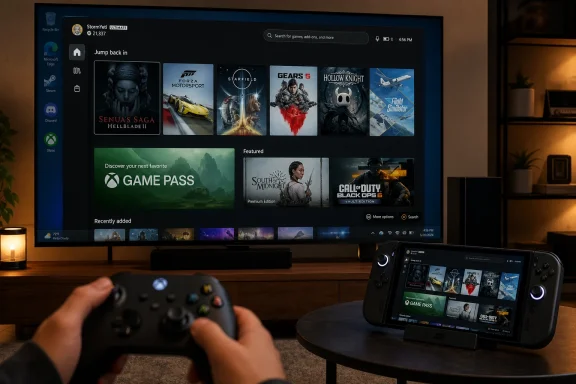
Microsoft began rolling out Xbox mode for Windows 11 PCs on April 30, 2026, expanding a controller-first full-screen gaming interface beyond Asus’s ROG Xbox Ally handhelds to desktops, laptops, and tablets in selected markets. The move is more than another Xbox app redesign. It is Microsoft’s most explicit admission yet that Windows, as shipped, is not naturally good enough for the console-like PC future the company wants to sell. Xbox mode makes Windows gaming feel more coherent, but it also exposes the contradiction at the center of Microsoft’s strategy: the company is trying to build a console experience on top of an operating system that keeps behaving like a general-purpose billboard.
For decades, the Windows advantage in gaming was brute compatibility. If a game existed for PC, Windows was where it ran, and the rough edges were tolerated because the library was unmatched. That bargain works at a desk with a keyboard, a mouse, and a user who already accepts driver updates, launchers, overlays, and settings panels as part of the hobby.
It works less well on a couch, in bed, or on a handheld. There, the Windows desktop feels less like freedom and more like unpaid labor. Tiny controls, background pop-ups, login prompts, storefront updates, and notification spam are not just annoyances; they are reminders that the machine is not really yours in the moment you want to play.
Xbox mode is Microsoft’s attempt to put a proper front door on that experience. Instead of dumping players onto the desktop and asking them to know where Steam, Epic, Battle.net, Game Pass, cloud saves, Game Bar, Bluetooth pairing, and display settings live, it tries to collapse that friction into a controller-friendly shell.
That is a meaningful shift. Microsoft has spent years saying that Xbox is no longer one box under a television, but a platform spanning console, PC, cloud, and handheld devices. Xbox mode is the software expression of that thesis. It says the Xbox experience can be a layer inside Windows rather than a separate operating system running on dedicated console hardware.
The problem is that a layer is still a layer. Xbox mode may hide the desktop at launch, but it does not make Windows disappear.
This matters because PC gaming’s abundance has become its own tax. Players do not merely own games; they own fragments of libraries spread across publishers, stores, launchers, subscription catalogs, and cloud entitlements. A game may be installed locally, available through Game Pass, playable through the cloud, owned through Xbox Play Anywhere, or trapped in a third-party launcher that demands an update before it will even show the Play button.
Xbox mode does not abolish that complexity, but it does improve the surface area. For players already invested in Xbox, Game Pass, and Play Anywhere, the ability to see console-linked entitlements beside PC storefront titles makes the ecosystem feel less artificially divided. It also makes clear why Microsoft keeps pushing Play Anywhere as a strategic asset rather than a convenience feature.
The catch is obvious the moment the player leaves the dashboard fantasy. Third-party games still depend on third-party launchers for installation, patching, authentication, and sometimes online services. Xbox mode can present Steam games in a Microsoft-flavored interface, but it cannot turn Steam into an Xbox service, nor can it make EA, Ubisoft, Epic, or Blizzard behave as if they were subordinate pieces of a single console dashboard.
That difference matters because consoles are not popular merely because their interfaces are simple. They are popular because the platform holder has the power to enforce a consistent experience. Microsoft can recommend a better path through Windows, but on PC it cannot fully dictate one without undermining the openness that makes PC gaming valuable in the first place.
Handheld PC makers have been solving this problem in their own ways for years. Asus’s Armoury Crate, Lenovo’s Legion Space, Steam Big Picture, SteamOS, and community-driven handheld tools all exist because Windows has never been naturally comfortable at seven inches or ten feet. Microsoft’s version is important because it moves the fix closer to the platform layer.
Still, the elegance gap remains. A true console dashboard rarely asks the user to pretend a joystick is a mouse. Xbox mode does, because Windows software was never built around one input model. The cursor is a bridge, not a destination.
That distinction will matter more as Microsoft moves toward its next-generation Xbox hardware strategy. If Project Helix is indeed meant to blur console and PC gaming on one machine, then Microsoft cannot rely on “good enough” controller emulation forever. A premium console-PC hybrid will need to make traditional Windows interactions feel exceptional rather than merely survivable.
For now, the gamepad cursor is practical, welcome, and revealing. It is Microsoft patching over a user-interface culture that has been optimized for desks, not couches.
But the numbers cut both ways. If Xbox mode improves gaming performance by suppressing the rest of Windows, then the implicit message is that the rest of Windows is part of the problem. The desktop environment, startup tasks, widgets, services, telemetry hooks, bundled apps, and AI-adjacent features are not neutral passengers when a device is trying to behave like a console.
That is where the “Windows bloat” argument becomes less about taste and more about product fit. Enthusiasts have long used debloating scripts, startup managers, privacy tools, and PowerShell commands to slim Windows down. Microsoft can reasonably warn that some of those tools are risky, overzealous, or unsupported. But the desire behind them is not irrational.
A console-like gaming mode should not require the user to become a system custodian. If the promise is faster access to games, fewer distractions, and better performance, then users should not have to spend their first evening uninstalling bundled apps, muting AI prompts, disabling background services, and digging through settings to make the machine feel purpose-built.
The irony is that Xbox mode is strongest precisely where normal Windows is weakest. It narrows the interface, prioritizes games, reduces clutter, and assumes the user wants to do one thing. That is good design. It is also an indictment of the default experience.
A gaming device is a particularly bad place for that kind of ambiguity. Players are sensitive to input latency, background CPU usage, RAM pressure, unwanted overlays, network activity, and anything that interrupts fullscreen play. If an AI feature cannot explain why it deserves to be present during a gaming session, users will assume it is stealing resources or attention.
That perception may not always be technically fair. Modern Windows systems are complicated, and not every background component has a measurable effect on frame rate. But product trust is not built on telling users they are wrong to dislike the thing they keep seeing.
Microsoft appears to understand this in the Xbox lane, where it has reportedly pulled back from some of the more intrusive gaming-AI ideas and refocused on practical player features. That is the right instinct. Nobody objects to intelligence in the system when it solves real problems: automatic resolution tuning, better docking behavior, smarter cloud-save conflict handling, and controller-aware navigation are all forms of intelligence.
The problem is branding every form of assistance as an AI experience and assuming that makes it more attractive. For Xbox mode to succeed, Microsoft needs less Copilot theater and more invisible competence.
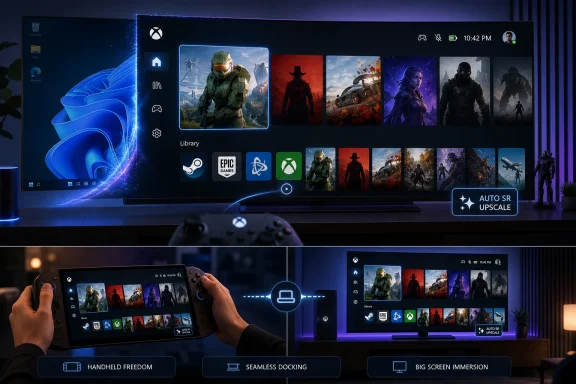
That matters most on handhelds. A small gaming PC is always negotiating among resolution, battery, heat, fan noise, and performance. Rendering at a lower resolution and upscaling intelligently can be the difference between a game that is technically playable and one that feels good enough to recommend.
Auto SR is not magic, and it should not be treated as a replacement for engine-aware upscaling. DLSS, FSR, and XeSS benefit from deeper integration with motion vectors, temporal data, and per-game tuning. A system-level upscaler arrives later in the rendering pipeline and has less context, which means image quality and latency tradeoffs will vary by title.
But Windows-level gaming features are strategically important. They let Microsoft improve old and unmodified games, not just new titles whose developers choose to support a particular SDK. That is the kind of platform leverage Windows should be using: compatibility plus enhancement, not clutter plus prompts.
The question is whether Microsoft can keep this work practical. Auto SR is compelling when it helps a handheld punch above its weight. It becomes less compelling if it is packaged as another marketing surface for AI rather than a quiet performance tool.
A Windows gaming handheld connected to a television has historically been a gamble. Display scaling may be wrong, audio may route unpredictably, controllers may need re-pairing, the game may open on the wrong screen, and the desktop may appear at exactly the moment the illusion breaks. Each failure is small in isolation. Together, they make the device feel like a PC pretending to be a console.
Xbox mode’s docking improvements are designed to preserve context. The machine should know that the player wants the game, not the desktop. It should handle the external display without ceremony, keep cloud-sync state visible, and let the user continue with a controller rather than reaching for a keyboard.
This is where Microsoft has a genuine opportunity. Valve’s Steam Deck proved that a Linux-based handheld can win affection not because it runs every Windows game perfectly, but because the default experience feels coherent. Microsoft has broader compatibility, deeper publisher relationships, Game Pass, DirectX, and decades of PC gaming inertia on its side. What it has lacked is discipline.
Docking is a discipline problem. If Xbox mode can make Windows behave predictably when moving between handheld, monitor, and television, it will solve a pain point that ordinary desktop Windows has never taken seriously enough.
But the deeper comparison is SteamOS. Valve’s advantage is not merely its interface; it is the feeling that the device has a default purpose. The Steam Deck boots into a gaming environment where the desktop exists as an option, not an ever-present gravitational force. That hierarchy is the difference between a gaming appliance and a general-purpose computer with a game launcher pinned to the taskbar.
Microsoft is trying to create that hierarchy inside Windows without sacrificing Windows. That is harder than what Valve attempted, because Microsoft must support more hardware, more launchers, more peripherals, more enterprise expectations, more legacy baggage, and more of its own monetization machinery. Windows is valuable because it is broad. Xbox mode is necessary because broadness is exhausting.
The danger is that Microsoft treats Xbox mode as a skin. A skin can make Windows prettier from a couch, but it cannot guarantee suspend/resume reliability, shader compilation behavior, controller consistency, clean updates, predictable storage management, or freedom from desktop interruptions. Those are system qualities, not app features.
SteamOS is the warning because it proves that users will accept some compatibility compromises in exchange for coherence. If Windows wants to remain the default gaming platform on handhelds, Microsoft has to make its compatibility advantage feel effortless rather than administrative.
That future is attractive on paper. Imagine a device that preserves the simplicity, suspend behavior, controller expectations, and living-room polish of Xbox while opening access to PC-native games and storefronts. For players, it could mean a larger library. For developers, it could mean fewer artificial platform boundaries. For Microsoft, it could mean turning Windows compatibility into a console differentiator rather than an enthusiast workaround.
But the hard questions are not solved by declaring that the next Xbox plays PC games. Which PC games? From which storefronts? With what anti-cheat support? Under what security model? How will mods work? How will refunds, saves, achievements, overlays, parental controls, and performance certification work when the platform blends console expectations with PC openness?
Xbox mode gives us a glimpse of one answer: aggregate the library, optimize the shell, and let Windows handle the messy compatibility underneath. That may be enough for handheld PCs, where buyers already expect some tinkering. It may not be enough for a console successor, where the audience expects the platform holder to absorb the mess.
This is why the Windows bloat problem is not a side complaint. It is central to whether Project Helix can feel like a new kind of console or merely a branded gaming PC with better marketing.
That does not make Xbox mode hostile to tinkering, but it does reveal a tension. The more Microsoft simplifies the interface, the more it risks burying the controls that advanced users want. The more it exposes those controls, the less console-like the experience becomes.
Steam has spent years navigating this split. Steam Big Picture and Steam Deck’s gaming mode simplify the default path, while desktop mode remains available for users who want to go deeper. Microsoft will need a similarly honest model. Hiding Windows is useful; pretending Windows no longer matters is not.
There is also the Microsoft Store legacy to overcome. PC gamers have long memories of locked-down app packages, awkward install paths, repair failures, permission weirdness, and games that behaved differently depending on whether they came from Steam or Microsoft’s store. The Xbox app has improved substantially, but reputation lags product work.
For Xbox mode to earn trust among enthusiasts, it has to respect the PC part of PC gaming. That means making the easy path easy without making the advanced path feel like a jailbreak.
Xbox mode is a consumer gaming story, but it carries an enterprise lesson: role-specific Windows experiences are only as good as the policy, servicing, and management model behind them. If Microsoft can create a clean gaming posture for Windows, administrators will reasonably ask why similar discipline cannot apply elsewhere.
A gaming PC and an enterprise workstation are not the same device, but they share a demand for intentionality. Both benefit when background behavior is transparent, resource usage is controlled, notifications are respectful, and unwanted bundled experiences are removable. Both suffer when Microsoft’s commercial priorities leak into the user’s workflow.
This is why the bloat debate persists. It is not just nostalgia for leaner operating systems. It is frustration that Windows increasingly asks users and administrators to negotiate with it. A gaming mode that suppresses distractions proves Microsoft knows the negotiation is tiring.
The best version of Xbox mode would not merely be a place where games take center stage. It would be evidence that Microsoft can still build Windows experiences with restraint.
But users should calibrate expectations. This is not a new operating system. It does not remove the need for third-party launchers. It does not make every Windows prompt controller-friendly. It does not turn every Play Anywhere promise into universal ownership across all versions of a game. It does not erase the desktop, the Store, Game Bar, driver panels, anti-cheat quirks, or the occasional demand for a keyboard.
That is not failure. It is the reality of building a console experience out of PC parts. The achievement is that Microsoft is finally treating that reality as a product problem rather than leaving it to OEM utilities and forum guides.
The risk is that Microsoft stops at the shell. A full-screen dashboard is the visible part of the console experience, but the invisible parts are what make players trust it: resume reliability, updates that do not sabotage a session, quiet background behavior, clean controller handling, fast launches, obvious storage controls, and a sense that nothing unrelated to gaming is trying to intrude.
Xbox mode is promising because it points in that direction. It is incomplete because Windows keeps pointing in several others at once.
 Microsoft Finally Admits the Desktop Is the Wrong Front Door for Gaming
For decades, the Windows advantage in gaming was brute compatibility. If a game existed for PC, Windows was where it ran, and the rough edges were tolerated because the library was unmatched. That bargain works at a desk with a keyboard, a mouse, and a user who already accepts driver updates, launchers, overlays, and settings panels as part of the hobby.It works less well on a couch, in bed, or on a handheld. There, the Windows desktop feels less like freedom and more like unpaid labor. Tiny controls, background pop-ups, login prompts, storefront updates, and notification spam are not just annoyances; they are reminders that the machine is not really yours in the moment you want to play.
Xbox mode is Microsoft’s attempt to put a proper front door on that experience. Instead of dumping players onto the desktop and asking them to know where Steam, Epic, Battle.net, Game Pass, cloud saves, Game Bar, Bluetooth pairing, and display settings live, it tries to collapse that friction into a controller-friendly shell.
That is a meaningful shift. Microsoft has spent years saying that Xbox is no longer one box under a television, but a platform spanning console, PC, cloud, and handheld devices. Xbox mode is the software expression of that thesis. It says the Xbox experience can be a layer inside Windows rather than a separate operating system running on dedicated console hardware.
The problem is that a layer is still a layer. Xbox mode may hide the desktop at launch, but it does not make Windows disappear.
The Unified Library Is the Feature Microsoft Should Have Built Years Ago
The most immediately useful part of Xbox mode is not glamorous. It is the consolidated library. Pulling installed games from Steam, Epic Games Store, Battle.net, the Xbox app, Game Pass, and other PC storefronts into one controller-navigable place is exactly the sort of plumbing that makes a Windows gaming device feel less like a compromised laptop.This matters because PC gaming’s abundance has become its own tax. Players do not merely own games; they own fragments of libraries spread across publishers, stores, launchers, subscription catalogs, and cloud entitlements. A game may be installed locally, available through Game Pass, playable through the cloud, owned through Xbox Play Anywhere, or trapped in a third-party launcher that demands an update before it will even show the Play button.
Xbox mode does not abolish that complexity, but it does improve the surface area. For players already invested in Xbox, Game Pass, and Play Anywhere, the ability to see console-linked entitlements beside PC storefront titles makes the ecosystem feel less artificially divided. It also makes clear why Microsoft keeps pushing Play Anywhere as a strategic asset rather than a convenience feature.
The catch is obvious the moment the player leaves the dashboard fantasy. Third-party games still depend on third-party launchers for installation, patching, authentication, and sometimes online services. Xbox mode can present Steam games in a Microsoft-flavored interface, but it cannot turn Steam into an Xbox service, nor can it make EA, Ubisoft, Epic, or Blizzard behave as if they were subordinate pieces of a single console dashboard.
That difference matters because consoles are not popular merely because their interfaces are simple. They are popular because the platform holder has the power to enforce a consistent experience. Microsoft can recommend a better path through Windows, but on PC it cannot fully dictate one without undermining the openness that makes PC gaming valuable in the first place.
Controller Navigation Is a Small Fix to a Huge Old Problem
The new gamepad cursor is one of those features that sounds minor until you remember how miserable Windows can be with a controller. A thumbstick-controlled cursor is not a revolution, but it is a concession to reality. Not every menu, launcher, mod manager, cloud-save prompt, or account login screen was built for the living room.Handheld PC makers have been solving this problem in their own ways for years. Asus’s Armoury Crate, Lenovo’s Legion Space, Steam Big Picture, SteamOS, and community-driven handheld tools all exist because Windows has never been naturally comfortable at seven inches or ten feet. Microsoft’s version is important because it moves the fix closer to the platform layer.
Still, the elegance gap remains. A true console dashboard rarely asks the user to pretend a joystick is a mouse. Xbox mode does, because Windows software was never built around one input model. The cursor is a bridge, not a destination.
That distinction will matter more as Microsoft moves toward its next-generation Xbox hardware strategy. If Project Helix is indeed meant to blur console and PC gaming on one machine, then Microsoft cannot rely on “good enough” controller emulation forever. A premium console-PC hybrid will need to make traditional Windows interactions feel exceptional rather than merely survivable.
For now, the gamepad cursor is practical, welcome, and revealing. It is Microsoft patching over a user-interface culture that has been optimized for desks, not couches.
The RAM Savings Are Real, But They Tell an Awkward Story
Microsoft and its hardware partners have emphasized that Xbox mode can reduce background activity and free more system resources for games. On constrained handhelds and lower-memory machines, that matters. A few hundred megabytes saved here, fewer background tasks there, and a lower idle-power state can translate into smoother frame pacing, better battery life, or less fan noise.But the numbers cut both ways. If Xbox mode improves gaming performance by suppressing the rest of Windows, then the implicit message is that the rest of Windows is part of the problem. The desktop environment, startup tasks, widgets, services, telemetry hooks, bundled apps, and AI-adjacent features are not neutral passengers when a device is trying to behave like a console.
That is where the “Windows bloat” argument becomes less about taste and more about product fit. Enthusiasts have long used debloating scripts, startup managers, privacy tools, and PowerShell commands to slim Windows down. Microsoft can reasonably warn that some of those tools are risky, overzealous, or unsupported. But the desire behind them is not irrational.
A console-like gaming mode should not require the user to become a system custodian. If the promise is faster access to games, fewer distractions, and better performance, then users should not have to spend their first evening uninstalling bundled apps, muting AI prompts, disabling background services, and digging through settings to make the machine feel purpose-built.
The irony is that Xbox mode is strongest precisely where normal Windows is weakest. It narrows the interface, prioritizes games, reduces clutter, and assumes the user wants to do one thing. That is good design. It is also an indictment of the default experience.
Copilot Is the Wrong Symbol for a Gaming Machine
The backlash to AI features in Windows gaming is not simply anti-AI reflex. Gamers already accept machine learning when it produces visible value: DLSS, frame generation, upscaling, denoising, matchmaking improvements, accessibility tools, and smarter capture features all have plausible places in the stack. The objection is to AI that feels stapled onto the operating system because Microsoft has a corporate mandate to put Copilot everywhere.A gaming device is a particularly bad place for that kind of ambiguity. Players are sensitive to input latency, background CPU usage, RAM pressure, unwanted overlays, network activity, and anything that interrupts fullscreen play. If an AI feature cannot explain why it deserves to be present during a gaming session, users will assume it is stealing resources or attention.
That perception may not always be technically fair. Modern Windows systems are complicated, and not every background component has a measurable effect on frame rate. But product trust is not built on telling users they are wrong to dislike the thing they keep seeing.
Microsoft appears to understand this in the Xbox lane, where it has reportedly pulled back from some of the more intrusive gaming-AI ideas and refocused on practical player features. That is the right instinct. Nobody objects to intelligence in the system when it solves real problems: automatic resolution tuning, better docking behavior, smarter cloud-save conflict handling, and controller-aware navigation are all forms of intelligence.
The problem is branding every form of assistance as an AI experience and assuming that makes it more attractive. For Xbox mode to succeed, Microsoft needs less Copilot theater and more invisible competence.
Auto SR Shows the Promise of Windows as a Gaming Platform Layer
Automatic Super Resolution is the most technically interesting part of the broader Xbox mode moment because it points to something Windows can do that a storefront cannot. Unlike game-specific upscalers such as DLSS, FSR, or XeSS, Auto SR works at the operating-system and display-pipeline level, using on-device processing to upscale supported games without requiring each developer to integrate a vendor-specific technology.That matters most on handhelds. A small gaming PC is always negotiating among resolution, battery, heat, fan noise, and performance. Rendering at a lower resolution and upscaling intelligently can be the difference between a game that is technically playable and one that feels good enough to recommend.
Auto SR is not magic, and it should not be treated as a replacement for engine-aware upscaling. DLSS, FSR, and XeSS benefit from deeper integration with motion vectors, temporal data, and per-game tuning. A system-level upscaler arrives later in the rendering pipeline and has less context, which means image quality and latency tradeoffs will vary by title.
But Windows-level gaming features are strategically important. They let Microsoft improve old and unmodified games, not just new titles whose developers choose to support a particular SDK. That is the kind of platform leverage Windows should be using: compatibility plus enhancement, not clutter plus prompts.
The question is whether Microsoft can keep this work practical. Auto SR is compelling when it helps a handheld punch above its weight. It becomes less compelling if it is packaged as another marketing surface for AI rather than a quiet performance tool.
Docking Turns the Handheld PC Into Microsoft’s Switch Test
Improved docking support may sound mundane beside AI upscaling and next-generation console rumors, but it is central to the experience Microsoft is chasing. The Nintendo Switch trained an entire market to expect play to move fluidly from handheld to television. Windows handhelds can technically do this, but technical possibility is not the same as consumer confidence.A Windows gaming handheld connected to a television has historically been a gamble. Display scaling may be wrong, audio may route unpredictably, controllers may need re-pairing, the game may open on the wrong screen, and the desktop may appear at exactly the moment the illusion breaks. Each failure is small in isolation. Together, they make the device feel like a PC pretending to be a console.
Xbox mode’s docking improvements are designed to preserve context. The machine should know that the player wants the game, not the desktop. It should handle the external display without ceremony, keep cloud-sync state visible, and let the user continue with a controller rather than reaching for a keyboard.
This is where Microsoft has a genuine opportunity. Valve’s Steam Deck proved that a Linux-based handheld can win affection not because it runs every Windows game perfectly, but because the default experience feels coherent. Microsoft has broader compatibility, deeper publisher relationships, Game Pass, DirectX, and decades of PC gaming inertia on its side. What it has lacked is discipline.
Docking is a discipline problem. If Xbox mode can make Windows behave predictably when moving between handheld, monitor, and television, it will solve a pain point that ordinary desktop Windows has never taken seriously enough.
Steam Big Picture Is the Rival, but SteamOS Is the Warning
It is tempting to frame Xbox mode as Microsoft’s answer to Steam Big Picture. On the surface, that is true. Both provide a controller-first way to browse a game library, launch titles, manage friends, and operate a PC from the couch.But the deeper comparison is SteamOS. Valve’s advantage is not merely its interface; it is the feeling that the device has a default purpose. The Steam Deck boots into a gaming environment where the desktop exists as an option, not an ever-present gravitational force. That hierarchy is the difference between a gaming appliance and a general-purpose computer with a game launcher pinned to the taskbar.
Microsoft is trying to create that hierarchy inside Windows without sacrificing Windows. That is harder than what Valve attempted, because Microsoft must support more hardware, more launchers, more peripherals, more enterprise expectations, more legacy baggage, and more of its own monetization machinery. Windows is valuable because it is broad. Xbox mode is necessary because broadness is exhausting.
The danger is that Microsoft treats Xbox mode as a skin. A skin can make Windows prettier from a couch, but it cannot guarantee suspend/resume reliability, shader compilation behavior, controller consistency, clean updates, predictable storage management, or freedom from desktop interruptions. Those are system qualities, not app features.
SteamOS is the warning because it proves that users will accept some compatibility compromises in exchange for coherence. If Windows wants to remain the default gaming platform on handhelds, Microsoft has to make its compatibility advantage feel effortless rather than administrative.
Project Helix Raises the Stakes From App Design to Platform Identity
The reported Project Helix strategy gives Xbox mode a much larger significance. If Microsoft’s next Xbox is meant to play both console and PC games, then the company is not merely improving the Xbox app on Windows. It is rehearsing the interface and policy decisions that could define the next Xbox generation.That future is attractive on paper. Imagine a device that preserves the simplicity, suspend behavior, controller expectations, and living-room polish of Xbox while opening access to PC-native games and storefronts. For players, it could mean a larger library. For developers, it could mean fewer artificial platform boundaries. For Microsoft, it could mean turning Windows compatibility into a console differentiator rather than an enthusiast workaround.
But the hard questions are not solved by declaring that the next Xbox plays PC games. Which PC games? From which storefronts? With what anti-cheat support? Under what security model? How will mods work? How will refunds, saves, achievements, overlays, parental controls, and performance certification work when the platform blends console expectations with PC openness?
Xbox mode gives us a glimpse of one answer: aggregate the library, optimize the shell, and let Windows handle the messy compatibility underneath. That may be enough for handheld PCs, where buyers already expect some tinkering. It may not be enough for a console successor, where the audience expects the platform holder to absorb the mess.
This is why the Windows bloat problem is not a side complaint. It is central to whether Project Helix can feel like a new kind of console or merely a branded gaming PC with better marketing.
Modders and Tinkerers Still Live Outside the Console Fantasy
Xbox mode is designed for frictionless play, but PC gaming’s most loyal users often define value by what happens after launch. Mods, reshade tools, trainers, custom launch arguments, community patches, alternative controllers, fan translations, save editors, benchmarking overlays, and configuration files are part of the culture. A console-style shell can make those workflows harder to see.That does not make Xbox mode hostile to tinkering, but it does reveal a tension. The more Microsoft simplifies the interface, the more it risks burying the controls that advanced users want. The more it exposes those controls, the less console-like the experience becomes.
Steam has spent years navigating this split. Steam Big Picture and Steam Deck’s gaming mode simplify the default path, while desktop mode remains available for users who want to go deeper. Microsoft will need a similarly honest model. Hiding Windows is useful; pretending Windows no longer matters is not.
There is also the Microsoft Store legacy to overcome. PC gamers have long memories of locked-down app packages, awkward install paths, repair failures, permission weirdness, and games that behaved differently depending on whether they came from Steam or Microsoft’s store. The Xbox app has improved substantially, but reputation lags product work.
For Xbox mode to earn trust among enthusiasts, it has to respect the PC part of PC gaming. That means making the easy path easy without making the advanced path feel like a jailbreak.
Enterprise Lessons Are Hiding in a Gaming Story
WindowsForum readers know the pattern because it is not limited to gaming. Microsoft often solves complexity by adding another experience layer rather than simplifying the base system. New Settings pages sit beside old Control Panel remnants. Security dashboards coexist with legacy management tools. Consumer AI features appear on machines that administrators want to keep predictable.Xbox mode is a consumer gaming story, but it carries an enterprise lesson: role-specific Windows experiences are only as good as the policy, servicing, and management model behind them. If Microsoft can create a clean gaming posture for Windows, administrators will reasonably ask why similar discipline cannot apply elsewhere.
A gaming PC and an enterprise workstation are not the same device, but they share a demand for intentionality. Both benefit when background behavior is transparent, resource usage is controlled, notifications are respectful, and unwanted bundled experiences are removable. Both suffer when Microsoft’s commercial priorities leak into the user’s workflow.
This is why the bloat debate persists. It is not just nostalgia for leaner operating systems. It is frustration that Windows increasingly asks users and administrators to negotiate with it. A gaming mode that suppresses distractions proves Microsoft knows the negotiation is tiring.
The best version of Xbox mode would not merely be a place where games take center stage. It would be evidence that Microsoft can still build Windows experiences with restraint.
The April Rollout Gives Gamers a Better Shell, Not a Finished Console
The practical read is more encouraging than the philosophical one. Xbox mode gives Windows 11 gaming devices a more credible living-room and handheld interface. It reduces some background noise, improves controller navigation, brings libraries together, supports newer platform features such as Auto SR, and gives Microsoft a place to iterate before Project Helix becomes a real consumer product.But users should calibrate expectations. This is not a new operating system. It does not remove the need for third-party launchers. It does not make every Windows prompt controller-friendly. It does not turn every Play Anywhere promise into universal ownership across all versions of a game. It does not erase the desktop, the Store, Game Bar, driver panels, anti-cheat quirks, or the occasional demand for a keyboard.
That is not failure. It is the reality of building a console experience out of PC parts. The achievement is that Microsoft is finally treating that reality as a product problem rather than leaving it to OEM utilities and forum guides.
The risk is that Microsoft stops at the shell. A full-screen dashboard is the visible part of the console experience, but the invisible parts are what make players trust it: resume reliability, updates that do not sabotage a session, quiet background behavior, clean controller handling, fast launches, obvious storage controls, and a sense that nothing unrelated to gaming is trying to intrude.
Xbox mode is promising because it points in that direction. It is incomplete because Windows keeps pointing in several others at once.
The Console PC Future Will Be Won in the Unsexy Details
Xbox mode is best understood as a useful first draft of Microsoft’s next gaming identity. The big picture is obvious: Xbox wants to be the bridge between console comfort and PC breadth. The details will decide whether that bridge feels sturdy.- Xbox mode makes Windows 11 more usable from a couch or handheld, but it remains a full-screen layer over a general-purpose desktop operating system.
- The unified library is genuinely helpful, though third-party storefronts still control installation, updates, authentication, and many support headaches.
- Auto SR is a strategically important Windows-level gaming feature, especially for handhelds, but it will not replace game-integrated upscalers in every scenario.
- The RAM and background-task reductions are welcome, but they also highlight how much non-gaming baggage standard Windows brings to gaming devices.
- Project Helix will need deeper integration than Xbox mode currently provides if Microsoft wants a console-PC hybrid to feel like a console rather than a managed Windows PC.
- Microsoft’s biggest opportunity is not more AI branding, but fewer interruptions, cleaner defaults, and a gaming posture that respects both casual players and tinkerers.
References
- Primary source: aol.com
Published: Fri, 22 May 2026 13:06:14 GMT
Xbox Mode Turns Your PC Into A Console, But It Can't Hide Windows 11 Bloat - AOL
Xbox mode for Windows 11 is finally out of preview, and it brings some genuinely useful features. Windows bloat is still very much along for the ride, though.www.aol.com - Related coverage: windowscentral.com
The next Xbox may drop the disc drive, but players seem ready for disc‑to‑digital — if it's even real | Windows Central
Project Helix raises new questions about physical games, backward compatibility, and whether disc‑to‑digital will be an essential part of the Xbox ecosystem.www.windowscentral.com - Related coverage: gamesradar.com
As Halo and Forza Horizon 6 prepare to jump ship to PS5, Xbox fans use new community voting tool to tell Microsoft they want their exclusives back | GamesRadar+
Xbox Player Voice is live, and exclusives top the listwww.gamesradar.com - Related coverage: gamespot.com
Xbox Mode, Formerly Xbox Full Screen Experience, Finally Launches On Windows 11 In April - GameSpot
Xbox Mode, formerly known as Xbox Fullscreen Experience, will start shipping on Windows 11 in April.www.gamespot.com - Related coverage: techrepublic.com
Microsoft Plans ‘Xbox Mode’ for Windows 11 PCs Starting in April
Microsoft says Xbox mode is coming to Windows 11 in April, bringing a console-style interface, faster game loading tools, and a unified PC strategy.www.techrepublic.com
- Related coverage: pcworld.com
Microsoft outs Xbox Project Helix: 'We want to break down the artificial barriers between PC and console' | PCWorld
Microsoft committed to shipping its next-gen console to developers in 2027, and listed several of its features. They should look familiar to PC gamers.www.pcworld.com
- Related coverage: windowslatest.com
Tested: First look at the new Xbox Mode for Windows 11 PCs with console-style gaming UI
Microsoft confirms Xbox Mode for Windows 11 PCs coming in 2026, and I tested the new console-style gaming interface on a Windows PC www.windowslatest.com
- Related coverage: pureinfotech.com
Microsoft confirms Xbox mode arrives on Windows 11 PCs in April 2026 - Pureinfotech
Windows 11 is getting Xbox Full Screen Experience in April 2026, transforming PCs into console-style gaming systems. pureinfotech.com
- Related coverage: tomshardware.com
Microsoft confirms next-gen Xbox will play PC games — 'Project Helix' teased as more than just a console | Tom's Hardware
But will it be able to play all PC games?www.tomshardware.com - Related coverage: techspot.com
Microsoft's full-screen Xbox experience is now available to Windows 11 Insiders | TechSpot
Microsoft recently announced a new Canary build within the Windows Insider Program. While not particularly groundbreaking in terms of features, Windows 11 Canary Build 29570.1000 does include...www.techspot.com - Related coverage: technobezz.com
Microsoft Launches Xbox Mode for All Windows 11 Devices Starting April 30 | Technobezz
Windows 11 devices become gaming consoles with a new controller-first interface, unified game library, and Quick Resume starting April 30.www.technobezz.com - Related coverage: gizchina.com
Xbox Project Helix: Next-Gen Console Built With AMD and DirectX
Xbox revealed Project Helix at GDC — a next-gen console built on a custom AMD SoC with DirectX upgrades and order-of-magnitude ray tracing.www.gizchina.com - Related coverage: business-standard.com
Full-screen Xbox experience now available on Windows 11-based PCs, tablets | Tech News - Business Standard
Full Screen Xbox Experience on Windows 11 PCs: Microsoft is rolling out Xbox mode to Windows 11 PCs and tablets in select markets, bringing a console-style interface with controller-first navigation and unified game librarieswww.business-standard.com
- Related coverage: techradar.com
Microsoft confirms its next Xbox, Project Helix, will go out to studios next year — 'We plan to ship alpha versions of the hardware to developers beginning in 2027' | TechRadar
Microsoft has shared new details about its next-generation Xbox console, Project Helix, and confirmed it will be in developers' hands sooner than expected.www.techradar.com - Related coverage: news.xbox.com
- Official source: support.microsoft.com
Automatic Super Resolution - Microsoft Support
Automatic Super Resolution is the first OS-integrated AI technique where your games not only play better but look stunning too!support.microsoft.com - Official source: developer.microsoft.com
- Related coverage: xbox.com
Xbox Play Anywhere | Xbox
Games that are Xbox Play Anywhere are yours to play across the Xbox ecosystem on PC and Xbox console at no additional cost.www.xbox.com - Official source: blogs.windows.com
Windows 11 PC gamers: Xbox mode rolls out and ROG Xbox Ally updates include Auto SR preview
Xbox mode will begin rolling out in select markets to Windows 11 PCs, including laptops, desktops and tablets, bringing a console-inspired Xbox experience to more players than ever. Xbox mode is designed for the moments when you want your gamesblogs.windows.com - Related coverage: gamermarkt.com
Windows 11 Auto SR: NPU Upscaling Changes Handheld Gaming
Windows 11 Auto SR uses the NPU to upscale games on the ROG Xbox Ally X, delivering up to 42% higher FPS. Here is how it works and what benchmarks show.www.gamermarkt.com - Related coverage: tomsguide.com
The Xbox PC app now gives you access to all your Windows games — launch titles from Steam, Epic Games and more | Tom's Guide
You can now launch Steam games and titles from other launchers in the Xbox PC app. Here's how it works.www.tomsguide.com - Related coverage: pcgamer.com
Microsoft is paving more PC roads to Project Helix, releasing a Windows 11 Xbox Mode in April for laptops and desktops | PC Gamer
This should make navigating Windows on controller easier.www.pcgamer.com - Related coverage: lg.com