

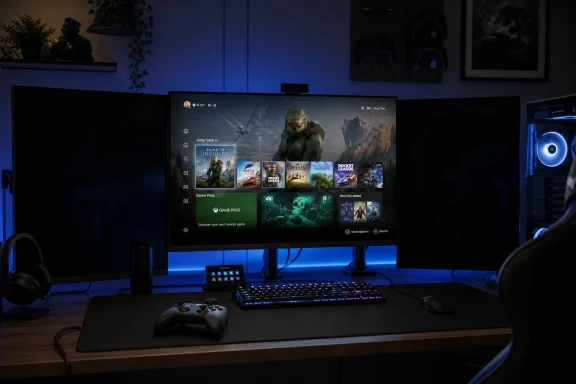
Microsoft’s Xbox Mode for Windows 11 is now rolling out to PCs with a full-screen, controller-first gaming interface, but early user testing shows that enabling it can blank secondary monitors instead of preserving a normal multi-display desktop. That behavior is not a small edge case for PC gaming; it is a statement about what kind of “PC console” Microsoft thinks it is building. The company is trying to make Windows feel less like Windows when games are the point, and the first visible trade-off is the very flexibility PC players have spent years normalizing. Xbox Mode may be a win for handhelds and living-room rigs, but on a desk with two or three screens, it exposes the tension at the heart of Microsoft’s gaming strategy.
Xbox Mode is being sold as a way to make Windows 11 behave more like a console: boot into a clean gaming surface, navigate with a controller, and reduce the desktop clutter that makes handheld Windows devices feel like tiny laptops with joysticks. On a handheld, that pitch is easy to understand. Nobody buys a seven-inch gaming device because they want to poke through tray icons, dismiss OneDrive nags, and fight with tiny window controls before launching a game.
The problem is that Microsoft has now pushed the same idea onto a much broader class of PCs. Desktops, laptops, tablets, handhelds, and TV-connected machines all technically sit under the Windows 11 umbrella, but they are not the same kind of gaming device. A mode that feels elegant on a handheld can feel oddly hostile on a workstation with a main monitor, a chat screen, a capture display, and a browser parked off to the side.
That is why the reported multi-monitor behavior matters. If Xbox Mode takes over the primary screen and blanks the others, it is not merely “going full screen.” It is suspending one of the modern PC’s defining habits: using the machine as a gaming system and a communications, media, monitoring, and productivity station at the same time.
Microsoft’s likely defense is obvious. Xbox Mode is meant to be focused, fast, and controller-friendly. Secondary monitors are beside the point when the target experience is a couch, a handheld, or a single display. But Windows is not Xbox hardware, and PC users notice when optional focus starts to look like enforced simplification.
The second screen is where Discord lives. It is where walkthroughs, patch notes, OBS, Spotify, hardware telemetry, Twitch chat, YouTube, browser guides, maps, wikis, and mod managers sit while the game keeps running on the primary panel. For many players, the point of PC gaming is not just higher frame rates or better graphics settings; it is the ability to wrap the game inside a broader computing environment.
Windows itself has gradually adapted to that reality. Borderless windowed gaming, better Alt-Tab behavior, variable refresh rate support, Game Bar overlays, and per-monitor scaling have all contributed to a world where the game no longer has to monopolize the entire machine. Classic exclusive full screen still exists, but the modern Windows gaming experience has mostly moved toward coexistence.
Xbox Mode appears to pull in the other direction. It revives the console assumption that play is a single-screen state, not a multi-window workflow. That assumption may improve consistency, but it also strips away one of the reasons many players choose Windows over a console in the first place.
The irony is that Microsoft spent years trying to make PC gaming feel less brittle. Now, in pursuit of a cleaner console-style experience, it risks making Windows feel less like the thing PC gamers actually use.
That is why Xbox Mode’s startup optimizations are important. Microsoft has described the experience as more than a skin over the Xbox app. It is meant to reduce the amount of background activity that launches with Windows and give games a cleaner runway. If secondary displays are being disabled as part of that philosophy, the logic is consistent: fewer active surfaces, fewer distractions, fewer ways for the desktop to intrude.
But “consistent” is not the same as “good for everyone.” On a high-end desktop with a dedicated GPU and plenty of memory, the resource cost of keeping a second monitor alive may be trivial compared with the utility it provides. On a handheld or low-power laptop, that same cost may be meaningful. A single policy across all form factors risks treating a tower PC like a battery-constrained portable.
This is where Microsoft’s old Windows problem returns in a new shape. Windows succeeds because it runs on everything, but gaming experiences increasingly need to be tuned for specific device classes. A handheld wants discipline. A desktop wants flexibility. A living-room PC wants simplicity. A streamer’s rig wants control. Xbox Mode cannot satisfy all of those users if it behaves as though they all bought the same machine.
The best version of Xbox Mode would make performance focus a choice, not a surprise. A user should be able to decide whether secondary displays stay active, dim, sleep, or shut off entirely. The current reported behavior may be defensible as a default for handhelds and TVs, but on multi-monitor desktops it feels like a console answer imposed on a PC question.
Steam Big Picture is not perfect, and SteamOS gets its best results precisely because Valve controls a narrower experience on the Steam Deck. But on Windows desktops, Steam’s full-screen interface generally behaves like an app that takes over one display, not a declaration that the rest of the machine should go dark. That distinction is why the comparison stings.
Microsoft is trying to do something broader than Valve on Windows. Xbox Mode is tied into the Xbox app, Game Pass, cloud gaming, installed games, controller navigation, and the company’s larger ambition to blur the line between Xbox consoles and Windows PCs. It is not merely a launcher; it is a platform signal.
That makes rough edges more consequential. When Steam Big Picture behaves awkwardly, users blame Steam. When Xbox Mode behaves awkwardly, users see Windows itself choosing sides. The operating system vendor is not just another app maker competing for the primary display. It controls the assumptions underneath the experience.
Microsoft wants Xbox Mode to feel native. That is the attraction. It is also the danger. Native experiences carry more authority, and users will judge them more harshly when they override established desktop behavior.
A controller-first shell is not a luxury there. It is table stakes. The Steam Deck changed expectations by showing that a PC-like gaming library could be wrapped in a console-like experience without asking users to manage a traditional desktop every time they wanted to play. Windows handheld makers have been chasing that level of coherence ever since.
Microsoft had to respond. If Windows is going to remain a serious platform for handheld PC gaming, it cannot rely indefinitely on OEM launchers, community tools, and users’ tolerance for jank. Xbox Mode is a necessary admission that the standard Windows shell is not enough.
But the desktop rollout complicates the story. Microsoft is not just fixing handheld Windows; it is exporting the handheld solution to PCs that may not need it. That is where the feature starts to look less like an ergonomic improvement and more like part of a larger platform consolidation effort.
The company wants one gaming identity across Xbox consoles, Windows handhelds, laptops, desktops, cloud endpoints, and perhaps future hybrid Xbox-PC hardware. That makes business sense. It also means the design center may drift away from the messy, user-controlled, multi-monitor desktop that defined PC gaming for decades.
The same is true for a child’s gaming PC in a bedroom, a dorm-room laptop plugged into a single display, or a handheld docked to a television. In those contexts, blanking inactive displays may be a feature rather than a bug. It reduces confusion and reinforces the illusion that the PC has become a console.
The trouble begins when Microsoft treats the desk as a living room. A PC gaming desk is not just a place where games happen; it is a command center. The secondary display is often not secondary in importance, even if Windows labels it that way. It may be the communication surface that keeps a multiplayer session coordinated or the monitoring surface that keeps a stream alive.
This is why user reaction is likely to split. Some players will applaud the focus. Others will see it as needless regression. Both groups are right from their own hardware context, which is precisely why a one-size-fits-all full-screen policy feels brittle.
Windows has always been at its best when it lets different users inhabit the same platform differently. Xbox Mode should learn from that tradition instead of trying to sand it down.
That matters because the PC gaming market is already a federation of storefronts, launchers, overlays, anti-cheat systems, account layers, and subscription services. Steam, Epic Games Store, GOG, Battle.net, EA app, Ubisoft Connect, itch.io, emulators, mod launchers, and standalone games all coexist uneasily on the same machine. A good gaming shell has to respect that sprawl.
Microsoft’s pitch is that Xbox Mode can gather the library and make the experience feel coherent. That is appealing, especially for Game Pass users. But PC gamers are allergic to anything that smells like a funnel. If Xbox Mode is perceived as a better shell for all games, it can win trust. If it is perceived as Windows bending toward Microsoft’s own gaming ecosystem, users will resist.
The multi-monitor issue feeds that anxiety because it looks like Microsoft prioritizing the purity of its shell over the habits of the platform. Even if the intent is performance, the effect is control. In PC gaming, the difference between those two is often political.
A good Xbox Mode would be opinionated without being authoritarian. It would make the easy path feel console-like while leaving escape hatches for users who bought a PC precisely because they wanted more than a console.
Those questions are not theoretical. Windows 11 gaming features increasingly live on machines that are not dedicated gaming rigs. A developer workstation may have Game Pass installed. A student laptop may be both a school device and a gaming device. A small business PC may be used after hours by someone who wants a controller-friendly interface. The boundary between work Windows and play Windows is porous.
If Xbox Mode becomes prominent, administrators will want policy controls. They will want to know whether it can launch at startup, whether it affects display behavior, whether it changes background app loading, and whether it creates support tickets from users who think their second monitor has failed. A blanked secondary display is not just a gamer annoyance in a managed environment; it is a helpdesk incident waiting to happen.
Microsoft should be unusually clear here. It needs documentation that distinguishes handheld behavior from desktop behavior, explains display handling, and gives administrators predictable controls. Vague “optimized for gaming” language is not enough when a feature changes how monitors behave.
The gaming audience may tolerate experimentation. IT departments tolerate settings.
Good performance modes are explicit. They tell the user what they are doing and why. Windows already has a long history of modes that change system behavior: Battery saver, Focus assist, Game Mode, tablet posture adaptations, HDR toggles, graphics preferences, and power plans. Some are more successful than others, but the basic contract is understandable. The system changes behavior, and the user gets a setting.
Xbox Mode needs that same contract. If Microsoft believes disabling secondary displays improves frame pacing, reduces GPU overhead, lowers power draw, or prevents focus problems, it should say so inside the experience. It should also provide a toggle for users who value multi-display workflows more than whatever performance margin is gained.
This is especially important because “performance” can become a vague shield for choices that are really about simplicity. PC users are often willing to trade convenience for measurable gains, but they are less forgiving when the gain is unclear. If blanking a second monitor saves meaningful power on handhelds, say that. If it improves stability for TV mode, say that. If it is simply the easiest way to make Xbox Mode feel console-like, that is a different conversation.
Transparency would not eliminate disagreement, but it would change the tone. Users are more likely to accept a hard trade-off when they are treated like participants rather than passengers.
A console-style Windows mode fits that future. It lets Microsoft test what happens when the Xbox user experience is detached from Xbox hardware and placed on commodity PCs. It gives the company a route into handhelds without building every device itself. It also lays groundwork for future hardware that may look less like a traditional console and more like a curated Windows gaming appliance.
In that light, the multi-monitor limitation is not an isolated annoyance. It is a clue about the design center. Microsoft is optimizing for the moments when Windows should disappear. That is the right instinct for handhelds and couch gaming, but it is a dangerous instinct if applied too broadly.
The future Xbox may be part console, part PC, part cloud endpoint, and part Windows profile. If so, Microsoft will need to decide how much of PC gaming’s unruly flexibility survives inside the Xbox-branded experience. The answer cannot be “as little as possible,” because then the PC becomes just another locked-down console with worse ergonomics.
The better answer is layered design. Give casual players the clean console path. Give enthusiasts the knobs. Give administrators policy. Give developers predictable behavior. That is harder than blanking extra displays, but Windows is supposed to be the platform that does the hard thing.
The desktop crowd is not a rounding error. It includes the players most likely to buy high-margin GPUs, subscribe to services, purchase premium monitors, stream games, mod titles, test previews, and evangelize platform features. These are also the users most likely to notice when Windows gaming features break established workflows.
They are not asking Microsoft to abandon the console-like dream. They are asking Microsoft not to confuse console-like with console-limited. A Windows gaming mode should be capable of focus without forgetting that the machine underneath is still a PC.
There is an easy way to avoid turning this into a culture war between couch players and desk players: expose the behavior as a mode-specific display preference. “Optimize for single display” could be the default on handhelds and TV devices. “Keep other displays active” could be the default or first-run option on desktops. Advanced users could decide whether apps continue running, whether displays dim, and whether notifications are suppressed.
That kind of configuration is not clutter. It is the cost of serving the Windows audience honestly.
Microsoft’s next move should be equally simple. It should document the behavior, explain the performance rationale if there is one, and add controls before the narrative hardens into “Xbox Mode breaks second monitors.” Once that impression sticks, it will be hard to dislodge, even if the underlying behavior changes later.
Source: TweakTown Xbox Mode on Windows 11 does not support multiple monitors, full screen gaming mode disables secondary screens when active
 Microsoft’s Console Dream Runs Into the Desk Setup
Xbox Mode is being sold as a way to make Windows 11 behave more like a console: boot into a clean gaming surface, navigate with a controller, and reduce the desktop clutter that makes handheld Windows devices feel like tiny laptops with joysticks. On a handheld, that pitch is easy to understand. Nobody buys a seven-inch gaming device because they want to poke through tray icons, dismiss OneDrive nags, and fight with tiny window controls before launching a game.The problem is that Microsoft has now pushed the same idea onto a much broader class of PCs. Desktops, laptops, tablets, handhelds, and TV-connected machines all technically sit under the Windows 11 umbrella, but they are not the same kind of gaming device. A mode that feels elegant on a handheld can feel oddly hostile on a workstation with a main monitor, a chat screen, a capture display, and a browser parked off to the side.
That is why the reported multi-monitor behavior matters. If Xbox Mode takes over the primary screen and blanks the others, it is not merely “going full screen.” It is suspending one of the modern PC’s defining habits: using the machine as a gaming system and a communications, media, monitoring, and productivity station at the same time.
Microsoft’s likely defense is obvious. Xbox Mode is meant to be focused, fast, and controller-friendly. Secondary monitors are beside the point when the target experience is a couch, a handheld, or a single display. But Windows is not Xbox hardware, and PC users notice when optional focus starts to look like enforced simplification.
The Secondary Screen Became Part of the Game
Multi-monitor gaming used to be a niche habit of flight-sim obsessives, streamers, and people with unusually deep desks. That era is over. A second display is now ordinary in gaming setups, especially among users who build or buy PCs powerful enough to care about Windows gaming modes in the first place.The second screen is where Discord lives. It is where walkthroughs, patch notes, OBS, Spotify, hardware telemetry, Twitch chat, YouTube, browser guides, maps, wikis, and mod managers sit while the game keeps running on the primary panel. For many players, the point of PC gaming is not just higher frame rates or better graphics settings; it is the ability to wrap the game inside a broader computing environment.
Windows itself has gradually adapted to that reality. Borderless windowed gaming, better Alt-Tab behavior, variable refresh rate support, Game Bar overlays, and per-monitor scaling have all contributed to a world where the game no longer has to monopolize the entire machine. Classic exclusive full screen still exists, but the modern Windows gaming experience has mostly moved toward coexistence.
Xbox Mode appears to pull in the other direction. It revives the console assumption that play is a single-screen state, not a multi-window workflow. That assumption may improve consistency, but it also strips away one of the reasons many players choose Windows over a console in the first place.
The irony is that Microsoft spent years trying to make PC gaming feel less brittle. Now, in pursuit of a cleaner console-style experience, it risks making Windows feel less like the thing PC gamers actually use.
Performance Is the Convenient Argument
There is a rational engineering case for shutting down distractions. Every background process, display surface, overlay, browser tab, chat client, capture utility, and launcher can consume some combination of CPU time, memory, GPU scheduling attention, bandwidth, and power. On handhelds, where thermal limits and battery life are unforgiving, reducing overhead is not just aesthetic. It is the difference between a device that feels polished and one that feels like Windows wearing a costume.That is why Xbox Mode’s startup optimizations are important. Microsoft has described the experience as more than a skin over the Xbox app. It is meant to reduce the amount of background activity that launches with Windows and give games a cleaner runway. If secondary displays are being disabled as part of that philosophy, the logic is consistent: fewer active surfaces, fewer distractions, fewer ways for the desktop to intrude.
But “consistent” is not the same as “good for everyone.” On a high-end desktop with a dedicated GPU and plenty of memory, the resource cost of keeping a second monitor alive may be trivial compared with the utility it provides. On a handheld or low-power laptop, that same cost may be meaningful. A single policy across all form factors risks treating a tower PC like a battery-constrained portable.
This is where Microsoft’s old Windows problem returns in a new shape. Windows succeeds because it runs on everything, but gaming experiences increasingly need to be tuned for specific device classes. A handheld wants discipline. A desktop wants flexibility. A living-room PC wants simplicity. A streamer’s rig wants control. Xbox Mode cannot satisfy all of those users if it behaves as though they all bought the same machine.
The best version of Xbox Mode would make performance focus a choice, not a surprise. A user should be able to decide whether secondary displays stay active, dim, sleep, or shut off entirely. The current reported behavior may be defensible as a default for handhelds and TVs, but on multi-monitor desktops it feels like a console answer imposed on a PC question.
Steam Big Picture Is the Comparison Microsoft Cannot Avoid
Microsoft did not invent the controller-friendly PC gaming shell. Valve has spent years refining Steam Big Picture, SteamOS, and the Steam Deck’s game-first interface. That history matters because it gives users a clear expectation: a full-screen gaming interface can coexist with a PC rather than pretending the rest of the PC has disappeared.Steam Big Picture is not perfect, and SteamOS gets its best results precisely because Valve controls a narrower experience on the Steam Deck. But on Windows desktops, Steam’s full-screen interface generally behaves like an app that takes over one display, not a declaration that the rest of the machine should go dark. That distinction is why the comparison stings.
Microsoft is trying to do something broader than Valve on Windows. Xbox Mode is tied into the Xbox app, Game Pass, cloud gaming, installed games, controller navigation, and the company’s larger ambition to blur the line between Xbox consoles and Windows PCs. It is not merely a launcher; it is a platform signal.
That makes rough edges more consequential. When Steam Big Picture behaves awkwardly, users blame Steam. When Xbox Mode behaves awkwardly, users see Windows itself choosing sides. The operating system vendor is not just another app maker competing for the primary display. It controls the assumptions underneath the experience.
Microsoft wants Xbox Mode to feel native. That is the attraction. It is also the danger. Native experiences carry more authority, and users will judge them more harshly when they override established desktop behavior.
Handheld Windows Needed This More Than Desktop Windows Did
The strongest case for Xbox Mode remains handheld gaming PCs. Devices like the ROG Ally family, Lenovo Legion Go line, and other Windows-based portables have always faced the same uncomfortable truth: the hardware may be compelling, but desktop Windows was not designed around thumbsticks and seven-inch screens.A controller-first shell is not a luxury there. It is table stakes. The Steam Deck changed expectations by showing that a PC-like gaming library could be wrapped in a console-like experience without asking users to manage a traditional desktop every time they wanted to play. Windows handheld makers have been chasing that level of coherence ever since.
Microsoft had to respond. If Windows is going to remain a serious platform for handheld PC gaming, it cannot rely indefinitely on OEM launchers, community tools, and users’ tolerance for jank. Xbox Mode is a necessary admission that the standard Windows shell is not enough.
But the desktop rollout complicates the story. Microsoft is not just fixing handheld Windows; it is exporting the handheld solution to PCs that may not need it. That is where the feature starts to look less like an ergonomic improvement and more like part of a larger platform consolidation effort.
The company wants one gaming identity across Xbox consoles, Windows handhelds, laptops, desktops, cloud endpoints, and perhaps future hybrid Xbox-PC hardware. That makes business sense. It also means the design center may drift away from the messy, user-controlled, multi-monitor desktop that defined PC gaming for decades.
The Living Room Is Not the Office
There is a version of Xbox Mode that makes perfect sense on a TV-connected PC. If a Windows 11 box is sitting under a television, controlled mostly with a gamepad, the desktop is a liability. The user wants the machine to wake, show games, launch quickly, and stay out of the way. Secondary monitors are not part of that story.The same is true for a child’s gaming PC in a bedroom, a dorm-room laptop plugged into a single display, or a handheld docked to a television. In those contexts, blanking inactive displays may be a feature rather than a bug. It reduces confusion and reinforces the illusion that the PC has become a console.
The trouble begins when Microsoft treats the desk as a living room. A PC gaming desk is not just a place where games happen; it is a command center. The secondary display is often not secondary in importance, even if Windows labels it that way. It may be the communication surface that keeps a multiplayer session coordinated or the monitoring surface that keeps a stream alive.
This is why user reaction is likely to split. Some players will applaud the focus. Others will see it as needless regression. Both groups are right from their own hardware context, which is precisely why a one-size-fits-all full-screen policy feels brittle.
Windows has always been at its best when it lets different users inhabit the same platform differently. Xbox Mode should learn from that tradition instead of trying to sand it down.
The Name Says More Than the Settings Page
Calling the feature Xbox Mode is not a neutral branding decision. “Full screen experience” sounded like a Windows feature. “Xbox Mode” sounds like a strategic destination. It tells users that Microsoft wants the Xbox identity to be the front door for gaming on Windows, not merely one app among many.That matters because the PC gaming market is already a federation of storefronts, launchers, overlays, anti-cheat systems, account layers, and subscription services. Steam, Epic Games Store, GOG, Battle.net, EA app, Ubisoft Connect, itch.io, emulators, mod launchers, and standalone games all coexist uneasily on the same machine. A good gaming shell has to respect that sprawl.
Microsoft’s pitch is that Xbox Mode can gather the library and make the experience feel coherent. That is appealing, especially for Game Pass users. But PC gamers are allergic to anything that smells like a funnel. If Xbox Mode is perceived as a better shell for all games, it can win trust. If it is perceived as Windows bending toward Microsoft’s own gaming ecosystem, users will resist.
The multi-monitor issue feeds that anxiety because it looks like Microsoft prioritizing the purity of its shell over the habits of the platform. Even if the intent is performance, the effect is control. In PC gaming, the difference between those two is often political.
A good Xbox Mode would be opinionated without being authoritarian. It would make the easy path feel console-like while leaving escape hatches for users who bought a PC precisely because they wanted more than a console.
Enterprise IT Will Recognize the Pattern
Windows enthusiasts may see Xbox Mode as a gaming feature, but IT professionals will recognize a familiar Microsoft pattern: a new experience arrives with a reasonable default, then the real debate becomes manageability. Can it be disabled? Can it be configured? Can it be targeted to specific device classes? Can it be kept away from shared workstations, classroom PCs, labs, or enterprise laptops?Those questions are not theoretical. Windows 11 gaming features increasingly live on machines that are not dedicated gaming rigs. A developer workstation may have Game Pass installed. A student laptop may be both a school device and a gaming device. A small business PC may be used after hours by someone who wants a controller-friendly interface. The boundary between work Windows and play Windows is porous.
If Xbox Mode becomes prominent, administrators will want policy controls. They will want to know whether it can launch at startup, whether it affects display behavior, whether it changes background app loading, and whether it creates support tickets from users who think their second monitor has failed. A blanked secondary display is not just a gamer annoyance in a managed environment; it is a helpdesk incident waiting to happen.
Microsoft should be unusually clear here. It needs documentation that distinguishes handheld behavior from desktop behavior, explains display handling, and gives administrators predictable controls. Vague “optimized for gaming” language is not enough when a feature changes how monitors behave.
The gaming audience may tolerate experimentation. IT departments tolerate settings.
The Real Bug May Be the Missing Choice
It is tempting to frame the multi-monitor behavior as either a bug or an intentional optimization. That binary is too narrow. The real problem is not that Xbox Mode might disable secondary displays; the problem is that users appear to be discovering the behavior by surprise.Good performance modes are explicit. They tell the user what they are doing and why. Windows already has a long history of modes that change system behavior: Battery saver, Focus assist, Game Mode, tablet posture adaptations, HDR toggles, graphics preferences, and power plans. Some are more successful than others, but the basic contract is understandable. The system changes behavior, and the user gets a setting.
Xbox Mode needs that same contract. If Microsoft believes disabling secondary displays improves frame pacing, reduces GPU overhead, lowers power draw, or prevents focus problems, it should say so inside the experience. It should also provide a toggle for users who value multi-display workflows more than whatever performance margin is gained.
This is especially important because “performance” can become a vague shield for choices that are really about simplicity. PC users are often willing to trade convenience for measurable gains, but they are less forgiving when the gain is unclear. If blanking a second monitor saves meaningful power on handhelds, say that. If it improves stability for TV mode, say that. If it is simply the easiest way to make Xbox Mode feel console-like, that is a different conversation.
Transparency would not eliminate disagreement, but it would change the tone. Users are more likely to accept a hard trade-off when they are treated like participants rather than passengers.
Microsoft Is Building the Next Xbox in Public
Xbox Mode should also be read as part of a broader shift in Microsoft’s gaming hardware strategy. The company has spent years making Xbox less dependent on a single plastic box under the TV. Game Pass, cloud streaming, Play Anywhere, PC releases, handheld partnerships, and cross-device saves all point toward Xbox as a service layer that happens to include consoles.A console-style Windows mode fits that future. It lets Microsoft test what happens when the Xbox user experience is detached from Xbox hardware and placed on commodity PCs. It gives the company a route into handhelds without building every device itself. It also lays groundwork for future hardware that may look less like a traditional console and more like a curated Windows gaming appliance.
In that light, the multi-monitor limitation is not an isolated annoyance. It is a clue about the design center. Microsoft is optimizing for the moments when Windows should disappear. That is the right instinct for handhelds and couch gaming, but it is a dangerous instinct if applied too broadly.
The future Xbox may be part console, part PC, part cloud endpoint, and part Windows profile. If so, Microsoft will need to decide how much of PC gaming’s unruly flexibility survives inside the Xbox-branded experience. The answer cannot be “as little as possible,” because then the PC becomes just another locked-down console with worse ergonomics.
The better answer is layered design. Give casual players the clean console path. Give enthusiasts the knobs. Give administrators policy. Give developers predictable behavior. That is harder than blanking extra displays, but Windows is supposed to be the platform that does the hard thing.
The Desktop Crowd Gets a Vote
The early community reaction appears mixed, and that is not surprising. Some users like the blank-screen behavior because it reinforces focus and may free resources. Others see it as an immediate reason to avoid Xbox Mode on desktop PCs. Microsoft should pay attention to both camps rather than treating one as the “real” audience.The desktop crowd is not a rounding error. It includes the players most likely to buy high-margin GPUs, subscribe to services, purchase premium monitors, stream games, mod titles, test previews, and evangelize platform features. These are also the users most likely to notice when Windows gaming features break established workflows.
They are not asking Microsoft to abandon the console-like dream. They are asking Microsoft not to confuse console-like with console-limited. A Windows gaming mode should be capable of focus without forgetting that the machine underneath is still a PC.
There is an easy way to avoid turning this into a culture war between couch players and desk players: expose the behavior as a mode-specific display preference. “Optimize for single display” could be the default on handhelds and TV devices. “Keep other displays active” could be the default or first-run option on desktops. Advanced users could decide whether apps continue running, whether displays dim, and whether notifications are suppressed.
That kind of configuration is not clutter. It is the cost of serving the Windows audience honestly.
The Useful Lesson Hidden in the Black Screen
The practical advice for users is simple: treat Xbox Mode as a device-specific experience, not a universal upgrade to Windows gaming. It may be exactly what you want on a handheld, a TV PC, or a controller-first laptop. It may be the wrong fit for a multi-monitor desktop where the surrounding apps are part of how you play.Microsoft’s next move should be equally simple. It should document the behavior, explain the performance rationale if there is one, and add controls before the narrative hardens into “Xbox Mode breaks second monitors.” Once that impression sticks, it will be hard to dislodge, even if the underlying behavior changes later.
The Xbox Mode Bargain Is Now Visible
Xbox Mode’s first real controversy is useful because it reveals the bargain Microsoft is asking Windows gamers to accept.- Xbox Mode is best understood as a console-style shell for Windows 11, not merely a cosmetic redesign of the Xbox app.
- Secondary monitors reportedly going dark is a major desktop trade-off, even if it is defensible for handhelds and TV-connected PCs.
- Microsoft’s performance argument is strongest on power-constrained devices and weakest on high-end multi-monitor desktops.
- The feature needs clearer display controls so users can choose focus, performance, or multi-screen flexibility.
- Administrators will need policy options if Xbox Mode becomes common on shared, school, work, or mixed-use Windows 11 machines.
- The success of Xbox Mode will depend on whether Microsoft preserves PC choice while making Windows feel less awkward for controller-first gaming.
Source: TweakTown Xbox Mode on Windows 11 does not support multiple monitors, full screen gaming mode disables secondary screens when active
