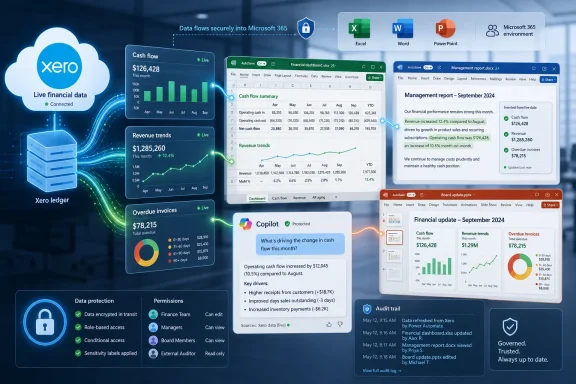
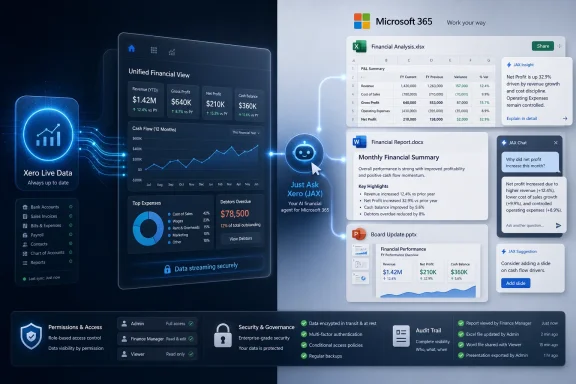
Xero announced on July 1, 2026, an integration with Microsoft 365 that lets small businesses and accountants query live Xero financial data from Microsoft 365 Copilot through JAX, the company’s AI financial assistant, starting with Copilot Chat and laying groundwork for Excel, Word, and PowerPoint. The pitch is simple: stop exporting numbers from the accounting system and start treating those numbers as a living layer inside the productivity suite where business work already happens. The bet is more ambitious than a connector, because it asks users to trust AI not merely with drafting prose but with interpreting cash flow, receivables, customer concentration, and performance trends. For WindowsForum readers, the story is less about bookkeeping glamour than about the next frontier of Microsoft 365 becoming the operating shell for business data.
For years, accounting software has lived in a browser tab, a desktop client, or a mobile app that users visit when they need a number, a report, or a task completed. Xero’s Microsoft 365 integration argues that this model is increasingly backwards. If the owner, finance manager, or outside accountant is already writing a loan application in Word or building a forecast in Excel, the financial system should come to them.
That is the same strategic logic Microsoft has been applying across Copilot: the productivity suite is no longer just a place to create documents. It is becoming an interface for querying, summarizing, and acting on organizational data. Xero wants its ledger to be part of that interface before a rival accounting platform turns the Microsoft work surface into its own distribution channel.
The company says users will be able to ask natural-language questions about cash flow, invoices, expenses, and business performance without leaving the Microsoft tools they use every day. At launch, the most concrete experience is Copilot Chat delivering text summaries and action confirmations informed by JAX. The more consequential roadmap is the promise that Excel, Word, and PowerPoint will be able to use live Xero data for structured tables, financial narratives, and presentation-ready charts.
This matters because small-business finance is still riddled with friction that big-company ERP teams have spent decades trying to tame. CSV exports, stale spreadsheets, hand-built charts, and copied report figures are not just annoyances. They are failure points where the wrong number makes it into the board deck, the lender package, or the weekly cash call.
The distinction is important. A chatbot that lives inside accounting software is useful only when the user remembers to go there. A financial agent that follows the user into Microsoft 365 becomes workflow plumbing, quietly changing where accounting work begins and ends.
The advertised examples are familiar but powerful: identify top customers, check who owes money, surface overdue invoices, generate profit-and-loss detail, draft report sections, and create PowerPoint visuals around revenue trends. None of those tasks is new. The novelty is that the user does not have to manually extract the data, reshape it, and then ask a general-purpose AI to write around it.
That is also where Xero is trying to differentiate JAX from generic AI assistants. The value is not merely that Copilot can write a paragraph about accounts receivable. It is that the paragraph can be grounded in current Xero data, with a path back to Xero as the system of record when the user needs to investigate or take action.
Excel has always been the shadow finance system of the business world. Even companies with polished accounting platforms eventually end up with a spreadsheet that contains the version of the business people actually argue over. That spreadsheet may include a cash forecast, customer ranking, hiring model, debt schedule, or monthly variance explanation.
The Xero-Microsoft integration is designed to meet that reality rather than pretend it can be abolished. Instead of asking users to stop using Excel, Xero is trying to make Excel a safer and more current surface for Xero data. That is a pragmatic move, and it reflects a lesson Microsoft learned long ago: the spreadsheet is not going away just because a SaaS vendor thinks dashboards are cleaner.
There is still a hard line between live data and trustworthy modeling. Pulling overdue invoices into Excel is one thing. Building a forecast that a bank, investor, or owner should rely on is another. Xero itself has previously described some JAX capabilities as beta and has warned in support materials that JAX may not provide financial advice or certain forecasting recommendations, which means the human review layer remains essential.
A board report, loan application, investor update, client advisory memo, or monthly management pack is often a translation exercise. The accounting system knows what happened. The business document must explain why it happened, whether it matters, and what should happen next.
Xero says Word could generate automated narrative paragraphs and formatted report sections using live financial summaries and accounts receivable data. PowerPoint could create slides with native charts, revenue trends, key metrics, and customer rankings. That is not just document automation; it is the packaging of financial evidence into business persuasion.
The danger is that persuasive formatting can make weak analysis look stronger than it is. A clean chart in PowerPoint carries rhetorical force even when the underlying assumptions are thin. If AI makes it effortless to generate financial storytelling, accountants and business owners will need to become more disciplined about labeling what is observed, what is inferred, and what is merely projected.
That ambition depends on integrations like this one. Microsoft can only make Copilot indispensable if it connects to the data users actually care about. Email, Teams chats, and SharePoint files matter, but for many businesses the decisive facts live elsewhere: in accounting, CRM, ticketing, HR, inventory, and line-of-business applications.
Xero gives Microsoft a particularly attractive domain because financial data has obvious daily utility. If a small-business owner can ask Copilot who owes money while drafting a follow-up email, or if an accountant can generate a client-ready summary from live bookkeeping data, Microsoft 365 becomes harder to leave. It also becomes harder to treat Copilot as a novelty.
The move fits a broader pattern in which Microsoft positions Copilot as the orchestration layer for work, while partners supply domain-specific systems and agents. That division of labor is commercially elegant. Microsoft owns the workspace, identity layer, app shell, and AI distribution surface; software vendors bring the proprietary workflows and data that make the assistant useful.
The harder questions are about access, permissions, retention, auditability, and user behavior. If Copilot can surface financial data inside Microsoft 365, then permission hygiene becomes even more important. A user who can see too much in Xero or Microsoft 365 may now be able to ask for that excess access in a more convenient and revealing form.
There is also the problem of context collapse. A spreadsheet, chat prompt, Word draft, and PowerPoint slide may each have different audiences and retention expectations. Once live accounting data flows into generated documents, organizations need to know where the output goes, who can discover it, and whether it becomes part of eDiscovery, backup, or compliance workflows.
For small businesses, this may sound like enterprise paranoia. It is not. The owner who would never email the full receivables ledger may still ask Copilot to summarize overdue invoices in a chat thread, paste the output into a document, and share it with a contractor. AI does not create the access-control problem, but it can make the consequences faster and less visible.
That is the optimistic case, and it is real. The profession has long been squeezed between compliance work, advisory ambitions, and clients who expect faster answers than manual workflows can support. An AI assistant that can retrieve, summarize, and draft from client data could make smaller practices look more responsive without adding headcount.
But the review burden does not disappear. It moves. Instead of checking whether the numbers were copied correctly from Xero to Excel, the accountant must check whether the AI pulled the right scope, understood the right period, respected the client context, and phrased the conclusion without overstating certainty.
That may be a better use of professional time, but it is still work. In fact, it may require more judgment than the manual task it replaces. The risk is that firms under price pressure treat AI-generated outputs as finished work rather than accelerated drafts.
That matters because small businesses do not usually have the patience or staffing depth to experiment with abstract productivity tools. They want to know whether they can make payroll, which customers are late, which expenses are drifting, and whether the next quarter looks survivable. A good integration should answer those questions in the flow of work, not demand a software pilgrimage.
The challenge is that “natural language” can obscure precision. A user asking “How are we doing?” may mean cash balance, profitability, bookings, overdue receivables, gross margin, or tax exposure. The assistant must either clarify the question or make assumptions visible. Otherwise, convenience becomes ambiguity dressed as insight.
This is where the quality of the product will be judged. Not by whether it can produce a handsome paragraph, but by whether it can consistently explain what data it used, what period it covered, what it excluded, and how the user can verify the result in Xero.
If a business owner is in Microsoft 365, Microsoft owns the moment. Xero’s integration is a way to avoid being reduced to a backend database while Copilot or another agent owns the user relationship. By putting JAX into the Copilot experience, Xero keeps its brand and system-of-record role attached to the answer.
This is the platform tension every SaaS vendor now faces. Integrating with Copilot can increase usage and relevance, but it can also train customers to begin their work outside the vendor’s own product. The SaaS application becomes the trusted data source and execution endpoint, while the daily interface shifts to the AI layer.
That trade-off may be unavoidable. Users have never loved switching tabs for the sake of vendor purity. If AI makes cross-application work easier, vendors that refuse to travel into the productivity suite risk looking old-fashioned, even if their own application remains more complete.
Grounding Copilot responses in live Xero data should reduce one class of hallucination: invented numbers. But it does not eliminate errors in interpretation, filtering, timing, or presentation. A model can use real data and still answer the wrong question.
The practical test is whether the integration preserves a clear chain back to the source. Xero says Copilot Chat can provide clickable links back to Xero for deeper work and actions such as sending payment reminders. That source-of-truth pathway is not a convenience feature; it is a control mechanism.
The best version of this product will make verification feel natural. The worst version will bury caveats under confident prose. In finance, confidence is not the same as correctness, and the UI should not pretend otherwise.
Admins will want to understand how the Xero connection is authorized, whether access is tenant-wide or user-scoped, how revocation works, and what logs exist when a user asks Copilot for financial data. They will also want clarity on whether outputs created in Word, Excel, and PowerPoint are governed like any other Microsoft 365 content once generated.
This is especially important in smaller organizations that lack formal data governance but still handle payroll, tax, customer, and banking information. The absence of an enterprise compliance team does not make the data less sensitive. It simply means the owner, accountant, or outsourced IT provider becomes the policy layer.
The Windows desktop remains part of the picture because Excel files, exported documents, synced OneDrive folders, browser sessions, and Teams chats all still touch user devices. A cloud AI integration can make old endpoint habits matter more, not less.
That is the “financial workbench” Microsoft and Xero are implicitly promising. It is not accounting software replacing Office, or Office replacing accounting software. It is a mesh of live data, documents, and AI-generated assistance.
If that works, the productivity gain is obvious. The user spends less time reconciling the artifacts of work and more time deciding what to do. The accounting system remains authoritative, while Microsoft 365 becomes the place where financial information is analyzed and communicated.
If it fails, the result will be another layer of AI theater: impressive demos, inconsistent answers, and users quietly returning to exports because they trust the old pain more than the new magic. The distance between those outcomes will depend less on branding and more on permissions, transparency, latency, and the mundane quality of generated tables.
Outlook integration could be genuinely useful for collections, vendor conversations, and lender correspondence. Teams integration could help owners and finance staff discuss live financial questions in context. But those same workflows could expose sensitive information to broader audiences if permissions and sharing defaults are not carefully managed.
There is a product-design challenge here that vendors often understate. The assistant must be helpful enough to save time, cautious enough to avoid accidental disclosure, and transparent enough that users understand when they are looking at live data versus generated commentary. That is not solved by a privacy paragraph at the bottom of a press release.
Xero and Microsoft are both incentivized to make the integration feel seamless. Administrators and accountants are incentivized to make it auditable. The winning implementation will need to satisfy both instincts.
AI compresses those steps. That is the value proposition, and also the risk. When a tool can answer, draft, model, and present in the same motion, organizations need to decide where review belongs.
Xero’s Microsoft 365 integration is a credible sign that AI in business software is moving past novelty chatboxes and into the connective tissue between systems of record and systems of work. The promise is compelling: live financial context in the same apps where decisions are modeled, written, and presented. The risk is equally clear: when accounting data becomes conversational, organizations must be more disciplined about source, scope, and authority than they were in the export-and-paste era. If Xero and Microsoft get that balance right, Copilot will feel less like an assistant bolted onto Office and more like the command line for small-business operations.
 Microsoft 365 Is Becoming the Front Door to the Ledger
For years, accounting software has lived in a browser tab, a desktop client, or a mobile app that users visit when they need a number, a report, or a task completed. Xero’s Microsoft 365 integration argues that this model is increasingly backwards. If the owner, finance manager, or outside accountant is already writing a loan application in Word or building a forecast in Excel, the financial system should come to them.That is the same strategic logic Microsoft has been applying across Copilot: the productivity suite is no longer just a place to create documents. It is becoming an interface for querying, summarizing, and acting on organizational data. Xero wants its ledger to be part of that interface before a rival accounting platform turns the Microsoft work surface into its own distribution channel.
The company says users will be able to ask natural-language questions about cash flow, invoices, expenses, and business performance without leaving the Microsoft tools they use every day. At launch, the most concrete experience is Copilot Chat delivering text summaries and action confirmations informed by JAX. The more consequential roadmap is the promise that Excel, Word, and PowerPoint will be able to use live Xero data for structured tables, financial narratives, and presentation-ready charts.
This matters because small-business finance is still riddled with friction that big-company ERP teams have spent decades trying to tame. CSV exports, stale spreadsheets, hand-built charts, and copied report figures are not just annoyances. They are failure points where the wrong number makes it into the board deck, the lender package, or the weekly cash call.
JAX Moves From Chatbot Branding to Workflow Plumbing
Xero has spent the past year positioning JAX, short for Just Ask Xero, as an AI financial “superagent.” That phrase carries the usual vendor fog, but the Microsoft 365 announcement gives it a more practical meaning. JAX is being framed as the layer that understands Xero’s financial data and can expose that understanding to the places where users already plan, explain, and decide.The distinction is important. A chatbot that lives inside accounting software is useful only when the user remembers to go there. A financial agent that follows the user into Microsoft 365 becomes workflow plumbing, quietly changing where accounting work begins and ends.
The advertised examples are familiar but powerful: identify top customers, check who owes money, surface overdue invoices, generate profit-and-loss detail, draft report sections, and create PowerPoint visuals around revenue trends. None of those tasks is new. The novelty is that the user does not have to manually extract the data, reshape it, and then ask a general-purpose AI to write around it.
That is also where Xero is trying to differentiate JAX from generic AI assistants. The value is not merely that Copilot can write a paragraph about accounts receivable. It is that the paragraph can be grounded in current Xero data, with a path back to Xero as the system of record when the user needs to investigate or take action.
Excel Is the Real Prize, Not the Chat Window
Copilot Chat will get the headline because chat is the most visible AI interface. But Excel is the real prize. If Xero can inject live data into spreadsheets as structured tables, it attacks one of the most stubborn rituals in small-business finance: exporting reports, cleaning columns, rebuilding formulas, and hoping nobody breaks a reference before the meeting.Excel has always been the shadow finance system of the business world. Even companies with polished accounting platforms eventually end up with a spreadsheet that contains the version of the business people actually argue over. That spreadsheet may include a cash forecast, customer ranking, hiring model, debt schedule, or monthly variance explanation.
The Xero-Microsoft integration is designed to meet that reality rather than pretend it can be abolished. Instead of asking users to stop using Excel, Xero is trying to make Excel a safer and more current surface for Xero data. That is a pragmatic move, and it reflects a lesson Microsoft learned long ago: the spreadsheet is not going away just because a SaaS vendor thinks dashboards are cleaner.
There is still a hard line between live data and trustworthy modeling. Pulling overdue invoices into Excel is one thing. Building a forecast that a bank, investor, or owner should rely on is another. Xero itself has previously described some JAX capabilities as beta and has warned in support materials that JAX may not provide financial advice or certain forecasting recommendations, which means the human review layer remains essential.
Word and PowerPoint Turn Accounting Data Into Persuasion
The Word and PowerPoint scenarios may sound secondary, but they point to a deeper shift in how business software vendors think about AI. Most financial work does not end when the number is calculated. It ends when the number is explained to someone who needs to approve, fund, question, or act on it.A board report, loan application, investor update, client advisory memo, or monthly management pack is often a translation exercise. The accounting system knows what happened. The business document must explain why it happened, whether it matters, and what should happen next.
Xero says Word could generate automated narrative paragraphs and formatted report sections using live financial summaries and accounts receivable data. PowerPoint could create slides with native charts, revenue trends, key metrics, and customer rankings. That is not just document automation; it is the packaging of financial evidence into business persuasion.
The danger is that persuasive formatting can make weak analysis look stronger than it is. A clean chart in PowerPoint carries rhetorical force even when the underlying assumptions are thin. If AI makes it effortless to generate financial storytelling, accountants and business owners will need to become more disciplined about labeling what is observed, what is inferred, and what is merely projected.
Microsoft Gains Another Reason for Businesses to Live in Copilot
For Microsoft, the Xero integration is another proof point for a strategy that has become increasingly clear: Copilot is not just a writing assistant bundled into Office. It is a platform meant to pull third-party business systems into Microsoft 365 and make those systems accessible through natural language.That ambition depends on integrations like this one. Microsoft can only make Copilot indispensable if it connects to the data users actually care about. Email, Teams chats, and SharePoint files matter, but for many businesses the decisive facts live elsewhere: in accounting, CRM, ticketing, HR, inventory, and line-of-business applications.
Xero gives Microsoft a particularly attractive domain because financial data has obvious daily utility. If a small-business owner can ask Copilot who owes money while drafting a follow-up email, or if an accountant can generate a client-ready summary from live bookkeeping data, Microsoft 365 becomes harder to leave. It also becomes harder to treat Copilot as a novelty.
The move fits a broader pattern in which Microsoft positions Copilot as the orchestration layer for work, while partners supply domain-specific systems and agents. That division of labor is commercially elegant. Microsoft owns the workspace, identity layer, app shell, and AI distribution surface; software vendors bring the proprietary workflows and data that make the assistant useful.
The Privacy Promise Is Necessary but Not the Whole Security Story
Xero says financial data shared between the platforms is used solely for the user’s specific session and that proprietary business data is not used to train Copilot AI models. That assurance is important, and it aligns with Microsoft’s broader enterprise messaging around Copilot data handling. But for administrators, “not used for training” is only the beginning of the security conversation.The harder questions are about access, permissions, retention, auditability, and user behavior. If Copilot can surface financial data inside Microsoft 365, then permission hygiene becomes even more important. A user who can see too much in Xero or Microsoft 365 may now be able to ask for that excess access in a more convenient and revealing form.
There is also the problem of context collapse. A spreadsheet, chat prompt, Word draft, and PowerPoint slide may each have different audiences and retention expectations. Once live accounting data flows into generated documents, organizations need to know where the output goes, who can discover it, and whether it becomes part of eDiscovery, backup, or compliance workflows.
For small businesses, this may sound like enterprise paranoia. It is not. The owner who would never email the full receivables ledger may still ask Copilot to summarize overdue invoices in a chat thread, paste the output into a document, and share it with a contractor. AI does not create the access-control problem, but it can make the consequences faster and less visible.
Accountants Get Leverage, but Also a New Review Burden
For accountants and bookkeepers, the integration promises leverage. Client work often involves answering repetitive questions, preparing management commentary, assembling reports, and translating financial data into plain English. If JAX can reliably surface live Xero information inside Microsoft 365, practitioners can spend less time moving numbers and more time interpreting them.That is the optimistic case, and it is real. The profession has long been squeezed between compliance work, advisory ambitions, and clients who expect faster answers than manual workflows can support. An AI assistant that can retrieve, summarize, and draft from client data could make smaller practices look more responsive without adding headcount.
But the review burden does not disappear. It moves. Instead of checking whether the numbers were copied correctly from Xero to Excel, the accountant must check whether the AI pulled the right scope, understood the right period, respected the client context, and phrased the conclusion without overstating certainty.
That may be a better use of professional time, but it is still work. In fact, it may require more judgment than the manual task it replaces. The risk is that firms under price pressure treat AI-generated outputs as finished work rather than accelerated drafts.
Small Businesses Want Answers, Not Another AI Console
The strongest part of Xero’s announcement is that it does not ask small businesses to learn a new AI destination. Microsoft 365 is already where many owners and managers live: Outlook for email, Excel for numbers, Word for paperwork, PowerPoint for pitches, Teams for coordination. If financial intelligence arrives there, adoption friction drops.That matters because small businesses do not usually have the patience or staffing depth to experiment with abstract productivity tools. They want to know whether they can make payroll, which customers are late, which expenses are drifting, and whether the next quarter looks survivable. A good integration should answer those questions in the flow of work, not demand a software pilgrimage.
The challenge is that “natural language” can obscure precision. A user asking “How are we doing?” may mean cash balance, profitability, bookings, overdue receivables, gross margin, or tax exposure. The assistant must either clarify the question or make assumptions visible. Otherwise, convenience becomes ambiguity dressed as insight.
This is where the quality of the product will be judged. Not by whether it can produce a handsome paragraph, but by whether it can consistently explain what data it used, what period it covered, what it excluded, and how the user can verify the result in Xero.
The Agent Race Is Really a Distribution Race
Xero’s move also says something about the state of accounting software competition. The AI race is not only about model quality. It is about distribution: whose assistant appears at the moment the user has intent?If a business owner is in Microsoft 365, Microsoft owns the moment. Xero’s integration is a way to avoid being reduced to a backend database while Copilot or another agent owns the user relationship. By putting JAX into the Copilot experience, Xero keeps its brand and system-of-record role attached to the answer.
This is the platform tension every SaaS vendor now faces. Integrating with Copilot can increase usage and relevance, but it can also train customers to begin their work outside the vendor’s own product. The SaaS application becomes the trusted data source and execution endpoint, while the daily interface shifts to the AI layer.
That trade-off may be unavoidable. Users have never loved switching tabs for the sake of vendor purity. If AI makes cross-application work easier, vendors that refuse to travel into the productivity suite risk looking old-fashioned, even if their own application remains more complete.
Live Financial Data Raises the Stakes for Hallucination
Generic AI errors are irritating. Financial AI errors can be operationally expensive. A wrong summary of overdue invoices could lead to an awkward customer conversation; a misleading cash-flow answer could affect hiring, purchasing, or borrowing decisions.Grounding Copilot responses in live Xero data should reduce one class of hallucination: invented numbers. But it does not eliminate errors in interpretation, filtering, timing, or presentation. A model can use real data and still answer the wrong question.
The practical test is whether the integration preserves a clear chain back to the source. Xero says Copilot Chat can provide clickable links back to Xero for deeper work and actions such as sending payment reminders. That source-of-truth pathway is not a convenience feature; it is a control mechanism.
The best version of this product will make verification feel natural. The worst version will bury caveats under confident prose. In finance, confidence is not the same as correctness, and the UI should not pretend otherwise.
Windows and Microsoft 365 Admins Inherit the Governance Problem
For WindowsForum’s core audience, the story lands in a familiar place: the endpoint is not the only battlefield anymore. Identity, app permissions, tenant governance, connected services, and data classification increasingly determine whether a shiny productivity integration is safe to deploy.Admins will want to understand how the Xero connection is authorized, whether access is tenant-wide or user-scoped, how revocation works, and what logs exist when a user asks Copilot for financial data. They will also want clarity on whether outputs created in Word, Excel, and PowerPoint are governed like any other Microsoft 365 content once generated.
This is especially important in smaller organizations that lack formal data governance but still handle payroll, tax, customer, and banking information. The absence of an enterprise compliance team does not make the data less sensitive. It simply means the owner, accountant, or outsourced IT provider becomes the policy layer.
The Windows desktop remains part of the picture because Excel files, exported documents, synced OneDrive folders, browser sessions, and Teams chats all still touch user devices. A cloud AI integration can make old endpoint habits matter more, not less.
The Microsoft 365 App Suite Becomes a Financial Workbench
The most interesting version of this integration is not a single Copilot answer. It is a workflow where a user asks for overdue invoices, sends reminders through a Xero path, refreshes an Excel forecast, drafts a Word report, and builds a PowerPoint summary without manually re-entering the same figures four times.That is the “financial workbench” Microsoft and Xero are implicitly promising. It is not accounting software replacing Office, or Office replacing accounting software. It is a mesh of live data, documents, and AI-generated assistance.
If that works, the productivity gain is obvious. The user spends less time reconciling the artifacts of work and more time deciding what to do. The accounting system remains authoritative, while Microsoft 365 becomes the place where financial information is analyzed and communicated.
If it fails, the result will be another layer of AI theater: impressive demos, inconsistent answers, and users quietly returning to exports because they trust the old pain more than the new magic. The distance between those outcomes will depend less on branding and more on permissions, transparency, latency, and the mundane quality of generated tables.
The Fine Print Will Decide Whether This Is Trusted or Merely Tried
The announcement says Xero plans to expand the integration to Outlook, Teams, and other Microsoft 365 apps. That expansion is logical, but it also raises the stakes. Email and chat are where financial data can move quickly, informally, and sometimes carelessly.Outlook integration could be genuinely useful for collections, vendor conversations, and lender correspondence. Teams integration could help owners and finance staff discuss live financial questions in context. But those same workflows could expose sensitive information to broader audiences if permissions and sharing defaults are not carefully managed.
There is a product-design challenge here that vendors often understate. The assistant must be helpful enough to save time, cautious enough to avoid accidental disclosure, and transparent enough that users understand when they are looking at live data versus generated commentary. That is not solved by a privacy paragraph at the bottom of a press release.
Xero and Microsoft are both incentivized to make the integration feel seamless. Administrators and accountants are incentivized to make it auditable. The winning implementation will need to satisfy both instincts.
The Numbers Can Move Faster Than the Controls
The practical lesson for customers is that live financial AI should be adopted deliberately, not feared reflexively. The old workflow was inefficient, but its friction sometimes served as a control. Exporting a report, saving a file, and building a deck created pauses where someone might notice a mismatch.AI compresses those steps. That is the value proposition, and also the risk. When a tool can answer, draft, model, and present in the same motion, organizations need to decide where review belongs.
- Businesses should confirm exactly which Xero data Copilot can access before enabling the integration broadly.
- Accountants should treat AI-generated financial narratives as draft work that requires professional review.
- Administrators should verify permission boundaries, audit options, and revocation procedures before rollout.
- Users should follow links back to Xero when an answer will drive payment, borrowing, hiring, or reporting decisions.
- Leaders should define which AI-generated financial outputs can be shared externally and which require approval.
Xero’s Microsoft 365 integration is a credible sign that AI in business software is moving past novelty chatboxes and into the connective tissue between systems of record and systems of work. The promise is compelling: live financial context in the same apps where decisions are modeled, written, and presented. The risk is equally clear: when accounting data becomes conversational, organizations must be more disciplined about source, scope, and authority than they were in the export-and-paste era. If Xero and Microsoft get that balance right, Copilot will feel less like an assistant bolted onto Office and more like the command line for small-business operations.
References
- Primary source: CPA Practice Advisor
Published: Wed, 01 Jul 2026 21:22:44 GMT
Xero Touts New Integration with Microsoft 365 - CPA Practice Advisor
Xero announced a new integration with Microsoft 365 that brings real-time financial insights directly into Microsoft 365 Copilot through JAX, Xero's AI financial superagent.www.cpapracticeadvisor.com - Related coverage: xero.com
- Related coverage: central.xero.com
Xero Central
central.xero.com
- Related coverage: blog.xero.com
- Official source: learn.microsoft.com
Application Information for Finance Admin for Xero by Data-Driven AI - Microsoft 365 App Certification | Microsoft Learn
All available security and compliance information information for Finance Admin for Xero, its data handling policies, its Microsoft Cloud App Security app catalog information, and security/compliance information in the CSA STAR registry.learn.microsoft.com - Official source: appsource.microsoft.com

- Related coverage: streetinsider.com
Xero Launches Integration with Microsoft 365 to Bring Real-Time Financial Intelligence Directly Into Everyday Business Tools
Integration delivers live financial data to small businesses where they already work, enabling real-time action and reducing operational friction SAN MATEO, Calif.--(BUSINESS...www.streetinsider.com - Official source: fpc.microsoft.com
- Official source: microsoft.com
</rdf:Alt> </dc:title> <dc:description> <rdf:Alt> <rdf:li xml:lang="x-default"/> </rdf:Alt> </dc:description> <dc:creator> <rdf:Seq> <rdf:li>Lukas V
</rdf:Alt> </dc:description> <dc:creator> <rdf:Seq> <rdf:li>Lukas Velushwww.microsoft.com
- Related coverage: help.zscaler.com
- Official source: techcommunity.microsoft.com