
 Introduction
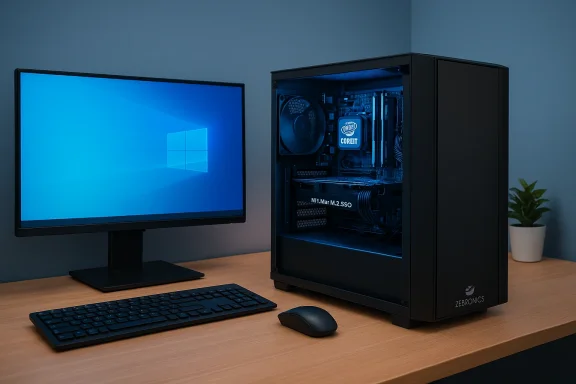
The headline — "ZEBRONICS Core i7 (16 GB 512 GB Windows 10) Assembled Desktop Computer" — reads like the kind of value-first assembled desktop bundle many buyers look for: a capable Intel Core i7, 16 GB RAM, and a 512 GB drive with Windows preinstalled. The listing you pointed to (IPP Media) is one of many regional classifieds and marketplace entries for assembled PCs sold under recognized peripheral brands such as Zebronics. I tried to fetch the IPP Media page directly, but the site returned a Cloudflare access block and the full article text could not be retrieved from that URL. Because of that I verified the product claims against independent seller/tracking pages and community guidance; those cross-checks are cited below and any claim that could not be verified directly from the IPP Media page is explicitly flagged. (Attempt to fetch IPP Media returned a Cloudflare block; access was not possible at the time of research.)Quick summary (what the listing claims)
- CPU: Intel Core i7 (assembled desktop)
- Memory: 16 GB RAM
- Storage: 512 GB (advertised as SSD in many retailer listings)
- OS: Windows 10 (as stated in the IPP Media headline)
- Form factor: Assembled desktop / bundled monitor in some packages
What I could and could not verify (transparency)
- Could not fetch the full IPP Media article because the site blocked automated retrieval; I therefore cannot quote its text verbatim or confirm any extra details that might appear only on that page. I attempted to extract the page and encountered a Cloudflare block. I then relied on independent seller records and community roundups to corroborate the core technical claims.
- Independent price/spec trackers and retailer listings show multiple Zebronics assembled systems and Pro‑Series laptops with Core i7 + 16 GB + 512 GB configurations; these confirm the plausibility of the advertised spec set but also reveal SKU variation (Windows 10 vs Windows 11, NVMe vs SATA, generation of Core i7, etc.). See the verification section below for links and citations. For example, price‑tracker and marketplace summaries for a Zebronics Core i7 / 16 GB / 512 GB desktop SKU were found on aggregator/tracker pages.
- Retail / price-tracker snapshot: A price-history/marketplace tracker lists a Zebronics Core i7 (16 GB / 512 GB / Windows 10) assembled desktop on Flipkart and shows recent price movement and historical low/high prices — corroborating that this SKU has circulated on Indian marketplaces under that spec set. This confirms the existence of an advertised SKU with the same headline specs as the IPP Media listing.
- Related Zebronics product pages: Zebronics sells multiple Pro/“NBC” series PCs and laptops in the 16 GB / 512 GB band, including Pro Series laptops with 12th‑gen Core i7 and 16/512 configurations (those laptop pages show Windows 11 in many listings). That demonstrates that the brand does market Core i7 / 16GB / 512GB SKUs broadly — though laptop pages are not a direct match to an assembled desktop bundle.
- Marketplace / vendor assembly listings: Assembled desktop sellers frequently list Core i7 buildds with mixed storage choices (single 512 GB SSD, SSD+HDD hybrids, or even HDD-only in older bundles). A separate assembled‑desktop product page from a vendor shows a Zebronics Core i7 (16GB / 1TB / Windows 10) variant, illustrating the SKU variability in assembled markets (different vendors may swap HDD/SSD, monitor size, or RAM type while using similar product names). This variability is a reason to always confirm the seller’s detailed SKU sheet.
- The IPP Media headline includes "Windows 10" but many current Zebronics listings for 16 GB / 512 GB machines (and related Pro Series devices) advertise Windows 11. That mismatch could be due to regional stocking (older builds shipped with Windows 10), or simply headline inconsistency between pages. Because this is a material difference for buyers (Windows 10 vs Windows 11 license, support, upgrade path), verify the OS image and license before purchase. Independent listings show both variants in the market; do not assume Windows 11 unless the seller specifically activation proof.
- Assembled desktop = non-OEM tower assembled from off‑the‑shelf parts (motherboard, CPU, RAM, SSD/HDD) and sold as a bundled system by a local assembler or reseller. These builds are often a good value but have important caveats:
- SKU fragmentation: the same product name can hide different internal brands (PSU, SSD model, RAM vendor) or storage types (NVMe vs SATA SSD vs HDD). Always request the full parts list. This is a repeated theme in assembled desktop guidance.
- Warranty & software activation: assembled sellers sometimes include trial software or nonstandard activation. Confirm Windows activation status and software warranty.
- Students and home users who value responsiveness: a 512 GB SSD as the main drive gives fast boot/app loads if the drive is indeed an SSD (confirm NVMe vs SATA).
- Light content creators: a mid/high‑end Core i7 with 16 GB is fine for hobby video/photo editing, but if you rely on GPU-accelerated rendering you’ll need a discrete GPU or different SKU.
- Who should not buy: serious gamers or pro‑level video editors expecting high FPS or heavy GPU acceleration — assembled productivity bundles commonly ship without discrete GPUs or inadequate PSUs for full GPU upgrades.
- Exact CPU model (e.g., Intel Core i7‑9th gen / i7‑12th gen / etc.). Generation matters for IPC, integrated graphics, and platform features.
- Storage type and interface — NVMe M.2 SSD, SATA SSD, or HDD? (If the ad only says “512 GB” ask whether it is NVMe M.2 and the model/manufacturer.)
- RAM: installed capacity, exact module configuration (1×16 GB or 2×8 GB), and speed (DDR4‑3200, etc.). Dual‑channel (2×8 GB) is materially faster than single‑stick 1×16 for many workloads.
- Motherboard model / chipset — this reveals expansion options (extra M.2 slots, PCIe lanes, dual‑channel support).
- PSU wattage and brand — essential if you plan to add a discrete GPU later.
- Windows activation status and license proof — retail key, COA sticker, or digital entitlement — and whether the seller offers a software warranty or driver support.
- Physical photos of internal layout, PSU label, RAM modules, and SSD stickers — particularly important for assembled desktops.
- Return policy and repair warranty period.
- NVMe vs SATA: NVMe NVMe drives deliver multiple‑fold higher sequential and random I/O performance than SATA HDDs and better than SATA SSDs — this directly impacts boot time, app launch time, and file transfers.
- RAM channel configuration: 2×8 GB (dual‑channel) uses two memory channels and roughly doubles memory bandwidth compared with 1×16 GB (single-channel integrated GPU performance and some CPU‑bound tasks.
- PSU: many budget assemblers use low‑quality or nonstandard PSUs (proprietary shapes, low amperage on 12V rails) that limit future GPU utility problems.
If the system ships as advertised (Core i7 / 16 GB / 512 GB) and you want the best long‑term value, consider this upgrade ladder — ordered by impact on everyday experience:
- Confirm the 512 GB is NVMe. If it’s not NVMe (or it’s an HDD), install a 256–51 This is the single most perceptible upgrade. Evidence from buyer guides and roundups consistently shows an SSD for the OS yields the largest UX improvement.
- Ensure RAM runs in dual‑channel (2×8 GB). If it’s 1×16 GB, buy a matched 8 or 16 GB stick to run dual‑channel. Many assembled listings ship either way; confirm with the seller first.
- Check PSU headroom before adding a discrete GPU. If you plan to add a midrange GPU later, upgrade to a quality 550–650 W (80+ Bronze or better) from a reputable brand first.
- If vendor uses a small proprietary or low‑quality PSU, consider replacing it sooner rather than later — cheap PSUs are a long‑term reliability risk.
- Activation: On first boot check Settings → Update & Security → Activation (Windows 10) or Settings → System → Activation (Windows 11) to see Windows activation status. If the seller can’t demonstrate a valid license or activation, insist on proof before purchase.
- Drivers: For assembled desktops, the chipset and LAN/WLAN drivers may be bundles from the motherboard/chipset vendor (Intel/AMD) rather than random third‑party driver packs. Keep a driver USB stick with chipset, LAN, GPU drivers ready at first boot.
- Windows 10 → Windows 11: if the unit is sold with Windows 10 but has a modern CPU and TPM 2.0 support, you may be eligible for a free upgrade to Windows 11. Confirm Secure Boot and TPM availability in BIOS if you plan to upgrade.
- Windows updates: after onboarding, install all Windows updates, then reboot and verify device manager for any “unknown devices.” If drivers are missing, install chipset and LAN drivers first to ensure network connectivity for the remainder.
- System not activating: ask seller for license key / proof. If seller supplied OEM key tied to another PC, insist on a refund/clarification; otherwise purchase a retail key.
- Slow system dB”: check Task Manager → Performance for RAM occupancy and disk type. If disk is showing as a slow HDD, plan the NVMe swap and cloning of OS. Use CrystalDiskInfo or Windows Disk Management to check SSD model and interface.
- Drivers causing network or audio issues: Get chipset and LAN drivers from Intel/AMD vendor pages; audio from Realtek/IDT where applicable. Avoid “driver update” utilities from unknown vendors.
- Unexpected reboots or instability: check PSU voltages and RAM stability with MemTest86 (for memory) and a PSU tester or multimeter if you suspect power issues. Cheap PSUs can cause system instability under load.
- Responsiveness: with an NVMe boot drive and 16 GB dual‑channel RAM, everyday responsiveness will be excellent — fast boot, snappy app launches, and comfortable multitasking.
- CPU performance: Core i7 performance depends heavily on generation. A modern 12th‑gen or newer i7 will be significantly faster than older 7th–9th gen parts in multi‑threaded workloads. Ask the seller for the exact CPU model. If the listing doesn’t say generation, treat that as a red flag.
- Graphics: Unless a discrete GPU is included, integrated graphics will handle video, streaming, and light editing but will not match even entry‑level discrete GPUs for gaming or GPU acceleration.
- Price trackers show these assembled Zebronics i7 16GB / 512GB bundles often in the budget/value range on marketplaces (example: tracked Flipkart listing with recent prices and historical highs/lows). Price matters, but the precise components matter more — the same “Zebronics i7 16/512” name can hide different internals. Verify parts before committing.
- “Please confirm the exact CPU model (e.g., Intel Core i7‑9xx / i7‑12xx).”
- “Is the 512 GB an NVMe M.2 SSD? Please share the SSD brand and model sticker photo.”
- “How is the 16 GB configured — 2×8 GB (dual channel) or 1×16 GB? Please send a photo of inside showing RAM sticks.”
- “What is the PSU make and wattage? Please show a clear photo of PSU label.”
- “Is Windows preinstalled and activated? Show the activation page (Settings → Activation).”
- “What warranty and return policy do you offer (hardware and software)?”
- The headline configuration (Core i7, 16 GB, 512 GB) is a sensible, value‑oriented base for Windows productivity and light content work — provided the underlying components are quality parts (NVMe SSD, dual‑channel RAM, adequate PSU). The assembled market commonly offers that spec set, but it is also where SKU ambiguity and low‑quality PSUs or mismatched parts often surface.
- If you’re buying: insist on the checklist above, verify photos, and if the vendor cannot prove the SSD is NVMe or the RAM is dual‑channel, either negotiate price accordingly or walk away. If the system arrives with an HDD or single‑channel RAM, plan an immediate NVMe +egest UX gains for the least money. Practical upgrade order: NVMe SSD → dual‑channel RAM → PSU (if planning GPU) → discrete GPU.
- Marketplace / price tracker (Flipkart tracker / buyhatke) showing a Zebronics Core i7 (16GB/512GB/Windows 10) assembled desktop on marketplace listings and price history. This corroborates the advertised SKU and recent pricing patterns.
- Zebronics product listings and Pro Series pages showing 16 GB / 512 GB SKUs for related Zebronics devices; helpful to show the brand does manufacture/sell 16/512 SKUs (mostly laptops in these examples, used for cross-reference).
- Assembled desktop buyer guidance and upgrade ladder from independent guides and community forum roundups (recommended upgrades: NVMe SSD first, then RAM and PSU). These practices are widely referenced in assembled desktop buying advice.
- Assembled‑desktop risk checklist and expansion caveats (PSU, SKU fragmentation, software activation) from community posts and buyer roundups.
- The IPP Media headline is plausible and consistent with other advertised Zebronics SKUs on the market, but because I could not fetch the original IPP Media article due to site access restriction, treat any detail that appears only on that blocked page as currently unverified until you can either view the page or obtain the seller’s full spec sheet and photos.
- If you want, I can:
- Attempt a live retrieval of the IPP Media page from a different network or provide guidance on capturing activation proof and parts photos to send the seller in a chat.
- Draft a compact “pre‑purchase message” you can paste to the seller to extract the exact component serials and activation evidence.
- Help you interpret a set of seller photos (upload them here) and confirm whether the parts match the claimed spec.
Source: IPPMedia IPP-Home
Last edited by a moderator:
