

Right now my default font is Calibri and font size is 11 on Word 2010 and who the hell uses those when writing a paper? So I was wondering how do I change my default font to times roman and font size to 11 so I dont have to change it to that every time I want to make a word document?
📎 AI Summary:
TALLY inquired about changing the default font and size in Word 2010 from Calibri 11 to Times New Roman 11 for easier formatting when writing documents. Mike responded with a quick method using Ctrl + D to access font settings and set the new default, including an image for guidance. TALLY appreciated the solution, indicating satisfaction with the assistance provided.
TALLY inquired about changing the default font and size in Word 2010 from Calibri 11 to Times New Roman 11 for easier formatting when writing documents. Mike responded with a quick method using Ctrl + D to access font settings and set the new default, including an image for guidance. TALLY appreciated the solution, indicating satisfaction with the assistance provided.

Member details
- Joined
- Jul 22, 2005
- Messages
- 9,270
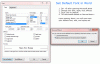
Open Microsoft Word and hold down Ctrl + D. Choose your font, and size, presumably Times New Roman, and click "Set as Default"
Please view the corresponding image by clicking on it:
Please view the corresponding image by clicking on it:
Welcome to the forums 
