

Hello everyone;
Some of you may have heard about or even used or are using
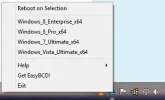
iReboot by Neosmart Technologies, makers of EasyBCD.
The icon sits in the Tray Notification area and if right clicked, will show all your OS's,
and all you have to do is select (click on) which OS you wish to reboot to, then reboot your machine.
What I have found, which will allow you to skip the OS Boot Menu entirely, is to make your OS choice
before you Shut Down completely. Next time you turn on your machine, you will boot to the OS chosen
as if you only had 1 OS, skipping the Boot Menu altogether, making a faster boot.
Attachments
-
 Microsoft Defender: No threats detected Scan detailsiReboot.webp8.3 KB · Views: 558