📎 AI Summary:
The thread discusses issues with the context menu in Windows 8 where options like Control Panel stop working after initial use. The original poster attempted various troubleshooting steps, including error checking and system restore, but ultimately resolved the problem by restoring Windows to a previous working state and reinstalling programs. The overall sentiment is positive, with users offering suggestions and expressing satisfaction that the issue was resolved.

Sad Nation

New Member
Joined
Jun 5, 2012
Messages
3
Thread Author #1
The right click on the start menu, power user menu pops up when I click it but when I click an option like control panel nothing happens. It did work for a while when I first installed Windows 8 Consumer Preview and then stopped. I installed Windows 8 Release Preview hoping it was just a bug from a beta version of the OS but again it worked when I first installed and then stopped after a while.

Any clues guys?

Intel Core 2 Extreme X9650 Quad
8 Gig Ram
Nvidia GTX 480
XFX nForce 7
Crucial C300 SSD 256Gb
etc
 

Trouble

Noob Whisperer
Joined
Nov 30, 2009
Messages
13,723
Have you tried either or both the System file checker and or a restore point?
Have you installed any third party Start button software overlays which may be impacting it somehow?
 

Sad Nation

New Member
Joined
Jun 5, 2012
Messages
3
Thread Author #3
Hi

I have just tried the Error checking facility on the C drive which says no errors on the drive. I haven't tried system restore as I have only just got my install of the OS back to where it was before I installed Release Preview. If I system restore, I lose all the programs I have installed since the problem started. If I knew when it occurred it would be a start! I can do a system refresh which also loses all of my programs!

I have not installed any hacks to try to get the start button back as I have decided that Microsoft knows best in this case and I might as well get used to it!
 

Drew

Banned
Joined
Mar 25, 2006
Messages
3,560
'SN',

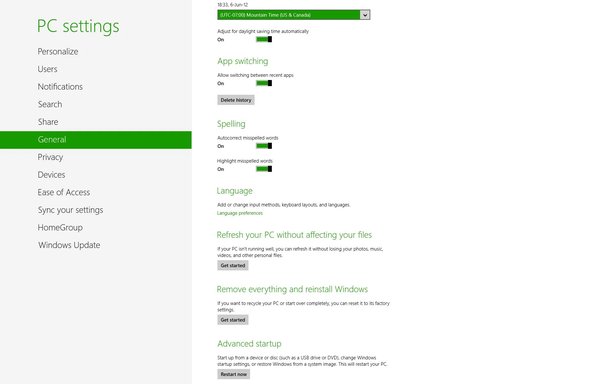
Use Refresh your PC w/out affecting Files (See picture)

Cheers,
Drew

Link Removed
 

Solution

Sad Nation

New Member
Joined
Jun 5, 2012
Messages
3
Thread Author #5
Hi all

I ended up system restoring back to when it did work so I am sorted now. Just spent the last two days reinstalling all of my programs and games but at least my menu works as it should now!