📎 AI Summary:
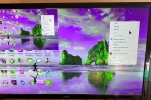
The thread discusses a display issue where the user's desktop appears as a smaller window occupying about a quarter of the screen. The original poster in Post #1 reports this problem and seeks a solution. Contributors suggest likely causes, such as the Picture-In-Picture (PIP) function on the monitor (Post #4), or recommend reinstalling display drivers (Post #5), with the overall sentiment: users are troubleshooting a display scaling or overlay problem with various suggested remedies.

2beor02bmerlin

New Member
Joined
Apr 29, 2021
Messages
2
Thread Author #1
My Desktop has changed and I now have a smaller desktop on top of the usual one and taking up about a quarter of the screen.

Would anyone have a remedy for this please ?
 

Attachments

  • IMG_0671.webp
    IMG_0671.webp
    496.8 KB · Views: 112
Solution
My Desktop has changed and I now have a smaller desktop on top of the usual one and taking up about a quarter of the screen.

Would anyone have a remedy for this please ?
Try reinstalling the Display drivers and it will be fixed. Open device manager> expand the option of display adapter> right click and select uninstall. Uninstall both of the options in it. Once done, restart your pc and it will be fixed.

AsadAlam

Member
Joined
May 10, 2021
Messages
55
My Desktop has changed and I now have a smaller desktop on top of the usual one and taking up about a quarter of the screen.

Would anyone have a remedy for this please ?
Try reinstalling the Display drivers and it will be fixed. Open device manager> expand the option of display adapter> right click and select uninstall. Uninstall both of the options in it. Once done, restart your pc and it will be fixed.
 

Solution

bochane

Essential Member
Joined
Oct 18, 2012
Messages
1,403
Is te PIP function of your monitor enabled? If so, switch it off.
 

Last edited: