

TroutButter
New Member
Member details
- Joined
- Dec 22, 2018
- Messages
- 1
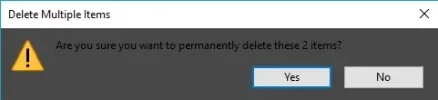
About a few months ago I think, I started to notice my three Win10 machines the background color of certain dialogs were now a very dark grey. It looks really weird and makes some things harder to see. I guess it happened after a certain update (who knows which one) and as my machines got that update they all started doing this. I've been looking through the theme options and all color personalization options I could find but nothing is really standing out to me of what or where the setting for this is.
I have attached a screenshot of an example.
Switching between dark mode and light mode makes no difference either. How do I change the color back to the proper one instead of this dark hard-to-read grey?
I have attached a screenshot of an example.
Switching between dark mode and light mode makes no difference either. How do I change the color back to the proper one instead of this dark hard-to-read grey?
Attachments
-
 Microsoft Defender: No threats detected Scan detailsrecycle.webp3.9 KB · Views: 159