
📎 AI Summary:
The thread discusses a user experiencing Error 711 and Error 20 when trying to connect a Huawei E220 3G dongle on Windows 8 Pro x64, indicating issues with the Remote Access Connection Manager service. Responders suggest that the user may need to contact their service provider for additional drivers or software. The overall advice emphasizes installing the proper driver and software for the dongle to enable proper connection management.

lkhz

New Member
Joined
Aug 4, 2013
Messages
1
Thread Author #1
I got Huawei E220 3G USB dongle. I couldn't use it to connect to the internet on Windows 8 Pro x64.

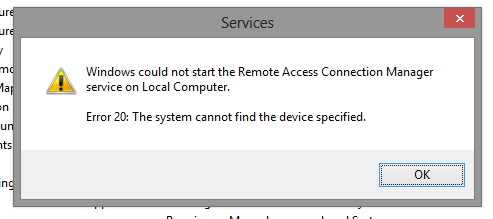
Its giving Error 711. Saying Remote Access Connection Manager couldn't start. I went to services and tried to manually start it. But Its giving Error 20 as below.
8wCFckt.png
 

Solution
As Trouble stated....along with your 3G wifi dongle you'll need to install the software and driver for dongle to make it's connection. I had one with TWC, which came with a disc to install driver/software for it. Once the software and driver is installed, then it would use it's on connection manager to make the mobile connection for you, well the one for TWC did. They all should work very similar to that.

Trouble

Noob Whisperer
Joined
Nov 30, 2009
Messages
13,723
It may be necessary for you to talk to your Service Provider and see if there might be a need for some additional software or driver package in order for the device to work properly with Windows 8.
 

Jimbo22

Essential Member
Joined
Aug 27, 2008
Messages
5,036
As Trouble stated....along with your 3G wifi dongle you'll need to install the software and driver for dongle to make it's connection. I had one with TWC, which came with a disc to install driver/software for it. Once the software and driver is installed, then it would use it's on connection manager to make the mobile connection for you, well the one for TWC did. They all should work very similar to that.
 

Solution