📎 AI Summary:
The forum discussion centers on a user experiencing frequent internet disconnections, despite all connections appearing correct. The user, who built their PC and uses a wired connection upstairs with a TP-Link wireless adapter, seeks help to resolve the issue. Responders suggest updating network drivers, with guidance provided on how to find and update drivers via the device manufacturer's website or Device Manager, reflecting a collaborative effort to troubleshoot the connectivity problem.

NettleWarbler

Banned
Joined
Mar 25, 2016
Messages
636
Thread Author #1
My internet connction keeps going off , it happens lots of times everyday lately . All the connections seem to be in right . Can someone please help me .
 

NettleWarbler

Banned
Joined
Mar 25, 2016
Messages
636
Thread Author #3
The wires are downstairs (the router ) , its wired the BT operator said it would get the best connection speeds that way , I wish it had been wireless I don't know if that's possible now . Getting it wireless I mean . The wireless adaptor in my usb port is a tp-link AC600 .
 

NettleWarbler

Banned
Joined
Mar 25, 2016
Messages
636
Thread Author #4
I'm still losing internet access at regular intervals , any suggestions are most welcome . Thank you .
 

Neemobeer

Windows Forum Team
Staff member
Joined
Jul 4, 2015
Messages
8,995
Well I'd start by verifying you have the most current drivers for your network card.
 

Solution

Neemobeer

Windows Forum Team
Staff member
Joined
Jul 4, 2015
Messages
8,995
Go to the support page for your computer manufacturer and enter your model. There should be a driver section and a network section under that with the most recent driver.
 

Neemobeer

Windows Forum Team
Staff member
Joined
Jul 4, 2015
Messages
8,995
Then you'll need to look in Device Manager and go to the device manufacturer website for the driver
 

NettleWarbler

Banned
Joined
Mar 25, 2016
Messages
636
Thread Author #13
Look how do I find it from this snip .
37170
 

NettleWarbler

Banned
Joined
Mar 25, 2016
Messages
636
Thread Author #17
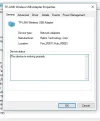
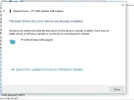
I clicked TP-LINK Wireless USB Adapter . it says the device is working properly . When I went to driver and tried to update it , it said it was the latest driver . I will have to log off now . Good night .
37171
3717137172
 

Neemobeer

Windows Forum Team
Staff member
Joined
Jul 4, 2015
Messages
8,995
You said you are plugged in so like I said that's not the right device