
📎 AI Summary:
The thread discusses customizing the Windows 10 Action Center icon to resemble that of Windows 7. The original poster inquires if the icon can be changed, suspecting it might involve editing system DLL files like shell32.dll or imageres.dll. After attempting to locate the icon within these DLLs using Resource Tuner, they report finding nothing, indicating the customization may be more complex or not directly feasible.

Vetral32

Well-Known Member
Joined
Oct 7, 2015
Messages
38
Thread Author #1
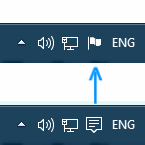
So I was making my Windows 10 system look like Windows 7 because I was used to it. While getting all the resources I found the problem with the action center of how it is not the icon I want it to be. Is there a way to change it? IMAGE OF WANT I WANT
npepnBi.png
 

Neemobeer

Windows Forum Team
Staff member
Joined
Jul 4, 2015
Messages
8,995
Yes it can be done, no it can't be done easily. You would need to locate the library that image is contained in and replace the images you want
 

Vetral32

Well-Known Member
Joined
Oct 7, 2015
Messages
38
Thread Author #3
Would it be at any chance a dll? because I don't think I would find it very easily
 

Neemobeer

Windows Forum Team
Staff member
Joined
Jul 4, 2015
Messages
8,995
For any Windows icons yes. Usually either shell32.dll or imageres.dll
 

Solution

Vetral32

Well-Known Member
Joined
Oct 7, 2015
Messages
38
Thread Author #5
Okay then I will try to look through them carefully with Resource Tuner. Thanks.
 

Vetral32

Well-Known Member
Joined
Oct 7, 2015
Messages
38
Thread Author #6
Well I checked through the dll files and found nothing in either of them. (Do not ask how I found them so fast)