

📎 AI Summary:
The thread discusses how to fix screen splitting issues in Windows, particularly with game display alignment and quality loss when zooming out. The original poster struggles with centering a game window that gets cut off, and suggestions include adjusting from the corner or using multiple desktops. Final advice recommends using Windows Snap to manually position browser windows side-by-side for better control.
The thread discusses how to fix screen splitting issues in Windows, particularly with game display alignment and quality loss when zooming out. The original poster struggles with centering a game window that gets cut off, and suggestions include adjusting from the corner or using multiple desktops. Final advice recommends using Windows Snap to manually position browser windows side-by-side for better control.
Solution

Hi
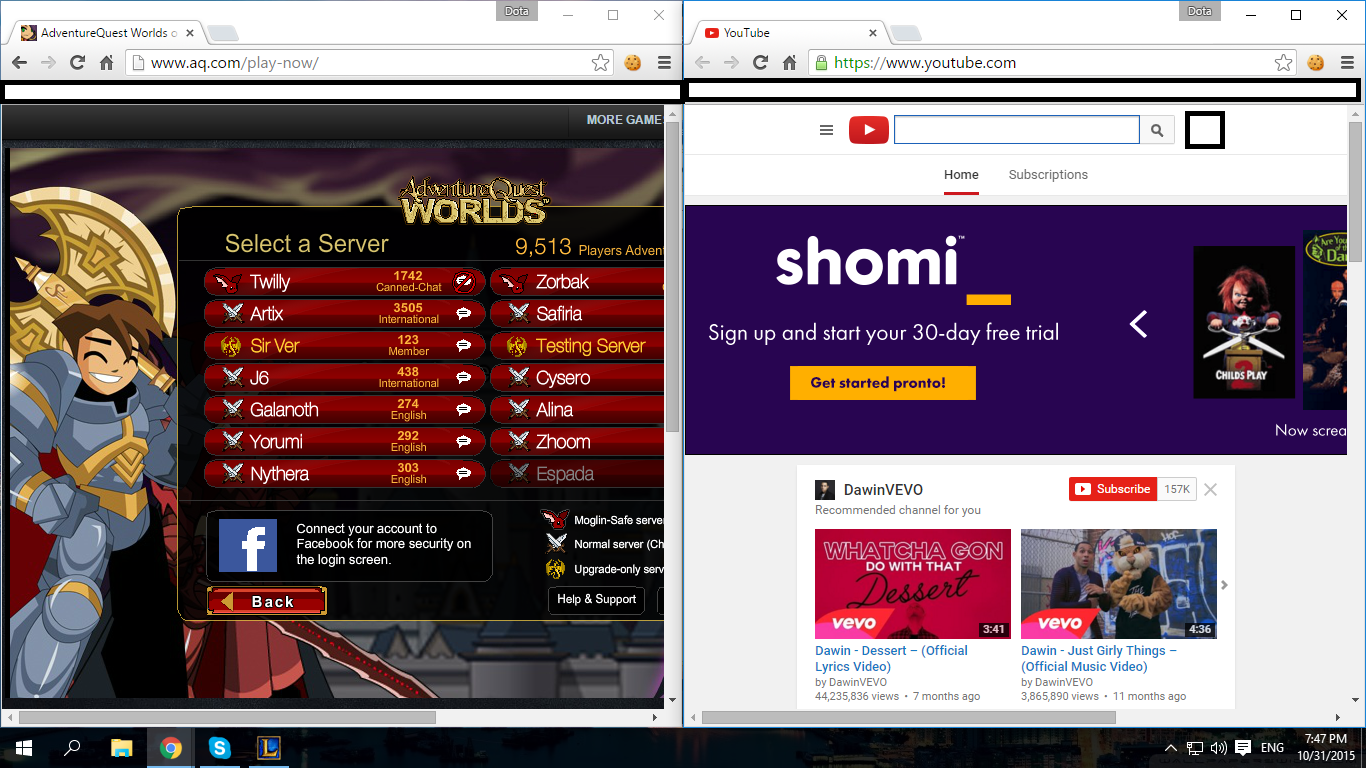
All I did was open 2 Chrome windows and then use snap to place one on each side of the monitor, then go to the appropriate web page on each one.
Link Removed
I think this looks like what you are after, you will either have to reduce it to fit, or center it manually using the drag bar at the bottom.
Mike
PS. Your monitor size will have an influence on how the display looks on your setup.
The one above it on my 27" 1920 by 1080 monitor, and both pages are very easy to read in this size.
If you have a lower resolution monitor it will crop the pages to a greater degree at the same page size settings.
All I did was open 2 Chrome windows and then use snap to place one on each side of the monitor, then go to the appropriate web page on each one.
Link Removed
I think this looks like what you are after, you will either have to reduce it to fit, or center it manually using the drag bar at the bottom.
Mike
PS. Your monitor size will have an influence on how the display looks on your setup.
The one above it on my 27" 1920 by 1080 monitor, and both pages are very easy to read in this size.
If you have a lower resolution monitor it will crop the pages to a greater degree at the same page size settings.
I did that, but most of it is still cut off, anymore solutions? I was thinking of zooming out on the page (ctrl + scroll wheeldown) but that decreases the quality significantlyThe game is centered to the browser... the (left) browser however is left aligned.
p.s. try adjusting from the corner
View attachment 31176
Last edited by a moderator:

Member details
- Joined
- May 22, 2012
- Messages
- 4,599
The only sure and simple way is to add a desktop and spread out because screen splitting is a w8 or w8.1.1 tool that was dropped in WX for the new 'Task view".
You could use something like Rainmeter to redesign your desktop but thats not a simple fix.
You could use something like Rainmeter to redesign your desktop but thats not a simple fix.
How does adding a desktop help?The only sure and simple way is to add a desktop and spread out because screen splitting is a w8 or w8.1.1 tool that was dropped in WX for the new 'Task view".
You could use something like Rainmeter to redesign your desktop but thats not a simple fix.

Member details
- Joined
- May 25, 2009
- Messages
- 6,684
Hi
All I did was open 2 Chrome windows and then use snap to place one on each side of the monitor, then go to the appropriate web page on each one.
Link Removed
I think this looks like what you are after, you will either have to reduce it to fit, or center it manually using the drag bar at the bottom.
Mike
PS. Your monitor size will have an influence on how the display looks on your setup.
The one above it on my 27" 1920 by 1080 monitor, and both pages are very easy to read in this size.
If you have a lower resolution monitor it will crop the pages to a greater degree at the same page size settings.
All I did was open 2 Chrome windows and then use snap to place one on each side of the monitor, then go to the appropriate web page on each one.
Link Removed
I think this looks like what you are after, you will either have to reduce it to fit, or center it manually using the drag bar at the bottom.
Mike
PS. Your monitor size will have an influence on how the display looks on your setup.
The one above it on my 27" 1920 by 1080 monitor, and both pages are very easy to read in this size.
If you have a lower resolution monitor it will crop the pages to a greater degree at the same page size settings.
Last edited:
