

Janis Skaris
New Member
Member details
- Joined
- Dec 8, 2014
- Messages
- 14
Hello, i've got free space about 150 gb and I want add it to my C: Drive wich is my local disk. How can I do this?
Attachments
-
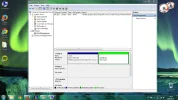 Microsoft Defender: No threats detected Scan detailsCapture.webp90.4 KB · Views: 403


