📎 AI Summary:
The thread discusses a user's struggle to share a cable internet connection via Wi-Fi on Windows, with initial troubleshooting unsuccessful. The user eventually successfully enabled internet sharing by configuring the Microsoft Virtual WiFi Miniport Adapter and setting up a hosted network using specific command-line commands, after applying a hotfix and extensive research. The overall sentiment is positive, highlighting the value of users sharing solutions to help others facing similar networking issues.

rinu123

New Member
Member details
Joined
Feb 21, 2013
Messages
4
Thread Author #1
My goal is to use a cable internet connection and share it via wi-fi to my phone. Trouble is my phone doesn't see the wi-fi network I created.

I am aware that there are a lot of tutorials on how to do this and a lot of troubleshooting tips around. I have tried everything I could find but no luck so far.

What I have done so far:
Enabled sharing on cable connection's adapter.
Crated ad hoc network and connected the wi-fi adapter to it.
Made sure IP addresses are automatic.
Temporarily turned off firewall.
Temporarily turned off user account control.
Made sure all relevant services are running.
Restarted the adapters.
Restarted the computer.
Let Windows look for problems with the adapters.

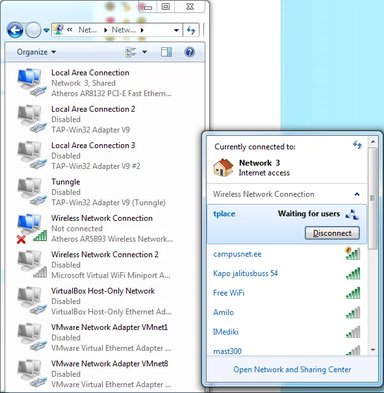
The main idea for having the screenshot is the red X on the wireless connection. It sais it's not connected even after it is connected to the ad hoc network. I haven't worked out if that is OK or not.
Link Removed

Hope you can help.
 

Attachments

  • network.webp
    network.webp
    47.2 KB · Views: 512
    Microsoft Defender: No threats detected Scan details
Solution
So finally it works.

What I did was enable Microsoft Virtual WiFi Miniport Adapter (Wireless Network Connection 2). I shared my cable connection to it.
And then from command line:
netsh wlan set hostednetwork mode=allow ssid=VirtualNetworkName key=Password
netsh wlan start hostednetwork
(replaced the VirtualNetworkName and Password of course)

It's not the ad hoc network I originally wanted. It's better.

Note I did install a hotfix to make it work since the start command resulted in an error at first. Also an hour or two of googleing was needed.

rinu123

New Member
Member details
Joined
Feb 21, 2013
Messages
4
Thread Author #2
So finally it works.

What I did was enable Microsoft Virtual WiFi Miniport Adapter (Wireless Network Connection 2). I shared my cable connection to it.
And then from command line:
netsh wlan set hostednetwork mode=allow ssid=VirtualNetworkName key=Password
netsh wlan start hostednetwork
(replaced the VirtualNetworkName and Password of course)

It's not the ad hoc network I originally wanted. It's better.

Note I did install a hotfix to make it work since the start command resulted in an error at first. Also an hour or two of googleing was needed.
 
Last edited:
Solution

zvit

Honorable Member
Member details
Joined
Nov 3, 2009
Messages
2,442
It's great when users post the solutions to their own issues. It's a great benefit for others who have similar issues. Thanks for that!