Minybuddie

New Member
Joined
Aug 20, 2009
Messages
12
I've been running my computer with Windows7 and with WindowsVista. I've decided now that I copied all my files I need Vista to be erased. I need the space. I have no idea how to do this. Some help would be very appreciated.

PS: Every topic I post on this forum goes without any replies. I'm really sick of this. Was it something I said? :confused:
 

Solution
What you need to know is that all the info needed to boot either operating system is kept on the system (C: ) drive. If you delete Vista you will wipe out your boot info too and you won't be able to boot anything. If you're going to run W7 alone then you will have to install it on the C: drive.

gavin19

New Member
Joined
Aug 8, 2009
Messages
440
Where is Vista located? On another hard drive? Another partition?

You can download a free partition manager like EASEUS and use it to format the partition/drive with Vista on it. This is only if you want to delete the entire partition/drive of course.
 

gavin19

New Member
Joined
Aug 8, 2009
Messages
440
Grab the 7600 RTM build if you don't already have it. Install that to C and then migrate your files over to the fresh install. Then you are free to erase F.
 

stueycaster

Millennium Celebration Award Winner
Premium Supporter
Joined
Feb 5, 2009
Messages
1,706
What you need to know is that all the info needed to boot either operating system is kept on the system (C: ) drive. If you delete Vista you will wipe out your boot info too and you won't be able to boot anything. If you're going to run W7 alone then you will have to install it on the C: drive.
 

Solution

SIW2

New Member
Joined
Jun 10, 2009
Messages
1,169
Hi Minnybuddy,

Post a screenshot of Disk Management.

You may be able to use a bootable partition manager to copy the contents of the 7 partition onto the partition currently containing Vista.

Then run startup repair from the 7 dvd to add the boot files.

Depends on your partition sizes.
 

Last edited:

tejap

New Member
Joined
Jun 5, 2010
Messages
12
Hello all,

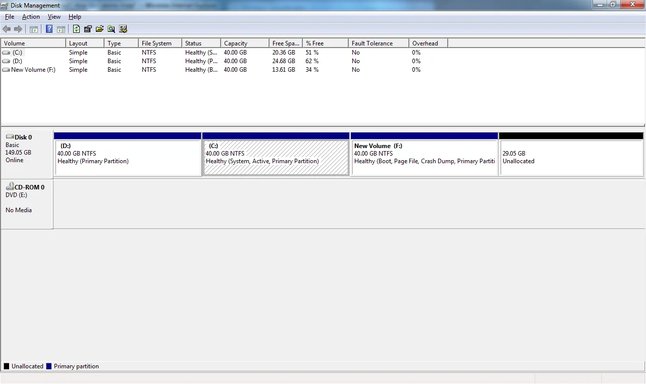
I also have the same query as that of MinyBuddie, I too have Vista on C: drive and Windows 7 on F: drive.
I am posting screenshot of Disk Management in my pc.

partition.webp

Please suggest me how I can remove Vista (which I am not using).
I would like to know if there are any problems that would arise after vista is completely removed.

Thank you,
Teja
 

Saltgrass

Excellent Member
Microsoft Community Contributor
Joined
Oct 16, 2009
Messages
15,152
You really need to start a new thread. The fact your Win 7 install shows drive F: while booted to, might lead to problems.

On the new thread, post the disk management picture again, and explain what the 40 G partition is...