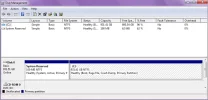
I have a HP g60 laptop, I just replaced the hard drive with a Seagate 1 TB SATA 5400RPM hard drive because the previous one died. I installed a downloaded windows 7 home premium on it. After following the instructions I managed to get it up and running again. But the next day I turned it on as soon as it got to the desktop it shut down unexpectedly and restarted. After logging in and getting to the desktop for about 2 minutes it turned off again. Did I do something wrong with the windows 7 installation, or is there a problem with the hard drive? Also my battery is a bit old I have to keep the laptop plugged into the outlet. It is not charging like it used to could this be the problem? Thanks for all help in advance.
📎 AI Summary:
The thread discusses issues with a HP g60 laptop after installing a new 1TB Seagate hard drive and Windows 7. The original poster reports the laptop shutting down unexpectedly shortly after startup, raising questions about whether the installation or hardware (including an aging battery) might be causing the problem. Other users suggest checking the hard drive size compatibility and verifying if the OS has been activated; the original poster confirms activation and seeks clarification or further assistance.
The thread discusses issues with a HP g60 laptop after installing a new 1TB Seagate hard drive and Windows 7. The original poster reports the laptop shutting down unexpectedly shortly after startup, raising questions about whether the installation or hardware (including an aging battery) might be causing the problem. Other users suggest checking the hard drive size compatibility and verifying if the OS has been activated; the original poster confirms activation and seeks clarification or further assistance.
Solution

I am surprised that you got the G60 working at all with a 1TB drive. HP advise the maximum drive size is 500GB. Can you check your hard drive config in control panel to show us what you have in the laptop.

Member details
- Joined
- May 16, 2010
- Messages
- 5,688
I am surprised that you got the G60 working at all with a 1TB drive. HP advise the maximum drive size is 500GB. Can you check your hard drive config in control panel to show us what you have in the laptop.