📎 AI Summary:
The thread discusses a user’s issue with missing the Microsoft Word icon in the 'New' menu on the desktop. Despite trying repairs and following advice, the user couldn’t restore the icon until they used the New Menu Editor tool. Other contributors suggested repair options and provided resources, with the overall tone being helpful and positive once the user resolved the problem.

helloween961

New Member
Member details
Joined
Jun 6, 2016
Messages
4
Thread Author #1
Hi,

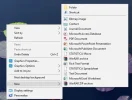
I wanted to create a new Microsoft Word document on desktop but found that the MS word icon was missing in the 'New' column. Why is it that and how can I recover the icon?

Thank you very much for your help😛😛😛
 

Attachments

  • Screenshot_1.webp
    Screenshot_1.webp
    24 KB · Views: 314
Solution
No, I installed it last year. But I've succeeded in restoring the MS Word icon in the context menu by installing New Menu Editor. Thanks very much for your help.😛😛😛😛

helloween961

New Member
Member details
Joined
Jun 6, 2016
Messages
4
Thread Author #5
I can find the MS Office apps in the Start of Windows 10, but I just can't find it in the New Column (as shown in the attached image). Thanks for your help.
 

kemical

Essential Member
Member details
Joined
Aug 28, 2007
Messages
36,163
Hmm... Did you recently install Office and if so is it activated?
 

helloween961

New Member
Member details
Joined
Jun 6, 2016
Messages
4
Thread Author #7
No, I installed it last year. But I've succeeded in restoring the MS Word icon in the context menu by installing New Menu Editor. Thanks very much for your help.😛😛😛😛
 
Solution