
📎 AI Summary:
The thread discusses a user noticing unwanted entries under the "New" menu in File Explorer, asking how to delete them. A responder suggests that these entries can be caused by malware or legitimate applications and explains that they are often created by files in the C:\Windows\SHELLNEW directory or registry entries under ShellNew keys. The overall sentiment is informational, aiming to guide the original poster on potential causes and solutions for removing unnecessary "New" menu entries.

Curious

Excellent Member
Member details
Joined
Mar 2, 2010
Messages
150
Thread Author #1
Hello,
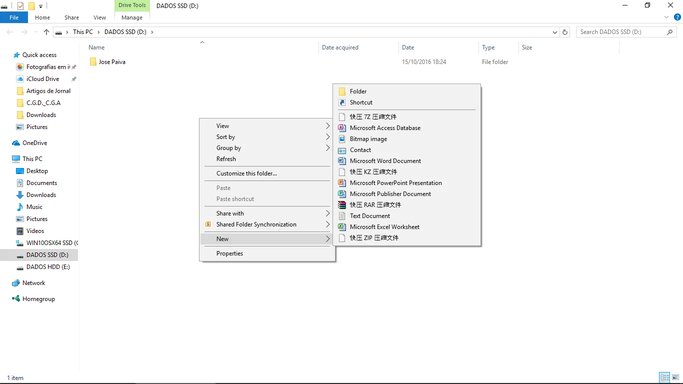
When in any File Explorer window i click in an empty place of the screen, i get some options.
One of them is "NEW". when i put the cursor on it i have two options. "Folder" and "Shortcut".
As you can see in the file that i upload i have also a lot of entries that i do not use.
How can i delete them?
Thanks and best regards

José Paiva
 

Attachments

  • COMO RETIRAR NEWS QUE NÃO INTERESSAM.webp
    COMO RETIRAR NEWS QUE NÃO INTERESSAM.webp
    40.2 KB · Views: 294
Solution
One possibly is malware of course as well as some legit applications have been know to cause this. Have you installed anything recently?

These entries are generated by adding a file to C:\Windows\SHELLNEW and adding a sub key called ShellNew under a .### shell extension key under the classes root or user hive in registry

Neemobeer

Windows Forum Team
Staff member
Member details
Joined
Jul 4, 2015
Messages
8,995
One possibly is malware of course as well as some legit applications have been know to cause this. Have you installed anything recently?

These entries are generated by adding a file to C:\Windows\SHELLNEW and adding a sub key called ShellNew under a .### shell extension key under the classes root or user hive in registry
 
Solution