📎 AI Summary:
The thread discusses an issue after reinstalling Windows 10 on an HP laptop, where the user notices two boot options appear at startup, with one failing to load and likely referencing a USB stick. The user seeks advice on resolving this, and a responder suggests using the `bcdedit` command to identify and remove the extra boot entry. The user follows the advice, successfully resolves the problem, and expresses gratitude for the help.

hawkeye62

Extraordinary Member
Joined
Oct 2, 2011
Messages
270
Thread Author #1
I had to do a re-install of Windows 10 on my older laptop (HP X360). I used the Windows Media Creation Tool to install a basic system. Everything seems to be working and I have installed most of the programs, address book and Favorites that I need. BUT, one thing that I don't understand is when I power on, I get a screen with two OS options to boot. One boots after 6 seconds and boots into the new install. If I select the other, it fails to boot, I think it is trying to boot a USB stick. I have the BIOS set to boot to the default boot manager first and USB second and DVD third. There must be a BIOS option that would stop the two options, but I don't know what it is. I would appreciate any advice.

Regards, Jim
 

Solution
The second boot loader entry can be removed. Noticeable that device = unknown.

From an elevated prompt you can run the following to remove the entry and remove it from the display order
bcdedit /delete {04e0df77-5977-11e8-a41b-ca887a3862f4} /cleanup

Neemobeer

Windows Forum Team
Staff member
Joined
Jul 4, 2015
Messages
8,995
Run bcdedit /enum from elevated cmd or PowerShell prompt and post the output. You probably have an extra boot entry. Once I can see the entries I can tell you which to remove
 

hawkeye62

Extraordinary Member
Joined
Oct 2, 2011
Messages
270
Thread Author #3
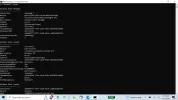
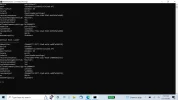
Thanks for your reply! I have attached the results of bcdedit /enum.

Best regards, Jim
 

Attachments

  • Screenshot (1).webp
    Screenshot (1).webp
    107.2 KB · Views: 33
  • Screenshot (2).webp
    Screenshot (2).webp
    99.7 KB · Views: 37

Neemobeer

Windows Forum Team
Staff member
Joined
Jul 4, 2015
Messages
8,995
The second boot loader entry can be removed. Noticeable that device = unknown.

From an elevated prompt you can run the following to remove the entry and remove it from the display order
bcdedit /delete {04e0df77-5977-11e8-a41b-ca887a3862f4} /cleanup
 

Solution

hawkeye62

Extraordinary Member
Joined
Oct 2, 2011
Messages
270
Thread Author #5
That fixed it!! Thank you very much Neemobeer! (I thought I made a reply earlier, but it didn't show up?

Best regards, Jim

I just realized that I wasn't logged on. So, after logging on both replies showed up.