

BlackLion89
New Member
Member details
- Joined
- Oct 15, 2019
- Messages
- 3
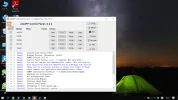
Just downloaded the XAMPP Control Panel and tried starting Apache and MySQL. I got the following message:
Windows Version: Enterprise 64-bit
17:44:12 [main] XAMPP Version: 5.5.38
17:44:12 [main] Control Panel Version: 3.2.2 [ Compiled: Nov 12th 2015 ]
17:44:12 [main] You are not running with administrator rights! This will work for
17:44:12 [main] most application stuff but whenever you do something with services
17:44:12 [main] there will be a security dialogue or things will break! So think
17:44:12 [main] about running this application with administrator rights!
17:44:12 [main] XAMPP Installation Directory: "c:\qmdownload\softmgr\xampp\"
17:44:12 [main] Checking for prerequisites
17:44:13 [main] All prerequisites found
17:44:13 [main] Initializing Modules
17:44:13 [main] Starting Check-Timer
17:44:13 [main] Control Panel Ready
17:44:15 [Apache] Attempting to start Apache app...
17:44:15 [Apache] Status change detected: running
17:44:17 [Apache] Status change detected: stopped
17:44:17 [Apache] Error: Apache shutdown unexpectedly.
17:44:17 [Apache] This may be due to a blocked port, missing dependencies,
17:44:17 [Apache] improper privileges, a crash, or a shutdown by another method.
17:44:17 [Apache] Press the Logs button to view error logs and check
17:44:17 [Apache] the Windows Event Viewer for more clues
17:44:17 [Apache] If you need more help, copy and post this
17:44:17 [Apache] entire log window on the forums
How do I fix this problem?
Cheers
Windows Version: Enterprise 64-bit
17:44:12 [main] XAMPP Version: 5.5.38
17:44:12 [main] Control Panel Version: 3.2.2 [ Compiled: Nov 12th 2015 ]
17:44:12 [main] You are not running with administrator rights! This will work for
17:44:12 [main] most application stuff but whenever you do something with services
17:44:12 [main] there will be a security dialogue or things will break! So think
17:44:12 [main] about running this application with administrator rights!
17:44:12 [main] XAMPP Installation Directory: "c:\qmdownload\softmgr\xampp\"
17:44:12 [main] Checking for prerequisites
17:44:13 [main] All prerequisites found
17:44:13 [main] Initializing Modules
17:44:13 [main] Starting Check-Timer
17:44:13 [main] Control Panel Ready
17:44:15 [Apache] Attempting to start Apache app...
17:44:15 [Apache] Status change detected: running
17:44:17 [Apache] Status change detected: stopped
17:44:17 [Apache] Error: Apache shutdown unexpectedly.
17:44:17 [Apache] This may be due to a blocked port, missing dependencies,
17:44:17 [Apache] improper privileges, a crash, or a shutdown by another method.
17:44:17 [Apache] Press the Logs button to view error logs and check
17:44:17 [Apache] the Windows Event Viewer for more clues
17:44:17 [Apache] If you need more help, copy and post this
17:44:17 [Apache] entire log window on the forums
How do I fix this problem?
Cheers
Attachments
-
 Microsoft Defender: No threats detected Scan detailsXAMPP.webp266.4 KB · Views: 330

