📎 AI Summary:
The forum thread discusses a hidden form or window appearing on a Windows 7 PC, related to OEM client operations, which the original poster finds disruptive. The user seeks advice on how to handle this persistent window, and responders request more details and suggest troubleshooting steps such as uninstalling recent software (Skype and Spotify) and checking hardware information. Overall, the discussion aims to identify and resolve the unexpected window issue, with some emphasis on recent software changes as potential causes.

joran184

New Member
Joined
Nov 14, 2014
Messages
4
Thread Author #1
Hello there,
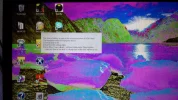
This form is hidden as part of the normal execution of OEM client. The standard method of hiding this is:
1)set opacity to 0%
2)set shownintaskbar=false
3)in a timer calback,set from visible=false.
This is on my screen every time i start my windows 7 computer.what do i have to do now?
Regards.
 

Solution
Only installed Skype and Spotify....that qualifies as recent changes. Uninstall them both and reboot and see if issue continues.

Jimbo22

Essential Member
Joined
Aug 27, 2008
Messages
5,035
Can you post some screen shots of your issue please?

What form, what OEM client?
 

joran184

New Member
Joined
Nov 14, 2014
Messages
4
Thread Author #4
Picture is loading....
 

Attachments

  • 20141114_152313.webp
    20141114_152313.webp
    1.2 MB · Views: 261

Jimbo22

Essential Member
Joined
Aug 27, 2008
Messages
5,035
What is the make/model of your PC/laptop you're having this issue on?

What if anything has recently changed to the PC/laptop....eg...software installs, hardware/driver installs?
 

joran184

New Member
Joined
Nov 14, 2014
Messages
4
Thread Author #6
Nothing has changed recently... i only installed Skype and Spotify. It's a HP model g62.. it's a very old one so i don't know the name anymore...
 

Jimbo22

Essential Member
Joined
Aug 27, 2008
Messages
5,035
Only installed Skype and Spotify....that qualifies as recent changes. Uninstall them both and reboot and see if issue continues.
 

Solution

Jimbo22

Essential Member
Joined
Aug 27, 2008
Messages
5,035
If you open the battery tray, remove the battery...the specific model is listed inside there.