📎 AI Summary:
The original poster, XBILL, is experiencing issues with System Restore, finding no restore points and an error indicating insufficient disk space despite setting it to 12GB. Fixer1234 suggests that XBILL might be mistakenly trying to create restore points on the recovery partition instead of the main drive, warning that the recovery partition is meant for system recovery and should be ignored when creating restore points. The thread primarily addresses troubleshooting the restore point creation problem, with guidance on proper partition selection, and overall seems aimed at resolving disk space or partition-related issues.

XBILL

New Member
Member details
Joined
Jan 19, 2014
Messages
7
Thread Author #1
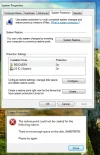
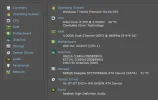
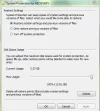
went,t to open system restore ,no restore points, when i tried to create one i get this error,not enough space on disk i have it set at 12g.max,will up load pic,also checked out some fixs from forum thanks for any help you can give me on this.
 

Attachments

  • ScreenShot019.webp
    ScreenShot019.webp
    45.9 KB · Views: 303
  • ScreenShot022.webp
    ScreenShot022.webp
    25.8 KB · Views: 252
  • ScreenShot021.webp
    ScreenShot021.webp
    25.7 KB · Views: 292
Solution
One of your screen shots shows the highlighted drive as named "Recovery". Are you by any chance trying to use the factory recovery partition? If so, that could be the problem. That partition holds a backup of your operating system in case you need to recover Windows. Just ignore that partition for purposes of restore points. If you have been creating restore points in the normal course of events, they should be on the C drive (the other selection).

Fixer1234

Senior Member
Member details
Joined
Aug 3, 2012
Messages
481
One of your screen shots shows the highlighted drive as named "Recovery". Are you by any chance trying to use the factory recovery partition? If so, that could be the problem. That partition holds a backup of your operating system in case you need to recover Windows. Just ignore that partition for purposes of restore points. If you have been creating restore points in the normal course of events, they should be on the C drive (the other selection).
 

Solution