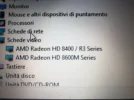
hi there, i'm spending 20 minutes of my time to write this Support post in the hope to save hours of your precious time on the Video Board problem. In few words after any W10 upgrade my video board start to be slower, i experienced difficults to even just move the arrow of my mouse!! in addition there's the impossibility to change the brightness of my screen... everything become fixed just doing a rollback of the driver of the VideoBoard it self! (initially i used to disabled the video board, gaining the normal speed of the mouse's arrow but loosing the brightness, now with this trick i can enjoy both the functions). i hope to be usefull, have a nice day
📎 AI Summary:
The thread discusses issues with video card performance and display settings following a Windows 10 upgrade, with the original poster experiencing slow mouse movement and inability to adjust screen brightness. They found that rolling back the video drivers temporarily resolves these problems. A subsequent user asks for specific details about the video card model, to which the original poster responds that they use AMD Radeon HD 8400/R3 and HD 8600 series cards. The overall tone suggests a troubleshooting effort, with users exchanging technical details to find a solution.
The thread discusses issues with video card performance and display settings following a Windows 10 upgrade, with the original poster experiencing slow mouse movement and inability to adjust screen brightness. They found that rolling back the video drivers temporarily resolves these problems. A subsequent user asks for specific details about the video card model, to which the original poster responds that they use AMD Radeon HD 8400/R3 and HD 8600 series cards. The overall tone suggests a troubleshooting effort, with users exchanging technical details to find a solution.