

I have a weird problem that has been bugging me for a long time and I have exhausted all the sources I thought would solve me -- this forum is my last hope.
I have two Windows 10 1511 laptops -- one is a clone of the other: it was restored from a backup image of the other.
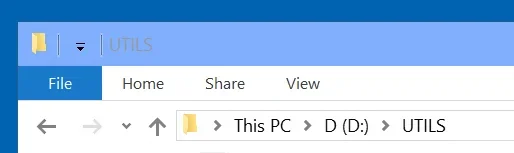
In the source laptop the top Explorer menu looks like attached image 1
In the cloned laptop, Explorer top menu looks like attached image 2 -- different.
I need the first menu but NOBODY seems to know why the different menus and how to bring the 1st menu to the cloned laptop.
This is weird because:
1. How can Explorer look different on a clone than on the source?
2. I considered the possibility that I've done something on 2 or on 1 that affected Explorer, but for the life of me I have no idea what, and nobody seems to have either.
If anybody know these two Explorer looks and how to fix this, I would appreciate it.
I have two Windows 10 1511 laptops -- one is a clone of the other: it was restored from a backup image of the other.
In the source laptop the top Explorer menu looks like attached image 1
In the cloned laptop, Explorer top menu looks like attached image 2 -- different.
I need the first menu but NOBODY seems to know why the different menus and how to bring the 1st menu to the cloned laptop.
This is weird because:
1. How can Explorer look different on a clone than on the source?
2. I considered the possibility that I've done something on 2 or on 1 that affected Explorer, but for the life of me I have no idea what, and nobody seems to have either.
If anybody know these two Explorer looks and how to fix this, I would appreciate it.
Last edited by a moderator:


