hogon52

Senior Member
Joined
Oct 29, 2009
Messages
4
Hi Guys

have upgraded to Win7 Ultimate from Vista Business running a 64bit OS. I have a problem with an error keeps coming up "unable to start the Bluetooth stack". I have tried reinstalling and updating the Bluetooth driver, still no joy.
Checking the Services it's the Bluetooth support service that seems to stop. I restart it and after about 10mins it stops and i get the error messeage "unable to start the Bluetooth stack" . Anyone have any ideas how to fix it. It's driving me up the wall now lol.
 

Last edited:
Solution
Herr Hogon,

I've suffered with this. I finally found that the Bluetooth BTTray was getting installed into /Programme Files/Thinkpad and not into /Programme Files(x86).

I installed the Widcomm drivers, copied them across and so far so good.

Hope it helps

LanceBombardier

New Member
Joined
Dec 1, 2009
Messages
2
Herr Hogon,

I've suffered with this. I finally found that the Bluetooth BTTray was getting installed into /Programme Files/Thinkpad and not into /Programme Files(x86).

I installed the Widcomm drivers, copied them across and so far so good.

Hope it helps
 

Solution

reghakr

Essential Member
Joined
Jan 26, 2009
Messages
14,185
Not sure if this will help, but it's worth a try.

Download BluetoothView v1.35

bluetoothview_icon.gif
BluetoothView v1.35 - Monitor the Bluetooth activity around you
Copyright (c) 2008 - 2009 Nir Sofer Link Removed


Description

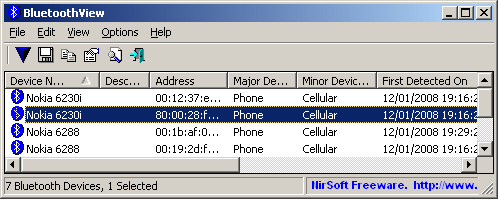
BluetoothView is a small utility that runs in the background, and monitor the activity of Bluetooth devices around you. For each detected Bluetooth device, it displays the following information: Device Name, Bluetooth Address, Major Device Type, Minor Device Type, First Detection Time, Last Detection Time, and more.
BluetoothView can also notify you when a new Bluetooth device is detected, by displaying a balloon in your taskbar or by playing a small beep sound.

bluetoothview.gif
 

hogon52

Senior Member
Joined
Oct 29, 2009
Messages
4
re bluetooth stack

HI Guys,

thanks for your replys. I have since reinstalled Win7 and seems there was some software i had on original install that was causing the problem. Have a great Christmas. Nice Car by the way

Regards

Hogon52
 

Larry Longwell

New Member
Joined
Jun 28, 2015
Messages
1
Using Windows 7 on HP Pavilion dv7.
I, too, get the error message "ERROR: Unable to start the Bluetooth stack service".
I checked and found the Bluetooth Software in in "C:\Program Files\WIDCOMM\Bluetooth Software".
Is this the correct place?
If not, how do I move it to the correct file location?
(Obviously, I am not extremely proficient with operating system software manipulation.)
Thanks for any help with this.
Larry