
The Japanese configuration is substantially less vague than the initial reporting suggested. Acer identifies the machine by part number NH.U3DSJ.003 and specifies 32GB of DDR5-5600 memory, a 512GB PCIe Gen4 NVMe SSD, a 1920×1200 180Hz IPS display, and an 85W RTX 5060 with 8GB of GDDR7 memory. It also carries a Japanese-layout RGB keyboard, Windows 11 Home, USB4, Wi‑Fi 6E, Killer E2600 Ethernet, a 76Wh battery, and a 2.1kg chassis.
The missing item is price. Acer Japan’s published specification page contains no retail price, release date, or named sales channel for this AMD model. That prevents this from being a finished buying recommendation for Japanese shoppers, and it means prospective import buyers should not assume it will mirror either the memory configuration or street pricing of models sold elsewhere.
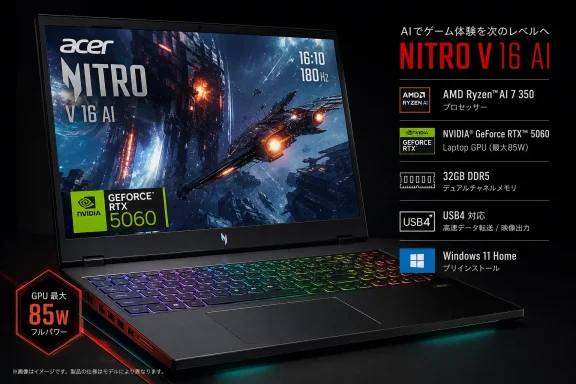 The RTX 5060’s 85W rating is the specification that will decide game performance
The most useful finding in Acer’s Japanese listing is not the Ryzen AI badge; it is the GPU power limit. The ANV16-A71-N73Y56 uses an RTX 5060 Laptop GPU rated at a maximum graphics power of 85W and a 1,660MHz maximum graphics boost clock.
That is a meaningful qualification. “RTX 5060 Laptop GPU” is not a uniform performance tier across every notebook: laptop makers set distinct power envelopes, cooling capacity, and firmware profiles. An 85W implementation may be a sensible balance in a 2.1kg mainstream machine, but its frame rates should not be compared blindly with higher-wattage RTX 5060 systems—or with an RTX 5070 simply because both belong to Acer’s broad Nitro V 16 AI range.
Acer’s own product-family page advertises configurations reaching an RTX 5070, while the Japanese Ryzen AI 7 450 SKU stops at the RTX 5060. The 180Hz panel is therefore best understood as headroom for esports titles and older or well-optimized games at native 1920×1200, rather than a promise that every current AAA title will run at 180 frames per second with high-quality ray tracing settings.
Independent testing gives that caution some weight. GamesRadar+, reviewing a different Nitro V 16 AI configuration with an RTX 5060 and 32GB of RAM, found it did not consistently lead its comparison group in 1080p game benchmarks. That review is not a test of Acer’s Japanese unit—the processor, regional firmware, panel settings, drivers, and thermal modes can differ—but it reinforces the point that this is a value-oriented RTX 5060 laptop, not a proxy for the fastest RTX 5060 designs on the market.
The display itself is better specified than many entry-level gaming panels. Acer lists a matte IPS screen with 100% sRGB coverage, a 3ms gray-to-gray response time in overdrive mode, 16:10 aspect ratio, and 180Hz refresh. However, the company does not disclose the panel’s brightness. For buyers who use a laptop in bright rooms or intend to judge HDR-like media performance, that omission matters more than the refresh-rate number.
Ryzen AI 7 450 makes this a Copilot+ PC, but it will not add frames by itself
AMD’s Ryzen AI 7 450 is an eight-core, 16-thread Ryzen AI 400-series processor with a 2.0GHz base clock, boost speeds up to 5.1GHz, Radeon 860M integrated graphics, and a 50 TOPS neural processing unit. AMD’s published specifications place its configurable power range between 15W and 54W.
The 50 TOPS NPU clears the performance threshold associated with Microsoft’s Copilot+ PC category, and Acer labels the Japanese laptop accordingly. That gives the Nitro V 16 AI a dedicated accelerator for supported local AI tasks in Windows and compatible applications, rather than requiring those workloads to sit continuously on the RTX GPU or CPU.
Still, the “AI” label should be read carefully in a gaming notebook. Conventional game rendering will depend predominantly on the RTX 5060, its 85W power ceiling, the MUX switch, and the game’s use of technologies such as DLSS 4. The NPU is useful for tasks that can actually target it—certain camera and audio effects, media features, and locally processed AI experiences—but it is not an extra graphics engine that raises rasterized frame rates in unsupported games.
Acer adds its own software layer, including Acer Intelligence Space, NitroSense, Acer PurifiedView, and Acer PurifiedVoice. NitroSense has direct relevance to performance because it exposes system and fan controls; the AI hub is more of a discovery and launch surface whose available functions can vary by region, hardware, and future software updates. Acer says as much in its broader product notes, which is a reminder that a Copilot+ PC designation establishes capability, not a fixed list of permanently bundled AI features.
Japan receives the 32GB configuration, but Acer has closed off memory upgrades
The Japanese SKU carries 32GB of RAM as two 16GB DDR5-5600 SO-DIMMs. On paper, that is a welcome step above many mainstream gaming-laptop configurations that ship with 16GB, particularly for players who keep a browser, voice client, capture tools, mods, or creative software open alongside games.
But Acer’s fine print removes the normal upgrade advantage associated with SO-DIMM memory: it says users cannot change or expand the installed memory for this product. The maximum supported capacity is also listed as 32GB, and both memory slots are occupied. In practical terms, prospective buyers should treat 32GB as a fixed lifetime allocation, not as a starting point for a future 64GB upgrade.
The storage picture is slightly better, although Acer applies similarly restrictive wording. The machine ships with a single 512GB M.2 2280 PCIe Gen4 NVMe SSD and has a second M.2 2280 slot listed as vacant and reserved for SSD options. Yet the same Japanese specification says customer modification or expansion is not supported. There is a physical path to a second drive, but buyers should check the warranty terms and local service policy before treating that slot as freely user-serviceable.
A 512GB boot drive is the one clear capacity compromise in this configuration. After Windows 11, recovery partitions, drivers, and a few current large games, free space can disappear quickly. The unoccupied M.2 slot is therefore more consequential than the NPU for long-term ownership—provided Acer Japan or an authorized service partner will fit a second drive without creating a support problem.
This is a regional rollout, not evidence of a broader U.S. configuration
Acer’s January announcement said the AMD-powered Nitro V 16 AI would reach North America in the third quarter of 2026 and EMEA in the second quarter, with exact specifications varying by market. The Japanese listing confirms that promise has become a real, specific Ryzen AI 400-series system in at least one additional region, but Acer Japan has not accompanied it with the kind of launch release, price sheet, or retailer list it used for its July 24 Intel Core Ultra 7 355 Nitro V 16 AI lineup.
That distinction is important because the Intel and AMD machines share the same Nitro V 16 AI branding while carrying different internal platforms and ports. The Japanese AMD model offers USB4; Acer’s July Japanese Intel announcement described a related Nitro V 16 AI line based on Core Ultra 7 355 and Thunderbolt 4. Model numbers, rather than the product-family name, are the reliable way to distinguish them.
For Windows users, the ANV16-A71-N73Y56 has a coherent formula: a current Copilot+ capable Ryzen processor, 32GB of fixed memory, a competent color-accurate 180Hz screen, and an RTX 5060 that should be judged as an 85W implementation. The remaining unanswered retail question is simple: until Acer publishes Japanese pricing and sales availability, the laptop’s value proposition cannot be measured against the many RTX 5060 alternatives that will compete on price, storage capacity, and GPU power rather than on the presence of an NPU.
