
/usage is a context/token diagnostic, while /status is the documented command for monitoring subscription capacity; and Anthropic’s current Pro-plan terms still reserve the right to vary access during high-traffic periods.
The practical consequence is straightforward for Windows developers: do not treat a “limit reached” notification as evidence that Claude Code is broken or that an upgrade is immediately required. Start by checking Settings > Usage in Claude and /status in the terminal. Then inspect the session itself. A 15-prompt coding session can consume more capacity than a day of brief chat because Claude Code repeatedly sends its accumulated conversation, project instructions, file reads, tool results, and newest request to the model.
Anthropic’s own Claude Code guidance confirms the core of H2S Media’s report: context size—not a simple message count—is what makes quota disappear quickly.
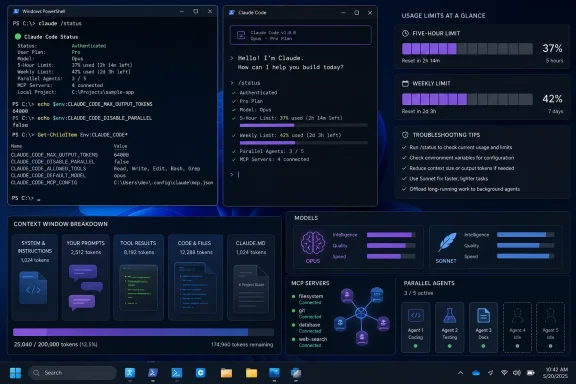
/status tells you about plan capacity; /usage is about the session
H2S Media tells readers to run /usage to understand what consumed their allowance. Anthropic’s cost-management documentation does say /usage reports current token use, but the company’s separate Pro and Max subscription guidance tells customers to use /status to monitor remaining plan allocation.
That difference is more than terminal trivia. A user who sees a large context footprint in /usage has found a likely cause of fast consumption, but not necessarily the reason they are currently blocked. Subscription limits are shared across Claude’s consumer surfaces: Claude on the web, desktop and mobile apps, Claude Code in the terminal, and supported IDE integrations such as VS Code, Cursor, IntelliJ, and PyCharm. A developer can therefore have a light-looking terminal session and still discover the capacity was consumed by browser research, desktop use, or IDE work under the same account.
Anthropic’s consumer support material also makes a distinction H2S Media only partly emphasizes: an API key changes the commercial model entirely. If ANTHROPIC_API_KEY is present in the Windows environment, Claude Code uses that key rather than the user’s Pro or Max subscription. The result is API billing rather than plan usage.
In PowerShell, the check is simple:
$env:ANTHROPIC_API_KEY
An empty result is expected for someone intentionally using a subscription login. A value does not mean the key is malicious or misconfigured—it may be deliberate for a Console, Amazon Bedrock, Google Vertex AI, or Microsoft Foundry workflow—but it does mean the user should stop comparing API charges with a consumer plan’s included allowance.
For Windows shops that manage developer environments centrally, this is worth checking in user environment variables, machine environment variables, shell profiles, CI configuration, and IDE terminal inheritance. A stale variable installed for a prior experiment can quietly change how Claude Code authenticates.
The five-hour reset is real, but peak-hour language has not vanished
Anthropic states that Pro subscribers have a session-based limit that resets every five hours, plus a weekly limit assigned to a fixed weekly reset time visible in Settings > Usage. H2S Media is right to separate those two cases. A five-hour interruption is usually an operational nuisance; a weekly ceiling is the signal that a person’s habitual workload may no longer fit their plan.
But the article’s assertion that Anthropic has removed peak-hour reductions for Pro and Max customers does not match Anthropic’s current Pro-plan support page. The page still says Pro offers at least five times the free-tier per-session usage during peak hours and says Anthropic may impose additional limits to ensure fair access. That is not proof that a specific subscriber will face an evening throttle, nor does it recreate the older public descriptions of peak-time cutbacks. It does mean readers should not plan their work around a claim that peak-hour treatment has been categorically removed.
The more durable rule is to trust the account dashboard and the limit message shown at the time of the block. Anthropic assigns the weekly reset to the account; it is not a universal Friday or Sunday deadline. IT teams should avoid publishing a shared “reset time” in internal documentation unless they have verified that it applies to every relevant account.
Anthropic also provides several ways to continue after a plan limit: wait for reset, move up from Pro to Max where appropriate, enable usage credits, or use a pay-as-you-go Console account. The company says transitions to API-credit use require explicit consent, but the economic distinction still matters. A subscription interruption becomes an API-spend event the moment a user opts in.
Context is the meter readers can actually control
The most useful part of H2S Media’s advice is its focus on conversation hygiene. Anthropic’s Claude Code documentation confirms that every request carries the conversation so far, project context such as CLAUDE.md, files Claude has read, and the latest prompt. Tool use adds further requests containing tool results. Prompt caching lowers the repeated cost of unchanged material, but it does not make a sprawling session free.
On a subscription, Claude Code automatically uses a one-hour cache lifetime. Once a user exceeds included plan usage and begins drawing on usage credits, it falls back to five minutes. API-key and cloud-provider connections also default to a five-minute lifetime. The first request after a sufficiently long break must rebuild the cache, which explains why a seemingly harmless “continue” can be unexpectedly expensive in a large session.
There is another nuance that changes the common advice to switch models freely. Anthropic says model switching is a cache-invalidating event because each model has its own cache. Moving from Opus to Sonnet may be the right cost decision for future work, but the first turn after the switch has to rebuild the conversation under the new model. That is a reason to select the working model early in a task, not a reason to leave Opus on indefinitely.
The best day-to-day behavior is more prosaic:
- Use
/clearwhen moving to unrelated work, because stale discussion from a completed bug fix raises the context burden of every later request. - Use
/compactwhen still working on the same task but the conversation has become unwieldy, and give it specific preservation instructions if tests, interfaces, or a partial refactor matter. - Use
/renamebefore clearing a session that may need to be resumed later. - Keep prompts bounded to the file, function, failing test, or expected behavior rather than asking Claude to “improve the codebase.”
H2S Media correctly notes that /compact itself is not a magic savings button. Anthropic explains that it generates a summary request and replaces old history with a shorter recap. Used at a natural task boundary, it can reduce future context and keep the session coherent. Used compulsively as a ritual, it adds work without solving the underlying issue: a session that should have been cleared because the task changed.
CLAUDE.md, MCP servers, and agent teams can turn small jobs into large ones
Anthropic recommends keeping CLAUDE.md under 200 lines, and its own documentation explains why. Project instructions load into the context window at session start. A huge all-purpose file full of migration procedure, release checklists, security-review instructions, deployment notes, and style rules charges every task with material most tasks do not need.
The better Windows-friendly repository setup is to leave short, universal engineering rules in CLAUDE.md and move specialized procedures into skills or path-scoped instructions. Anthropic says skills load on demand, whereas the base project instructions remain always present. This is a performance and quota decision as much as a prompt-writing one.
MCP configuration deserves the same restraint. Anthropic now defers full MCP tool definitions by default, which reduces the initial overhead, but server names still enter context and connecting or disconnecting an MCP server can invalidate the cache. The company recommends using /context to see what is occupying context and /mcp to identify configured servers. Where an established command-line tool exists—gh, aws, gcloud, or sentry-cli, for example—the CLI avoids maintaining an MCP tool listing in the prompt.
Agent teams are the feature most likely to make a subscription feel inadequate when it is really being used as a parallel-compute budget. Anthropic estimates that agent teams in plan mode use roughly seven times the tokens of a standard session. Each teammate has its own context window, project setup, and working conversation. The feature is experimental and disabled by default, which is appropriate: it belongs on contained research, code review, or clearly partitioned development work, not routine edits.
Subagents are more economical when the goal is isolation rather than concurrency. Sending a test run, documentation search, or log-analysis task to a subagent keeps noisy output out of the main session and returns a summary. The parent context stays cleaner; the subagent still costs tokens, but it prevents the primary conversation from carrying thousands of lines of test output forward.
The immediate action is not to buy a larger tier after one bad afternoon. Check /status, identify whether the limit is five-hour or weekly, clear unrelated sessions, reduce always-on instructions, and stop leaving expensive models or multiple workers active for ordinary tasks. Upgrade only when the weekly ceiling repeatedly interrupts work that has already been disciplined.
