

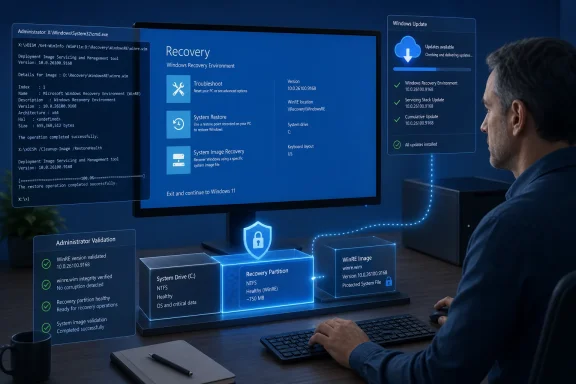
This is a recovery-partition update, not a monthly Windows desktop cumulative update. It changes the copy of Windows used for Startup Repair, reset and advanced recovery operations, so the practical question for administrators is whether the installed WinRE image has been serviced—not whether the running OS has a matching build number.
Microsoft’s KB5121002 support note is unusually short. It says only that the release “makes improvements” to WinRE and gives no fixed-issue list, CVE, security-impact statement, or explanation of what changed from KB5101719. No independent outlet had reported technical details of KB5121002 at publication time, leaving Microsoft’s stated target WinRE version as the clearest way to validate deployment.
KB5121002 replaces the July WinRE package
KB5121002 supersedes KB5101719, the Safe OS Dynamic Update Microsoft released on July 14 for the same Windows 11 24H2 and 25H2 population. The previous package targeted WinRE version 10.0.26100.8875, so the August release advances the recovery image’s revision by 293.
Both Windows 11 releases share the 26100 WinRE base here, even though their normal operating-system builds differ. That is expected: the recovery environment is maintained as its own image, stored separately from the active Windows installation. A PC can therefore appear fully patched in Settings while still carrying an older recovery image if WinRE servicing did not complete.
Microsoft lists KB5121002 as available through Windows Update and the Microsoft Update Catalog. Windows Server Update Services, however, is marked unavailable. That distinction matters for managed fleets that approve everything through WSUS: the automatic consumer-style Windows Update route is available, but Microsoft is not offering this package through WSUS as a normal approval and deployment item.
For organizations that service images themselves, Microsoft points to the standalone package and its Windows RE servicing instructions. That makes KB5121002 relevant both to already-deployed PCs and to offline installation media, custom WIM files, task-sequence images and recovery images maintained by IT teams.
The verification guidance exposes a documentation mismatch
Microsoft’s KB5121002 page says a successfully updated device should report WinRE version 10.0.26100.9168. Its accompanying support guidance offers three ways to check: Microsoft’s GetWinReVersion.ps1 script, the WinREAgent event log, or DISM against the recovery image.
The most direct built-in route is to run reagentc /info from an elevated Command Prompt, identify the Windows RE location, then inspect that winre.wim with DISM. Microsoft’s example uses:
Dism /Get-ImageInfo /ImageFile:<WinRE-path>\winre.wim /index:1
Administrators can also check the System log in Event Viewer for a WinREAgent Event ID 4501 entry, which records successful Windows Update servicing of the recovery environment and reports the resulting WinRE version. Microsoft’s PowerShell script mounts the image, reads the winpeshl.exe file revision, and removes the temporary mount afterward.
There is, however, a discrepancy in Microsoft’s own documentation that administrators should recognize before using version reporting as a blanket validation method. Microsoft Learn’s current article on adding updates to Windows RE says an LCU changes the WinRE version number, while a Dynamic Update should instead be confirmed with DISM /Get-Packages. KB5121002 is explicitly labeled a Safe OS Dynamic Update, yet Microsoft’s KB page instructs customers to expect the version change to 10.0.26100.9168.
In this case, follow the KB that matches the package: 10.0.26100.9168 is Microsoft’s published post-installation target for KB5121002. For manually serviced online or offline images, it is prudent to perform both checks—confirm that KB5121002 appears as Installed in the package list and verify the version Microsoft assigns to this release. That avoids treating a generic servicing guideline as more authoritative than the update’s own deployment record.
The update is permanent once committed to an image
Microsoft says KB5121002 has no prerequisites and does not require a device restart. That should make routine Windows Update deployment low-friction for endpoints that receive it normally.
The more consequential line is the removal policy: KB5121002 cannot be removed once it has been applied to a Windows image. This is standard behavior for WinRE servicing, but it changes the rollout calculus for image engineers. Do not treat the standalone CAB or MSU as an ordinary endpoint patch that can simply be uninstalled if a later validation step fails.
A manually updated recovery image should be copied or snapshotted before servicing, particularly when it is part of a reference image that will seed new machines. Microsoft’s Windows RE instructions also call for component cleanup and a reset of the component base after adding a Dynamic Update package. Once that work is committed, rollback means returning to a known-good image, not uninstalling KB5121002 in place.
For a running PC, Microsoft documents mounting WinRE with ReAgentC.exe /mountre, adding the package with DISM, checking package state, then committing the image with ReAgentC.exe /unmountre /commit. On BitLocker- or Device Encryption-protected systems, the company further advises disabling and re-enabling Windows RE after the manual update so the newly serviced image is enabled and correctly configured.
Do not confuse this with the Secure Boot certificate work
The KB5121002 page links to Microsoft’s broader warning about Windows Secure Boot certificates beginning to expire in June 2026. That link is a reminder of a separate operational concern, not evidence that KB5121002 itself delivers Secure Boot certificate updates.
Microsoft has not said that this Safe OS Dynamic Update contains a certificate refresh, resolves a Secure Boot boot failure, or remediates a specific security vulnerability. The omission matters because WinRE updates and the Secure Boot certificate transition both touch pre-boot or recovery functions, making it easy for an abbreviated KB article to invite an unsupported connection.
Administrators working through Secure Boot certificate readiness should continue to follow Microsoft’s certificate-specific guidance and verify firmware, boot-manager, policy and deployment prerequisites independently. Installing KB5121002 is sensible WinRE maintenance for eligible Windows 11 24H2 and 25H2 systems; it should not be recorded as proof that the Secure Boot certificate transition is complete.
What to do with KB5121002
For most PCs, the right action is to let Windows Update install KB5121002 and then spot-check the recovery environment on a representative sample, especially where recovery partitions have been resized, customized or previously failed to service.
For managed images, the practical checklist is shorter:
- Confirm that the target image is Windows 11 24H2 or 25H2 and that the appropriate KB5121002 package has been selected for its architecture.
- Preserve a recoverable copy of the image before servicing because Microsoft does not support removing the update after it has been applied.
- Validate the package state with DISM and validate the resulting WinRE version against Microsoft’s published 10.0.26100.9168 target.
- Record that WSUS is not a listed distribution channel for this update, rather than assuming a normal WSUS synchronization and approval cycle will deploy it.
KB5121002 is a quiet update, but recovery components are most visible when something has already gone wrong. The immediate milestone is clear: Windows 11 24H2 and 25H2 devices that receive this package should have a WinRE image reporting version 10.0.26100.9168, while enterprises maintaining custom images need to build that version check into their servicing validation.