
GB News presented KB5101684 as a newly rolled-out update for “Windows 11 users worldwide.” Microsoft’s own release documentation says otherwise: it was an optional preview package for Windows 11 24H2 and 25H2, installed manually through Optional Updates unless a user had enabled early access to updates. TechRepublic also identified it as an optional package when it arrived, advising organizations without a need for its specific fixes to wait for the regular cumulative update.
That distinction is more than release-calendar trivia. Home users and IT administrators should no longer go hunting for KB5101684 in the Microsoft Update Catalog simply to make an 8GB PC feel faster. A fully patched Windows 11 24H2 or 25H2 machine should instead be on the August 11 cumulative update: build 26100.9168 for 24H2 or build 26200.9168 for 25H2. Those build numbers, rather than an older preview KB number, are the useful check that the broadly released fixes are present.
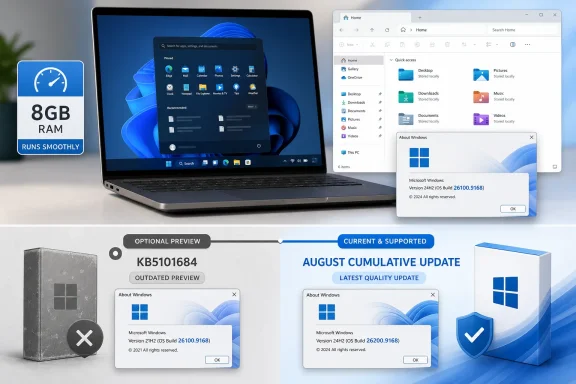 The 8GB claim is about responsiveness, not extra capacity
Microsoft’s documented changes target reliability problems that are most visible when Windows is operating under memory pressure. The company specifically called out the sign-in and lock-screen experience on systems with low available memory, alongside startup reliability for the Start menu and taskbar. Windows Central, which first highlighted the low-RAM angle, reported that Microsoft expects the improvements to be particularly noticeable on PCs with 8GB of RAM or less.
But the update does not increase installed memory, change a laptop’s processor, or make every program faster. It addresses pauses and failures around parts of the Windows shell that users repeatedly touch: File Explorer, taskbar jump lists, the Start menu, Task View, and login. A budget laptop that struggles when a browser, Teams call, security software, and several File Explorer windows are open may feel less brittle after the update; a system constrained by a slow eMMC drive, a nearly full SSD, or an underpowered CPU will retain those bottlenecks.
Microsoft’s language is also careful. The release notes promise reliability improvements, while the “speed boost” framing comes from how fewer shell delays can feel in day-to-day use. That is a meaningful maintenance improvement, especially on machines with 8GB of RAM, but it is not a benchmarkable hardware upgrade and should not be sold as one.
What the update changes in ordinary Windows use
The visible fixes are concentrated in the operating system processes that make a PC seem responsive or unresponsive before an application has even started doing work. Microsoft says it improved the reliability of explorer.exe, the Windows process behind File Explorer, much of the desktop, and the taskbar. That work covers jump lists, recent files, sharing files and folders, Task View, and switching between virtual desktops.
Microsoft also changed its update cleanup logic. The company says the revised cleanup behavior is intended to improve system performance immediately after a Windows update. On a low-memory system, post-install servicing work can compete with normal activity for CPU time, disk access, and memory; reducing that work should make the first session after a patch less disruptive.
Other changes in the package are less dramatic but useful:
- Windows app search is intended to better recognize partial app names and typing mistakes.
- The taskbar system tray has reliability work for touchscreen devices used in tablet posture.
- Start menu view preferences should persist more reliably.
- File Explorer receives fixes beyond the responsiveness work, including behavior around its Home view and file-size display.
- The update fixes an SMB File History problem where backups to network shares could fail with an incorrect invalid-credentials message.
For managed Windows fleets, the SMB backup fix and a repair for device-management enrollment are more consequential than the consumer-facing “snappier PC” pitch. TechRepublic reported that the preview package fixed an issue that could leave newly provisioned, MDM-enrolled devices incorrectly marked noncompliant. That is the kind of defect that can block a deployment or generate false alarms in Microsoft Intune, even if the end user sees only a healthy desktop.
KB5101684 was a preview test, not the update to deploy now
Microsoft labeled KB5101684 a cumulative preview update for Windows 11 24H2 and 25H2. Its associated builds were 26100.8973 and 26200.8973. Preview releases are Microsoft’s route for distributing non-security fixes before the next monthly security release; they are optional by design and do not belong in the same category as the regular Patch Tuesday package.
The important operational detail is that Microsoft’s release notes said these changes would appear in the next security update for Windows Update for Business. That follow-through matters: it means organizations that held the preview to avoid unnecessary change were not supposed to miss the fixes permanently. The August 11 servicing release is the relevant deployment vehicle for ordinary patching.
There is another rollout wrinkle. Microsoft says its features can be released in stages rather than arriving on every eligible PC simultaneously. The update package may be installed while a particular feature or interface behavior remains withheld temporarily, depending on the device and Microsoft’s controlled rollout schedule. Therefore, seeing the current build number is stronger evidence that the servicing package is installed than judging an update solely by whether a user immediately notices a faster taskbar or different search behavior.
For administrators, this is a familiar reason to separate servicing compliance from feature validation. Confirm the build first, test the workflows that matter to the business second, and do not treat a marketing description of a smoother experience as proof that all devices received the same visible change at the same moment.
Check the build, then decide whether the PC needs more than a patch
To verify a device, press Win + R, run winver, and inspect the Windows 11 version and OS build. On Windows 11 24H2, the August release is build 26100.9168; on 25H2, it is build 26200.9168. Devices that remain on 26100.8973 or 26200.8973 have the July preview package but are not yet on the newer August cumulative build.
Users who have paused updates, are managed by an employer, or run a version no longer supported may not receive the current release on the same schedule. Windows 11 24H2 Home and Pro editions reach end of servicing on October 13, 2026, according to Microsoft’s lifecycle notice. That date is close enough that a PC still on 24H2 should be assessed for its supported upgrade path instead of assuming monthly patches will continue indefinitely.
The update is worth taking because it combines ordinary security servicing with fixes that can remove some of Windows 11’s most irritating low-memory stalls. But it does not alter the economics of a machine that has 4GB or 8GB of soldered RAM, a slow storage device, or years of accumulated startup software. If the system still bogs down after reaching the August build, the next troubleshooting target is startup load, free disk space, browser tab use, and vendor utilities—not a search for an obsolete preview package.
