
The immediate operational point is simple: this is a separately serviced Windows AI model update, not a normal cumulative update and not a Microsoft Store app update. Microsoft’s KB5124882 says systems must first have the latest cumulative update for their Windows release, then Windows Update can deliver the model package. On an eligible device, administrators and users should see “2026-08 Image Transform version 1.2608.951.0 (KB5124882)” under Settings > Windows Update > Update history.
Microsoft does not describe the fixes, model-quality changes, performance changes, download size, or any known issues in the release notes. So there is no evidence yet that KB5124882 adds a user-facing editing feature, fixes a specific failure, or materially changes the output of object removal. It is a maintenance release whose content is largely opaque outside Microsoft.
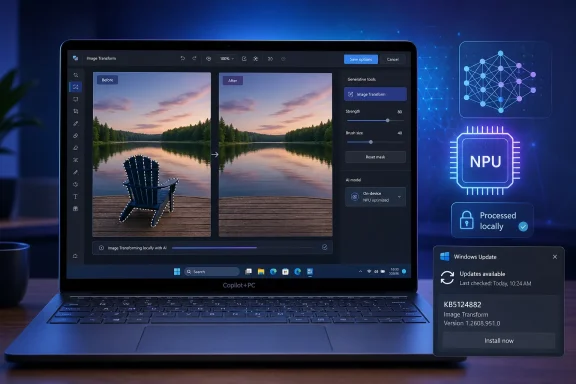 The update is limited to Copilot+ hardware
KB5124882 applies only to Windows 11 24H2 and 25H2 devices that qualify as Copilot+ PCs. A standard Windows 11 installation—even one with a discrete GPU or a processor marketed for AI acceleration—does not become eligible simply by installing this package; the component relies on the Copilot+ class of hardware and its dedicated neural processing unit.
Microsoft’s broader Copilot+ AI-components documentation describes Image Transform as one piece of an on-device stack: a machine-learning model, runtime support, and hardware-optimized execution layer. Its stated job is to support context-aware image modification, specifically removal of a foreground object and reconstruction of what should appear behind it.
That distinction is important for support teams. KB5124882 is not an update to the Microsoft Photos application, Paint, Microsoft Designer, or the Copilot consumer app. Those products may expose image-editing controls, but this package updates a lower-level component they and other Windows experiences can call on supported hardware. An app update can change the controls or workflow without changing the model; a component update can refresh the underlying model without presenting a new button anywhere in the interface.
Microsoft Learn’s AI Imaging documentation separately identifies Object Erase as a Copilot+ PC capability requiring an NPU. It describes the resulting operation in plainer terms: an object can be removed and the erased portion replaced with background. That published API capability closely matches Image Transform’s description in KB5124882, although Microsoft has not named the individual Windows apps or third-party applications that consume this exact version of the component.
KB5124882 continues Microsoft’s model-by-model servicing
Microsoft’s History of AI updates confirms that version 1.2608.951.0 was released on August 27, 2026, and places KB5124882 in the “All systems” column for Copilot+ PCs on the Windows 11 24H2 and 25H2 servicing track. The same release date brought 1.2608.951.0 updates to several adjacent AI components, including Image Creation, Image Processing, and Phi Silica, with different KB numbers depending on the component and processor path.
For Image Transform specifically, the previous listed version for 24H2 and 25H2 was 1.2607.840.0, distributed as KB5121640 on July 28, 2026. KB5124882 therefore supersedes a one-month-old predecessor rather than replacing an older, long-lived Windows feature package.
This rhythm illustrates what Microsoft calls component-based servicing. Instead of binding every improvement to a major Windows feature update, the company can ship a new image model or runtime through Windows Update independently. In theory, that allows image capabilities to improve more quickly than the OS itself. In practice, it also means two Windows 11 PCs on the same OS build can have different AI behavior when one has received a newer component package and the other has not.
There is a second wrinkle in Microsoft’s own release history that can confuse anyone inventorying the fleet by KB number alone. Microsoft maintains separate tables for Windows 11 26H1 and for the 24H2/25H2 family. On August 27, the 26H1 table shows a different Image Transform KB, KB5124893, at version 1.2607.840.0. KB5124882 is specifically the 24H2 and 25H2 package and should not be assumed to apply to 26H1 just because the release dates align.
For enterprises, that means update reporting needs to retain at least four fields: the Windows release, whether the device is actually a Copilot+ PC, the component name, and the installed component version. “Windows 11 is current” will not establish whether Image Transform is current.
What Microsoft has—and has not—said changed
Microsoft’s published statement about KB5124882 is limited to “improvements” to Image Transform. The company has not published benchmark results, before-and-after examples, a model architecture identifier, a CVE, or a known-issues list. It also has not said whether the new version improves object selection, background reconstruction, speed, memory consumption, output consistency, or compatibility with a particular NPU vendor.
That lack of detail changes how the update should be handled. There is no security advisory here and no stated emergency action for administrators. Organizations that manage Copilot+ endpoints should treat KB5124882 as a normal quality and capability-maintenance package, validate it against image-editing workflows where those workflows matter, and record the deployed version. It should not be represented internally as a security patch unless Microsoft later issues a separate advisory.
The privacy claim also needs a precise reading. Microsoft says Image Transform runs locally on the device and keeps image data on the PC while performing the transformation. That describes the processing path of this component, not every action an application might take before or after it invokes the component. An app can still have its own sync, sharing, account, telemetry, or cloud-generation behavior. Local object erasure should not be treated as a blanket statement about the privacy posture of every image feature exposed in Windows apps.
How to verify deployment
The supported verification method is Windows Update history. On a Copilot+ PC running 24H2 or 25H2, open Settings, select Windows Update, then open Update history. A successfully applied package should appear by its full August 2026 name and identify KB5124882 alongside Image Transform version 1.2608.951.0.
If it is absent, the first check is not the Photos or Paint version—it is whether the device has the latest cumulative update for its installed Windows release. Microsoft lists that current cumulative update as a prerequisite. The next check is eligibility: the package will not be offered to non-Copilot+ PCs.
The practical result is modest but real. Eligible Windows 11 24H2 and 25H2 systems are receiving a new local image-editing component automatically, while the visible software may look unchanged. Until Microsoft supplies a changelog or a reproducible quality comparison, the only confirmed change is the component version itself: Image Transform has moved from 1.2607.840.0 to 1.2608.951.0 on the 24H2/25H2 Copilot+ servicing track.
