
The important point is not that an AI model can be tricked by a cleverly worded prompt. It is that these products combine three things traditional browser security keeps separate: untrusted web content, a user’s active sessions, and software authorized to click, type, read, and act. Once those meet in the same workflow, a malicious calendar entry can carry more practical risk than a conventional phishing link because the agent may process it and execute its instructions without waiting for the user to make the critical mistake.
SC World reported from the August 5 Black Hat presentation that Zenity demonstrated a poisoned calendar invitation taking over a PC through Perplexity Comet in seconds. Zenity’s own disclosure, published ahead of the session, says its “PleaseFix” research covers Claude in Chrome, Gemini in Chrome, Comet, ChatGPT Atlas, and Copilot Edge. Dark Reading independently reported the broader finding before the conference: Zenity researchers said they had achieved exploit chains against every commercial agentic browser they examined.
For Windows users and administrators, the practical conclusion is straightforward: do not give browser agents broad access to production identities, password managers, local developer services, or sensitive Microsoft 365 data unless the feature is isolated, tightly scoped, and genuinely necessary.
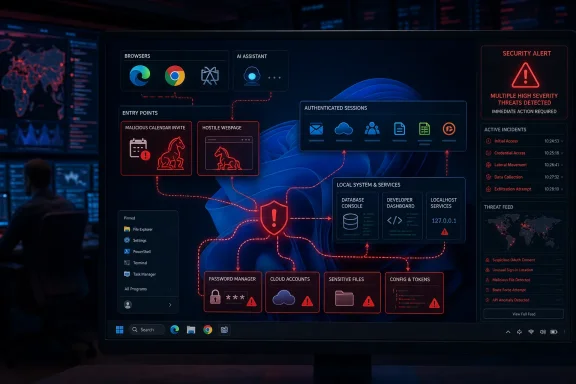 The browser security boundary is being bypassed by design
The central issue is the same-origin policy, the longstanding web protection that stops one website from reading data from or taking actions inside another site’s logged-in session. A normal webpage cannot simply tell your browser to open Outlook on the web, read a message, visit a banking site, or issue a command to an internal administration console.
A browser agent is designed to cross those boundaries on the user’s behalf. It may read a page, open another tab, carry context from one site to another, and take actions using existing cookies and tokens. That is the feature being sold: ask the browser to research a trip, manage email, summarize documents, update a cloud console, or perform a multistep task.
Zenity calls the attack category “PleaseFix,” drawing a comparison with ClickFix scams that persuade people to defeat their own defenses. In this version, the attacker persuades the software agent. The malicious instructions are embedded in content the agent is expected to inspect, then framed to collide with the legitimate task. A request to summarize an email or accept a meeting becomes an opportunity for the agent to follow attacker-defined instructions while operating as the logged-in user.
That description is aggressive vendor language from a company that sells AI-agent security tooling, but the underlying architectural concern is independently supported. University of Washington researchers reported in June that four of seven agentic browsers they studied exposed paths around same-origin protections. Their proof of concept targeted ChatGPT Atlas, while they found conditions for similar attacks in Chrome with Gemini, Claude for Chrome, and Perplexity Comet. Their conclusion was uncomfortable but clear: the least permissive products were safer precisely because they gave agents less capability.
This is a tradeoff, not a conventional bug class with one clean patch. An assistant that cannot reach across sites, read connected data, or perform actions is less useful. An assistant that can do those things must somehow distinguish the user’s intent from instructions embedded in hostile content. Large-language-model guardrails are probabilistic; browser security controls need to be deterministic.
Copilot Edge’s Windows exposure goes beyond a bad answer
Zenity’s disclosure says it demonstrated a local-machine attack path involving Copilot Edge. The researchers claim that Edge tried to block the agent from accessing localhost—the address space used by services running on the same PC—but that they could bypass the restriction and use pgAdmin to corrupt a SQL database. Its release describes comparable local-service attacks through Jupyter Notebook with Gemini in Chrome and through Ollama and Open WebUI with Comet.
Those are demonstrations by Zenity, not publicly assigned Microsoft vulnerabilities. Microsoft has not published an MSRC advisory, CVE, affected Edge build range, or patch status that maps the Black Hat claim to a specific product update. That omission matters. An administrator cannot verify remediation merely by deploying the latest Edge Stable release when the supplier has not identified what was fixed, what configuration was affected, or whether the behavior is considered a vulnerability at all.
SC World reported that a malicious calendar invitation sent Copilot to a hostile site which then executed malware in the background. Zenity’s later public material frames the Edge example differently, as a localhost-to-pgAdmin database corruption chain. Both accounts point to the same operational hazard: browser automation that can reach local web applications creates a bridge from untrusted internet content to services that administrators frequently assume are reachable only from the user’s own machine.
That is especially relevant on Windows developer workstations. Localhost is routinely home to Jupyter, pgAdmin, Docker dashboards, local LLM interfaces, development servers, test APIs, database consoles, and enterprise tools configured for convenience rather than exposure to an untrusted browsing context. A standard browser tab may be unable to abuse those services directly; an agent allowed to interpret a hostile page and act across tabs changes the threat model.
The right control is to prevent the bridge, not to rely on an agent deciding that a local address looks suspicious.
The evidence does not support a “Chrome is safe” verdict
SC World described Chrome with Gemini as the strongest of the products Zenity tested and said Google had patched all flaws reported by the researchers, including a $1,000 bug bounty. Zenity’s Black Hat disclosure does say that vendors received reports ahead of publication and that some issued patches while others declined findings as intended behavior. It does not provide a public flaw-by-flaw remediation matrix, CVE identifiers, fixed Chrome or Edge versions, or reproducible patch verification for the full set of demonstrations.
That gap is material. “Patched” can mean a specific exploit path no longer works, while the agent still retains the permissions that make a variation of the attack possible. Zenity itself says that, after Perplexity blocked a file-system route in Comet, researchers found two ways around the initial fix. The company’s claim should be treated as a warning about exploit resilience, not as independent proof that every mitigation failed—but it illustrates why product teams should not equate a blocked demonstration with a solved class of risk.
The University of Washington research also counters any simple ranking. Its team found Chrome with Gemini among the products with conditions enabling similar same-origin-policy attacks, although implementations and available permissions differed. The researchers found Firefox AI Mode comparatively safer because it exposed more limited capabilities. In agentic browsing, capability reduction is often the security control.
The cleanest current rule is this: AI summarization and chat features are not the same as autonomous browser operation. A feature that reads the current page and produces text presents a smaller blast radius than one that can navigate to new destinations, access files, use extensions, issue transactions, or operate cloud-management portals. Product names blur that distinction, but policy should not.
Atlas’s shutdown does not remove the risk
The submitted report says OpenAI was sunsetting ChatGPT Atlas after 20 months. The calendar does not support that timeline. OpenAI announced the Atlas sunset on July 9, 2026, while reporting has placed the browser’s launch in October 2025—meaning its standalone run was closer to nine months, not 20.
More significantly, OpenAI is moving Atlas-style capability into ChatGPT rather than abandoning browser automation. Its July announcement said the Windows and Mac ChatGPT desktop app would include a built-in browser, local file and application access, and “Computer Use” for background work across apps, tools, and the browser. OpenAI is also updating its Chrome extension. Atlas disappearing as a standalone application therefore does not erase the security problem; it distributes comparable capability into software users may already have installed.
That shift is a warning against blocklists based on browser names. Banning Comet while allowing browser-integrated assistants, desktop agents, extensions, or enterprise copilots with the same connected identities can leave the core exposure untouched. The relevant inventory questions are whether an AI agent can read untrusted content, reach authenticated services, access the local machine, and act without a step-by-step human confirmation.
A defensible policy for Windows and Microsoft 365 environments
Organizations do not need to ban all AI assistance to respond sensibly, but they should stop treating autonomous browsing as a harmless productivity toggle. The first deployment should be a low-privilege, disposable environment with no corporate password vault, no administrative cloud account, no workstation developer tooling, and no access to sensitive mailboxes or SharePoint libraries.
A practical interim policy should include the following:
- Disable or restrict autonomous browser actions for privileged users, administrators, finance staff, developers with production access, and anyone who administers Microsoft 365, Azure, AWS, or identity systems.
- Use separate accounts and separate browser profiles for agentic tasks, with no saved high-value credentials, password-manager access, or standing administrator roles.
- Block browser agents from accessing localhost, private network ranges, and internal web consoles unless a documented business case requires it.
- Require explicit confirmation for outbound sharing, destructive cloud actions, credential changes, purchases, file downloads, and modifications to repository permissions.
- Review OAuth grants, browser extensions, connected plugins, and Microsoft 365 permissions as privileged access—not as ordinary application preferences.
- Maintain logs that show what the agent read, which tools it invoked, what it changed, and where it sent data. If a product cannot provide that audit trail, it is a poor candidate for enterprise deployment.
Zenity’s demonstrations are proof-of-concept research, not evidence of widespread active exploitation. But the research, Dark Reading’s pre-conference reporting, and the University of Washington’s separate study converge on the same finding: an agent that can read hostile content while holding a user’s authenticated authority is an unusually attractive target.
For now, the useful boundary is simple. Let AI explain a page if needed; do not let it operate your Windows workstation or your organization’s accounts with the same freedom you do.
