

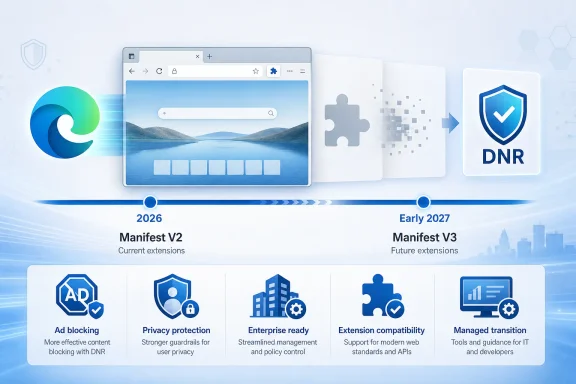
The practical message for Edge users is straightforward: if an extension still depends on Manifest V2, it needs a replacement or an upgrade path now. Microsoft’s August 7 announcement brings Edge in line with Chrome’s extension-platform direction after Edge spent more than a year as the major Chromium browser where classic uBlock Origin remained usable.
Digital Trends first reported the newly published schedule, and Microsoft’s own Edge developer documentation confirms the underlying technical change: Manifest V3 replaces the blocking use of the Web Request API with Declarative Net Request, or DNR. That does not eliminate ad blocking from Edge. It does mean a number of extensions cannot retain every capability they had under the older platform.
Edge’s announced deadline finally replaces “TBD”
The news is not that Microsoft prefers Manifest V3. It has said that for years, and the Edge Add-ons store stopped accepting new public Manifest V2 submissions in July 2022. The news is that Microsoft has finally attached a deployment schedule to ending runtime support for existing Manifest V2 extensions.
That is a meaningful change from the record Edge users and IT administrators had until now. Microsoft’s policy documentation, last updated on May 22, 2026, still says Manifest V2 will be deprecated but that the timeline “hasn’t been established.” The document also lays out controls for allowing or disabling MV2 extensions without reflecting the consumer end-of-2026 and enterprise early-2027 dates Microsoft has now announced.
Microsoft’s new timeline therefore supersedes the old TBD posture, but its public documentation is not yet synchronized. For an organization assessing browser compatibility, that matters more than it sounds: policy documentation is what administrators use to plan Intune, Group Policy, extension allowlists, change-control windows, and support communications. A blog announcement can establish intent; it does not by itself tell an admin which Edge build will enforce which phase.
Microsoft says only 58 Manifest V2 extensions in the Edge Add-ons store still have meaningful usage, and that all but three have a Manifest V3 alternative. That is encouraging, but it is a store-level migration statistic, not a guarantee that a replacement behaves identically or works with a company’s particular web applications. The important cases are usually not the long tail of lightly used add-ons; they are a handful of deeply embedded blockers, security tools, workflow injectors, legacy authentication helpers, and custom enterprise extensions.
Why the original uBlock Origin is affected
The original uBlock Origin is the extension users will notice most because it is substantially more than an ad-hiding tool. Its developer describes it as a wide-spectrum content blocker: it can block network connections, trackers, malware domains, scripts, pop-ups, nuisance content, and requests to third-party services before those requests complete.
Under Manifest V2, extensions such as uBlock Origin can use the blocking form of the Web Request API to inspect and cancel requests dynamically. In Chromium’s Manifest V3 model, ordinary extensions instead use Declarative Net Request rules supplied to the browser in advance. Microsoft’s developer documentation explicitly says Edge is replacing the Web Request API’s blocking role with DNR, while retaining Web Request for observation.
The architecture is intentional. Microsoft argues that MV3 reduces the risks from persistent background pages, remotely hosted extension code, broad site permissions, and code that can alter traffic at runtime. Those are defensible security goals. An extension with less power over every request is generally a smaller security risk than an extension allowed to inject remote code and intercept web traffic freely.
But the trade-off is capability, not merely implementation detail. The uBlock Origin project says uBlock Origin Lite is deliberately a “Lite” product rather than a feature-equivalent MV3 conversion. Some of its more advanced filtering capabilities cannot be carried over cleanly to DNR, particularly dynamic filtering features that depend on context or on the extension making real-time decisions about a request.
For many people, uBlock Origin Lite will be entirely adequate. It blocks a broad set of ads and trackers and is designed for a set-it-and-forget-it experience. The difference emerges for people who use custom filters, per-site controls, script blocking, advanced mode, or the full extension’s ability to manage third-party connections with fine granularity.
Calling MV3 “the end of ad blockers” would be wrong. Calling uBlock Origin Lite a drop-in replacement for the original uBlock Origin would also be wrong.
The enterprise extension policy is narrower than the headline suggests
Microsoft’s announced early-2027 enterprise window should not be read as a blanket promise that every managed endpoint can keep every MV2 extension alive unchanged until then.
The existing ExtensionManifestV2Availability policy offers several modes. An administrator can enable MV2, disable it, or allow it only for extensions installed through enterprise policy. Microsoft’s own documentation says a normal “Enable” setting will eventually be treated as though the policy were not configured once browser-default MV2 support ends. By contrast, EnableForForcedExtensions is described as remaining available regardless of the migration state.
That distinction is consequential. It indicates that the durable exception is for extensions that IT deploys through ExtensionInstallForcelist or ExtensionSettings with an installed mode, not necessarily every MV2 add-on a user installed on a corporate laptop. The full details may change when Microsoft updates its policy guidance, but organizations should plan around the stronger documented condition: force-installed legacy extensions have the clearest supported reprieve; user-installed MV2 extensions do not.
Administrators should now inventory Edge extensions by manifest version rather than wait for Stable-channel warnings. On managed Windows fleets, the immediate work is to identify which extensions are installed by policy, which are user-selected, whether an MV3 build exists, and whether the MV3 build preserves required behavior.
A useful starting checklist is short:
- Review
edge://extensionson pilot devices and extension-management reports for any add-on still marked Manifest V2. - Test the MV3 replacement against business-critical sites, including SSO flows, download portals, internal dashboards, and applications that depend on injected scripts.
- Treat uBlock Origin Lite, AdGuard, and Ghostery as separate products requiring validation, not as interchangeable names on a deployment list.
- If a business-critical MV2 extension is force-installed, use the enterprise window to pressure the vendor for an MV3 plan and a tested release date.
- Document whether the extension is a convenience tool or a security control, because a browser migration is not the place to discover that a content blocker was also preventing access to known malicious domains.
Chrome already showed what Edge’s rollout will feel like
Microsoft is following a sequence Chrome users have already experienced: warnings in pre-release channels, disabling extensions by default, a short transition period, and eventually a browser state where the user cannot simply turn the legacy add-on back on.
Chrome’s own published timeline says Manifest V2 was disabled for all Chrome users with Chrome 138 in July 2025, and that Chrome 139 removed the enterprise policy that had temporarily preserved MV2 support. Google is scheduled to remove remaining MV2 extensions from the Chrome Web Store on August 31, 2026; previously installed copies on Chrome 138 or earlier may remain installed, but cannot be updated or reinstalled from the store.
The comparison exposes what makes Edge’s timetable consequential. Switching from Chrome to Edge was once a practical short-term answer for users who needed the original uBlock Origin. Once Edge reaches its consumer cutoff, that workaround disappears for mainstream Chromium browsers. Manual sideloading will not restore an extension framework that the browser itself has disabled.
Firefox remains structurally different here. Mozilla continues to support the webRequestBlocking permission in its Manifest V3 implementation, while Chrome does not except for policy-installed extensions. That does not obligate Edge users to change browsers, and it does not make every Firefox extension a fit for every organization. It does mean that the choice is increasingly about extension capabilities, not browser branding.
What Edge users should do before Stable catches up
The initial disabling starts in Edge Canary, Dev, and Beta, so users of those channels should expect the first visible effects immediately. Stable users have more time, but Microsoft has not supplied the specific Stable build number or month for each phase in the material published so far. Its faster Edge release cadence adds urgency: beginning with Edge 152 on August 27, Microsoft is moving Stable releases to a two-week cycle.
Users relying on the original uBlock Origin should export or record their custom rules, trusted sites, and filtering setup before testing another blocker. An MV3 replacement may be good enough, but “good enough” is a conclusion each user needs to reach after trying the sites and controls that matter to them.
For IT teams, the deadline is no longer an abstract Chromium issue. Edge’s Manifest V2 retirement is now a dated compatibility project, with pre-release disruption starting in August 2026, consumer completion by December 2026, and the enterprise extension window closing in early 2027.
Update: Edge will warn users before disabling Manifest V2 extensions (August 8, 2026)
Windows Report reports that Microsoft will begin the transition with notices rather than immediate shutoffs. Users with affected extensions will see migration warnings in Edge’s Extensions management page and on relevant Edge Add-ons store listings, while developers will receive notices through Partner Center.
According to the report, Edge will notify users before an installed Manifest V2 extension is disabled. Where a Manifest V3 replacement is available, the browser and store experience will point users toward that supported version.
That clarification gives users and administrators a more visible testing window, but it does not change the announced consumer and enterprise retirement targets.
Update: Brave says it will continue supporting uBlock Origin (August 12, 2026)
Windows Central reports that Brave will keep supporting the original uBlock Origin and other Manifest V2 extensions, offering Edge users a Chromium-based alternative after Microsoft completes its MV2 retirement.
According to the report, Brave hosts affected MV2 extensions on its own servers and exposes a control at Settings > Extensions > Manifest v2 extensions for enabling them. Brave’s built-in ad blocker is separate from that compatibility setting and is not affected by Edge’s Manifest V3 migration.
Firefox has also publicly reiterated that support for uBlock Origin will continue. Unlike Brave, Firefox is not Chromium-based and retains a different extension architecture.
For users whose workflows depend on the original uBlock Origin’s advanced filtering and dynamic request blocking, Brave’s position creates an additional migration option beyond Firefox. It does not change Edge’s announced retirement schedule or make uBlock Origin Lite feature-equivalent to the original extension.