
For Purview administrators, this is not simply a better notification template. It moves selected response decisions to the person who owns or last handled the content, while creating new audit events that security and compliance teams must be prepared to review. The operational trade-off is obvious: faster containment for an accidentally shared sensitive file also means a destructive action can be initiated from a notification workflow rather than a dedicated admin console.
Microsoft lists Roadmap 527831 as Launched, with general availability dated January 2026 and availability for GCC, GCC High, and Department of Defense environments. Yet Microsoft Learn currently labels actionable email notifications for OneDrive and SharePoint as preview. Microsoft has not publicly explained that status mismatch, nor clarified whether the Roadmap entry reflects a government-cloud rollout while the broader feature remains preview elsewhere. Admins should treat the feature as requiring tenant-level validation rather than assuming the “Launched” label means identical availability and support terms in every Microsoft 365 cloud.
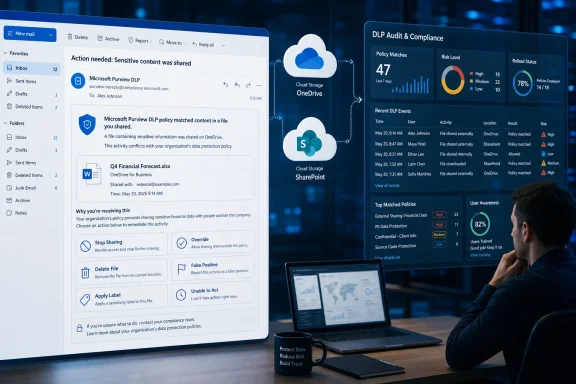 Six actions, but not six identical workflows
Microsoft’s documentation separates the actions in ways that matter when designing a DLP rule. Stop sharing file removes sharing access and links from the file, making it the quickest containment option where exposure came from a link or permissions grant. Delete file deletes the item, a much more consequential response that should not be placed casually into a user-facing notification.
“Apply sensitivity or retention label” is less direct than the Roadmap wording implies. Microsoft Learn says the notification takes the recipient to the relevant OneDrive folder or SharePoint site, where the user can apply the label. The email becomes a launch point for remediation, rather than silently applying a classification or retention setting itself.
The remaining choices — override, report false positive, and report unable to take action — are feedback and exception paths. An override requires a business justification and bypasses the matching DLP policy. A false-positive report and an unable-to-act report also require justification, but they notify administrators through the audit trail rather than resolving the underlying file automatically.
That distinction should influence the options exposed to end users. Stopping a share may be appropriate for a common external-sharing violation. Deleting source content can complicate retention, eDiscovery, records-management, and business-continuity obligations. Allowing an override can be legitimate for a policy still being tuned, but it is an explicit policy exception — not a technical fix.
Microsoft’s documentation exposes a rollout and configuration gap
The submitted Roadmap entry says the capability has launched. Microsoft Learn’s current DLP notification guidance says the same capability is in preview. There is also a useful historical wrinkle: the Microsoft 365 Message Center Archive preserved an earlier, similarly worded Roadmap entry, ID 464996, that described the feature as being developed for worldwide standard multi-tenant customers, with a December 2025 general-availability target.
The newer Roadmap ID 527831 instead identifies GCC, GCC High, and DoD. That suggests Microsoft may be tracking a separate government-cloud release or re-release rather than announcing a clean, universal availability milestone. The record does not spell this out, so administrators should not infer that availability in a commercial tenant automatically means availability in a sovereign or government tenant, or vice versa.
There is no independent reporting that resolves the discrepancy. Microsoft’s own documentation is the relevant primary record here, and it points in two directions: the Roadmap says launched, while the product configuration documentation continues to apply a preview label. For compliance teams, the safer interpretation is to test the control in the target tenant and verify its presence in the Purview portal before changing production communications or incident procedures.
Actionable notifications require customized email and Markdown
The feature is opt-in at notification configuration time; it does not retrofit buttons into every existing Purview DLP email. Microsoft says administrators add the controls while configuring a customized end-user notification for a rule.
That comes with a deployment constraint that is easy to miss: once actions are added, the email body must use Markdown. HTML formatting is supported for ordinary customized DLP notification emails, but not for actionable ones. Organizations that have invested in branded HTML notification templates should expect to rebuild those templates in Markdown before enabling this feature.
The recipient model also remains limited. Microsoft’s notification guidance says email notifications can go only to individual recipients, not groups or distribution lists. Only newly created content triggers a notification email; editing existing content triggers policy tips but not a new email notification. A remediation program that assumes every later edit will re-send an actionable message could leave violations waiting for the next manual review.
Administrators should also remember that Microsoft documents DLP notification emails as unprotected. That does not make the feature inherently unsafe, but it raises the standard for notification design. Avoid placing excessive policy logic, sensitive match details, or business context in the email body, particularly if messages can be forwarded, retained in mailboxes for long periods, or accessed from unmanaged devices.
The audit trail is useful, but it is split across record types
Microsoft Learn documents a divided audit model for these actions. Delete, stop-share, and label-related actions are recorded as SharePoint file operations. Overrides, false-positive reports, and unable-to-act reports use the DLPInfo operation under the ComplianceDLPSharePoint record type.
That split is consequential for security operations. A hunting query, alert rule, or investigation playbook that watches only DLP override activity will miss a user who removed sharing or deleted a file from an email notification. Conversely, a SharePoint file-operation search alone will not capture the justification submitted with a false-positive report or policy override.
The audit trail gives administrators an opportunity to tune policy quality rather than merely count violations. Repeated false-positive reports on the same sensitive information type, file pattern, site, or business process are evidence that a rule may need refinement. Repeated “unable to take action” submissions deserve different scrutiny: they may reveal missing permissions, a broken file ownership process, an overly rigid retention rule, or users being asked to remediate content they cannot safely change.
The control does not replace incident response. Purview DLP policies can still generate alerts and incident reports for administrators, and Microsoft’s policy reference notes that SharePoint and OneDrive alerts are generally limited to one alert per file per rule. Actionable notifications add an end-user response channel; they do not guarantee that a user sees, understands, or completes the requested remediation.
Keep the first deployment narrow
The capability applies to OneDrive and SharePoint, not Exchange, Teams chat, endpoint DLP, or on-premises repositories. That boundary matters in organizations whose DLP policy names span multiple locations. An employee receiving an actionable message about a OneDrive file should not be expected to encounter the same options for a blocked email attachment or a Teams message.
A prudent first deployment is a low-risk, well-understood DLP policy limited to OneDrive and SharePoint. Enable stop sharing, false-positive reporting, and unable-to-act reporting before exposing deletion or overrides broadly. Test with a nonproduction site and a representative user account, then confirm each outcome in the Purview audit experience and the Microsoft Defender XDR investigation workflow used by the security team.
The tests should cover more than button visibility:
- Confirm that stop sharing removes both direct permissions and existing sharing links as expected for the file.
- Confirm that a deletion follows the organization’s retention, recycle-bin, eDiscovery, and recovery processes.
- Confirm that the label action directs users to the correct file location and that they have rights to apply the intended sensitivity or retention label.
- Confirm that override, false-positive, and unable-to-act justifications are captured where investigators expect to find them.
- Confirm that the Markdown version of the notification still gives users enough context to make a safe decision without disclosing unnecessary sensitive information.
Microsoft’s new email actions can reduce the time between a DLP match and a response, especially when a user can immediately remove an exposed sharing link. But the current documentation conflict means the immediate task for Purview administrators is verification: establish whether Roadmap 527831 is actually enabled in the intended cloud, confirm its preview or general-availability support status with Microsoft where necessary, and instrument every action before giving users the ability to delete, unshare, or override from their inbox.
Update: Earlier roadmap entry now lists worldwide launch (August 15, 2026)
Microsoft has updated Roadmap ID 464996 to mark actionable DLP email notifications as launched for Worldwide (Standard Multi-Tenant) customers, with general availability dated December 2025. The entry was updated August 14, 2026.
This changes the earlier picture in which ID 464996 described the feature as still being developed. It also strengthens the case that Microsoft is tracking separate commercial and government-cloud releases: ID 464996 now covers worldwide commercial tenants, while ID 527831 identifies GCC, GCC High, and DoD availability.
The documentation conflict remains unresolved. Microsoft Learn continues to label the OneDrive and SharePoint email actions as preview, despite both roadmap records now showing launched status. Administrators should therefore treat commercial availability as indicated by the roadmap, but continue validating support status, licensing scope, and tenant-level behavior before relying on the controls in production incident-response workflows.
