
The immediate job is not a broad hunt for every private channel that lacks an owner. Microsoft changed that plan in July after customers objected to deleting ordinary ownerless channels. The channels now exposed are narrower, but they are also the channels least likely to have a visible internal champion: completely empty private workspaces and guest-only spaces left behind after an employee or contractor departed.
As of Monday, August 17, 2026, the end-of-July remediation date stated in Microsoft’s updated Message Center notice has passed. Teams tenants should treat any status showing affected channels as an active recovery exercise, rather than a cleanup task to schedule for later.
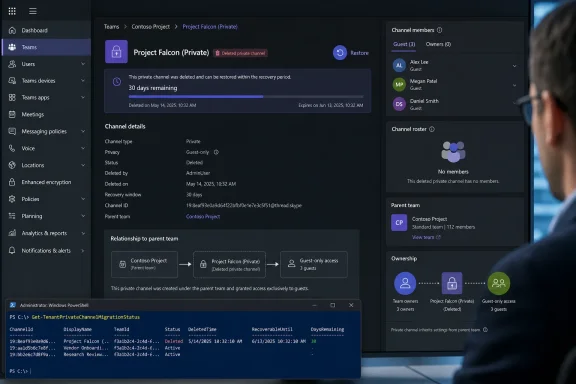 The deletion scope is narrower than the original warning
Microsoft’s private-channel migration is part of a broader backend change that moves private-channel compliance data from individual user mailboxes to the parent team’s Microsoft 365 group mailbox. The company began announcing the transition in 2025, pitching simplified retention, legal hold, DLP, and eDiscovery administration, along with larger private-channel limits and channel-meeting support.
The migration encountered a practical problem: some legacy private channels have no eligible internal owner who can satisfy the new model’s ownership requirements. Earlier notices indicated that ownerless private channels could be removed if administrators did not intervene. Microsoft’s July update reversed the broad deletion plan, saying it would migrate and retain ordinary ownerless channels as-is.
That reversal is important because it changes the audit target. A private channel merely having zero owners is not, by itself, proof it is in the deletion cohort. The two remaining scenarios are specific:
- A private channel has no users at all, leaving its membership roster empty and the channel inaccessible to anyone in the tenant.
- A private channel contains guest users but has no in-tenant user assigned as an owner.
Microsoft’s own public Q&A response to an administrator managing 95 ownerless channels makes the operational distinction clear: empty, inactive channels can be allowed to expire, while channels with members and recent activity should be prioritized for assignment of an internal owner. It specifically flags guest-only memberships as unable to migrate without intervention.
The catch is that guest-only does not necessarily mean obsolete. A private channel used for a customer project, legal review, agency engagement, or vendor onboarding may continue to contain active external participants even after every internal participant has been removed. The channel can therefore look like an abandoned administrative object while remaining the only shared record of a project.
The PowerShell status command identifies the real candidates
Microsoft’s Get-TenantPrivateChannelMigrationStatus cmdlet is the first check administrators should run. It requires tenant administrator permissions and returns a tenant-level migration state: NotStarted, InProgress, Completed, or RequiresAdminAttention.
The useful part is the Details field. Microsoft documents it as a JSON string containing aggregate totals for migrated, failed, ownerless, and remaining channels. When action is required, it can also include ownerlessChannelsDetails, with the private channel’s thread ID and its parent team ID.
That output is more valuable than a manual tour through the Teams client because private channels are deliberately hard to discover. A team owner who is not a member of a private channel can see it in Manage team, but cannot necessarily see it in the regular Teams channel list. The empty-roster case is even worse: there is no active member to notice that the channel exists, let alone that it is about to be deleted.
Administrators should parse the Details output rather than simply record the tenant’s overall migration status. A Completed status means the migration finished; RequiresAdminAttention means that at least one private channel was skipped because it lacked an owner. Microsoft’s documentation says failed channels are retried automatically, but ownerless channels require an administrator to intervene.
The status output alone does not say whether a channel contains business records worth preserving. Pair each listed channel and parent team ID with an ownership and activity review. At minimum, establish whether the parent team remains active, whether the channel has files, whether its membership is empty or guest-only, and whether it falls under a records schedule, investigation, contract obligation, or legal hold.
Restoring a channel is only the first half of remediation
For a channel already soft-deleted, MakeUseOf says a team owner can open the relevant team, choose Manage team, expand Channels, open Deleted, and select Restore. Microsoft’s Teams documentation independently confirms that a deleted private channel can be restored for 30 days by a team owner or a private-channel owner.
Do not stop after the restore completes. Restoration returns the channel to a recoverable state, but the migration blocker remains until the organization assigns at least one eligible internal owner. Microsoft’s Message Center guidance, as mirrored by Purview.expert, says each affected private channel needs at least one in-tenant user as an owner.
There are two supported administrative paths. Microsoft’s guidance on the migration points administrators to Microsoft Graph APIs for ownership remediation. Teams PowerShell also provides Add-TeamChannelUser, which can add an owner to a private channel when given the parent team’s group ID, the channel display name, and the internal user’s UPN.
There is one technical detail that can trip up rushed remediation. Microsoft documents that the intended owner must first be a member of the private channel before that account can be promoted to the Owner role. In a guest-only channel, the selected employee may therefore need to be added to the parent team and then to the private channel before the owner assignment can succeed.
After the ownership change, rerun Get-TenantPrivateChannelMigrationStatus. A successful administrative change is not the same thing as a completed backend migration; the tenant should be rechecked until the affected channel no longer appears in the details and the migration state no longer requires attention.
Retention and legal holds preserve evidence, not channel usability
Microsoft says applicable retention policies and legal holds continue to be honored when these channels are deleted. That is a meaningful compliance safeguard, but it should not be confused with a disaster-recovery plan.
Under the new architecture, private-channel messages are stored in the parent team’s group mailbox after migration, and retention policies for Teams channel messages apply at the group level. Microsoft’s Purview documentation also says that deleted messages under an applicable retention policy, litigation hold, delay hold, or eDiscovery hold can remain discoverable even when they are no longer visible in the Teams client.
That may preserve evidentiary copies of conversations. It does not guarantee that a project team can resume using the channel, recover its membership structure intact, or regain straightforward access to the files tied to the private channel’s separate SharePoint site. Teams creates a dedicated SharePoint site for each private channel precisely because access is restricted to channel members.
Administrators should therefore verify both sides of the record. Check Purview retention and eDiscovery scopes to determine whether content is preserved, then restore and repair the Teams channel itself if the workspace remains operationally important. A hold can satisfy a legal preservation requirement while leaving employees without the working files and conversation space they expected.
This is a governance failure that Teams made visible
The most useful outcome of this migration may be the inventory it forces. Private channels were often created for sensitive work, then inherited informally by people who assumed the parent team’s ownership model applied. It does not. A private channel has its own membership and owner roles, and the departure of its last internal owner can turn a seemingly healthy collaboration space into an inaccessible orphan.
The small number of channels now eligible for deletion should not obscure the wider ownership problem. Microsoft has spared most ordinary ownerless channels from the end-of-July deletion schedule, but it has not made them healthy configurations. They still represent private spaces whose access, accountability, and migration outcome depend on a missing owner.
For the two categories now being removed, the calendar is simpler: restore any soft-deleted channel that contains records or active work, assign an internal owner, and confirm the result in the migration-status output before the channel’s 30-day recovery period ends.
