
At first glance, this looks like a niche formatting preference. In practice, comma behavior sits directly in the path of one of Outlook’s most frequent and error-prone activities: resolving people in the To, Cc, and Bcc fields. A centrally selected default can reduce ambiguity for organizations whose contacts, directories, exports, or business conventions use names such as “Smith, Jane.”
The catch is equally important: this is a default-setting policy, not a hard user lock. Microsoft’s rollout communication says users can still change the corresponding setting in their own Outlook experience after the organizational preference is applied. Microsoft 365 Message Center archive: MC1239176
That distinction makes the feature more flexible than a blunt administrative mandate—but it also means IT teams must approach it as a usability, support, and change-management decision rather than assume it will impose perfect recipient-entry consistency.
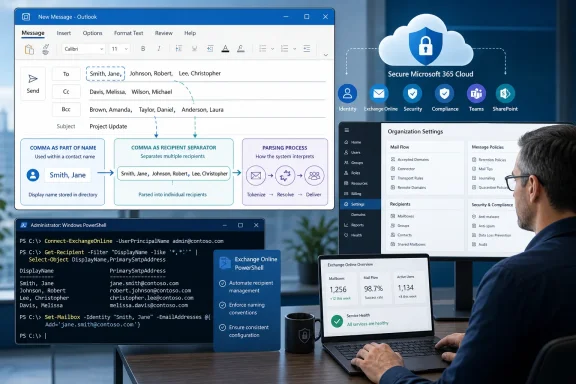 Background: Why Outlook’s Comma Behavior Matters
Email recipient fields appear simple until a user needs to enter several people quickly, paste a list of names, or work with contacts represented in “Last name, First name” format. Whether Outlook treats a comma as a punctuation mark or as an instruction to complete one recipient and begin another changes the meaning of the exact same keystrokes.
Consider a user who types:
Taylor, Morgan
If commas are interpreted as recipient delimiters, Outlook may attempt to resolve Taylor as one recipient and Morgan as another. If commas are not being used as separators, the application has a better chance of treating the text as part of one display name or a search string.
That scenario is especially relevant in organizations where:
- The global address list contains users formatted as Last name, First name.
- Teams routinely paste names from HR systems, CRM platforms, spreadsheets, or external directories.
- Staff communicate with customers or partners whose names are conventionally written with commas.
- Helpdesk teams receive recurring reports that Outlook “split a name into two people.”
- Employees have mixed habits carried over from classic Outlook, Outlook on the web, and other mail clients.
Microsoft describes the policy as a new Exchange Online control for the default Mail Compose and Reply setting that determines whether commas are used as recipient separators. The associated Message Center notice identifies Outlook on the web and new Outlook for Windows as the affected user experiences. MC1239176
The Microsoft 365 roadmap entry supplied for this feature lists Outlook, Web, and General Availability in the Worldwide Standard multi-tenant environment. Microsoft 365 Roadmap That scope matters for Windows administrators: while the management plane is Exchange Online, the practical impact reaches users of the modern Outlook client on Windows as well as browser-based Outlook.
What the New Admin Policy Changes
The new policy gives an administrator the ability to establish the organization’s starting behavior for the Outlook setting commonly presented to users as “Use commas as recipient separators.” In effect, the tenant can choose whether that setting begins enabled or disabled for applicable users.
Microsoft’s Message Center documentation frames the behavior in clear operational terms:
- Administrators can select whether the default is on or off across the tenant.
- Users affected by the policy receive the administrator-selected value as their default.
- Users can still alter the preference in Outlook after the policy is configured.
- Existing behavior does not automatically change merely because the feature becomes available. MC1239176
That final point deserves emphasis. A “launched” roadmap status does not mean every tenant suddenly begins interpreting recipient commas differently. Microsoft’s published guidance says that no change occurs until an administrator actively modifies the organizational configuration. MC1239176
Default, Not Enforcement
The policy’s design creates a deliberate balance between administrative consistency and individual preference. IT can ensure that everyone starts with a sane baseline for the organization’s naming conventions, while employees who need a different behavior can adjust their local Outlook setting.
This is a strength when the business has diverse teams. A customer-service group may frequently work with externally formatted contacts, while an engineering team may primarily use short internal aliases and prefer commas as a rapid multi-recipient delimiter.
It is also a limitation for organizations looking for strict standardization. If users can override the default, a helpdesk cannot assume that every reported recipient-resolution issue stems from—or is solved by—the tenant setting. Local preference remains part of the troubleshooting picture.
A Policy Built for Real-World Directory Data
The strongest use case is not simply “some users like commas.” It is avoiding collision between a delimiter convention and a contact naming convention.
Organizations often format display names in a directory as:
Last name, First name
That ordering has legitimate benefits in sorted address lists, formal records, payroll exports, legal systems, and customer databases. Yet it can be awkward in an email compose field if a comma is configured to mean “finish this recipient.”
Microsoft specifically calls out organizations using “Last name, First name” contact formats as beneficiaries of the change. MC1239176 That reflects a sensible recognition that recipient parsing is not a cosmetic detail. It shapes how reliably users can find people and how confidently they can send messages under time pressure.
Rollout History and the June Policy-Setting Issue
This feature did not arrive as a completely frictionless rollout. Microsoft’s updated roadmap description includes a notice dated June 2, 2026, stating that the company was correcting an issue with setting the policy and expected work to complete in mid-June. Microsoft 365 Roadmap
The related Message Center update provides a slightly different schedule, saying the correction was expected to complete by early July 2026, after the original timeline had moved. MC1239176 The practical lesson is not that the feature should be dismissed; the roadmap now identifies it as launched. It is that administrators should test the actual tenant behavior rather than depend entirely on an estimated completion date embedded in a historical rollout message.
Microsoft explicitly notes that roadmap release information is subject to change, and that the site is intended to describe estimated release dates and commercial feature availability. Microsoft 365 Roadmap For day-to-day operations, that means the tenant itself—not merely the roadmap status—must be treated as the final test of readiness.
What to Verify Before Broad Adoption
Before changing a tenant-wide mail-compose default, administrators should verify four things:
- The parameter is available in the tenant.
Microsoft’s Exchange PowerShell documentation listsRecipientDelimitersas a Boolean parameter applicable to Exchange Online. Set-OrganizationConfig documentation - The configured value can be read back.
Microsoft documentsGet-OrganizationConfigas the cmdlet for retrieving Exchange organization configuration data. Get-OrganizationConfig documentation - The user experience matches the expected behavior.
Test recipient entry in both Outlook on the web and new Outlook for Windows with realistic names, including names that contain commas and lists of multiple recipients. - User overrides behave as expected.
Because the policy sets a default rather than a permanent lock, test what happens when a pilot user changes the Outlook setting after the organizational value has been set.
This approach is more important than usual because Microsoft publicly acknowledged a policy-setting issue during the rollout. A tenant-wide configuration setting should never be broadly communicated as complete until IT has observed the behavior in the client experiences employees actually use.
Configuring the Outlook Recipient Delimiter Default
Microsoft’s Message Center guidance points administrators to Exchange Online PowerShell and identifies Set-OrganizationConfig as the configuration mechanism. MC1239176 Microsoft’s formal PowerShell reference describes Set-OrganizationConfig as the cmdlet used to configure various settings for an Exchange organization. Set-OrganizationConfig documentation
The published parameter name is:
-RecipientDelimiters
Note the spelling: Delimiters, with the second “i.” Microsoft’s archived Message Center text presents the example with RecipientDelimeters, which appears to be a typographical error; the official PowerShell parameter reference lists RecipientDelimiters as the Exchange Online Boolean parameter. Set-OrganizationConfig documentation
Enable Commas as Recipient Separators by Default
To set the organizational default so commas are used to separate recipients:
Set-OrganizationConfig -RecipientDelimiters $true
This should make commas the default separator behavior for affected Outlook compose and reply experiences, while retaining the user-level ability to change the preference later. Microsoft’s Message Center announcement describes the choice as a tenant-wide default, not an immutable user restriction. MC1239176
Disable Commas as Recipient Separators by Default
To favor names and contact strings containing commas, set the value to false:
Set-OrganizationConfig -RecipientDelimiters $false
For many organizations using a directory convention such as Surname, Given name, this is likely to be the more intuitive baseline. It reduces the possibility that typing a name in its familiar directory form will be interpreted as an attempt to add two distinct recipients.
Read the Organization-Level Value
Use Get-OrganizationConfig to retrieve the organization configuration and filter for the relevant property:
Get-OrganizationConfig | Format-List RecipientDelimiters
The Get-OrganizationConfig cmdlet is Microsoft’s documented way to retrieve configuration data for the Exchange organization. Get-OrganizationConfig documentation
A broader diagnostic view can also be useful during testing:
Get-OrganizationConfig | Format-List *Delimiter*
That command is not a substitute for client testing. It confirms the service-side setting, but it does not prove that a browser session, a cached client setting, or a user-level override has picked up the expected behavior.
Permissions and Tenant Preparation
Administrators need the appropriate Exchange permissions to use organizational configuration cmdlets. Microsoft’s Set-OrganizationConfig reference notes that access depends on the permissions assigned to the account running the cmdlet. Set-OrganizationConfig documentation
In some Exchange Online tenants, customization-related operations may also encounter an organization customization requirement. Microsoft documents Enable-OrganizationCustomization as a one-time command that can be required when modifying certain Exchange Online organization objects for the first time, and it recommends checking the IsDehydrated property through Get-OrganizationConfig where relevant. Enable-OrganizationCustomization documentation
That does not mean every administrator should run the customization command preemptively. It means change owners should recognize the possible prerequisite, use least privilege, and follow their organization’s established Exchange Online administration procedures.
Testing Scenarios That Actually Matter
A delimiter setting is easy to validate badly. Sending one message to two short internal aliases may confirm that Outlook accepts commas, but it does little to expose the recipient-resolution risks that motivated this policy.
A meaningful pilot should include a representative test matrix.
Test Names That Contain Commas
Create or identify test contacts displayed in these kinds of formats:
Adams, Jordan
Chen, Mei
O'Connor, Riley
Then type each format into the recipient field and observe whether Outlook searches for one person or tries to create multiple recipient tokens.
This directly validates the organization’s intended behavior. It also reveals whether users can reliably use the same display-name syntax they see in the directory.
Test Multiple Recipients
Check multiple recipient entry using both commas and semicolons where relevant to established company habits:
Alex Kim, Priya Shah, Morgan Lee
The goal is not to declare one delimiter universally superior. The goal is to identify whether users’ everyday muscle memory matches the selected tenant default.
Test Pasted Lists
Pasting data is a major source of address-field problems. Test content copied from:
- Excel worksheets
- CRM contact screens
- HR directories
- Teams chats
- Web pages
- Existing email messages
A default that seems ideal for manually typed names may create friction when users paste a value that contains commas as part of a display name, title, business name, or address-related note.
Test User Overrides
The Message Center announcement says users may toggle the setting after the policy is set. MC1239176 Test that user-facing behavior deliberately.
Document:
- Where the user finds the compose-and-reply preference.
- Whether a changed value takes effect immediately.
- Whether the change survives browser restarts or new Outlook restarts.
- Whether returning the preference to the organizational default produces the expected outcome.
- What support staff should ask users to check when a reported behavior differs from the tenant standard.
Without this test, IT may mistake a user override for a policy failure—or, worse, attempt unnecessary service-side changes when the issue is confined to one mailbox preference.
Benefits for Microsoft 365 and Outlook Administrators
The new Outlook delimiter policy is not a headline-grabbing productivity feature, but it addresses a familiar kind of enterprise friction: small inconsistencies that generate avoidable support requests and erode user confidence.
Better Alignment With Naming Standards
A large organization rarely has one perfect naming convention. Still, it may have a dominant directory format, especially after mergers, identity-system migrations, or integrations with HR and line-of-business applications.
Setting the Outlook default to match the most common format makes the address field feel less surprising. In environments where Last name, First name is standard, disabling commas as the default delimiter can help Outlook behave more naturally for users entering names in the form they recognize.
More Predictable Support Outcomes
A tenant baseline gives support teams a clearer starting point. Rather than immediately treating every recipient-resolution incident as an isolated Outlook quirk, helpdesk documentation can state the organizational default and explain that individual settings may differ.
That is a modest but real improvement in incident handling:
- Support can confirm the tenant preference.
- Support can inspect the user-level setting.
- Support can distinguish a known override from a client or service defect.
- Support can provide a consistent resolution path.
A Low-Disruption Configuration Model
Microsoft says there is no automatic behavior change without administrative action. MC1239176 That makes the feature relatively safe to introduce through a controlled pilot.
IT can assess the effect before making a tenant-wide decision, without worrying that the mere rollout will unexpectedly alter recipient processing for all users.
Risks and Limitations to Manage
The feature is useful precisely because comma behavior is subjective and context-dependent. That same fact produces several risks.
It Cannot Eliminate Human Error
A recipient delimiter policy cannot prevent an employee from selecting the wrong autocomplete suggestion, overlooking an unintended recipient, or pasting a malformed address list. It addresses one parsing preference, not the broader challenge of safe email addressing.
Organizations handling sensitive material should continue to rely on established controls such as mail flow rules, sensitivity labels, Data Loss Prevention policies, recipient validation practices, and employee training. This Outlook setting is a usability refinement—not a security boundary.
User Overrides Can Reduce Uniformity
Because individual users may change the preference, a company cannot assume that every endpoint follows the chosen setting forever. MC1239176
That is often the right trade-off. Employees working with unusual external naming patterns may genuinely need a different setting. But organizations seeking uniform outcomes should update their support runbooks to include both the tenant value and the user value.
Mixed-Client Environments Need Careful Messaging
The roadmap scope names Outlook on the web, while the Message Center notice identifies both Outlook on the web and new Outlook for Windows. Microsoft 365 Roadmap MC1239176
Companies still running a mixture of classic Outlook for Windows, new Outlook, web Outlook, macOS Outlook, mobile clients, and third-party mail apps should avoid overselling the setting as universal Outlook behavior. The policy should be described accurately as a control for the documented supported experiences, then verified in the organization’s actual device estate.
The Rollout Issue Makes Validation Non-Negotiable
Microsoft’s June update about correcting an issue with policy setting is an operational warning, even though the feature is now marked launched in the roadmap. Microsoft 365 Roadmap
Administrators should treat the setting as they would any other Exchange Online organization configuration change:
- Confirm the parameter exists.
- Record the initial value.
- Change it in a controlled window.
- Validate in Outlook on the web and new Outlook for Windows.
- Test recipient names with commas.
- Test user overrides.
- Publish a brief internal support note only after the observed results are satisfactory.
Recommended Deployment Approach
For most Microsoft 365 tenants, the most responsible implementation is a short, evidence-based pilot rather than an immediate company-wide settings change.
1. Audit Existing Naming Patterns
Review the display-name format in the global address list and the sources employees commonly use for contacts. If the organization has a significant volume of names formatted as Last name, First name, defaulting to commas not being recipient separators is likely worth testing first.
If internal users almost exclusively enter short aliases and already expect commas to split recipients, enabling comma separation may better preserve current habits.
2. Establish a Baseline Before Changing Anything
Capture the current organizational value:
Get-OrganizationConfig | Format-List RecipientDelimiters
Also collect a small set of real-world examples from support tickets, where possible. The quality of the decision improves when it is driven by actual recipient-resolution patterns rather than general preferences.
3. Pilot With a Diverse Group
Include employees from departments that work with:
- External customer lists
- Formal directory exports
- Names from multiple locales
- Shared mailboxes
- Distribution lists
- Heavy copy-and-paste workflows
A pilot limited to IT staff may fail to identify the exact workflows where name parsing is most consequential.
4. Communicate the Behavioral Change Clearly
Avoid opaque messaging such as “Outlook delimiter policy enabled.” Users need a plain-language explanation:
Outlook’s default treatment of commas in recipient fields has changed. If you type names in “Last name, First name” format, Outlook should be less likely to split the name at the comma. You can still adjust your own compose-and-reply setting if needed.
This communicates both the expected effect and the continued availability of individual choice.
5. Monitor, Then Document
After rollout, track helpdesk volume involving:
- Contacts splitting unexpectedly
- Recipient names failing to resolve
- Confusion over multi-recipient entry
- Differences between Outlook on the web and new Outlook for Windows
- Users whose local settings differ from the organizational baseline
If the result is positive, update internal Outlook onboarding and service-desk knowledge articles. Microsoft itself recommends reviewing recipient formatting conventions and updating relevant helpdesk or user-training materials when adopting the feature. MC1239176
The Bottom Line
Microsoft’s new Outlook delimiter setting admin policy is a narrowly targeted but practical Exchange Online improvement. It lets organizations decide whether commas should be the default method for separating recipients in Outlook compose and reply workflows, rather than leaving that decision entirely to per-user defaults. Microsoft 365 Roadmap
Its greatest value will be felt by tenants where directory names, customer records, and imported contact data commonly use comma-separated name formats. For those organizations, aligning Outlook’s default parsing behavior with the way people and systems actually represent names can remove a small but persistent source of email friction.
The policy is most effective when treated as a tested default, not a magic fix. Users can still override it, client scope must be verified, and Microsoft’s earlier policy-setting issue makes a controlled validation cycle essential. But for Windows and Microsoft 365 administrators seeking a cleaner, more consistent Outlook recipient-entry experience, this is precisely the kind of low-level control that can make daily work noticeably less error-prone.
