
ThreatLabz said it has tracked the activity since January 2026 and assesses the operator is likely an initial-access broker working in support of ransomware operations. The immediate lesson for Windows administrators is straightforward: remote-support tools are not inherently malicious, but an unsolicited Teams call followed by a Quick Assist request should be treated as a high-risk event.
 Quick Assist becomes the handoff point
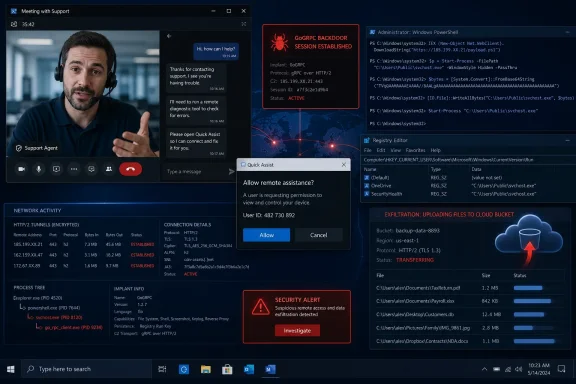
Once a victim accepts the Quick Assist session, the intruder can run PowerShell to profile the host, assess whether it belongs to a corporate network, retrieve additional payloads, and establish persistence through a Registry Run key. Zscaler’s researchers said the newer activity is more selective, with scripts checking for endpoint protection, domain infrastructure, and indicators of a valuable enterprise target.
The main payload is GoGRPC, a Go-based backdoor that uses gRPC over HTTP/2 for command-and-control traffic. ThreatLabz identified four variants—Lep, Giver, Pet, and Kind—with the latter two adding TLS encryption to the communications channel. That evolution makes network inspection more difficult where organizations lack TLS visibility or do not restrict unusual outbound destinations.
The actor has also used reverse SOCKS proxy tools, including RevSocket, PyGRPC, and RSOX, to create network tunnels after access. Another utility, S3Siphon, reportedly searches common user data locations—including Desktop, Documents, Downloads, Pictures, Videos, and OneDrive—and uploads selected files to an Amazon S3 bucket over HTTPS. That combination points beyond a simple remote-access scam toward reconnaissance, lateral movement, and potential extortion.
The practical control is not only user training
Microsoft’s Quick Assist documentation recommends disabling or removing the app where an organization does not use it, rather than leaving it available as an unmanaged fallback. Microsoft says blocking its remote-assistance service endpoint disables Quick Assist, though that also disrupts Remote Help because the two use the same endpoint.
Organizations that need remote assistance should make the approved support path explicit: IT staff should initiate requests through a ticketing workflow, employees should independently verify the technician through known contact details, and spontaneous Teams calls should never be accepted as proof of identity. A quick call-back to the service desk can break this attack chain before a remote-control code is entered.
Security teams should also investigate endpoints for PowerShell that downloads external content, unexpected Run-key changes, newly installed Go or Python binaries, and outbound gRPC or WebSocket connections that do not map to an approved application. Network controls should allow required HTTP/2 services while flagging or blocking unrecognized gRPC destinations; treating all encrypted web traffic as equivalent gives this campaign room to operate.
For enterprises on Windows 11 24H2 or later with Enterprise or Education licensing, Microsoft’s policy-based inbox-app removal can also remove Quick Assist and prevent its reinstallation while the policy remains active. The decision is operational rather than cosmetic: if Quick Assist is not part of the sanctioned support model, removing it takes away the social engineer’s most convenient handoff.
