
For producers who want lo-fi drums, unstable synth pads, softened vocals, degraded transitions, or the sound-design freedom of a variable-speed cassette deck, the appeal is immediate. RealCassette’s premise is simple: make digital audio feel less fixed. Its execution, at least on paper, is more specific than the many “vintage” effects that combine a generic high-frequency roll-off with a noise generator and call it tape.
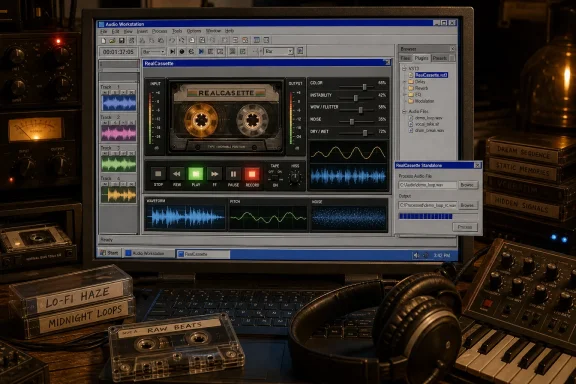 Overview: a cassette effect built around measured imperfections
RealCassette is positioned as an effect based on measurements from physical cassette tapes. According to the release coverage, each included tape profile was captured from an actual cassette, with its individual tone coloration, wobble, noise, and movement reflected in the software. The report attributes those profiles to cassettes found in the developer’s grandmother’s attic, an origin story that fits the product’s deliberately nostalgic visual presentation.
That distinction matters. A useful cassette effect is not merely an EQ curve that darkens audio. Real tape playback can introduce several types of behavior at once: spectral filtering, hiss, level irregularity, pitch instability, intermittent dropouts, and the subtle sense that the recording is moving rather than sitting perfectly still in a digital timeline.
RealCassette exposes those behaviors through a compact collection of controls:
- Color
- Instability
- Wow/Flutter
- Noise Level
- Dry/Wet
- Input
- Output
The plug-in’s Color control reportedly uses the measured frequency response of a selected tape profile. Instability introduces tape-derived dropouts and slower changes in signal level, while Wow/Flutter reproduces the pitch curve associated with the captured deck behavior. Bedroom Producers Blog’s launch coverage also notes that the interface’s reels animate while audio passes through the effect.
That last point is cosmetic, but it is not meaningless. Audio plug-ins live at the intersection of engineering and creative ritual. A functional interface that visibly communicates “this sound is in motion” can make a processor easier to approach, particularly when its purpose is intentional imperfection.
Why cassette emulation still matters in a pristine digital workflow
There is no shortage of high-quality audio effects that promise warmth, vintage character, saturation, or tape sound. RealCassette does not appear to argue that it is the most complete recreation of a studio tape machine, and that is arguably one of its strengths. The concept is narrower and friendlier: it is a free cassette tape plug-in for Windows that invites experimentation.
Tape character is more than saturation
Many producers reach for tape-style processing to make a sound less sharp, less static, or less obviously computer-generated. A cassette-oriented effect can be especially effective when the source is already synthetic or extremely clean:
- A rigid drum loop can gain uneven transients and a slightly worn edge.
- A soft pad can become unstable enough to feel sampled from an aging home recording.
- A vocal ad-lib can be pushed behind the mix through filtering, hiss, and pitch drift.
- A transition effect can become more interesting when its timing and tuning are gently destabilized.
- A clean guitar or keyboard track can be made to feel more intimate and less direct.
The value lies in controlled inconsistency. Digital recording normally preserves a sound with extraordinary repeatability. Cassette-inspired processing gives the user a way to selectively undermine that repeatability, making the sound feel more lived-in, fragile, or distant.
RealCassette’s separate controls suggest that it should be possible to use only one component of the cassette illusion. A producer may want the spectral shaping from Color but no audible noise. Another may want a mostly clean tonal balance while applying a distinctly unsteady pitch movement. A third may be looking for severe degradation, with noise, dropouts, pitch drift, and a wet-heavy blend all working together.
The difference between movement and modulation
The Wow/Flutter section may be the most creatively important component for many users. In broad terms, wow and flutter are pitch variations caused by imperfect transport speed. In music production, the audible result can range from a slow, seasick drift to a more rapid shimmer or jitter.
That can be a problem when it happens accidentally on a recording. In a plug-in, however, it becomes an expressive tool. A subtle amount can soften the clinical precision of held chords and sampled instruments. A stronger setting can turn a drum break or melodic phrase into something that feels damaged, unstable, or psychologically distant.
The related Instability control has a different job. Pitch variation affects tuning and timing perception; instability through level drift and dropouts affects continuity. Used sparingly, it can make an otherwise polished source sound as if it is being replayed from a fragile medium. Used aggressively, it can create a broken-media aesthetic that suits ambient, experimental electronic music, horror scoring, vaporwave, degraded hip-hop, and transitions intended to sound deliberately malfunctioning.
The standalone app is the feature that broadens RealCassette’s audience
The VST3 edition makes RealCassette a natural fit for DAW-based work, but the standalone application is what gives the package a broader practical identity. Rather than being limited to insert effects during a production session, it can function as a dedicated audio-file processor for Windows.
According to the release details, the standalone app can open WAV, AIFF, FLAC, OGG, and MP3 files, provides waveform scrubbing, and renders the processed result as a new WAV file. Those file-handling and export capabilities are listed in the original release report. That is a useful spread of input support for a free utility, covering both uncompressed production formats and common compressed listening formats.
Varispeed changes the creative equation
The standout standalone feature is varispeed. RealCassette reportedly changes both playback speed and pitch in the manner of a tape-deck speed control. Bedroom Producers Blog specifically highlights this as a key sound-design feature.
This is more consequential than it first sounds. Modern DAWs offer sophisticated time-stretching and pitch-shifting tools, but they are often designed to preserve quality and maintain timing independence. Varispeed is valuable because it does the opposite in a musically recognizable way: speed and pitch move together.
Slow a sound down and it gets lower, heavier, and longer. Push it faster and it becomes brighter, shorter, and higher. That behavior is useful for:
- Resampling drums
Process a drum loop at a different speed, render it, then bring it back into a project for a more crushed or transformed groove. - Creating pitched transitions
Slow a riser, percussion fill, or vocal phrase into a downward, tape-stop-adjacent movement without relying on a separate pitch effect. - Building texture from ordinary recordings
A mundane field recording can become a dark drone, metallic rhythm bed, or haunted background layer when its speed, tone, noise, and pitch movement are changed together. - Designing one-shot samples
Percussion hits, foley, and vocal chops can be rendered at multiple speed settings, creating a coordinated set of related but tonally distinct samples. - Processing material outside a DAW
Podcasters, video editors, game-audio hobbyists, and casual creators may not own or use a VST3-compatible host. A standalone tool lets them access the effect without building a full music-production environment.
This turns RealCassette from a plug-in into a small sound-design workstation. It may be a specialized workstation, but specialization is part of the appeal. There is value in an application that opens a file, lets the user audibly age and destabilize it, then prints a result quickly.
Built-in dynamics protection is a sensible inclusion
The standalone program also includes an output limiter/compressor with threshold, ratio, attack, release, and brick-wall safety controls. The feature set is described in the release announcement.
That is a practical choice because tape coloration, noise additions, and level changes can make output gain management more complicated than expected. A user processing files offline may not have a channel strip, limiter, or metering chain ready after the effect. Including a dynamics stage should make it easier to avoid unexpectedly excessive output peaks before rendering.
It should not be confused with a mastering suite. The goal is likely safety and convenience rather than transparent final-stage mastering. Still, a basic compressor/limiter section is enough to make the standalone workflow more self-contained.
A Windows-first release with an important compatibility caveat
RealCassette is listed as supporting Windows 10 and Windows 11 and is distributed in 64-bit VST3 form, alongside the standalone app. The launch details make this a clearly Windows-first release rather than a cross-platform plug-in with a secondary Windows build.
That focus will be welcome for users who have watched certain freeware releases favor macOS, Audio Units, or platform-neutral formats while overlooking Windows-native workflows. A VST3 effect and a standalone executable cover two common ways that Windows users work with audio.
Windows 10 support is useful, but security context matters
There is a necessary caveat for home users on standard Windows 10 editions. Microsoft states that Windows 10 reached end of support on October 14, 2025, although the company offers an Extended Security Updates program for eligible systems and notes that some enterprise and IoT lifecycle paths differ. Microsoft’s Windows release information confirms the general-support status and outlines the available servicing exceptions.
That does not make RealCassette unusable on Windows 10. The application is explicitly listed as compatible with it. But an audio plug-in should not become the reason to keep a general-purpose creative workstation on an unsupported operating system. Users working on Windows 10 should understand their edition’s support status, consider Extended Security Updates where appropriate, and maintain a sensible security posture.
For most new setups, Windows 11 is the more straightforward destination. For established studios, compatibility with Windows 10 remains helpful because plug-in ecosystems tend to outlast operating-system transition cycles.
Installation and first-use recommendations
A free audio plug-in can be easy to obtain yet still require a disciplined setup. RealCassette’s appeal is that it can function in either a DAW or standalone context, but users should decide which workflow is needed before copying files into plug-in directories or processing irreplaceable recordings.
A sensible first-pass workflow
- Download only from the developer’s listed distribution page.
The release report links directly to the RealCassette Gumroad page, rather than to third-party plug-in mirrors. - Keep the original audio file intact.
Treat offline processing as rendering, not editing. Work from a copy, particularly when processing field recordings, voice sessions, purchased samples, or client material. - Start with the factory tape profiles.
All eight are built into the package, according to the release details. The included-profile count is reported here. Begin with modest settings and learn how each profile changes the source before increasing instability or noise. - Use the Dry/Wet control as a mix decision, not an afterthought.
A 100% wet cassette treatment can be compelling on an aux return, transition, or intentionally degraded sample. On a main vocal or drum bus, a partial blend may retain intelligibility and punch. - Gain-stage deliberately.
Adjust input and output so that any audible thickening, clipping, or density is a creative choice. Then use the standalone limiter carefully when rendering files that may later be imported into a project. - Test plug-in compatibility in the target host.
The stated format is VST3, not every legacy DAW or lightweight editor supports it. The standalone app is a useful fallback for users whose preferred program cannot load the format.
Treat a new freeware release like any other executable
New and niche Windows applications can receive a SmartScreen prompt even when the warning reflects low reputation rather than a definitive security finding. Microsoft explains that SmartScreen considers both the reputation of the file and the publisher; a newly released executable can generate a warning before enough positive reputation is established. Microsoft’s SmartScreen documentation also advises users to proceed only after verifying the source.
The appropriate response is neither panic nor blind dismissal. Download from the developer’s identified page, inspect the publisher and file details where available, retain Windows security protections, and avoid copies rehosted on unknown download sites. For users in managed environments, policy may prevent execution of software that has not been approved by IT, regardless of whether it is free or creatively useful.
Strengths: focused design, offline utility, and a low barrier to experimentation
RealCassette’s most obvious strength is its combination of constraints and intent. It does not try to be every analog processor at once. The named controls map cleanly onto recognizable cassette traits—tone, noise, level inconsistency, and pitch movement—so the user can think in audible outcomes rather than in abstract DSP terminology.
The second strength is the standalone processor. Many plug-ins are excellent but disappear from consideration when a creator wants to process a file quickly, batch-test ideas, or make sound-design assets outside a DAW session. RealCassette appears designed to preserve that immediacy.
The third is the price. Free software can often invite a casual download, but in this case the lack of financial barrier is creatively important. A user can test whether cassette-style movement helps their production without needing to justify another purchase in a crowded effects category.
The fourth is the reported use of tape-specific profiles. If the profile behavior is as distinct as described, the included choices may prevent the effect from becoming a one-setting novelty. The reported measurement-based approach implies that different profiles are intended to deliver more than cosmetic labels.
Risks and limitations: character processing is not automatically improvement
The principal risk with any cassette plug-in is overuse. Noise, high-frequency loss, pitch drift, and dropouts are emotionally evocative precisely because they signal fragility. Put them on every channel, however, and the mix can lose impact, clarity, stereo definition, and low-end focus.
A free tool is not necessarily a full tape-machine substitute
RealCassette should be evaluated for what it is: a character processor and creative utility, not automatically a replacement for a deep commercial tape-machine emulation. Producers seeking calibrated tape formulations, speed standards, multitrack machine behavior, precise saturation models, crosstalk controls, or extensive calibration options may still prefer a more elaborate product.
That limitation is not a criticism of the release. In fact, a compact tool can be preferable when the objective is rapid inspiration. The question is whether its sonic range suits the task at hand.
Heavy processing can compromise mix translation
A few practical cautions are worth keeping in mind:
- Excessive Noise Level can mask high-frequency detail and quiet musical gestures.
- Strong Wow/Flutter can blur tuning relationships between layered melodic parts.
- High Instability settings can reduce punch on drums or distract from lead vocals.
- Aggressive varispeed rendering changes duration as well as pitch, which can complicate synchronization.
- A brick-wall safeguard can prevent overs, but it cannot restore dynamics already flattened by overprocessing.
The best uses may be selective: a parallel drum bus, a sampled break, an intro vocal, a transition, a background pad, or a deliberately degraded alternate version of a clean part.
RealCassette fits a growing appetite for tactile imperfection
The larger appeal of RealCassette is cultural as well as technical. Its Windows 98-inspired visual language, animated tape reels, and old-media premise make the plug-in feel like an antidote to increasingly uniform creative software. The release coverage notes that the interface embraces lo-fi computer nostalgia, which is exactly the right visual companion for an effect built around mechanical inconsistency.
That does not mean nostalgia alone can carry the product. The deciding factor will always be sound. But the design gives the process a clear identity: the user is not adding generic “warmth”; they are sending audio through a simulated, imperfect cassette experience and deciding how much of that history to keep.
For Windows producers, sound designers, and sample makers, RealCassette looks especially compelling as a free VST3 cassette tape effect with an unusually capable companion app. The combination of measured tape-profile behavior, discrete controls for tone and instability, offline file rendering, varispeed, and basic output dynamics gives it a practical creative role beyond novelty.
Its best use is unlikely to be on every channel of every production. Its best use is where a clean sound needs personality, a stable phrase needs motion, or a straightforward audio file needs to become something stranger.
