
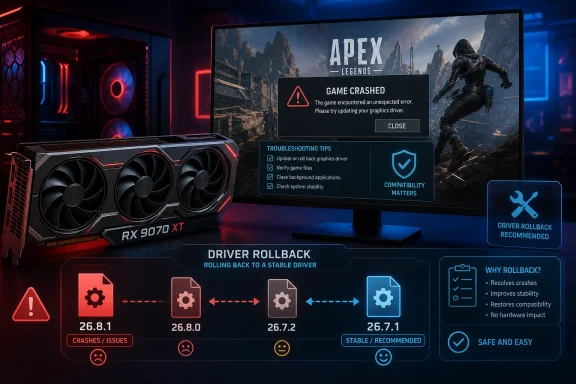
The practical point is straightforward. This is not a broad instruction for every Radeon owner, nor is it an AMD-published Apex Legends advisory. It is a targeted workaround issued through the Apex Legends Japan community channel for RX 9070 XT systems running Adrenalin 26.8.1, which AMD released on August 20 as a WHQL Recommended driver for Windows 10 and Windows 11.
VideoCardz first highlighted the Japanese notice, and PC Gamer and HotHardware independently reported the account’s confirmation and rollback advice. Reports from users on Reddit, Steam, and EA’s community forums align with that guidance: some RX 9070 XT owners report the game resumes working after installing 26.7.1, although a rollback is not proof of the underlying bug or a permanent resolution.
 The confirmed scope is narrower than many crash reports
The official Apex notice names the Radeon RX 9070 XT. It does not say that every Radeon RX 9000 card is affected, that all RX 9070 XT PCs will crash, or that the defect has been traced conclusively to a specific change in AMD’s driver.
That matters because community discussions have broadened quickly beyond the confirmed scope. Some players with the non-XT Radeon RX 9070 have described similar startup failures, while older Radeon owners have posted about DXGI_ERROR_DEVICE_HUNG and fatal errors dating back months. Those reports may point to superficially similar symptoms, but they should not be treated as confirmation that the 26.8.1 regression affects the entire Radeon product line.
The strongest evidence remains the narrow before-and-after pattern: RX 9070 XT users install 26.8.1, Apex Legends begins failing or crashes, and some regain access after moving back to 26.7.1. The Apex team has recognized that pattern and is investigating. It has not published a crash signature, a reproducible test case, or a hardware configuration matrix.
For IT-minded players and support staff, this means avoiding a familiar but unhelpful conclusion: a crash after a driver update does not automatically establish that the GPU, PSU, RAM overclock, Windows installation, or game files are faulty. In this case, there is enough evidence to treat Adrenalin 26.8.1 as the first variable to remove on an affected RX 9070 XT machine.
AMD’s release notes omit Apex Legends entirely
AMD’s official 26.8.1 release notes list new support for the Radeon RX 9050 4GB, game support for several titles, and fixes involving multi-adapter configurations and Adrenalin recording. The known-issues list includes a separate intermittent Starfield crash on Radeon RX 9000 hardware, for which AMD also recommends reverting to 26.7.1.
Apex Legends is absent from both lists. AMD has not, as of August 29, added the Apex/RX 9070 XT failure to the public 26.8.1 known-issues record or issued a dedicated support notice.
That creates an important distinction in how the story has been framed elsewhere. The recommended 26.7.1 rollback is real, but it came from Apex Legends’ Japanese community account—not from AMD’s notes for this game. AMD’s existing 26.7.1 advice applies to Starfield on the broader RX 9000 series. The overlap in workaround does not establish that the two games share a bug.
It does, however, make 26.7.1 a sensible short-term baseline. AMD shipped it on July 28, before 26.8.1, and it supports the same modern Windows versions: Windows 11 version 21H2 and later, plus Windows 10 64-bit version 21H2 and later. A user who returns to 26.7.1 is giving up the newer driver’s additions and fixes, but not moving to an obsolete or unsupported branch.
There is also a support-process problem here. A WHQL Recommended badge means the package passed Microsoft’s Windows Hardware Lab Kit certification requirements; it does not mean every game, rendering path, overlay combination, and GPU configuration has been validated against every release. Apex Legends’ public acknowledgement is therefore useful, but AMD needs to add the issue to its own known-issues list if the rollback remains necessary.
The bindless launch-option fix is evidence, not an official repair
A separate community workaround has gained traction: adding three launch options that disable particular bindless rendering paths associated with static props and world depth. PC Gamer reported that the change let it launch and play Apex Legends on an affected RX 9070 XT system, and several users have reported success with the same settings through Steam and the EA app.
The commands are plausible as a diagnostic workaround because they switch off narrowly named rendering features rather than making a vague “performance mode” change. But they are not part of the official Apex advisory, and they should not be presented as a fully validated cure.
More importantly, similar bindless-related launch options were being shared by Apex players months before Adrenalin 26.8.1 shipped, including reports from users with older Radeon cards. That history weakens claims that bindless rendering itself is the newly introduced 26.8.1 defect. The present crash could involve a longstanding Apex rendering weakness exposed by a driver change, a driver regression in a particular shader or memory-management path, or a combination of both.
Players who need the game working reliably should prefer the rollback the Apex account specifically named. Experimenting with launch options can be worthwhile for users who must remain on 26.8.1 for another title or a newly supported feature, but it comes with two limitations: it may not work for every failure mode, and disabling a newer rendering path may change performance or visual behavior.
Do not stack every internet fix at once. If an RX 9070 XT system starts working after a driver rollback, leave the launch options unset initially. Otherwise, it becomes impossible to tell whether the driver change fixed the issue or whether the game is now being held together by a separate workaround.
A clean 26.7.1 rollback is the lowest-risk response
Affected players should download the Adrenalin 26.7.1 package before uninstalling the current driver, then remove 26.8.1 and reboot before installing the older package. AMD’s own support documentation says that when a downgrade is required, users should first uninstall the existing Adrenalin release with AMD Cleanup Utility and then install the desired version.
AMD Cleanup Utility is designed to remove AMD graphics and audio driver components while leaving AMD chipset drivers alone. It creates a restore point and may blank or flicker the display during removal; AMD recommends Safe Mode for the cleanup, although the tool can also run in normal Windows mode. Those details are useful because a black screen during the removal stage is expected behavior, not necessarily a second graphics failure.
A less invasive first attempt is to remove AMD Software through Windows’ Installed apps page, restart, and install 26.7.1. If Windows continues to load remnants of the newer package, the installer fails, or the crash persists despite the simple uninstall, use AMD Cleanup Utility and repeat the installation cleanly.
After the rollback, test Apex Legends before restoring GPU tuning, overlays, recording hooks, or custom launch parameters. Radeon overlay functions, Discord overlays, monitoring tools, shader-cache changes, undervolts, and memory overclocks can all complicate a crash investigation. They may not be the cause here, but eliminating variables makes a useful bug report far more likely.
What AMD and Respawn still need to disclose
The current advice gets affected players back into the game, but it leaves several operational questions unanswered. Neither AMD nor the Apex team has said whether the failure occurs at launch, during shader compilation, while entering a match, or after a particular graphics setting is enabled. Neither has specified whether a Windows build, CPU platform, multi-monitor setup, frame-generation option, or overlay is involved.
There is also no announced fix date. AMD has not said whether an out-of-band driver hotfix is planned, while Respawn has not identified a game patch that will address the issue. That is why RX 9070 XT owners should treat 26.7.1 as a temporary compatibility baseline, not as a solution that makes the problem disappear from the vendor’s backlog.
Until one of the companies publishes a corrected driver or game update, the concrete action is to keep 26.8.1 off affected RX 9070 XT systems, document the exact crash behavior, and retest only when release notes specifically mention Apex Legends or the RX 9070 XT regression.
