

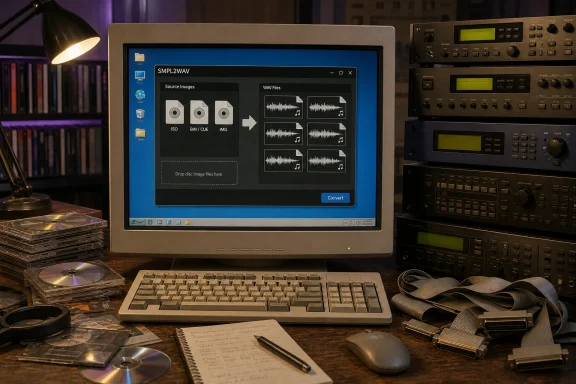
For Windows users with old sample-CD archives, the appeal is straightforward. SMPL2WAV says it can open ISO, BIN/CUE and IMG images directly, let users preview their contents, then batch-export material as WAV files. That avoids the two usual dead ends with this material: Windows can mount an ISO, but it cannot interpret a sampler’s proprietary filesystem; and contemporary DAWs can load WAV files, but typically cannot read the native image structures created for an Akai S3000, Roland S-760, E-mu EOS machine or Ensoniq ASR-10.
The important qualification is that SMPL2WAV is a conversion and extraction tool, not a hardware-sampler replacement. Sonic State’s headline calls it a “Hardware Sample CD Extractor,” but Analog Visionz’s described workflow is software-only: drag an image onto the app, browse its contents, and write WAVs to disk. No physical disc, optical drive, vintage sampler, SCSI interface, or proprietary removable-media reader is required if the library is already available as a supported image file.
The support list is narrower than the marketing shorthand
Analog Visionz says SMPL2WAV supports “major” sampler formats, but the published compatibility list deserves closer reading before anyone buys it to process an entire archive. It identifies specific families and image types rather than promising a universal importer for every disk ever used by those brands.
The stated coverage includes E-mu E4B and EOS banks plus E3S samples; Akai S1000, S1100, S3000 and CD3000 ISO images; MPC2000, MPC2000XL and MPC3000 disk images; Roland S-750, S-760, S-770 and DJ-70 CD and hard-disk images; and Ensoniq EPS, EPS16+ and ASR-10 images. Akai stereo left/right pair merging is also listed.
That is useful coverage for the sample-CD era, particularly for commercially distributed libraries built around rack samplers and CD-ROM drives. It does not, however, establish support for every Akai, E-mu, Roland or Ensoniq media format. A reader with an S5000/S6000 archive, older Akai S900 media, E-mu Ultra-era disks, Roland S-50/S-550 content, Kurzweil libraries, Yamaha A-series discs, Fairlight volumes, or sampler disks copied through an unusual backup utility should not infer compatibility from the company names alone.
The published announcement also groups ZIP, 7z, RAR, ISO and folders containing WAV, AIFF, FLAC and MP3 under “standard audio.” Those are primarily containers or ordinary file sources, not evidence that every unknown archive inside them can be decoded. A ZIP file full of WAVs is easy; a ZIP file holding an unsupported proprietary disk image remains unsupported. That distinction is the difference between a tool that solves a conversion job and one that simply opens the archive surrounding it.
For an archive with irreplaceable material, the practical procedure is to keep the original image untouched, run a test extraction of a few representative instruments, and compare the result against the original sampler or a known-good conversion. The product’s first release may be exactly what many users need, but format support is where legacy-media projects succeed or fail.
Automatic slicing could be the feature that saves the most time
The most consequential feature is not the format reader but SMPL2WAV’s automatic slicing for long audio tracks. Many classic sample discs, including some Zero-G releases, placed many individual hits or phrases sequentially on conventional audio tracks. A basic CD rip gives the user one long WAV file; making it usable means manually locating each sound, cutting it, trimming the gaps, naming it and exporting it.
Analog Visionz says SMPL2WAV detects silence, splits the audio into separate samples and trims them automatically. The company says the feature works on ordinary audio sources as well as sampler-disc images, which makes it potentially useful even where a library is already in WAV, AIFF, FLAC or MP3 form.
That should be read as a workflow accelerator rather than a guarantee of perfect recovery. Silence-based detection works best with clearly separated drum hits, effects and one-shots. It is less predictable with sounds that have fades, long reverb tails, low-level noise floors, ambience, vinyl crackle, deliberately overlapping phrases, or musical performances where the “silence” is part of the timing. Peak normalization and silence trimming can likewise be helpful defaults for a drum library but undesirable for material where original headroom, tail length, and relative level are part of the sound design.
The vendor has not published a detection threshold, minimum silence length, confidence control, or any indication that slice points can be reviewed in a dedicated edit view before export. Users converting rare material should therefore treat automatic slicing as the first pass and audit the output, especially at transitions where a truncated transient or chopped reverb tail might not be obvious until the samples are used in a track.
WAV export solves accessibility, not necessarily instrument reconstruction
SMPL2WAV’s export target is sensible. WAV is the common denominator for Windows audio software, modern DAWs, software samplers and a great deal of current hardware. Once a sound is a conventional WAV file, it can be auditioned in File Explorer-compatible media tools, edited in an audio editor and moved into software such as Ableton Live, FL Studio, REAPER, Bitwig Studio, Kontakt, Serato Sample or a hardware sampler that accepts WAV media.
But the announcement carefully promises “clean WAV output,” not a fully rebuilt sampler instrument. That leaves several important questions unanswered: whether original loop points are retained where available; whether root-key and tuning metadata survive; whether velocity layers and key groups are reconstructed; whether named programs become mapped instruments; and whether original effects, filters, envelopes, modulation routings and performance settings are exported in any reusable form.
Those details matter because an old sampler library is often more than a folder of recordings. Its programs may specify which notes trigger each sample, how samples crossfade, whether a loop sustains, how a sound responds to velocity, and how its filter or envelope behaves. Exporting the underlying audio is still valuable—and often the only realistic preservation route—but it can turn a ready-to-play instrument into a collection of assets that must be mapped again inside a modern sampler.
The listed Akai stereo L/R pair-merging feature is a good sign that the developer is addressing one common reconstruction problem at the audio level. Yet no equivalent claim is made for broader program, multisample or performance metadata. For users whose goal is to rescue drum hits, sound effects and one-shots, that may be irrelevant. For orchestral, piano, vocal, synth, and phrase libraries built around multisamples, it is a purchasing question worth resolving before committing to a full conversion.
Windows support is welcome, but the release details remain thin
The developer says SMPL2WAV has native Windows and macOS versions, with separate compatibility for Intel Macs and Apple Silicon. A Linux port is described as in development. That cross-platform stance is a real point of differentiation in a niche where long-lived conversion utilities have often been Windows-only, tied to older hardware, or priced for professional archive work.
Still, the release information does not specify the supported Windows versions, whether the application is portable or installed, its CPU architecture requirements, disk-space needs, code-signing status, update policy, refund terms, or whether there is a trial edition. Sonic State’s report also does not identify a version number or publish a changelog. As of the announcement, no independent hands-on review or separate outlet has reported on accuracy, performance, or compatibility with real-world library images.
That does not undermine the release itself; it defines the current evidence. SMPL2WAV is a low-cost first-generation utility with a clearly useful goal, but the $19 introductory price should not be confused with proof that every advertised image family has been tested against every commercially released disc.
For Windows musicians and archivists, the immediate use case is clear: a supported image archive can now be tested without locating obsolete hardware. The responsible move is to start with one noncritical disc, retain the original image, verify a handful of exports for channel assignment and slice quality, and only then send a larger library through batch conversion.