
The practical change is a move away from building and assigning combinations of Teams app permission policies. In the Teams admin center, an administrator will be able to open an individual app and set its availability to “All users can install,” “Specific users and groups can install,” or “No user can install.” Microsoft also plans a tenant-wide default for newly published apps in the Teams app store.
For GCC High administrators, the important part is not the new set of labels. It is the change in the administrative unit: access decisions move from policy-first administration to app-by-app entitlement management. That can make a narrow deployment—such as allowing a case-management connector only for an investigative unit—far easier to understand and audit. It also changes the failure modes teams need to prepare for when Microsoft migrates existing policy assignments.
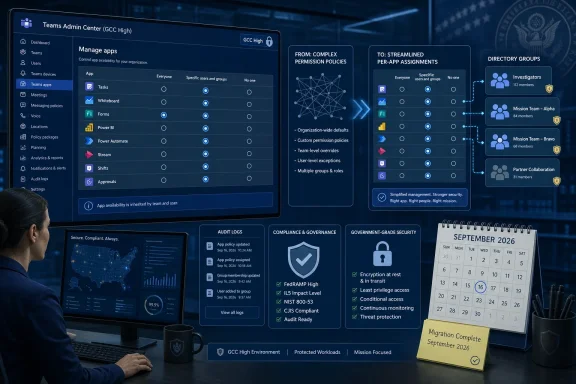 A policy model becomes a per-app assignment model
Microsoft’s Teams documentation describes app-centric management as a replacement for app permission policies once a tenant has been migrated. Under the previous policy approach, administrators could combine organization-wide app settings, an app’s allow-or-block state, and permission policies assigned to users. That architecture could meet complex requirements, but it also made it difficult to determine why one employee could access an app while another could not.
App-centric management puts the decision on the app record itself. The three availability states are straightforward:
- An app set to Everyone is available to all organizational users, including new users and guests.
- An app set to Specific users or groups is available only to the selected assignments.
- An app set to No one is unavailable to users across the organization.
Microsoft Learn says the supported assignment targets include security groups, Microsoft 365 groups, dynamic user groups, nested groups, and distribution lists. That matters in GCC High, where access often tracks mission roles or segregated operating units more closely than a broad departmental structure. An administrator can use an existing directory group to define access rather than create a one-off Teams permission policy for every variation of permitted apps.
The model does not remove the need to understand the app itself. Availability in Teams is an entitlement control: it governs whether the user can add and use the app. It does not by itself replace Microsoft Entra consent controls, app publisher review, data-loss prevention, procurement review, or any separate authorization required by the app’s back-end service. A Teams app can be unavailable to users and still remain a software asset worth reviewing; conversely, making an app available does not establish that it is suitable for government data.
The default for new apps deserves the most scrutiny
The new tenant-level default is the setting most likely to shape the security posture of a GCC High deployment. Microsoft says admins can choose a default availability value for apps newly published to the Teams app store, while the per-app setting can override that default.
That gives security teams an operational choice. A permissive default reduces administrative work and lets users discover newly available apps without waiting for an app owner to intervene. A restrictive default creates a review gate: newly published apps are not broadly usable until an administrator explicitly assigns them to everyone or to a defined set of users.
For GCC High organizations, where app intake may be tied to a formal authorization process, the safer operational baseline will often be to prevent automatic broad availability and make exceptions deliberately. The Roadmap entry does not say which default Microsoft will apply to existing GCC High tenants, whether the default will vary by app category, or whether a tenant can stage the feature before migration. Those omissions matter more than the feature description suggests, because a tenant-wide default can affect every newly published app that has not received an explicit per-app decision.
Microsoft’s general app-centric-management documentation says that, for new organizations, the default permits users to install apps. It also explains that changing the organization-wide default does not overwrite apps an administrator has already explicitly configured as available to everyone, restricted to selected people, or available to no one. That preserves intentional per-app decisions, but it creates an inventory problem: admins must know which apps are relying on the tenant default and which have been individually managed.
Before GCC High rollout, Teams owners should identify apps that currently depend on a broad organization-wide allow setting. Otherwise, a later change to the default may produce a wave of “missing app” reports from users who had access only because the tenant setting was permissive.
Migration preserves access, but it is not a rollback plan
Microsoft’s Roadmap entry says existing app permission policies will be migrated in a way intended to maintain app availability. Microsoft Learn provides the sharper warning: after a tenant switches to app-centric management, administrators can no longer access, edit, or use permission policies, and the migration cannot be reversed.
That makes this a configuration migration, not a cosmetic Teams admin center update.
Microsoft documents a mapping from the old controls to the new availability states. Apps previously allowed broadly should map to availability for everyone; apps controlled by a custom policy should be mapped to selected users or groups; and blocked apps should become available to no one. But the documentation also acknowledges that conflicts can arise. During a migration review, an admin may have to choose an availability state for apps whose prior policy treatment is unclear or inconsistent.
This is where GCC High administrators should resist treating a successful migration as proof that every access result is correct. A tenant can preserve the broad effect of an old policy while still losing the logic that made the old arrangement intelligible. In particular, policies that were built around overlapping user populations, exceptions, or inherited operational practice should be documented before migration. The new structure can simplify the final state, but it cannot reconstruct an undocumented business reason after a broad policy assignment has disappeared.
Microsoft’s own migration guidance indicates that custom permission-policy structures are translated through security groups. That may be useful for preserving membership-based access, but it can also add directory objects that administrators must own and review. Teams administrators, identity teams, and compliance owners should agree on who maintains those groups before relying on them as the gate for sensitive apps.
The Teams admin center will not solve bulk remediation by itself
The Roadmap emphasizes graphical controls in Teams admin center, and the interface should be easier for routine app-by-app changes. But Microsoft’s documentation identifies a meaningful limitation: administrators cannot update app availability in bulk from the Teams admin center. Bulk updates require PowerShell, including the Update-M365TeamsApp cmdlet.
That distinction matters when a tenant has hundreds of Teams apps, a large catalog of internal line-of-business apps, or a policy decision that needs to be applied across a defined class of apps. A tenant cannot safely assume that its initial per-app review will be a quick sequence of clicks. It needs an exportable inventory, a documented desired state, and a tested method for applying and verifying changes at scale.
The administrative interface also has assignment limits. Microsoft says admins can add up to 99 users or groups at a time to an app, while the search interface shows only 20 results. Those limits reinforce the case for assigning groups rather than individuals wherever access follows a durable role. Individual assignments are useful for limited testing or a small exception, but they are a poor substitute for an access-management design.
Propagation is another operational constraint. Microsoft says availability changes can take up to 24 hours to take effect and, in rare cases, as long as six days to appear in Teams clients. That window has consequences for change tickets and incident response. An administrator who restricts an app after a compliance decision should not promise immediate client-side disappearance; likewise, an authorized user may not see a newly approved app immediately after assignment.
Separate access controls from app deployment and governance
App-centric management addresses who can install and use an app. It should not be confused with Teams app setup policies, which govern matters such as whether an app is pinned in the Teams client and the order in which pinned apps appear. An app can be available without being promoted to the app bar, and an app can be pinned for a target population only after its access is allowed.
The same separation applies to custom-app uploads and third-party app governance. Microsoft’s Teams policy documentation continues to describe controls for custom app upload and broader app governance outside the narrow availability setting. A restrictive availability assignment does not automatically answer whether users may upload their own app packages, whether an integrated app has been approved, or whether an app’s permissions meet an agency’s requirements.
The cleanest implementation is therefore a short but deliberate review:
- Inventory every app currently available in the GCC High tenant and record whether its access comes from a broad default, an allow/block setting, or a permission policy.
- Decide the intended default for newly published apps before Microsoft begins the migration, and identify app categories that require explicit review.
- Replace fragile individual assignments with governed directory groups where the access rule reflects an ongoing job function.
- Test pilot assignments with representative users and allow for the documented propagation delay before declaring a migration defect.
- Prepare PowerShell-based bulk procedures and keep an export of the pre-migration configuration, because permission policies will not be available as a fallback afterward.
Microsoft has supplied a September 2026 general-availability target, but has not published a precise rollout date, a detailed GCC High migration sequence, or a stated default posture for existing tenants in the Roadmap entry. The immediate task for GCC High Teams administrators is to treat the change as an access-control migration and capture the current policy intent before the old permission-policy interface becomes unavailable.
